

10个简化日常工作的Python短脚本:从网页抓取到格式转换

精选10个面向日常办公与数据运维的Python实用短脚本,覆盖静态网页抓取、文件整理、表格合并、格式转换及系统清理,提供完整代码与落地注意事项。
一、数据获取与网络自动化
脚本1:静态网页文章标题与链接批量抓取
日常运维中常需收集竞品资讯、公告列表或内部技术周报。采用 requests 发起 HTTP 请求,结合 BeautifulSoup 解析 DOM 树,能够在数秒内将静态网页中的新闻条目抽取为整洁的结构化数据。
import requests
from bs4 import BeautifulSoup
import csv

def scrape_articles(target_url, output_csv="articles.csv"):
    headers = {
        "User-Agent": "Mozilla/5.0 (Windows NT 10.0; Win64; x64) AppleWebKit/537.36"
    }
    try:
        response = requests.get(target_url, headers=headers, timeout=10)
        response.raise_for_status()
        response.encoding = response.apparent_encoding
    except requests.RequestException as e:
        print(f"请求失败: {e}")
        return

    soup = BeautifulSoup(response.text, "html.parser")
    records = []

    # 依据目标页面结构定位条目,此处以常规 article 标签为例
    for item in soup.find_all("article"):
        link_tag = item.find("a")
        title = link_tag.get_text(strip=True) if link_tag else ""
        href = link_tag.get("href", "") if link_tag else ""
        if title and href:
            records.append({"title": title, "link": href})

    if records:
        with open(output_csv, "w", newline="", encoding="utf-8-sig") as f:
            writer = csv.DictWriter(f, fieldnames=["title", "link"])
            writer.writeheader()
            writer.writerows(records)
        print(f"抓取完成,共提取 {len(records)} 条数据,已保存至 {output_csv}")
    else:
        print("未匹配到有效条目,请检查选择器结构。")

if __name__ == "__main__":
scrape_articles("https://example.com/news")timeout=10是防止脚本因个别网站无响应而无限卡死的基础防护,不可省略。- 写 CSV 时使用
utf-8-sig编码,可直接避免 Excel 打开中文文件时产生乱码。
脚本2:HTTP API 接口响应批量轮询与格式校验
前后端联调或排查多环境服务健康状态时,手动在浏览器中逐个点击接口效率极低。通过脚本读取接口清单,验证状态码与核心返回值结构,可迅速得到服务检查清单。
import requests
import json

ENDPOINTS = [
    {"name": "用户状态", "url": "https://api.example.com/v1/user/status", "expect_key": "user_id"},
    {"name": "配置检查", "url": "https://api.example.com/v1/system/config", "expect_key": "version"}
]

def check_endpoints(endpoints):
    for ep in endpoints:
        try:
            res = requests.get(ep["url"], timeout=5)
            if res.status_code != 200:
                print(f"[异常] {ep['name']} 状态码异常: {res.status_code}")
                continue

            data = res.json()
            if ep["expect_key"] in data:
                print(f"[正常] {ep['name']} 校验通过")
            else:
                print(f"[警告] {ep['name']} 缺少预期字段: {ep['expect_key']}")
        except (requests.RequestException, json.JSONDecodeError) as err:
            print(f"[失败] {ep['name']} 请求或解析错误: {err}")

if __name__ == "__main__":
    check_endpoints(ENDPOINTS)
二、文件系统与批量归档
脚本3:散落文件的批量重命名与序列化整理
桌面或下载文件夹中经常充斥着杂乱命名的图片与附件。使用内置模块 pathlib,可以按照文件最后修改时间或统一前缀进行自动化重命名与编号归档。
from pathlib import Path
from datetime import datetime

def batch_rename_files(directory_path, prefix="Doc"):
    folder = Path(directory_path)
    if not folder.is_dir():
        print("指定路径不存在或不是目录")
        return

    # 按文件修改时间正序排序
    files = sorted([f for f in folder.iterdir() if f.is_file()], key=lambda f: f.stat().st_mtime)

    for index, file_path in enumerate(files, start=1):
        mtime = datetime.fromtimestamp(file_path.stat().st_mtime).strftime("%Y%m%d")
        new_name = f"{prefix}_{mtime}_{index:03d}{file_path.suffix.lower()}"
        target_path = file_path.with_name(new_name)

        # 避免覆盖同名文件
        if not target_path.exists():
            file_path.rename(target_path)
            print(f"{file_path.name} -> {new_name}")

if __name__ == "__main__":
    batch_rename_files("./raw_files", prefix="ProjectA")
脚本4:过期构建缓存与临时文件自动化清理
工程构建产物、本地测试缓存、临时解压目录随时间推移会占用大量磁盘空间。本脚本扫描指定目录,安全删除指定天数以前未被修改过的临时文件。
from pathlib import Path
import time

def cleanup_expired_files(target_dir, retention_days=7):
    base = Path(target_dir)
    if not base.exists():
        return

    now = time.time()
    cutoff_time = now - (retention_days * 86400)
    deleted_count = 0

    for item in base.glob("**/*"):
        if item.is_file():
            # 比较最后修改时间
            if item.stat().st_mtime < cutoff_time:
                try:
                    item.unlink()
                    deleted_count += 1
                except PermissionError as e:
                    print(f"权限不足跳过: {item.name}")

    print(f"清理完成:共移除 {deleted_count} 个超过 {retention_days} 天的过期文件。")

if __name__ == "__main__":
    cleanup_expired_files("./cache", retention_days=3)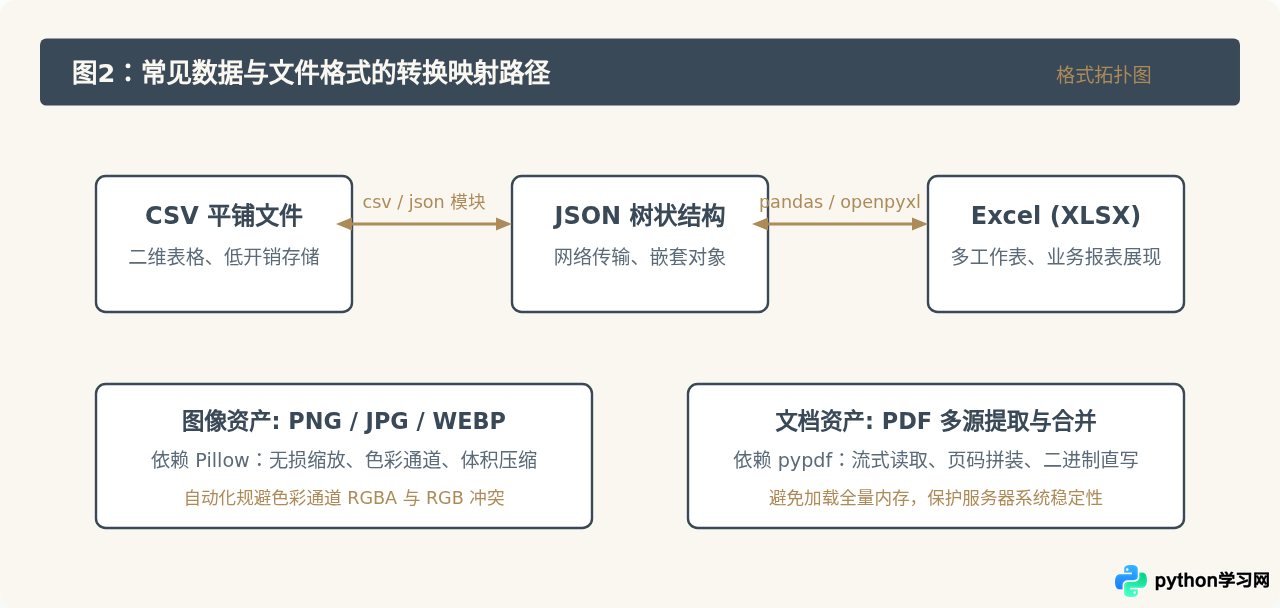
三、数据与格式转换
脚本5:CSV 与结构化 JSON 双向转换
很多老旧报表系统仅支持导出 CSV,而前端展示或后端 API 普遍需要 JSON 格式。以下脚本实现轻量且兼容复杂表头的双向转换,无需安装任何重量级第三方库。
import csv
import json
from pathlib import Path

def csv_to_json(csv_path, json_path):
    with open(csv_path, "r", encoding="utf-8-sig") as f:
        reader = csv.DictReader(f)
        rows = list(reader)
    with open(json_path, "w", encoding="utf-8") as f:
        json.dump(rows, f, ensure_ascii=False, indent=2)
    print(f"已将 {len(rows)} 行数据转为 JSON: {json_path}")

def json_to_csv(json_path, csv_path):
    with open(json_path, "r", encoding="utf-8") as f:
        data = json.load(f)
    if not data or not isinstance(data, list):
        print("JSON 内容必须是非空对象列表")
        return
    fieldnames = list(data[0].keys())
    with open(csv_path, "w", newline="", encoding="utf-8-sig") as f:
        writer = csv.DictWriter(f, fieldnames=fieldnames)
        writer.writeheader()
        writer.writerows(data)
    print(f"已生成 CSV 文件: {csv_path}")

if __name__ == "__main__":
    csv_to_json("data.csv", "data.json")
脚本6:多份同构表格文件快速合并
月度销售报表、分支机构打卡记录通常按人或按天分散在不同表格中。借助 pandas,仅需数行代码即可将目录下所有同构表格横向拼接并重新编排索引。
from pathlib import Path
import pandas as pd

def merge_spreadsheets(folder_path, output_filename="merged_result.xlsx"):
    folder = Path(folder_path)
    # 同时匹配 csv 与 xlsx 格式
    matched_files = list(folder.glob("*.csv")) + list(folder.glob("*.xlsx"))

    if not matched_files:
        print("未在目录下找到匹配的表格文件。")
        return

    df_list = []
    for file in matched_files:
        try:
            if file.suffix == ".csv":
                df = pd.read_csv(file, encoding="utf-8-sig")
            else:
                df = pd.read_excel(file)
            df["_来源文件"] = file.name  # 记录数据来源,方便追溯核对
            df_list.append(df)
        except Exception as e:
            print(f"读取文件 {file.name} 失败: {e}")

    if df_list:
        combined_df = pd.concat(df_list, ignore_index=True)
        combined_df.to_excel(output_filename, index=False)
        print(f"成功合并 {len(df_list)} 个文件,总计 {len(combined_df)} 行记录。")

if __name__ == "__main__":
    merge_spreadsheets("./monthly_reports")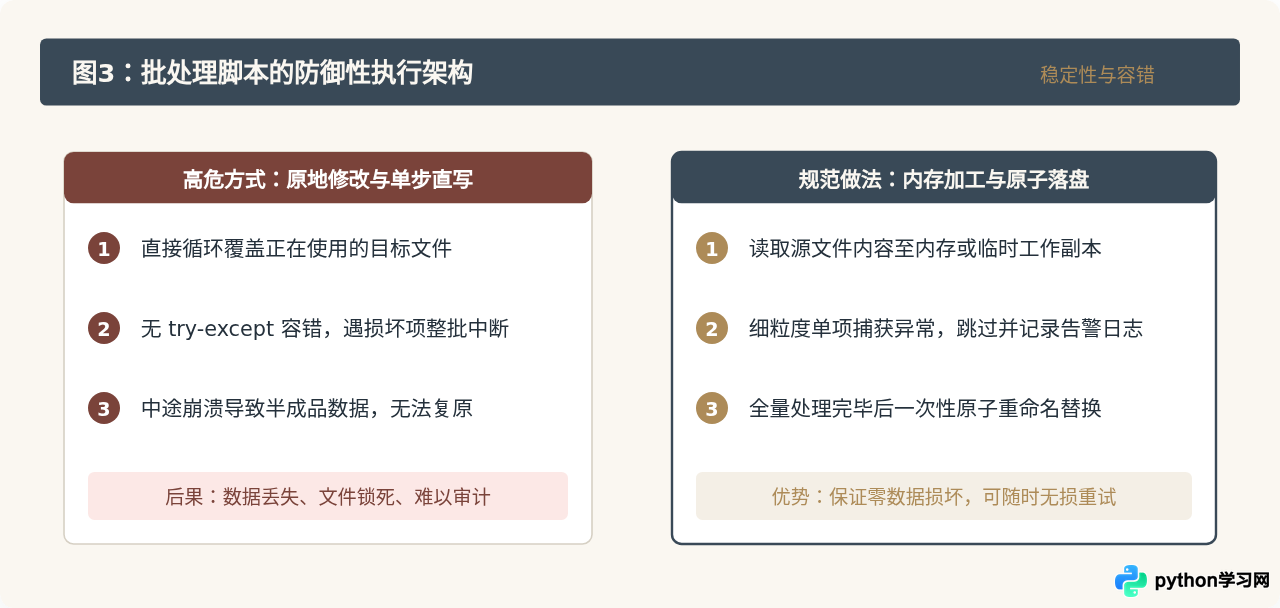
脚本7:批量图片等比缩放与格式转换
网页配图或文档附件通常要求体积轻量、宽度固定。利用图像处理库 Pillow,可将包含 PNG、BMP、JPEG 的散落目录自动转换为统一宽度的 WebP 或标准 JPEG 格式。
from PIL import Image
from pathlib import Path

def convert_and_resize_images(source_folder, output_folder, target_width=1200, quality=85):
    src = Path(source_folder)
    out = Path(output_folder)
    out.mkdir(parents=True, exist_ok=True)

    extensions = {".jpg", ".jpeg", ".png", ".bmp"}
    count = 0

    for file in src.iterdir():
        if file.suffix.lower() in extensions:
            try:
                with Image.open(file) as img:
                    # RGBA 转 RGB 避免保存为 JPEG 时报 OSError 错误
                    if img.mode in ("RGBA", "P"):
                        img = img.convert("RGB")

                    # 按原比例缩放宽度
                    if img.width > target_width:
                        ratio = target_width / float(img.width)
                        target_height = int((float(img.height) * float(ratio)))
                        img = img.resize((target_width, target_height), Image.Resampling.LANCZOS)

                    target_file = out / f"{file.stem}.jpg"
                    img.save(target_file, "JPEG", quality=quality)
                    count += 1
            except Exception as e:
                print(f"处理图片 {file.name} 失败: {e}")

    print(f"处理完成,共输出 {count} 张优化图片至 {output_folder}")

if __name__ == "__main__":
    convert_and_resize_images("./photos", "./optimized_photos")
脚本8:PDF 多文件合并与指定页拆分
多份合同、报表或扫描件合并是常见行政需求。使用 pypdf 可免于安装沉重的桌面 PDF 编辑软件,快速拼接或按页抽取目标文档。
from pypdf import PdfReader, PdfWriter
from pathlib import Path

def merge_pdfs(pdf_list, output_path):
    writer = PdfWriter()
    for item in pdf_list:
        path = Path(item)
        if not path.is_file():
            print(f"文件不存在: {item}")
            continue
        reader = PdfReader(path)
        for page in reader.pages:
            writer.add_page(page)

    with open(output_path, "wb") as f:
        writer.write(f)
    print(f"PDF 合并成功: {output_path}")

def extract_pdf_pages(source_pdf, output_pdf, start_page, end_page):
    reader = PdfReader(source_pdf)
    writer = PdfWriter()
    total_pages = len(reader.pages)

    # 转换 1-based 索引为 0-based
    s = max(0, start_page - 1)
    e = min(total_pages, end_page)

    for i in range(s, e):
        writer.add_page(reader.pages[i])

    with open(output_pdf, "wb") as f:
        writer.write(f)
    print(f"已抽取第 {start_page} 至 {end_page} 页至 {output_pdf}")

if __name__ == "__main__":
    merge_pdfs(["cover.pdf", "body.pdf", "appendix.pdf"], "final_report.pdf")
四、运维分析与消息推送
脚本9:文本日志关键错误提取与词频统计
面对动辄数百兆的服务器日志文件,肉眼难以定位高频故障。通过流式按行读取与正则表达式,能够秒级提取异常堆栈并输出发生频次最高的前10类错误。
import re
from collections import Counter

def analyze_log_errors(log_path, top_n=10):
    pattern = re.compile(r"ERROR\s+\[(.*?)\]\s+(.*)")
    error_counter = Counter()

    with open(log_path, "r", encoding="utf-8", errors="ignore") as f:
        for line in f:
            match = pattern.search(line)
            if match:
                module, message = match.groups()
                # 截取主要错误消息摘要,忽略动态参数
                summary = f"[{module}] {message.split(':')[0]}"
                error_counter[summary] += 1

    print(f"--- 错误统计 TOP {top_n} ---")
    for err, count in error_counter.most_common(top_n):
        print(f"频次: {count:4d} | 详情: {err}")

if __name__ == "__main__":
    analyze_log_errors("app.log")
脚本10:带附件的自动化邮件发送通知
当上述自动化脚本在后台执行完成后,将最终产物通过邮件自动推送给相关人员,能构成完整的免运维闭环。使用 Python 标准库 smtplib 与 email 即可完成安全传输。
import smtplib
from email.mime.multipart import MIMEMultipart
from email.mime.text import MIMEText
from email.mime.application import MIMEApplication
from pathlib import Path

def send_report_email(smtp_server, port, user, password, to_addr, subject, body_text, attachment_path=None):
    msg = MIMEMultipart()
    msg["From"] = user
    msg["To"] = to_addr
    msg["Subject"] = subject

    # 添加邮件正文
    msg.attach(MIMEText(body_text, "plain", "utf-8"))

    # 添加附件
    if attachment_path:
        file = Path(attachment_path)
        if file.exists():
            with open(file, "rb") as f:
                part = MIMEApplication(f.read(), Name=file.name)
            part["Content-Disposition"] = f'attachment; filename="{file.name}"'
            msg.attach(part)

    try:
        with smtplib.SMTP_SSL(smtp_server, port, timeout=15) as server:
            server.login(user, password)
            server.send_message(msg)
        print(f"邮件已成功发送至 {to_addr}")
    except smtplib.SMTPException as e:
        print(f"邮件发送失败: {e}")

if __name__ == "__main__":
    send_report_email(
        smtp_server="smtp.example.com",
        port=465,
        user="bot@example.com",
        password="auth_token_here",
        to_addr="team@example.com",
        subject="每日数据汇总报告",
        body_text="您好,今日数据汇总已完成,请查收附件。",
        attachment_path="final_report.pdf"
    )
五、编写健壮办公脚本的四个原则
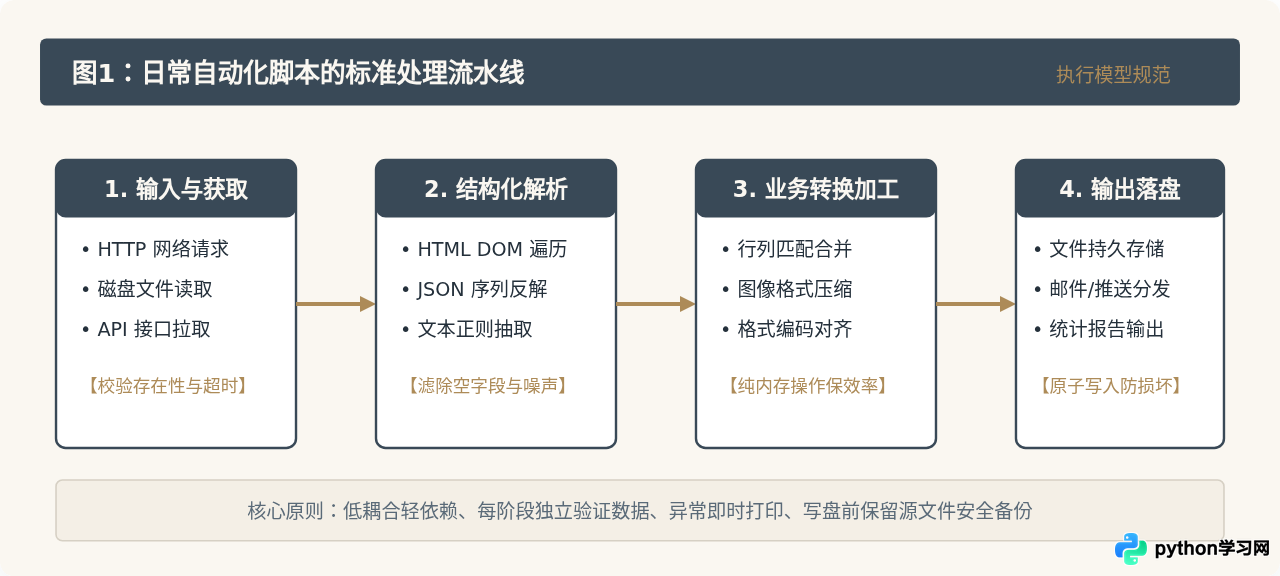
日常脚本虽然体量不大,但在实际运行中若缺乏防护,容易遭遇文件损坏、网络挂死或权限丢失问题。在编写时建议遵循以下四个基本约定:
| 原则维度 | 典型问题与表现 | 标准解决规范 |
|---|---|---|
| 路径处理 | 硬编码斜杠导致跨平台(Windows / Linux / macOS)路径报错 | 统一使用 pathlib.Path 处理路径拼接与存在性检查,杜绝手工拼接斜杠 |
| 编码规范 | Windows 系统默认 ANSI 打开导出的 CSV 出现中文乱码 | 文本读写统一显式声明 encoding="utf-8-sig" |
| 安全写入 | 处理大文件或批量改名时中途崩溃,损坏原始文件 | 优先将中间数据保留在内存中,或先写入临时文件,全部校验通过后再原子替换 |
| 资源管理 | 文件句柄或网络连接未释放,导致后续操作提示文件被占用 | 必须使用 with 上下文管理器封装文件与网络会话,确保任何异常均能安全释放 |
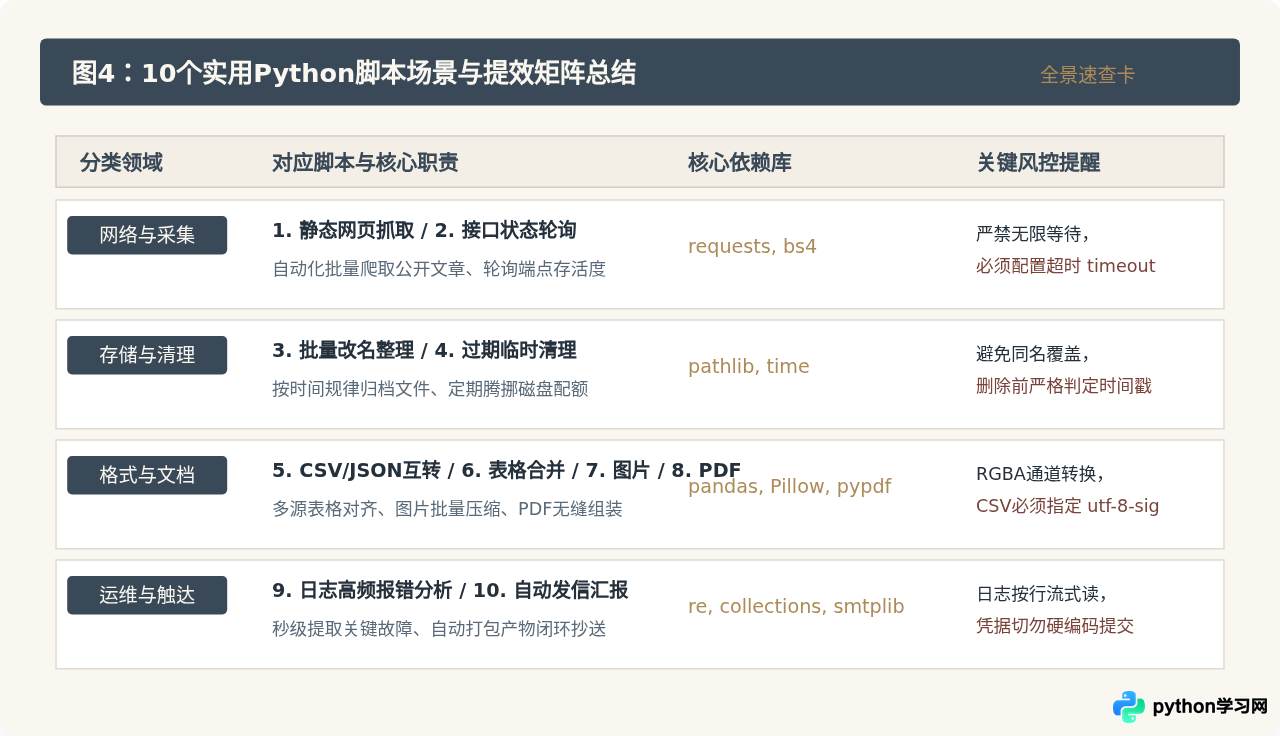
通过这10个短脚本的组合与参数微调,可以覆盖绝大多数日常办公与运维中的繁重手工事务。在编写新任务时,以标准流程为骨架,逐步添加数据清洗与防御性代码,即可快速构建出高可用、免维护的个人提效工具集。
免责声明:本文内容仅供参考,不代表本站观点。转载或引用请注明出处。









