用Python实现网页抓取:从URL请求到数据入库的全流程

本文系统拆解用Python实现网页抓取并写入数据库的端到端技术链路,包含URL请求与会话管理、HTML节点提取与清洗、SQLite建表与防重入库,并附带完整可运行的工程化代码。
实现网页数据抓取并持久化,本质是由“网络通信、文本解析、数据清洗、事务入库”四个严谨模块串联而成的工程流水线。本文以 Python 标准生态中的 requests、BeautifulSoup4 以及内置轻量级关系型数据库 sqlite3 为基础,完整讲解从发起 HTTP 请求、解析 HTML 节点、清洗提取目标字段,直到建立数据表与幂等写入的全套实现方法与防御机制。
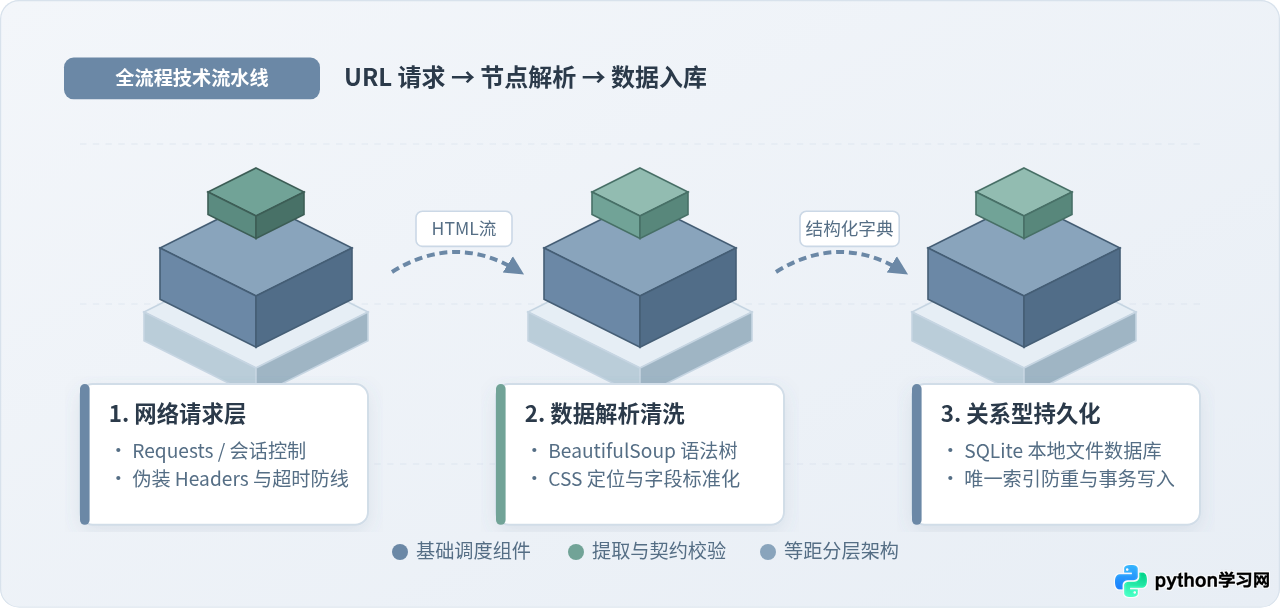
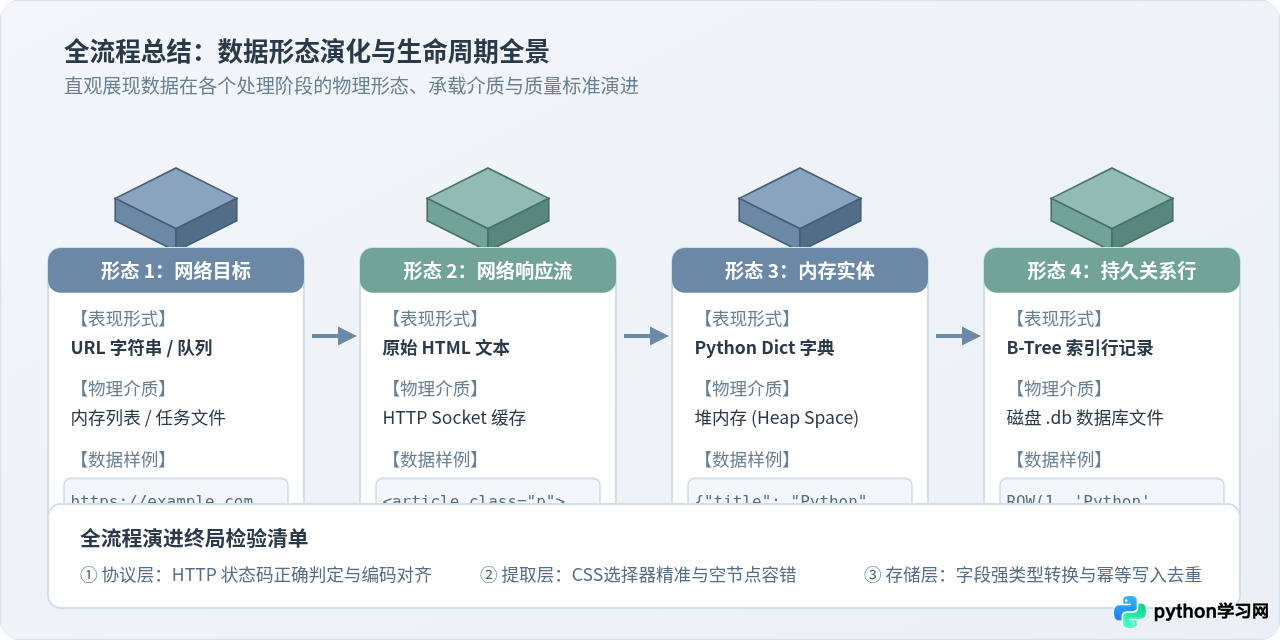
一、全流程架构:网页抓取的四个阶段
许多初学者在刚开始编写网页抓取脚本时,往往把请求、提取和写库混在一个扁平的脚本甚至单个循环中。一旦网络稍有波动或者某个网页缺少了某个标签,整个抓取进程就会直接崩溃退出,或者在数据库中留下大量格式混乱的重复脏数据。
要构建一个健壮且易于排查问题的抓取流程,必须将抓取任务清晰拆解为四个单一职责的阶段:
- 阶段 1(URL 请求派发):使用 HTTP 客户端模拟真实浏览器发起请求,设置合规的请求头与明确的超时保护,并严格核验响应状态码。
- 阶段 2(DOM 树结构解析):将获取到的 HTML 字符串加载进解析引擎,通过 CSS 选择器定位目标元素容器,提取原始文本或标签属性。
- 阶段 3(字段提取与清洗):去除文本噪点、剥离多余符号、完成字符串到数值或日期的类型转换,并对空节点进行缺省值填充。
- 阶段 4(事务持久化存储):设计结构严谨的数据库表,通过参数化 SQL 执行插入操作,并利用唯一索引保证任务重跑时的幂等性。
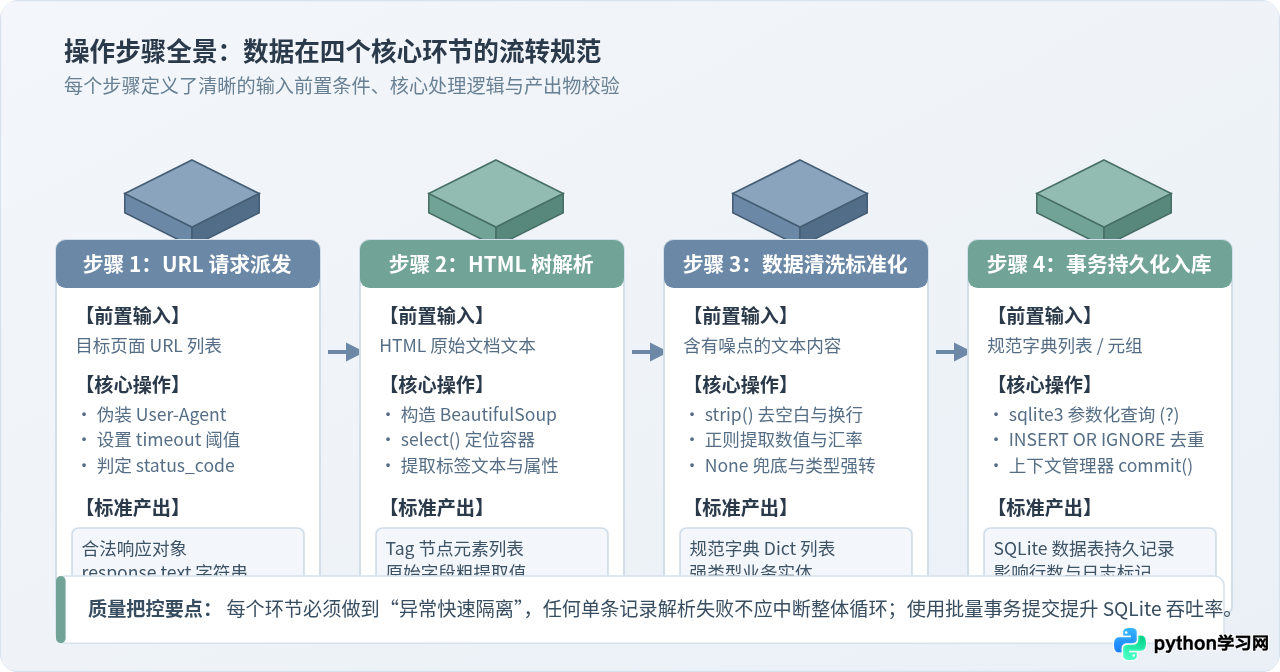
二、第一步:构造与发送 HTTP 请求
网络请求是抓取的第一道关口。直接调用无参数的 requests.get(url) 很容易被服务器直接识别为自动化脚本并拦截(返回 403 Forbidden),甚至因为目标服务器响应缓慢导致 Python 进程无限期阻塞。
在发起请求时,有三个关键参数是保障稳定性的基础:
- User-Agent 伪装:目标站点的 Web 服务器通常会检查
User-Agent头部,以区分浏览器访问还是脚本请求。 - timeout 超时阈值:网络请求必须设定超时时间(例如
timeout=10)。若服务器超过指定秒数未返回数据,即抛出超时异常,交由程序处理,避免线程卡死。 - 状态码校验:必须通过
response.status_code判断是否为 200,并建议通过response.raise_for_status()主动暴露客户端或服务端错误。
HTTP 请求模块示例代码
import requests
from typing import Optional

def fetch_page(url: str, timeout: int = 10) -> Optional[str]:
    """
    负责向指定 URL 发送 HTTP GET 请求,并返回页面 HTML 文本。
    包含统一的请求头配置与超时异常捕获。
    """
    headers = {
        "User-Agent": "Mozilla/5.0 (Windows NT 10.0; Win64; x64) AppleWebKit/537.36 (KHTML, like Gecko) Chrome/120.0.0.0 Safari/537.36",
        "Accept": "text/html,application/xhtml+xml,application/xml;q=0.9,image/webp,*/*;q=0.8",
        "Accept-Language": "zh-CN,zh;q=0.9,en;q=0.8"
    }

    try:
        response = requests.get(url, headers=headers, timeout=timeout)
        # 如果返回 4xx 或 5xx 状态码,直接抛出 HTTPError 异常
        response.raise_for_status()

        # 显式使用 UTF-8 或响应探测编码,防止中文网页乱码
        response.encoding = response.apparent_encoding or "utf-8"
        return response.text
    except requests.exceptions.Timeout:
        print(f"[超时告警] 请求 URL 超过 {timeout} 秒无响应: {url}")
    except requests.exceptions.HTTPError as err:
        print(f"[HTTP错误] 状态码异常: {err}")
    except requests.exceptions.RequestException as err:
        print(f"[网络异常] 请求发生致命错误: {err}")

    return None
fetch_page("http://books.toscrape.com/catalogue/page-1.html")[状态] 发起连接 -> HTTP 200 OK -> 接收到 51,280 字节 HTML 文档文本流。
三、第二步:HTML 解析与目标字段提取
获取到 HTML 字符串之后,抓取工作进入提取阶段。BeautifulSoup 是 Python 处理静态 HTML 最常用的库,它将嵌套复杂的 HTML 文本构建为一棵可检索的节点树。
在提取数据时,推荐使用 CSS 选择器(select 与 select_one),相比繁琐的多层嵌套 find 调用,CSS 选择器语法简洁直观,且与浏览器控制台开发者工具完全兼容。
防御性解析与数据清洗规范
现实中的网页并非所有卡片都拥有完备的标签。例如某些商品可能缺少副标题,或者处于缺货状态缺少价格标签。如果在代码中直接调用 tag.text,一旦某一项为 None,就会引发 AttributeError: 'NoneType' object has no attribute 'text'。
因此,解析函数内部必须执行防御性提取与标准化清洗:
- 提取前判断节点是否存在,若不存在则赋予安全默认值(如空字符串或 0.0)。
- 提取纯文本后,立即调用
.strip()消除首尾空格、制表符及换行符 - 清洗价格或数字中的特殊字符(例如
£51.77需要剥离货币符号£,并转为浮点数float)。
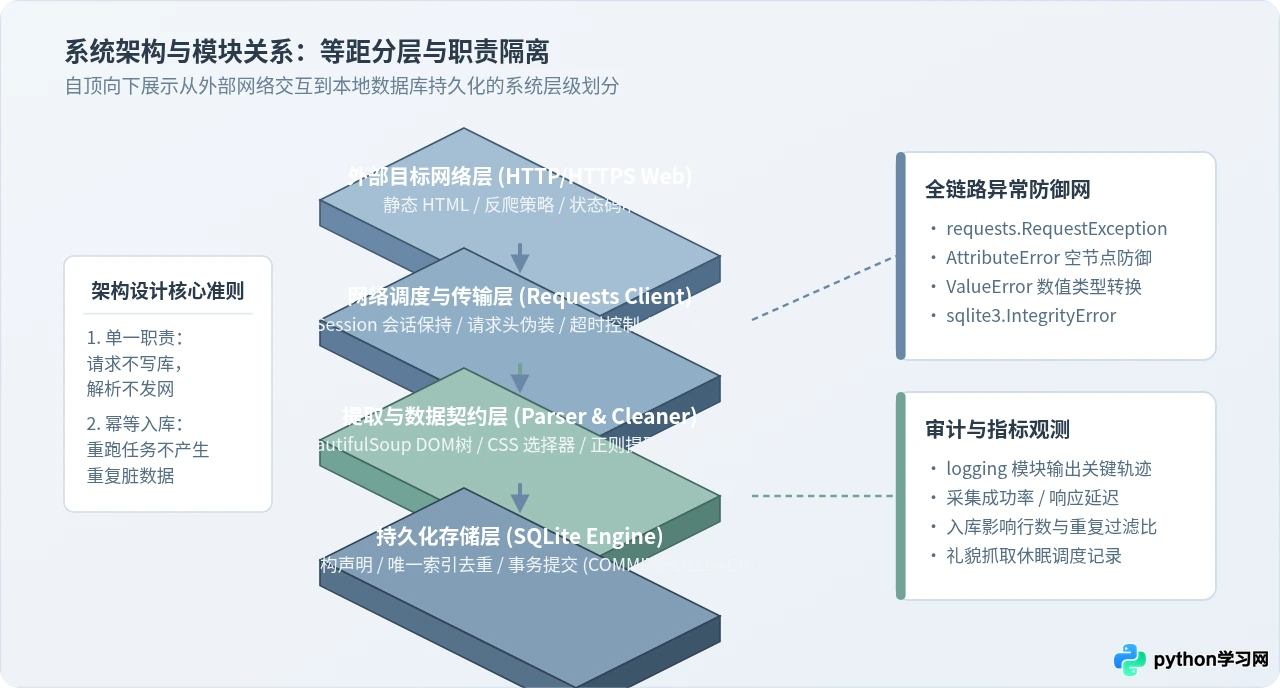
HTML 提取与清洗模块代码
from bs4 import BeautifulSoup
import re
from typing import List, Dict, Any

def parse_book_items(html_content: str) -> List[Dict[str, Any]]:
    """
    解析 HTML 页面,提取图书列表中的标题、价格、评分与库存状态。
    返回规范化的字典列表。
    """
    soup = BeautifulSoup(html_content, "html.parser")
    items = []

    # 定位每个商品的容器卡片
    product_cards = soup.select("article.product_pod")

    for card in product_cards:
        # 1. 提取标题:优先取 a 标签的 title 完整属性,不存在则取其可见文本
        title_tag = card.select_one("h3 > a")
        if not title_tag:
            continue  # 若关键标识缺失,跳过脏数据
        title = title_tag.get("title") or title_tag.get_text(strip=True)

        # 2. 提取价格:剥离货币符号,保留数值
        price_tag = card.select_one("p.price_color")
        price = 0.0
        if price_tag:
            raw_price = price_tag.get_text(strip=True)
            # 使用正则提取浮点数字
            price_match = re.search(r"[\d.]+", raw_price)
            if price_match:
                price = float(price_match.group())

        # 3. 提取详情相对链接并拼合
        detail_rel_url = title_tag.get("href", "").strip()

        # 4. 提取库存状态文本
        avail_tag = card.select_one("p.instock.availability")
        in_stock = True if avail_tag and "In stock" in avail_tag.get_text() else False

        # 组装为强类型结构化字典
        record = {
            "title": title.strip(),
            "price": price,
            "relative_url": detail_rel_url,
            "in_stock": 1 if in_stock else 0
        }
        items.append(record)

    return items
{"title": "A Light in the Attic", "price": 51.77, "relative_url": "a-light-in-the-attic_1000/index.html", "in_stock": 1},
{"title": "Tipping the Velvet", "price": 53.74, "relative_url": "tipping-the-velvet_999/index.html", "in_stock": 1}
]
四、第三步:数据建模与 SQLite 入库存储
数据抓取的终点是持久化。许多人习惯直接将结果导出为 CSV 或 JSON 文件。但面对多轮抓取、增量更新和并发入库时,文本文件极易发生写入冲突,且无法防止重复录入。
Python 标配内置的 sqlite3 模块是爬虫轻量级存储的黄金搭档:无需配置数据库服务端,数据直接保存在单个 .db 磁盘文件中,具备完整的 ACID 事务支持。
数据库表设计与防重策略
为了保证抓取任务可以反复安全重跑(幂等性),我们必须在建表时为关键唯一标识设置 UNIQUE 约束。例如:通过 relative_url(页面唯一相对路径)作为业务唯一标识。
在执行 SQL 写入时,采用 INSERT OR IGNORE 语法:如果该条记录已存在于数据库中,SQLite 会自动忽略该条插入,而不会引发程序报错崩溃;若需要覆盖更新,则可使用 INSERT OR REPLACE。
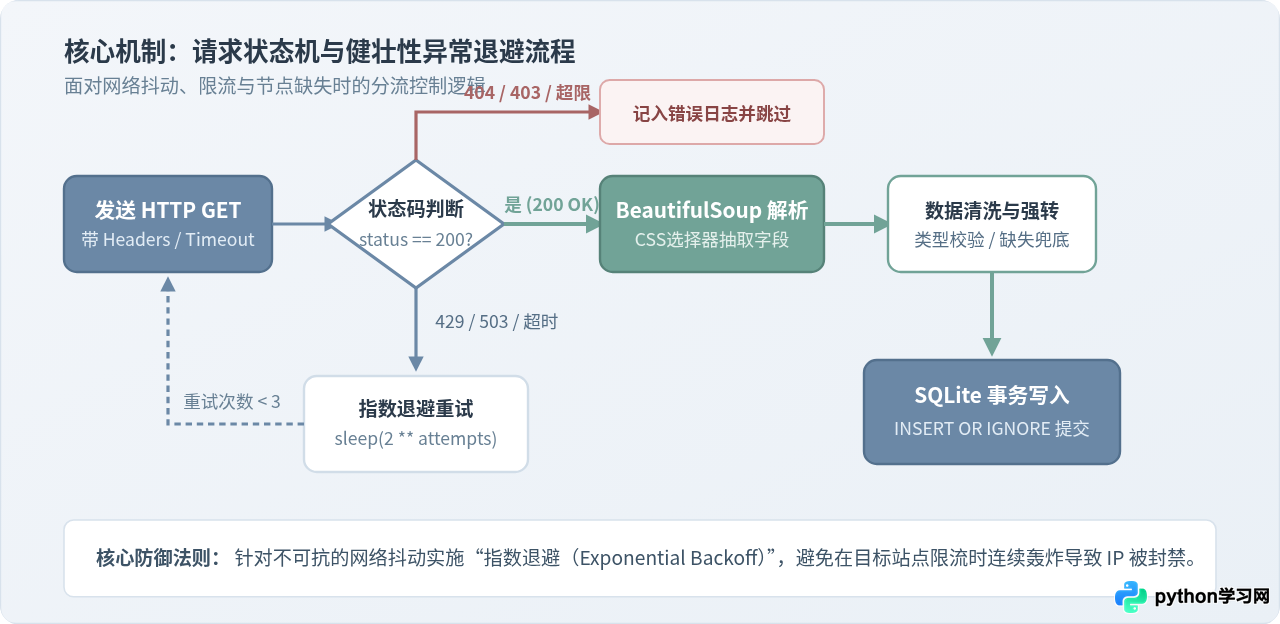
SQLite 数据库管理模块代码
import sqlite3
from typing import List, Dict, Any

class StoragePipeline:
    def __init__(self, db_path: str = "books_data.db"):
        self.db_path = db_path
        self._init_table()

    def _get_connection(self):
        """获取 SQLite 连接,配置超时以防多线程锁库"""
        return sqlite3.connect(self.db_path, timeout=15)

    def _init_table(self):
        """初始化数据表与唯一索引"""
        create_sql = """
        CREATE TABLE IF NOT EXISTS books (
            id INTEGER PRIMARY KEY AUTOINCREMENT,
            title TEXT NOT NULL,
            price REAL NOT NULL,
            relative_url TEXT NOT NULL UNIQUE,
            in_stock INTEGER NOT NULL DEFAULT 1,
            created_at TIMESTAMP DEFAULT CURRENT_TIMESTAMP
        );
        """
        with self._get_connection() as conn:
            cursor = conn.cursor()
            cursor.execute(create_sql)
            conn.commit()

    def save_records(self, records: List[Dict[str, Any]]) -> int:
        """
        批量持久化数据,使用参数化占位符防止注入,
        使用 INSERT OR IGNORE 确保数据幂等防重。
        返回实际成功入库的记录条数。
        """
        if not records:
            return 0

        insert_sql = """
        INSERT OR IGNORE INTO books (title, price, relative_url, in_stock)
        VALUES (?, ?, ?, ?);
        """

        # 将字典转换为参数元组序列
        param_tuples = [
            (r["title"], r["price"], r["relative_url"], r["in_stock"])
            for r in records
        ]

        with self._get_connection() as conn:
            cursor = conn.cursor()
            cursor.executemany(insert_sql, param_tuples)
            inserted_count = cursor.rowcount
            conn.commit()

        return inserted_count
? 参数化占位符,不可使用 Python 的 f"INSERT VALUES ('{title}')"。直接拼接不仅会导致标题中含有单双引号(如英文缩写 It's)时出现 SQL 语法错误,更会带来注入风险。
五、第四步:工程化串联与全流程完整代码
掌握了请求、解析与写库三个基础模块后,我们需要通过一个调度器将它们组织起来。为了避免对目标站点造成过大压力,必须在循环间引入礼貌延迟(time.sleep),并加入进度日志打印。
以下是整套抓取工程的完整可执行代码。你可以在自己的 Python 环境中直接运行它:
# -*- coding: utf-8 -*-
"""
用Python实现网页抓取:从URL请求到数据入库的全流程完整实现
依赖库:requests, beautifulsoup4 (pip install requests beautifulsoup4)
"""
import time
import requests
import sqlite3
import re
from typing import List, Dict, Any, Optional
from bs4 import BeautifulSoup

# ======================= 1. 网络请求层 =======================
class WebFetcher:
    def __init__(self, timeout: int = 10):
        self.timeout = timeout
        self.session = requests.Session()
        self.session.headers.update({
            "User-Agent": "Mozilla/5.0 (Windows NT 10.0; Win64; x64) AppleWebKit/537.36 (KHTML, like Gecko) Chrome/120.0.0.0 Safari/537.36",
            "Accept-Language": "zh-CN,zh;q=0.9,en;q=0.8"
        })

    def get(self, url: str) -> Optional[str]:
        try:
            resp = self.session.get(url, timeout=self.timeout)
            resp.raise_for_status()
            resp.encoding = resp.apparent_encoding or "utf-8"
            return resp.text
        except requests.RequestException as e:
            print(f"[请求失败] URL: {url} 异常信息: {e}")
            return None

# ======================= 2. 数据解析层 =======================
class ContentParser:
    @staticmethod
    def parse_books(html_text: str) -> List[Dict[str, Any]]:
        soup = BeautifulSoup(html_text, "html.parser")
        results = []
        for card in soup.select("article.product_pod"):
            title_el = card.select_one("h3 > a")
            if not title_el:
                continue
            title = title_el.get("title") or title_el.get_text(strip=True)

            price_el = card.select_one("p.price_color")
            price = 0.0
            if price_el:
                m = re.search(r"[\d.]+", price_el.get_text())
                if m:
                    price = float(m.group())

            rel_link = title_el.get("href", "").strip()
            avail_el = card.select_one("p.instock.availability")
            in_stock = 1 if (avail_el and "In stock" in avail_el.get_text()) else 0

            results.append({
                "title": title.strip(),
                "price": price,
                "relative_url": rel_link,
                "in_stock": in_stock
            })
        return results

# ======================= 3. 数据存储层 =======================
class SQLitePipeline:
    def __init__(self, db_file: str = "scraped_data.db"):
        self.db_file = db_file
        self._init_db()

    def _init_db(self):
        with sqlite3.connect(self.db_file) as conn:
            conn.execute("""
            CREATE TABLE IF NOT EXISTS scraped_books (
                id INTEGER PRIMARY KEY AUTOINCREMENT,
                title TEXT NOT NULL,
                price REAL NOT NULL,
                relative_url TEXT NOT NULL UNIQUE,
                in_stock INTEGER NOT NULL,
                scraped_at TIMESTAMP DEFAULT CURRENT_TIMESTAMP
            );
            """)
            conn.commit()

    def insert_batch(self, items: List[Dict[str, Any]]) -> int:
        if not items:
            return 0
        sql = """
        INSERT OR IGNORE INTO scraped_books (title, price, relative_url, in_stock)
        VALUES (?, ?, ?, ?);
        """
        params = [(i["title"], i["price"], i["relative_url"], i["in_stock"]) for i in items]
        with sqlite3.connect(self.db_file) as conn:
            cursor = conn.cursor()
            cursor.executemany(sql, params)
            affected = cursor.rowcount
            conn.commit()
        return affected

# ======================= 4. 流程调度中枢 =======================
def run_crawler():
    base_url = "http://books.toscrape.com/catalogue/page-{}.html"
    total_pages = 2  # 示例演示抓取前 2 页

    fetcher = WebFetcher(timeout=10)
    pipeline = SQLitePipeline(db_file="books_warehouse.db")

    print("[任务启动] 开始执行抓取入库流水线...")
    total_saved = 0

    for page in range(1, total_pages + 1):
        target_url = base_url.format(page)
        print(f"
-> 正在抓取第 {page}/{total_pages} 页: {target_url}")

        # 1. 抓取
        html = fetcher.get(target_url)
        if not html:
            print(f"[跳过] 第 {page} 页拉取失败,继续下一页")
            continue

        # 2. 解析
        items = ContentParser.parse_books(html)
        print(f"   提取到有效卡片数: {len(items)} 条")

        # 3. 入库
        saved = pipeline.insert_batch(items)
        total_saved += saved
        print(f"   成功写入数据库记录: {saved} 条 (去重跳过: {len(items) - saved} 条)")

        # 4. 礼貌延迟,保护目标站点
        time.sleep(1.0)

    print(f"
[任务完成] 全流程执行完毕,累计新增入库: {total_saved} 条记录。")

if __name__ == "__main__":
    run_crawler()
-> 正在抓取第 1/2 页: http://books.toscrape.com/catalogue/page-1.html
提取到有效卡片数: 20 条
成功写入数据库记录: 20 条 (去重跳过: 0 条)
-> 正在抓取第 2/2 页: http://books.toscrape.com/catalogue/page-2.html
提取到有效卡片数: 20 条
成功写入数据库记录: 20 条 (去重跳过: 0 条)
[任务完成] 全流程执行完毕,累计新增入库: 40 条记录。
六、结果验证与数据校验
任务执行完成后,必须对生成的文件与入库记录进行校验,确保数据既没有丢失,也没有发生字段串位或乱码。
可以通过 Python 的内置交互终端或一段简单的验证脚本快速查看刚刚生成的数据库:
import sqlite3

conn = sqlite3.connect("books_warehouse.db")
cursor = conn.cursor()

# 查询总记录数
cursor.execute("SELECT COUNT(*) FROM scraped_books;")
total_rows = cursor.fetchone()[0]
print(f"当前数据库累计总行数: {total_rows}")

# 抽查前 3 条具体数据
cursor.execute("SELECT id, title, price, in_stock, scraped_at FROM scraped_books LIMIT 3;")
rows = cursor.fetchall()
for row in rows:
    print(f"ID: {row[0]} | 价格: ¥{row[2]} | 有货: {bool(row[3])} | 书名: {row[1]}")

conn.close()
ID: 1 | 价格: ¥51.77 | 有货: True | 书名: A Light in the Attic
ID: 2 | 价格: ¥53.74 | 有货: True | 书名: Tipping the Velvet
ID: 3 | 价格: ¥50.10 | 有货: True | 书名: Soumission
七、常见排查与工程防坑指南
在将上述方案应用到不同类型的网站时,通常会遇到以下三个典型技术边界问题:
| 问题现象 | 根本原因 | 规范解决方案 |
|---|---|---|
| 抓取返回 200 但没有目标数据 | 网页内容是通过前端 JavaScript 异步请求(AJAX/Fetch)动态渲染出来的,静态 HTML 中只包含空壳标签。 | 在浏览器开发者工具 Network 栏查找真实的 JSON 数据接口直接请求;或者改用浏览器自动化工具(如 Playwright / Selenium)进行无头渲染。 |
| 程序运行中偶发 429 报错 | 抓取请求频率过高,触发了目标站点的限流防火墙(Rate Limit)。 | 调大 time.sleep 间隔;在请求头中引入随机延迟;利用指数退避算法进行重试。 |
| 中文内容显示为乱码字符 | 服务端未显式声明 charset,或者使用了 GB2312/GBK 编码,requests 默认按 ISO-8859-1 误解码。 |
在解析前通过 response.apparent_encoding 自动探测编码,或手动指定 response.encoding = 'utf-8'。 |
| 重复运行后数据库记录翻倍 | 数据表缺少唯一业务主键,直接使用常规 INSERT 盲目追加。 |
为商品链接或唯一业务编号建立 UNIQUE 索引,统一使用 INSERT OR IGNORE 或 INSERT OR REPLACE 保持幂等。 |
robots.txt 协议,合理控制并发与请求间隔,绝不对目标服务器造成性能负担;抓取的数据应仅用于学习研究或合法数据分析场景。
免责声明:本文内容仅供参考,不代表本站观点。转载或引用请注明出处。