适合Python新手的5个练手项目:从自动化脚本到简单爬虫

专为Python初学者设计的5个阶梯式实战项目,涵盖本地文件批量整理、Excel与CSV数据清洗汇总、定时邮件监控推送、静态网页信息采集以及多页结构化爬虫。包含完整代码、实现步骤与避坑指南。
很多初学者在学完 Python 的基础语法、列表字典和循环函数后,往往会陷入“语法都明白,但不知道能写什么”的停滞期。摆脱这种困境最有效的方法,是用代码解决具体的实际问题。本文精选了 5 个梯度合理的实战练手项目,从最基础的本地文件批量整理开始,经过表格数据处理、网络监控通知,平滑过渡到静态网页抓取与多页爬虫。每一个项目均配有完整的可执行代码、实现思路以及新手容易遇到的关键注意事项,帮助读者在动手编码中建立稳固的工程直觉。
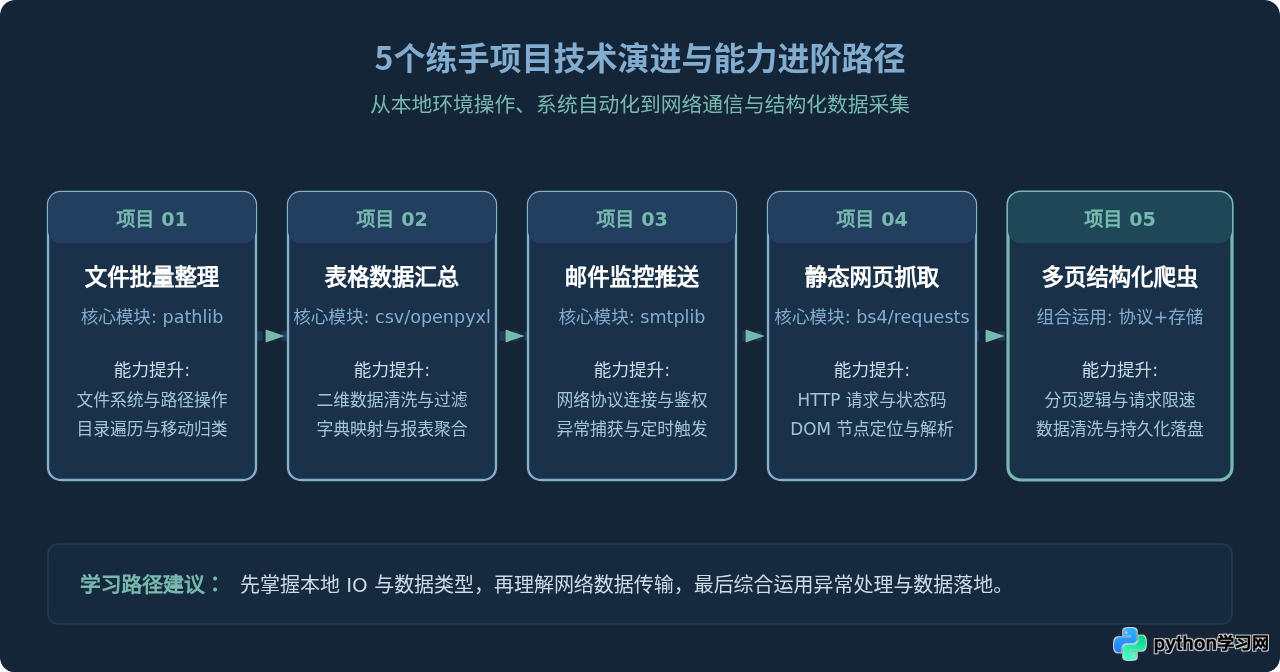
项目一:本地文件批量整理与智能归档
很多人的“下载”或“桌面”文件夹经常堆满各种格式的文件。手动分类费时费力,而这个项目就是编写一个脚本,根据文件扩展名(如图片、文档、安装包、音频)自动建立对应文件夹,并将分散的文件移动归档。这个项目只依赖 Python 标准库,非常适合作为初学者的第一个脚本。
核心解决问题与适用知识点
- 文件系统交互:学习使用标准库
pathlib与shutil。 - 字典分类映射:根据文件后缀(
.suffix)快速匹配目标归档文件夹。 - 安全性考量:跳过隐藏文件和正在处理的脚本本身,避免覆盖同名文件。
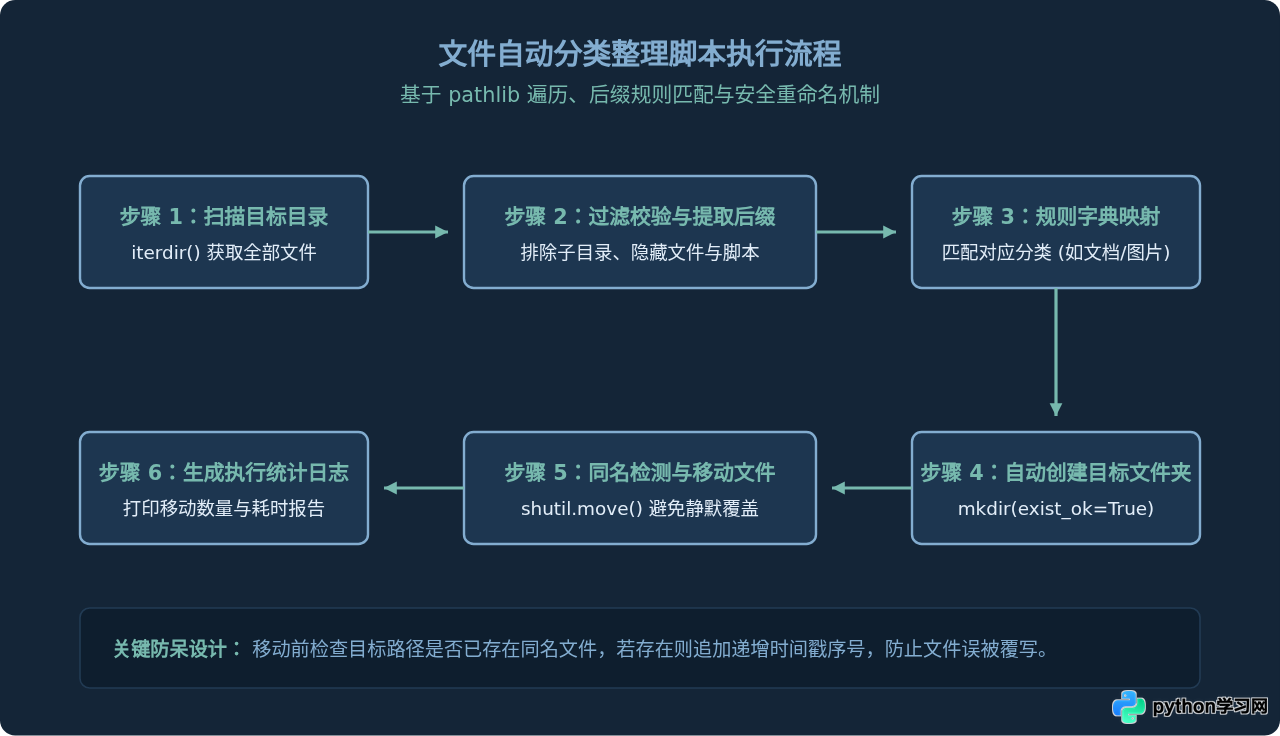
完整代码实现
import shutil
from pathlib import Path

def organize_folder(target_dir: str):
    base_path = Path(target_dir).resolve()
    if not base_path.exists() or not base_path.is_dir():
        print(f"错误:指定路径 '{target_dir}' 不是有效文件夹。")
        return

    # 定义后缀与归档文件夹对应字典
    category_rules = {
        "图片": [".png", ".jpg", ".jpeg", ".gif", ".webp", ".svg"],
        "文档": [".pdf", ".docx", ".doc", ".xlsx", ".csv", ".txt", ".md"],
        "压缩包": [".zip", ".tar", ".gz", ".7z", ".rar"],
        "代码脚本": [".py", ".sh", ".json", ".sql", ".html"],
    }

    # 反向生成扩展名映射字典
    ext_to_folder = {}
    for folder_name, extensions in category_rules.items():
        for ext in extensions:
            ext_to_folder[ext.lower()] = folder_name

    moved_count = 0

    # 遍历当前目录下的所有文件
    for file_path in base_path.iterdir():
        # 排除目录自身、隐藏文件以及脚本自身
        if file_path.is_dir() or file_path.name.startswith("."):
            continue

        ext = file_path.suffix.lower()
        folder_name = ext_to_folder.get(ext, "其他归档")
        dest_folder = base_path / folder_name
        dest_folder.mkdir(exist_ok=True)

        dest_file = dest_folder / file_path.name

        # 防止同名文件直接覆盖,自动追加编号
        counter = 1
        stem = file_path.stem
        while dest_file.exists():
            dest_file = dest_folder / f"{stem}_{counter}{file_path.suffix}"
            counter += 1

        shutil.move(str(file_path), str(dest_file))
        print(f"已移动: {file_path.name} -> {folder_name}/{dest_file.name}")
        moved_count += 1

    print(f"\n整理完成,共安全移动 {moved_count} 个文件。")

if __name__ == "__main__":
    # 执行前请替换为您需要整理的实际目录路径
    organize_folder("./test_download_folder")
避坑提示:在 Windows 系统下处理文件路径时,切忌硬编码使用单反斜杠 C:\folder\test,否则可能会触发转义字符错误。强烈推荐始终使用 Path("C:/folder/test") 或原始字符串 r"C:\folder\test"。
项目二:Excel / CSV 销售数据汇总与自动核对
在日常办公或数据处理中,经常需要从多个部门或分支机构提交的 CSV 表格中提取数据并计算总额。通过这个练手项目,新手可以熟练掌握二维表格数据的读取、字段清洗、异常值过滤以及结构化统计输出。
关键步骤与技术点
- 文件编码兼容:处理中文 CSV 时,常见
utf-8或utf-8-sig(带 BOM 头)与gbk,脚本应具备优雅容错。 - 数据类型转换:从表格读取的数字本质上都是字符串(如
"99.50"),必须显式转换为浮点数或整数后才能做加减求和。 - 分组字典聚合:运用 Python 基础字典
defaultdict,按照“产品类别”自动累计销售额与订单数。
import csv
from collections import defaultdict
from pathlib import Path

def aggregate_sales_data(csv_file_path: str):
    path = Path(csv_file_path)
    if not path.exists():
        print(f"找不到数据文件: {csv_file_path}")
        return

    category_sales = defaultdict(float)
    category_order_count = defaultdict(int)
    total_revenue = 0.0
    invalid_rows = 0

    # 优先使用 utf-8-sig 以兼容 Excel 导出的 BOM 头
    with open(path, mode="r", encoding="utf-8-sig") as f:
        reader = csv.DictReader(f)
        for row_num, row in enumerate(reader, start=2):
            category = row.get("产品类别", "").strip()
            amount_str = row.get("销售金额", "").strip()

            if not category or not amount_str:
                invalid_rows += 1
                continue

            try:
                # 剔除可能存在的千分位逗号
                clean_amount = float(amount_str.replace(",", ""))
                category_sales[category] += clean_amount
                category_order_count[category] += 1
                total_revenue += clean_amount
            except ValueError:
                print(f"第 {row_num} 行金额格式非法: '{amount_str}',已跳过")
                invalid_rows += 1

    print("=" * 45)
    print(f"销售汇总报表 (总销售额: {total_revenue:,.2f} 元)")
    print("=" * 45)
    print(f"{'产品分类':<12} | {'订单笔数':<8} | {'汇总金额 (元)':<12}")
    print("-" * 45)
    for cat, sales in sorted(category_sales.items(), key=lambda x: x[1], reverse=True):
        count = category_order_count[cat]
        print(f"{cat:<12} | {count:<8} | {sales:,.2f}")
    print("=" * 45)
    if invalid_rows > 0:
        print(f"提示:本次统计共忽略 {invalid_rows} 条缺失或异常数据。")

if __name__ == "__main__":
    # 示例调用
    aggregate_sales_data("monthly_sales.csv")
项目三:每日天气与系统提醒邮件自动推送
很多新手希望能用 Python 真正“为生活服务”。这个项目的核心目标是:使用 requests 访问一个公开的每日问候/天气 API 接口获取实时信息,然后使用 Python 标准库 smtplib 与 email 模块构造 HTML 格式的邮件并发送到自己的手机邮箱。一旦打通这一步,未来不管是服务器报警、爬虫状态还是股票价格预警,都可以接入这套推送逻辑。
关键步骤与实现机制
- SMTP 鉴权安全:发送邮件使用的是邮箱提供商(如 163、QQ 邮箱)生成的授权码(应用密码),绝不是邮箱网页端的明文登录密码。
- SSL 加密连接:现代邮件服务要求强制加密,推荐使用
smtplib.SMTP_SSL(host, 465)确保连接安全。 - MIME 协议封装:使用
MIMEMultipart和MIMEText组装富文本或 HTML 邮件正文。
import smtplib
from email.mime.text import MIMEText
from email.mime.multipart import MIMEMultipart
from email.header import Header

def send_daily_report(smtp_server: str, port: int, sender: str, auth_code: str, receiver: str):
    # 模拟从天气接口或本地采集到的结构化指标
    report_data = {
        "city": "北京",
        "weather": "晴朗 22℃",
        "disk_usage": "38%",
        "pending_tasks": 3
    }

    # 1. 创建邮件对象
    message = MIMEMultipart()
    message["From"] = Header(f"自动化助理 <{sender}>", "utf-8")
    message["To"] = Header(receiver, "utf-8")
    message["Subject"] = Header(f"【每日提醒】{report_data['city']} 今日状态与代办概览", "utf-8")

    # 2. 编写 HTML 邮件内容
    html_content = f"""
    <div style="font-family: sans-serif; line-height: 1.6; color: #333;">
        <h3 style="color: #1e40af;">每日自动化摘要</h3>
        <ul>
            <li><strong>城市天气:</strong>{report_data['city']} - {report_data['weather']}</li>
            <li><strong>服务器磁盘使用:</strong>{report_data['disk_usage']}</li>
            <li><strong>今日待处理事项:</strong>{report_data['pending_tasks']} 项</li>
        </ul>
        <p style="font-size: 12px; color: #888;">此邮件由 Python 自动化脚本定时发送,无需回复。</p>
    </div>
    """
    message.attach(MIMEText(html_content, "html", "utf-8"))

    # 3. 连接 SMTP 服务器并发送
    try:
        with smtplib.SMTP_SSL(smtp_server, port) as server:
            server.login(sender, auth_code)
            server.sendmail(sender, [receiver], message.as_string())
        print("每日提醒邮件发送成功!")
    except smtplib.SMTPAuthenticationError:
        print("发送失败:SMTP 认证错误,请检查邮箱地址或授权码是否填写正确。")
    except Exception as e:
        print(f"发送过程中出现异常: {e}")

if __name__ == "__main__":
    # 配置参数说明:QQ邮箱主机 smtp.qq.com 端口 465;163邮箱主机 smtp.163.com 端口 465
    # send_daily_report("smtp.qq.com", 465, "your_email@qq.com", "YOUR_AUTH_CODE", "receive@example.com")
    pass
项目四:静态网页基础数据抓取
网络爬虫是 Python 最具吸引力的方向之一。很多初学者一上来就去碰高难度的动态加载、滑动验证码或反混淆网站,极易产生挫败感。最合理的入门方式是从服务端渲染(SSR)的标准静态 HTML 页面切入,理解 HTTP 请求与 HTML 节点定位的完整闭环。
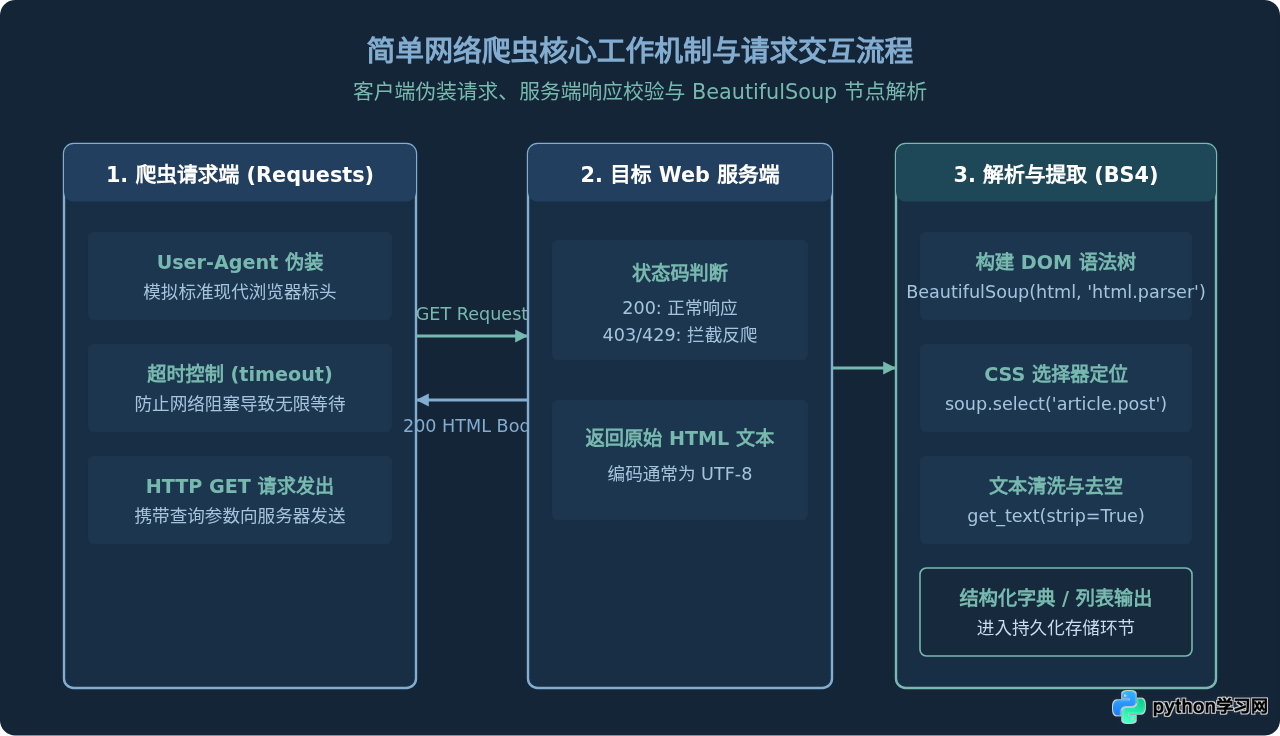
爬取实践:以提取博客精选列表为例
第三方库推荐安装:pip install requests beautifulsoup4。在这个项目中,我们将请求页面、解析每一个列表项中的标题、发布时间与文章链接:
import requests
from bs4 import BeautifulSoup

def scrape_simple_quotes():
    # 使用抓取练习网站作为标准化目标
    target_url = "http://quotes.toscrape.com/"

    # 标头伪装是爬虫的基本礼貌与必要准备
    headers = {
        "User-Agent": "Mozilla/5.0 (Windows NT 10.0; Win64; x64) AppleWebKit/537.36 (KHTML, like Gecko) Chrome/120.0.0.0 Safari/537.36"
    }

    try:
        response = requests.get(target_url, headers=headers, timeout=10)
        # 严格检查 HTTP 状态码,若非 200 则抛出异常
        response.raise_for_status()
        response.encoding = response.apparent_encoding
    except requests.exceptions.RequestException as e:
        print(f"网络请求失败: {e}")
        return []

    soup = BeautifulSoup(response.text, "html.parser")
    results = []

    # 定位包含名言条目的块级容器
    quote_cards = soup.select("div.quote")
    for card in quote_cards:
        text_elem = card.select_one("span.text")
        author_elem = card.select_one("small.author")
        tag_elems = card.select("div.tags a.tag")

        quote_text = text_elem.get_text(strip=True) if text_elem else ""
        author = author_elem.get_text(strip=True) if author_elem else "未知作者"
        tags = [t.get_text(strip=True) for t in tag_elems]

        results.append({
            "quote": quote_text,
            "author": author,
            "tags": ", ".join(tags)
        })

    print(f"成功抓取 {len(results)} 条记录。前两条展示:")
    for item in results[:2]:
        print(f"“{item['quote']}” —— {item['author']} [标签: {item['tags']}]")

    return results

if __name__ == "__main__":
    scrape_simple_quotes()
防踩坑要点:response.raise_for_status() 非常重要。很多新手没有检查状态码,当目标网站返回 403 Forbidden 或 404 Not Found 时,代码依然把错误提示页面的 HTML 传给 BeautifulSoup,最终导致 AttributeError: 'NoneType' object has no attribute 'get_text' 崩溃。
项目五:多页结构化爬虫与持久化存储
这是前四个项目的集大成者。真正的网络数据采集往往涉及多个分页以及数据落盘持久化。在本项目中,我们将解决三个核心现实问题:动态构造分页 URL、遵守礼貌抓取间隔以防止 IP 被封、以及将抓取结果自动追加写入本地 CSV 文件。
项目核心架构设计
- 分页机制:通过分析目标 URL 规律(例如
/page/1/、/page/2/)或动态提取页面“下一页(Next)”的超链接。 - 抓取礼貌限速:在每次请求间隙使用
time.sleep(1.5)进行随机或固定延迟,避免瞬间高频请求打垮对方服务或触发封控。 - 追加持久化:采集一条或一页后即时写入 CSV,即使爬取中途网络中断,之前成功抓取的数据也不会全部丢失。
import time
import csv
import requests
from bs4 import BeautifulSoup
from pathlib import Path

class MultiPageBookCrawler:
    def __init__(self, output_file: str, max_pages: int = 3):
        self.base_url = "http://books.toscrape.com/catalogue/page-{}.html"
        self.output_file = Path(output_file)
        self.max_pages = max_pages
        self.headers = {
            "User-Agent": "Mozilla/5.0 (Macintosh; Intel Mac OS X 10_15_7) AppleWebKit/537.36 (KHTML, like Gecko) Chrome/122.0.0.0 Safari/537.36"
        }
        self.init_storage()

    def init_storage(self):
        # 初始化 CSV 文件头
        if not self.output_file.exists():
            with open(self.output_file, mode="w", newline="", encoding="utf-8-sig") as f:
                writer = csv.writer(f)
                writer.writerow(["图书名称", "价格", "是否有货", "评星等级", "采集批次"])

    def parse_page(self, html_text: str):
        soup = BeautifulSoup(html_text, "html.parser")
        books_data = []

        product_cards = soup.select("article.product_pod")
        for card in product_cards:
            title_tag = card.select_one("h3 a")
            title = title_tag.get("title", "").strip() if title_tag else "未知书名"

            price_tag = card.select_one("p.price_color")
            price = price_tag.get_text(strip=True) if price_tag else "0.00"

            avail_tag = card.select_one("p.instock.availability")
            availability = avail_tag.get_text(strip=True) if avail_tag else "未知"

            # 评星等级通常存储在 class 属性中,如
            rating_tag = card.select_one("p.star-rating")
            rating = "未知"
            if rating_tag:
                classes = rating_tag.get("class", [])
                rating = [c for c in classes if c != "star-rating"][0] if len(classes) > 1 else "未知"

            books_data.append([title, price, availability, rating, "第1批"])

        return books_data

    def save_records(self, records: list):
        with open(self.output_file, mode="a", newline="", encoding="utf-8-sig") as f:
            writer = csv.writer(f)
            writer.writerows(records)

    def run(self):
        print(f"开始爬取,计划采集前 {self.max_pages} 页...")
        total_saved = 0

        for page in range(1, self.max_pages + 1):
            target_url = self.base_url.format(page)
            print(f"正在请求第 {page} 页: {target_url}")

            try:
                resp = requests.get(target_url, headers=self.headers, timeout=10)
                if resp.status_code == 404:
                    print(f"第 {page} 页不存在,已到达最后一页,结束抓取。")
                    break
                resp.raise_for_status()
                resp.encoding = "utf-8"

                items = self.parse_page(resp.text)
                self.save_records(items)
                total_saved += len(items)
                print(f"第 {page} 页抓取成功,保存 {len(items)} 本图书信息。")

                # 间隔延时,保护目标服务器
                time.sleep(1.2)
            except requests.exceptions.RequestException as err:
                print(f"请求第 {page} 页失败: {err}")
                continue

        print(f"爬取任务圆满结束!累计抓取并保存 {total_saved} 条数据到 {self.output_file.name}")

if __name__ == "__main__":
    crawler = MultiPageBookCrawler(output_file="scraped_books.csv", max_pages=2)
    crawler.run()
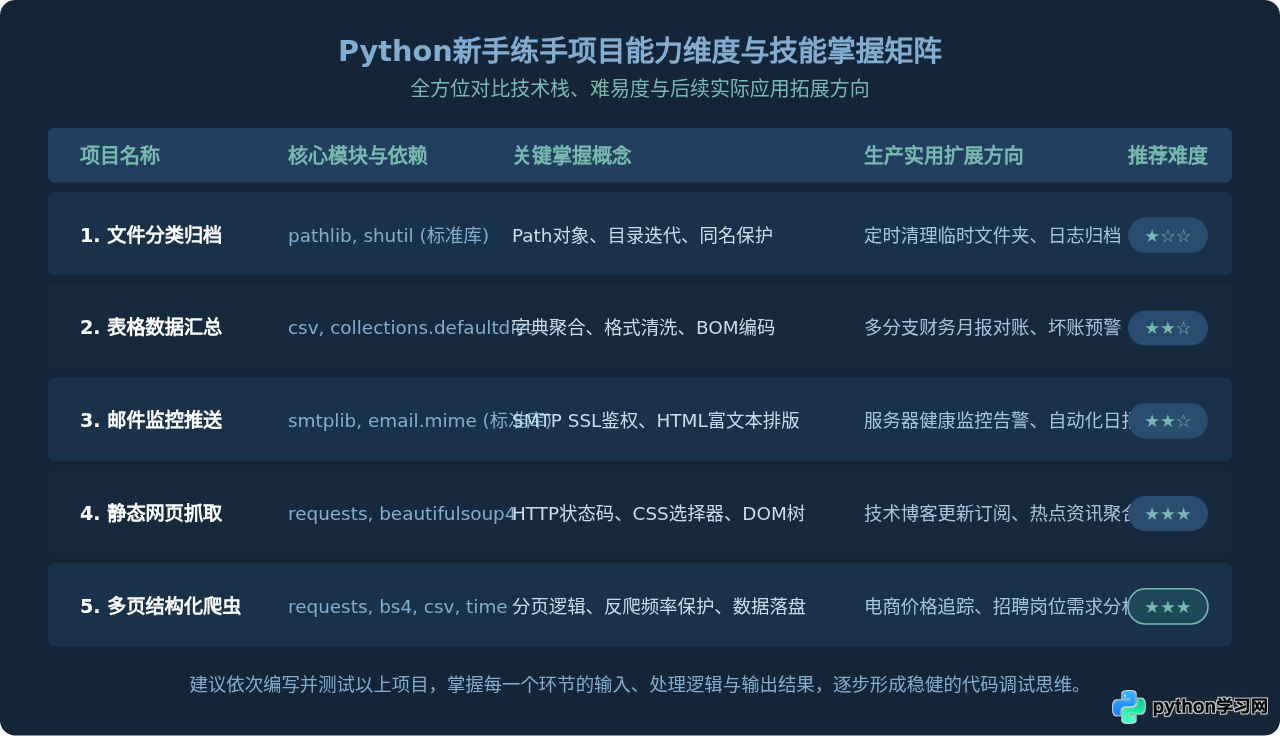
5个练手项目能力维度与技能掌握总结
通过按部就班地完成上述 5 个项目,初学者不仅能熟练掌握标准库的使用,还能对网络通信、DOM 节点树、持久化文件格式建立立体认知。下表全面总结了这 5 个练手项目的核心特征与后续可扩展方向:
新手代码编写与调试建议
在动手实践这 5 个项目的过程中,遇到报错是不可避免且必经的阶段。建立正确的调试习惯,可以节省大量排错时间:
- 打印中间变量:在每一步处理(尤其是列表切片、字典索引、字符串拆分)后,善用
print(type(var), var)确认数据结构是否与预期完全一致。 - 防范 NoneType 异常:在使用 BeautifulSoup 时,永远假设某个元素可能不存在,通过
if tag_elem:做防御性编程,避免代码因为个别页面缺少某个标签而中断退出。 - 保持小步迭代:不要试图一次性写完几十行爬虫或脚本再整体运行。先写通 1 个文件的移动,再加入循环;先抓通 1 个网页并打印,再加入分页和 CSV 存储。
免责声明:本文内容仅供参考,不代表本站观点。转载或引用请注明出处。