

Python爬虫实战:自动抓取金庸小说全集教程

发布时间:2026-10-13| 5人浏览过
本文提供基于Python的完整爬虫示例,演示如何自动抓取金庸小说全集。通过BeautifulSoup解析网页结构,遍历章节列表并逐章下载保存为本地文本文件。代码包含URL请求、HTML解析及文件写入逻辑,适合Python初学者学习网络数据采集与文件处理实战。
Python爬虫抓取小说实现原理
本示例详细讲解了如何使用Python编写爬虫程序来抓取小说内容。以下代码可供参考学习。
核心代码逻辑解析
# -*- coding: utf-8 -*-
from bs4 import BeautifulSoup
from urllib import request
import re
import os,time
#访问url,返回html页面
def get_html(url):
  req = request.Request(url)
  req.add_header('User-Agent','Mozilla/5.0')
  response = request.urlopen(url)
  html = response.read()
  return html
#从列表页获取小说书名和链接
def get_books(url):#根据列表页,返回此页的{书名:链接}的字典
  html = get_html(url)
  soup = BeautifulSoup(html,'lxml')
  fixed_html = soup.prettify()
  books = soup.find_all('div',attrs={'class':'bbox'})
  book_dict = {}
  for book in books:
    book_name = book.h3.a.string
    book_url = book.h3.a.get('href')
    book_dict[book_name] = book_url
  return book_dict
#根据书名链接,获取具体的章节{名称:链接} 的字典
def get_parts(url):
  html = get_html(url)
  soup = BeautifulSoup(html,'lxml')
  fixed_html = soup.prettify()
  part_urls = soup.find_all('a')
  host = "http://www.xiaoshuotxt.org"
  part_dict = {}
  for p in part_urls:
    p_url = str(p.get('href'))
    if re.search(r'\d{5}.html',p_url) and ("xiaoshuotxt" not in p_url):
      part_dict[p.string] = host + p_url
  return part_dict
#根据章节的url获取具体的章节内容
def get_txt(url):
  html = get_html(url)
  soup = BeautifulSoup(html,'lxml')
  fixed_html = soup.prettify()
  title = soup.h1.string #获取文章标题
  content = soup.find('div',attrs={'class':'zw'})
  txt = BeautifulSoup.get_text(content) #正文内容
  return txt
if __name__ == "__main__":
  root_dir= r'e:\books'
  #url = 'http://www.xiaoshuotxt.org/mingzhu/index_2.html' #第2页的小说
  url = "http://www.xiaoshuotxt.org/writer/58" #金庸的小说
  books = get_books(url)
  for book_name,book_url in books.items():
    os.mkdir(os.path.join(root_dir,book_name))
    part_dict = get_parts(book_url)
    print(book_name,"共:",len(part_dict),"章节")
    for part_name,part_url in part_dict.items():
      print("正在保存:",part_name)
      f1 = open(r'e:\books\%s\%s.txt'%(book_name,part_name),'w',encoding='utf-8')#以utf-8编码创建文件
      part_txt = get_txt(part_url)
      f1.write(str(part_txt))
      f1.close()
      time.sleep(2)
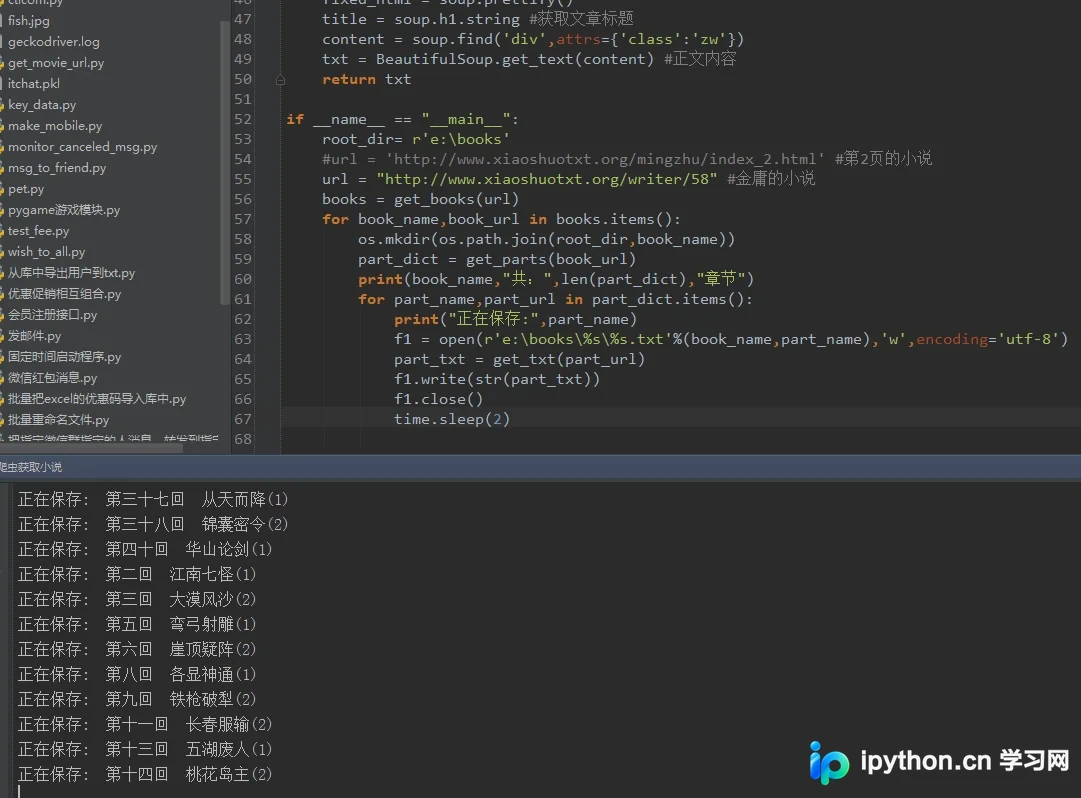
运行效果展示
程序运行后的效果展示如下:
如需了解更多Python相关知识,可参考本站相关专题:《Python Socket编程技巧总结》、《Python正则表达式用法总结》、《Python数据结构与算法教程》、《Python函数使用技巧总结》、《Python字符串操作技巧汇总》、《Python入门与进阶经典教程》及《Python文件与目录操作技巧汇总》。
希望上述内容能对您的Python编程学习有所帮助。
免责声明:本文内容仅供参考,不代表本站观点。转载或引用请注明出处。









