

Python BeautifulSoup库中find与find_all方法详解

本文详细介绍Python中BeautifulSoup库的核心查找方法find和find_all。通过构建实例、解析HTML结构,演示如何精准定位标签、提取文本与属性。重点讲解处理class关键字冲突的技巧,以及find_all在批量提取数据时的灵活应用,帮助开发者高效完成网页数据抓取任务。
BeautifulSoup查找方法概述
在Python网络爬虫开发中,BeautifulSoup是处理HTML和XML文档的强力工具。掌握其核心的查找方法find和find_all,能够显著提升数据提取的效率与准确性。本文将深入解析这两个方法的语法结构、参数含义及实际应用场景。
为了直观展示查找过程,我们首先准备一段包含列表项的HTML代码作为测试样本。这段代码模拟了常见的网页结构,其中包含带有不同class和id属性的li标签,便于后续演示各种匹配规则。
<html>
  <head>
    <title>
      index
    </title>
  </head>
  <body>
     <div>
        <ul>
           <li id="flask"class="item-0"><a href="link1.html" rel="external nofollow" rel="external nofollow" rel="external nofollow" rel="external nofollow" rel="external nofollow" >first item</a></li>
          <li class="item-1"><a href="link2.html" rel="external nofollow" rel="external nofollow" rel="external nofollow" rel="external nofollow" rel="external nofollow" rel="external nofollow" >second item</a></li>
          <li class="item-inactie"><a href="link3.html" rel="external nofollow" rel="external nofollow" rel="external nofollow" >third item</a></li>
          <li class="item-1"><a href="link4.html" rel="external nofollow" rel="external nofollow" rel="external nofollow" rel="external nofollow" >fourth item</a></li>
          <li class="item-0"><a href="link5.html" rel="external nofollow" rel="external nofollow" rel="external nofollow" >fifth item</a>
         </ul>
     </div>
    <li> hello world </li>
  </body>
</html>
在使用BeautifulSoup进行解析之前,必须首先创建BeautifulSoup对象实例。这一步是将原始HTML字符串转换为可操作的文档对象树(DOM)的关键步骤,只有完成实例化,才能调用后续的查找方法。
# 构建beautifulsoup实例
soup = BeautifulSoup(html,'lxml')
# 第一个参数是要匹配的内容
# 第二个参数是beautifulsoup要采用的模块,即规则
值得注意的是,使用BeautifulSoup前需确保已安装相应的解析器模块。例如,代码中使用了lxml解析器,这要求环境中已预先安装lxml库。用户可根据文档推荐,选择html.parser、lxml或html5lib等不同解析器,它们各有优劣,可根据具体需求选用。
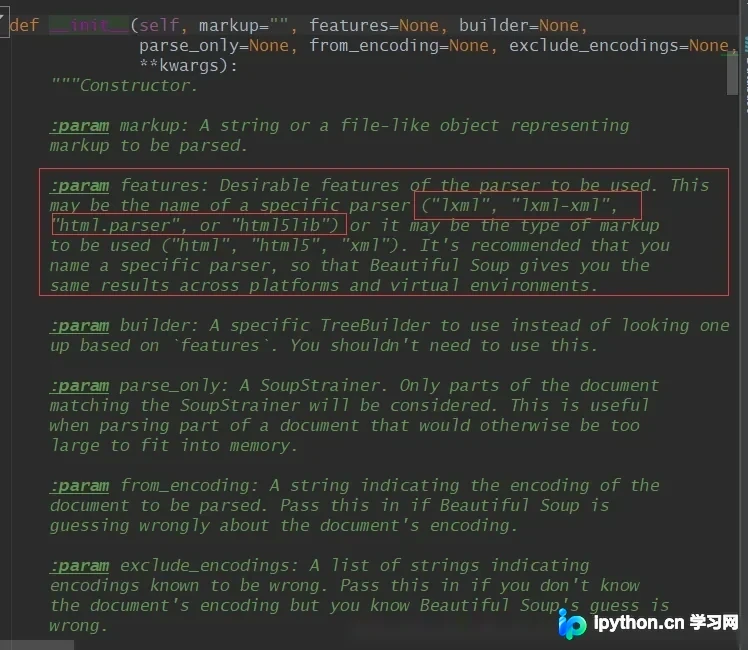
接下来,我们将详细拆解find和find_all两个核心方法的具体用法、参数配置及返回值处理,通过代码示例展示如何在实际项目中灵活运用这些功能。
find方法详解与使用
1. find方法 该方法用于查找文档中第一个符合指定条件的标签节点。一旦找到匹配项,立即返回该节点对象;若未找到,则返回None。 语法结构如下:
find(name, attrs, recursive, text, **wargs)
# recursive 递归的,循环的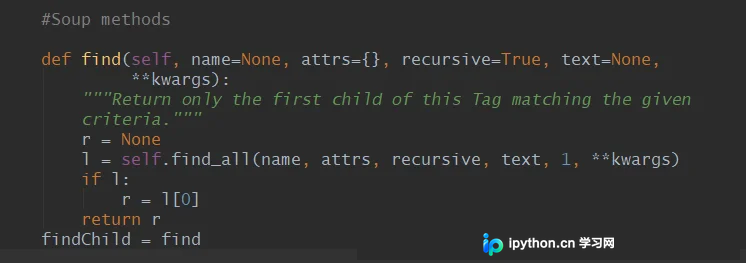
主要参数说明: name:指定要查找的标签名称(如div, p, a等)。 attrs:用于通过字典形式指定标签的属性匹配条件。 text:直接匹配标签内的文本内容。 recursive:控制是否递归搜索子节点,默认为True。
| 参数名 | 作用 |
|---|---|
| name | 查找标签 |
| text | 查找文本 |
| attrs | 基于attrs参数 |
下面是一个基础的使用示例,展示如何查找第一个li标签并提取其相关信息。
# find查找一次
li = soup.find('li')
print('find_li:',li)
print('li.text(返回标签的内容):',li.text)
print('li.attrs(返回标签的属性):',li.attrs)
print('li.string(返回标签内容为字符串):',li.string)
执行上述代码后,控制台将输出以下结果:
find_li: <li class="item-0" id="flask"><a href="link1.html" rel="external nofollow" rel="external nofollow" rel="external nofollow" rel="external nofollow" rel="external nofollow" >first item</a></li> li.text(返回标签的内容): first item li.attrs(返回标签的属性): {'id': 'flask', 'class': ['item-0']} li.string(返回标签内容为字符串): first item
除了直接指定标签名,find方法还支持通过“属性=值”的形式进行精确匹配。这种方式在处理具有特定ID或Class属性的元素时非常高效。
li = soup.find(id = 'flask')
print(li,'\n')
<li class="item-0" id="flask"><a href="link1.html" rel="external nofollow" rel="external nofollow" rel="external nofollow" rel="external nofollow" rel="external nofollow" >first item</a></li> 这里有一个关键注意点:在Python中,class是保留关键字,因此不能直接作为参数名使用。为了匹配HTML标签中的class属性,我们需要采用以下两种替代方案之一:
- 方案一:利用attrs参数,以字典形式传递属性匹配条件。这种方式兼容性最好,适用于所有属性。
- 方案二:使用BeautifulSoup提供的特殊关键字class_。BS4框架内部处理了这种命名冲突,允许开发者直接使用class_作为参数名,写法更为简洁。
# 第一种:在attrs属性用字典进行传递参数
find_class = soup.find(attrs={'class':'item-1'})
print('findclass:',find_class,'\n')
# 第二种:BeautifulSoup中的特别关键字参数class_
beautifulsoup_class_ = soup.find(class_ = 'item-1')
print('BeautifulSoup_class_:',beautifulsoup_class_,'\n')
运行上述两种方案后的输出结果如下:
findclass: <li class="item-1"><a href="link2.html" rel="external nofollow" rel="external nofollow" rel="external nofollow" rel="external nofollow" rel="external nofollow" rel="external nofollow" >second item</a></li>
BeautifulSoup_class_: <li class="item-1"><a href="link2.html" rel="external nofollow" rel="external nofollow" rel="external nofollow" rel="external nofollow" rel="external nofollow" rel="external nofollow" >second item</a></li>
find_all方法与灵活查询
2. find_all方法 与find不同,find_all用于查找文档中所有符合指定条件的标签节点。
find_all返回一个包含所有匹配结果的列表(List)。如果没有任何匹配项,则返回空列表。这是批量提取网页数据时最常用的方法,与find仅返回单个对象形成鲜明对比。
其语法结构与find基本一致,但多了一个limit参数用于限制返回结果的数量。 语法格式如下:
find_all(name, attrs, recursive, text, limit, **kwargs)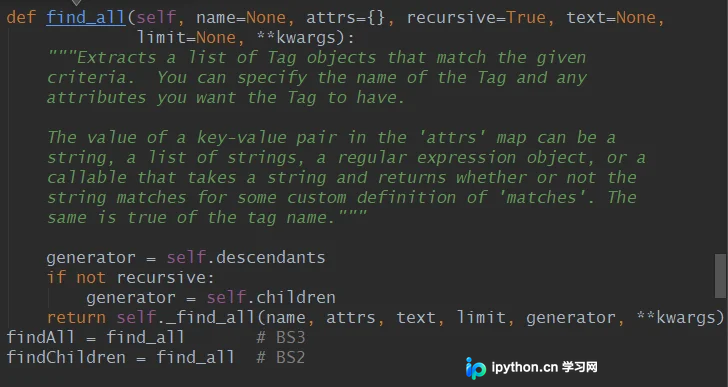
| 参数名 | 作用 |
|---|---|
| name | 查找标签 |
| text | 查找文本 |
| attrs | 基于attrs参数 |
除了name、attrs、text等参数外,find_all还引入了limit参数,允许用户指定最多返回多少个匹配结果,这对于分页处理或限制数据量非常有用。
以下代码演示了如何使用find_all获取所有li标签,并遍历输出它们的文本和属性信息。
# find_all 查找所有
li_all = soup.find_all('li')
for li_all in li_all:
	print('---')
	print('匹配到的li:',li_all)
	print('li的内容:',li_all.text)
	print('li的属性:',li_all.attrs)
运行该代码后,控制台将打印出所有匹配到的li标签及其详细信息,结果如下:
--- 匹配到的li: <li class="item-0" id="flask"><a href="link1.html" rel="external nofollow" rel="external nofollow" rel="external nofollow" rel="external nofollow" rel="external nofollow" >first item</a></li> li的内容: first item li的属性: {'id': 'flask', 'class': ['item-0']} --- 匹配到的li: <li class="item-1"><a href="link2.html" rel="external nofollow" rel="external nofollow" rel="external nofollow" rel="external nofollow" rel="external nofollow" rel="external nofollow" >second item</a></li> li的内容: second item li的属性: {'class': ['item-1']} --- 匹配到的li: <li cvlass="item-inactie"><a href="link3.html" rel="external nofollow" rel="external nofollow" rel="external nofollow" >third item</a></li> li的内容: third item li的属性: {'cvlass': 'item-inactie'} --- 匹配到的li: <li class="item-1"><a href="link4.html" rel="external nofollow" rel="external nofollow" rel="external nofollow" rel="external nofollow" >fourth item</a></li> li的内容: fourth item li的属性: {'class': ['item-1']} --- 匹配到的li: <li class="item-0"><a href="link5.html" rel="external nofollow" rel="external nofollow" rel="external nofollow" >fifth item</a> </li> li的内容: fifth item
此外,find_all支持更灵活的查询方式,例如通过attrs字典进行复杂条件匹配,或者结合正则表达式进行文本查找,极大提升了数据提取的灵活性。
# 最灵活的使用方式
li_quick = soup.find_all(attrs={'class':'item-1'})
for li_quick in li_quick:
	print('最灵活的查找方法:',li_quick)
运行上述灵活查询代码后,输出结果如下:
- 最灵活的查找方法: <li class="item-1"><a href="link2.html" rel="external nofollow" rel="external nofollow" rel="external nofollow" rel="external nofollow" rel="external nofollow" rel="external nofollow" >second item</a></li>
- 最灵活的查找方法: <li class="item-1"><a href="link4.html" rel="external nofollow" rel="external nofollow" rel="external nofollow" rel="external nofollow" >fourth item</a></li>
以下是包含上述所有示例的完整可运行代码,供读者参考和测试:
# coding=utf8
# @Author= CaiJunxuan
# @QQ=469590490
# @Wechat:15916454524

# beautifulsoup

# 导入beautifulsoup模块
from bs4 import BeautifulSoup

# HTML例子
html = '''
<html>
  <head>
    <title>
      index
    </title>
  </head>
  <body>
     <div>
        <ul>
           <li id="flask"class="item-0"><a href="link1.html" rel="external nofollow" rel="external nofollow" rel="external nofollow" rel="external nofollow" rel="external nofollow" >first item</a></li>
          <li class="item-1"><a href="link2.html" rel="external nofollow" rel="external nofollow" rel="external nofollow" rel="external nofollow" rel="external nofollow" rel="external nofollow" >second item</a></li>
          <li cvlass="item-inactie"><a href="link3.html" rel="external nofollow" rel="external nofollow" rel="external nofollow" >third item</a></li>
          <li class="item-1"><a href="link4.html" rel="external nofollow" rel="external nofollow" rel="external nofollow" rel="external nofollow" >fourth item</a></li>
          <li class="item-0"><a href="link5.html" rel="external nofollow" rel="external nofollow" rel="external nofollow" >fifth item</a>
         </ul>
     </div>
    <li> hello world </li>
  </body>
</html>
'''

# 构建beautifulsoup实例
soup = BeautifulSoup(html,'lxml')
# 第一个参数是要匹配的内容
# 第二个参数是beautifulsoup要采用的模块,即规则
# html.parser是python内置的结构匹配方法,但是效率不如lxml所以不常用
# lxml 采用lxml模块
# html5lib,该模块可以将内容转换成html5对象
# 若想要以上功能,就需要具备对应的模块,比如使用lxml就要安装lxml

# 在bs4当中有很多种匹配方法,但常用有两种:

# find查找一次
li = soup.find('li')
print('find_li:',li)
print('li.text(返回标签的内容):',li.text)
print('li.attrs(返回标签的属性):',li.attrs)
print('li.string(返回标签内容为字符串):',li.string)
print(50*'*','\n')

# find可以通过'属性 = 值'的方法进行select
li = soup.find(id = 'flask')
print(li,'\n')
# 因为class是python的保留关键字,所以无法直接查找class这个关键字
# 有两种方法可以进行class属性查询
# 第一种:在attrs属性用字典进行传递参数
find_class = soup.find(attrs={'class':'item-1'})
print('findclass:',find_class,'\n')
# 第二种:BeautifulSoup中的特别关键字参数class_
beautifulsoup_class_ = soup.find(class_ = 'item-1')
print('BeautifulSoup_class_:',beautifulsoup_class_,'\n')

# find_all 查找所有
li_all = soup.find_all('li')
for li_all in li_all:
	print('---')
	print('匹配到的li:',li_all)
	print('li的内容:',li_all.text)
	print('li的属性:',li_all.attrs)

# 最灵活的使用方式
li_quick = soup.find_all(attrs={'class':'item-1'})
for li_quick in li_quick:
	print('最灵活的查找方法:',li_quick)
通过本文的详细讲解,相信读者已经掌握了BeautifulSoup中find和find_all的核心用法。这两个方法是Python爬虫开发中的基础技能,熟练掌握它们将有助于更高效地处理各类网页数据。如需了解更多高级技巧,建议查阅官方文档或参考本站其他相关教程。
免责声明:本文内容仅供参考,不代表本站观点。转载或引用请注明出处。









