

C#基于TCP和UDP协议的网络通信程序实现

发布时间:2026-10-13| 3人浏览过
本文介绍如何使用C#中的核心类库实现两种基础网络通信:支持可靠连接的TCP(传输控制协议)和无需建连的UDP(用户数据报协议)。
TCP通信实现
TCP是面向连接的协议,要求通信双方都处于在线状态才能进行数据传输。在典型的应用场景下,服务器端需要先启动并进行端口监听,等待客户端发起请求。
第1步:配置服务端监听环境
目的:创建一个能接受外部连接的后台服务。
入口:控制台应用程序Main方法。
动作:实例化 TcpListener 对象并指定本地IP地址和端口号,调用 Start() 开启监听循环。
static void Main(string[] args)
{
    TcpClient client = null;
    NetworkStream stream = null;
    byte[] buffer = null;
    string receiveString = null;

    IPAddress localIP = IPAddress.Parse("127.0.0.1");
    int localPort = 11000;

    // 实例化监听器并开始监听
    TcpListener listener = new TcpListener(localIP, localPort);
    listener.Start();

    while (true)
    {
        client = listener.AcceptTcpClient();
        buffer = new byte[client.ReceiveBufferSize];
        stream = client.GetStream();
        stream.Read(buffer, 0, buffer.Length);

        // 清理资源
        stream.Close();
        client.Close();

        receiveString = Encoding.Default.GetString(buffer).Trim('\0');
        Console.WriteLine(receiveString);
    }
}
第2步:编写客户端连接逻辑
目的:建立与服务器的点对点连接并发送消息。
参数:远程主机IP(如 127.0.0.1)与对应端口(如 11000)。
风险提醒:如果服务端未开启,Connect 方法会抛出异常导致程序终止,因此实际生产中应加入超时重试或友好的错误提示机制。
static void Main(string[] args)
{
    string sendString = null;
    byte[] sendData = null;
    TcpClient client = null;
    NetworkStream stream = null;

    IPAddress remoteIP = IPAddress.Parse("127.0.0.1");
    int remotePort = 11000;

    while (true)
    {
        sendString = Console.ReadLine();
        sendData = Encoding.Default.GetBytes(sendString);
        client = new TcpClient();
        try
        {
            client.Connect(remoteIP, remotePort);
            stream = client.GetStream();
            stream.Write(sendData, 0, sendData.Length);
            stream.Close();
            client.Close();
        }
        catch (System.Exception ex)
        {
            Console.WriteLine("连接失败,请检查服务端是否运行!");
        }
    }
}
UDP通信实现
UDP是无连接协议,其优势在于低延迟和开销小,但代价是无法保证数据的送达率。即使目标服务器未处于运行状态,只要局域网通畅,数据包也能发出。
第1步:设置UDP服务端接收节点
目的:持续监听指定端口以捕获传入的数据包。
static void Main(string[] args)
{
    UdpClient client = null;
    string receiveString = null;
    byte[] receiveData = null;
    IPEndPoint remotePoint = new IPEndPoint(IPAddress.Any, 0);

    while (true)
    {
        // 绑定到本地11000端口
        client = new UdpClient(11000);
        receiveData = client.Receive(ref remotePoint);
        receiveString = Encoding.Default.GetString(receiveData);
        Console.WriteLine(receiveString);
        client.Close();
    }
}
第2步:配置UDP客户端发送策略
目的:直接向外网或本机特定IP/端口投送字节数组。
static void Main(string[] args)
{
string sendString = null;
byte[] sendData = null;
UdpClient client = null;
IPAddress remoteIP = IPAddress.Parse("127.0.0.1");
int remotePort = 11000;
IPEndPoint remotePoint = new IPEndPoint(remoteIP, remotePort);
while (true)
{
sendString = Console.ReadLine();
sendData = Encoding.Default.GetBytes(sendString);
client = new UdpClient();
client.Send(sendData, sendData.Length, remotePoint);
client.Close();
}
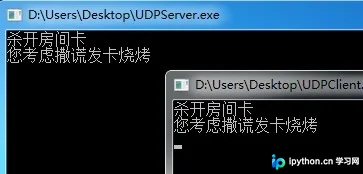
}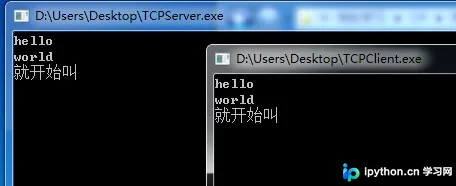 以上就是C#中TCP与UDP通信基本实现的详细内容,更多关于C# Socket编程的相关资料请关注本站其它相关文章!
免责声明:本文内容仅供参考,不代表本站观点。转载或引用请注明出处。









