

Python爬虫突破反爬:通过设置Cookie爬取蚂蚁短租数据详解

本文详细介绍如何使用Python爬虫应对网站反爬机制。针对蚂蚁短租的访问拦截,通过浏览器开发者工具获取Cookie和User-Agent,并在Python代码中通过urllib2设置Headers提交请求。结合BeautifulSoup解析HTML节点,成功获取贵阳地区短租房的名称、价格、评分及链接等详细信息,并存储为CSV文件。
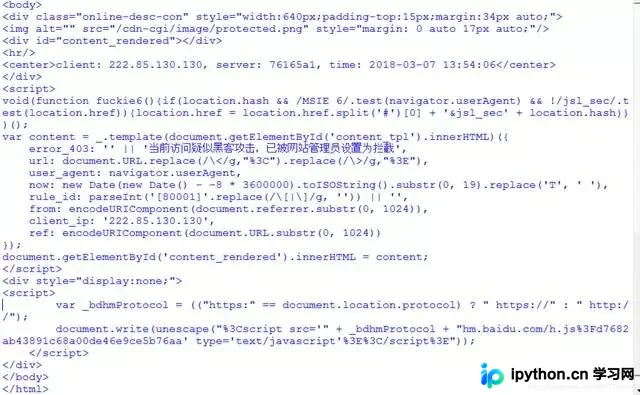
在开发Python爬虫过程中,常会遭遇网站设置的访问限制或反爬措施。例如,尝试抓取蚂蚁短租数据时,系统可能返回“当前访问疑似黑客攻击,已被网站管理员设置为拦截”的提示,如截图所示。为突破此类限制,采用设置Cookie的方式是有效的解决手段。感谢学生承峰提供的思路启发,技术迭代不断向前。
一、网站分析与爬虫拦截机制
打开蚂蚁短租网站并搜索“贵阳市”,页面反馈结果如截图所示。
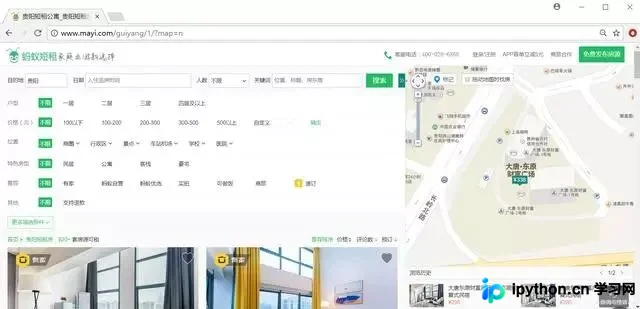
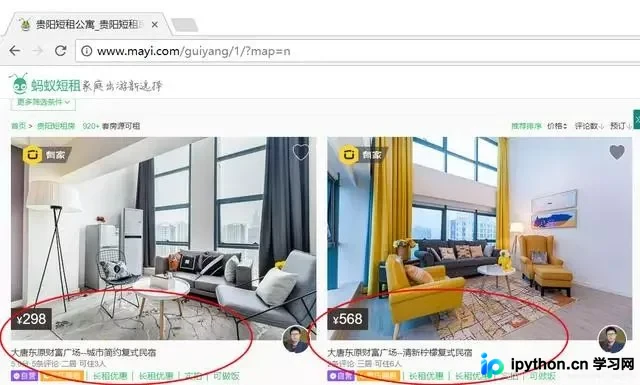
观察可知,短租房信息呈现出规律的分布结构,这正是我们需要抓取的目标数据,具体布局见下图。
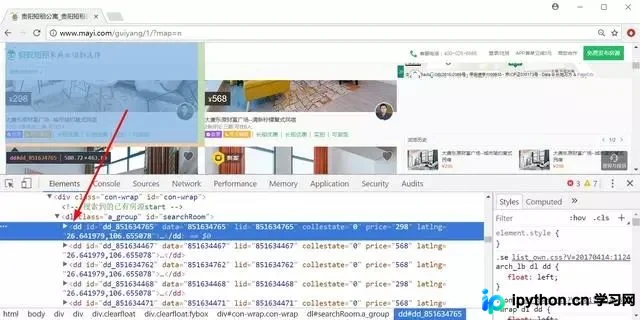
通过浏览器开发者工具审查元素发现,每条租房信息均包裹在<dd></dd>节点内。
很多人学习python,不知道从何学起。 很多人学习python,掌握了基本语法过后,不知道在哪里寻找案例上手。 很多已经做案例的人,却不知道如何去学习更加高深的知识。 那么针对这三类人,我给大家提供一个好的学习平台,免费领取视频教程,电子书籍,以及课程的源代码! QQ群:810735403
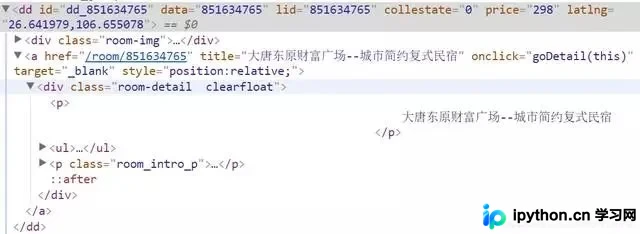
进一步定位房屋名称,如截图所示,其位于<div class="room-detail clearfloat"></div>节点之下。
接下来,我们编写一个基础的BeautifulSoup脚本尝试进行数据爬取。
# -*- coding: utf-8 -*-
import urllib
import re
from bs4 import BeautifulSoup
import codecs

url = 'http://www.mayi.com/guiyang/?map=no'
response=urllib.urlopen(url)
contents = response.read()
soup = BeautifulSoup(contents, "html.parser")
print soup.title
print soup
#短租房名称
for tag in soup.find_all('dd'):
 for name in tag.find_all(attrs={"class":"room-detail clearfloat"}):
 fname = name.find('p').get_text()
 print u'[短租房名称]', fname.replace('\n','').strip()
然而执行结果报错,这表明蚂蚁短租的反爬防护措施较为严密。
二、基于Cookie设置的BeautifulSoup爬虫实现
添加请求消息头的代码示例如下。此处先展示代码与运行结果,随后讲解Cookie的具体获取方法。
# -*- coding: utf-8 -*-
import urllib2
import re
from bs4 import BeautifulSoup

#爬虫函数
def gydzf(url):
 user_agent="Mozilla/5.0 (Windows NT 10.0; Win64; x64) AppleWebKit/537.36 (KHTML, like Gecko) Chrome/51.0.2704.103 Safari/537.36"
 headers={"User-Agent":user_agent}
 request=urllib2.Request(url,headers=headers)
 response=urllib2.urlopen(request)
 contents = response.read()
 soup = BeautifulSoup(contents, "html.parser")
 for tag in soup.find_all('dd'):
 #短租房名称
 for name in tag.find_all(attrs={"class":"room-detail clearfloat"}):
 fname = name.find('p').get_text()
 print u'[短租房名称]', fname.replace('\n','').strip()
 #短租房价格
 for price in tag.find_all(attrs={"class":"moy-b"}):
 string = price.find('p').get_text()
 fprice = re.sub("[¥]+".decode("utf8"), "".decode("utf8"),string)
 fprice = fprice[0:5]
 print u'[短租房价格]', fprice.replace('\n','').strip()
 #评分及评论人数
 for score in name.find('ul'):
 fscore = name.find('ul').get_text()
 print u'[短租房评分/评论/居住人数]', fscore.replace('\n','').strip()
 #网页链接url
 url_dzf = tag.find(attrs={"target":"_blank"})
 urls = url_dzf.attrs['href']
 print u'[网页链接]', urls.replace('\n','').strip()
 urlss = 'http://www.mayi.com' + urls + ''
 print urlss

#主函数
if __name__ == '__main__':
 i = 1
 while i<10:
 print u'页码', i
 url = 'http://www.mayi.com/guiyang/' + str(i) + '/?map=no'
 gydzf(url)
 i = i+1
 else:
 print u"结束"
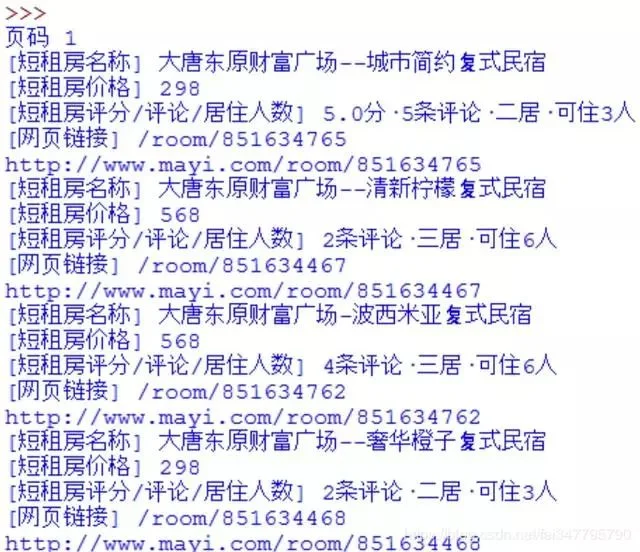
运行输出结果如截图所示:
页码 1 [短租房名称] 大唐东原财富广场--城市简约复式民宿 [短租房价格] 298 [短租房评分/评论/居住人数] 5.0分·5条评论·二居·可住3人 [网页链接] /room/851634765 http://www.mayi.com/room/851634765 [短租房名称] 大唐东原财富广场--清新柠檬复式民宿 [短租房价格] 568 [短租房评分/评论/居住人数] 2条评论·三居·可住6人 [网页链接] /room/851634467 http://www.mayi.com/room/851634467 ... 页码 9 [短租房名称] 【高铁北站公园旁】美式风情+超大舒适安逸 [短租房价格] 366 [短租房评分/评论/居住人数] 3条评论·二居·可住5人 [网页链接] /room/851018852 http://www.mayi.com/room/851018852 [短租房名称] 大营坡(中大国际购物中心附近)北欧小清新三室 [短租房价格] 298 [短租房评分/评论/居住人数] 三居·可住6人 [网页链接] /room/851647045 http://www.mayi.com/room/851647045
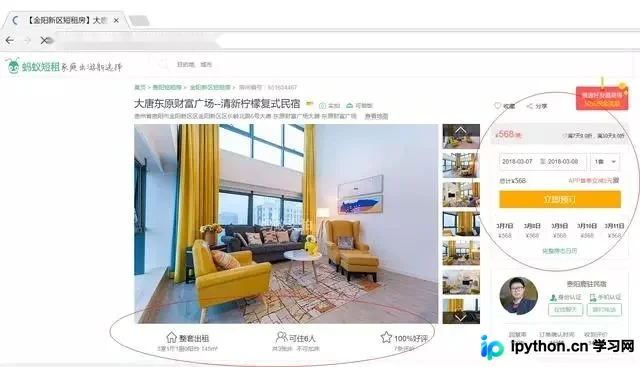
随后,我们尝试获取更详细的房源信息。
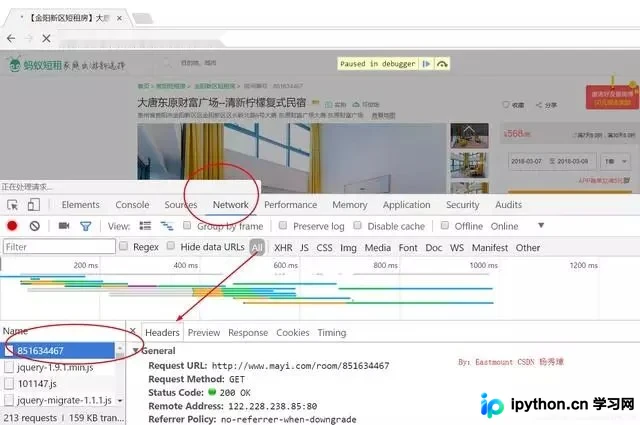
本文重点在于提供Cookie的分析方法。使用浏览器打开目标网页,右键点击“检查”,然后刷新页面。在“NetWork”(网络)标签页中找到对应的网页请求并点击,弹出的Headers(标头)中即包含所需的隐藏信息。
其中最常见的两个参数为Cookie和User-Agent,具体数值如截图所示。
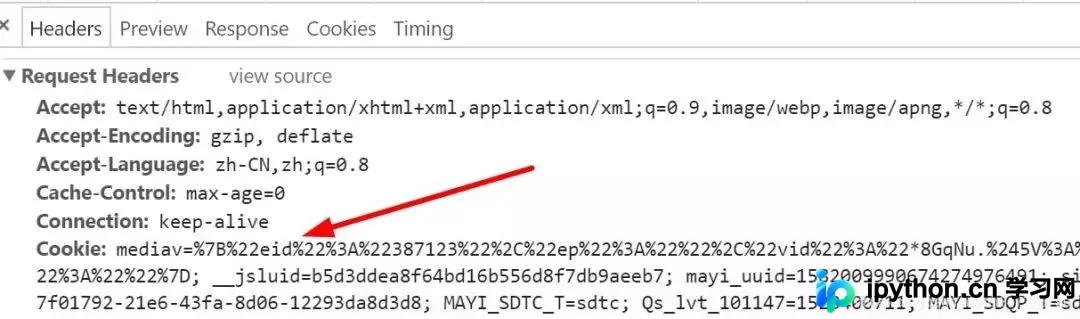
在Python代码中配置这些参数,并调用Urllib2.Request()提交请求即可,核心代码片段如下:
user_agent="Mozilla/5.0 (Windows NT 10.0; Win64; x64) ... Chrome/61.0.3163.100 Safari/537.36"
 cookie="mediav=%7B%22eid%22%3A%22387123...b3574ef2-21b9-11e8-b39c-1bc4029c43b8"
 headers={"User-Agent":user_agent,"Cookie":cookie}
 request=urllib2.Request(url,headers=headers)
 response=urllib2.urlopen(request)
 contents = response.read()
 soup = BeautifulSoup(contents, "html.parser")
 for tag1 in soup.find_all(attrs={"class":"main"}):
需要注意的是,Cookie值每小时更新一次,因此需要手动修改代码中的Cookie变量。同时需同步更新user_agent变量。完整代码如下所示:
import urllib2
import re
from bs4 import BeautifulSoup
import codecs
import csv

c = open("ycf.csv","wb") #write 写
c.write(codecs.BOM_UTF8)
writer = csv.writer(c)
writer.writerow(["短租房名称","地址","价格","评分","可住人数","人均价格"])

#爬取详细信息
def getInfo(url,fname,fprice,fscore,users):
 #通过浏览器开发者模式查看访问使用的user_agent及cookie设置访问头(headers)避免反爬虫,且每隔一段时间运行要根据开发者中的cookie更改代码中的cookie
 user_agent="Mozilla/5.0 (Windows NT 10.0; Win64; x64) AppleWebKit/537.36 (KHTML, like Gecko) Chrome/61.0.3163.100 Safari/537.36"
 cookie="mediav=%7B%22eid%22%3A%22387123%22eb7; mayi_uuid=1582009990674274976491; sid=42200298656434922.85.130.130"
 headers={"User-Agent":user_agent,"Cookie":cookie}
 request=urllib2.Request(url,headers=headers)
 response=urllib2.urlopen(request)
 contents = response.read()
 soup = BeautifulSoup(contents, "html.parser")
 #短租房地址
 for tag1 in soup.find_all(attrs={"class":"main"}):
 print u'短租房地址:'
 for tag2 in tag1.find_all(attrs={"class":"desWord"}):
 address = tag2.find('p').get_text()
 print address
 #可住人数
 print u'可住人数:'
 for tag4 in tag1.find_all(attrs={"class":"w258"}):
 yy = tag4.find('span').get_text()
 print yy
 fname = fname.encode("utf-8")
 address = address.encode("utf-8")
 fprice = fprice.encode("utf-8")
 fscore = fscore.encode("utf-8")
 fpeople = yy[2:3].encode("utf-8")
 ones = int(float(fprice))/int(float(fpeople))
 #存储至本地
 writer.writerow([fname,address,fprice,fscore,fpeople,ones])

#爬虫函数
def gydzf(url):
 user_agent="Mozilla/5.0 (Windows NT 10.0; Win64; x64) AppleWebKit/537.36 (KHTML, like Gecko) Chrome/51.0.2704.103 Safari/537.36"
 headers={"User-Agent":user_agent}
 request=urllib2.Request(url,headers=headers)
 response=urllib2.urlopen(request)
 contents = response.read()
 soup = BeautifulSoup(contents, "html.parser")
 for tag in soup.find_all('dd'):
 #短租房名称
 for name in tag.find_all(attrs={"class":"room-detail clearfloat"}):
 fname = name.find('p').get_text()
 print u'[短租房名称]', fname.replace('\n','').strip()
 #短租房价格
 for price in tag.find_all(attrs={"class":"moy-b"}):
 string = price.find('p').get_text()
 fprice = re.sub("[¥]+".decode("utf8"), "".decode("utf8"),string)
 fprice = fprice[0:5]
 print u'[短租房价格]', fprice.replace('\n','').strip()
 #评分及评论人数
 for score in name.find('ul'):
 fscore = name.find('ul').get_text()
 print u'[短租房评分/评论/居住人数]', fscore.replace('\n','').strip()
 #网页链接url
 url_dzf = tag.find(attrs={"target":"_blank"})
 urls = url_dzf.attrs['href']
 print u'[网页链接]', urls.replace('\n','').strip()
 urlss = 'http://www.mayi.com' + urls + ''
 print urlss
 getInfo(urlss,fname,fprice,fscore,user_agent)

#主函数
if __name__ == '__main__':
 i = 0
 while i<33:
 print u'页码', (i+1)
 if(i==0):
 url = 'http://www.mayi.com/guiyang/?map=no'
 if(i>0):
 num = i+2 #除了第一页是空的,第二页开始按2顺序递增
 url = 'http://www.mayi.com/guiyang/' + str(num) + '/?map=no'
 gydzf(url)
 i=i+1

c.close()
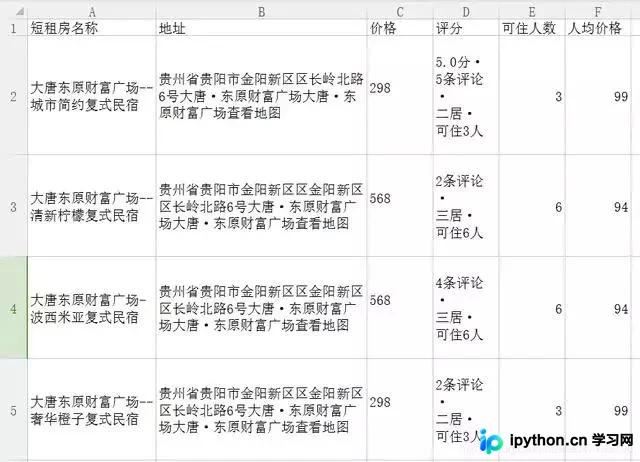
运行结果如下,数据将存储至本地CSV文件中:
此外,读者也可尝试使用Selenium进行蚂蚁短租的爬取,这同样是一种可行的技术方案。
至此,关于Python爬虫通过设置Cookie解决网站拦截并爬取蚂蚁短租数据的介绍完毕。如需了解更多相关Python爬虫内容,请搜索本站历史文章或继续浏览后续文章,希望大家多多支持本站!
免责声明:本文内容仅供参考,不代表本站观点。转载或引用请注明出处。









