

Python3实现北京及周边城市空气质量与天气数据定时爬取

发布时间:2026-10-13| 3人浏览过
本文介绍使用Python3编写爬虫程序,定期抓取北京及周边省会城市的PM2.5和天气数据。文章详细记录了在爬取过程中遇到的UnicodeDecodeError编码错误,并通过修改解码方式为gbk解决。此外,针对服务器运行时的异常中断问题,增加了URLError异常处理与重试机制,确保数据连续采集。
起初尝试在网上寻找现成的空气质量与天气状况爬虫程序,经过一番搜寻后,决定自行编写一个满足需求。
主要目标是采集北京以及周边省会城市的空气质量监测数据和天气数据。
在开发过程中遇到一个报错:UnicodeDecodeError: 'utf-8' codec can't decode byte 0xa1 in position 250。
经排查发现,目标页面的编码格式为gbk,因此将读取语句调整为data=urllib.request.urlopen(url).read().decode("gbk")即可正常解析。
随后将抓取到的数据保存至文本文档,以便后续导入Excel表格进行进一步分析。
由于实验室电脑不常开启,便将程序部署到服务器上,设定其每小时自动执行一次爬取任务。
某次夜间运行出现异常,由于未加入异常处理机制,导致从零点至早上五点的数据采集失败。
此次修改重点加入了异常处理逻辑。若捕获到URLError,程序将等待一分钟后自动重试。
相关实现代码如下:
#coding=utf-8
#北京及周边省会城市污染数据、天气数据每小时监测值爬虫程序
import urllib.request
import re
import urllib.error
import time
#模拟成浏览器
headers=("User-Agent","Mozilla/5.0 (Windows NT 10.0; WOW64) AppleWebKit/537.36 (KHTML, like Gecko) Chrome/45.0.2454.101 Safari/537.36")
opener = urllib.request.build_opener()
opener.addheaders=[headers]
#将opener安装为全局
urllib.request.install_opener(opener)
def get_pm25_and_weather(city):
 #首先执行获取空气质量数据,返回数据更新时间
 data_time=getpm25(city)
 #然后将获取到的数据更新时间赋值给获取天气数据函数使用
 getweather(city,data_time)
def getpm25(city):
 try:
 #设置url地址
 url="http://pm25.in/"+city
 data=urllib.request.urlopen(url).read().decode("utf-8")
 print("城市:"+city)
 #构建数据更新时间的表达式
 data_time='<div class="live_data_time">\s{1,}<p>数据更新时间:(.*?)</p>'
 #寻找出数据更新时间
 datatime=re.compile(data_time, re.S).findall(data)
 print("数据更新时间:"+datatime[0])
 #构建数据收集的表达式
 data_pm25 = '<div class="span1">\s{1,}<div class="value">\n\s{1,}(.*?)\s{1,}</div>'
 data_o3='<div class="span1">\s{1,}<div class ="value">\n\s{1,}(.*?)\s{1,}</div>'
 #寻找出所有的监测值
 pm25list = re.compile(data_pm25, re.S).findall(data)
 o3list=re.compile(data_o3, re.S).findall(data)
 #将臭氧每小时的值插入到原列表中
 pm25list.append(o3list[0])
 print("AQI指数,PM2.5,PM10,CO,NO2,SO2,O3:(单位:μg/m3,CO为mg/m3)")
 print(pm25list)
 #将获取到的值写入文件中
 writefiles_pm25(city,datatime,pm25list)
 #返回数据更新时间值
 return datatime
 except urllib.error.URLError as e:
 print("出现URLERROR!一分钟后重试……")
 if hasattr(e,"code"):
  print(e.code)
 if hasattr(e,"reason"):
  print(e.reason)
 time.sleep(60)
 #出现异常则过一段时间重新执行此部分
 getpm25(city)
 except Exception as e:
 print("出现EXCEPTION!十秒钟后重试……")
 print("Exception:"+str(e))
 time.sleep(10)
 # 出现异常则过一段时间重新执行此部分
 getpm25(city)
def writefiles_pm25(filename,datatime,pm25list):
 #将获取的数据写入文件中,数据分别为时间,AQI指数,PM2.5,PM10,CO,NO2,SO2,O3。(单位:μg/m3,CO为mg/m3)
 f = open("D:\Python\Python35\myweb\data_pm25\data_pm25_"+filename+".txt", "a")
 f.write(datatime[0])
 f.write(",")
 for pm25 in pm25list:
 f.write(str(pm25))
 f.write(",")
 f.write("\n")
 print("该条空气质量数据已添加到文件中!")
 f.close()
def getweather(city,datatime):
 try:
 #构建url
 url="http://"+city+".tianqi.com/"
 data=urllib.request.urlopen(url).read().decode("gbk")
 #构建数据收集的表达式
 data_weather = '<li class="cDRed">(.*?)</li>'
 data_wind='<li style="height:18px;overflow:hidden">(.*?)</li>'
 data_temperature='<div id="rettemp"><strong>(.*?)°'
 data_humidity='</strong><span>相对湿度:(.*?)</span>'
 #寻找出所有的监测值
 weatherlist = re.compile(data_weather, re.S).findall(data)
 windlist=re.compile(data_wind, re.S).findall(data)
 temperaturelist = re.compile(data_temperature, re.S).findall(data)
 humiditylist = re.compile(data_humidity, re.S).findall(data)
 #将其他值插入到天气列表中
 weatherlist.append(windlist[0])
 weatherlist.append(temperaturelist[0])
 weatherlist.append(humiditylist[0])
 print("天气状况,风向风速,实时温度,相对湿度:")
 print(weatherlist)
 #将获取到的值写入文件中
 writefiles_weather(city,datatime,weatherlist)
 except urllib.error.URLError as e:
 print("出现URLERROR!一分钟后重试……")
 if hasattr(e,"code"):
  print(e.code)
 if hasattr(e,"reason"):
  print(e.reason)
 time.sleep(60)
 # 出现异常则过一段时间重新执行此部分
 getweather(city,datatime)
 except Exception as e:
 print("出现EXCEPTION!十秒钟后重试……")
 print("Exception:"+str(e))
 time.sleep(10)
 # 出现异常则过一段时间重新执行此部分
 getweather(city, datatime)
def writefiles_weather(filename,datatime,weatherlist):
 #将获取的数据写入文件中,数据分别为时间,天气状况,风向风速,实时温度,相对湿度。
 f = open("D:\Python\Python35\myweb\data_weather\data_weather_"+filename+".txt", "a")
 f.write(datatime[0])
 f.write(",")
 for weather in weatherlist:
 f.write(str(weather))
 f.write(",")
 f.write("\n")
 print("该条天气数据已添加到文件中!")
 f.close()
#退出循环可用Ctrl+C键
while True:
 print("开始工作!")
 get_pm25_and_weather("beijing")
 get_pm25_and_weather("tianjin")
 get_pm25_and_weather("shijiazhuang")
 get_pm25_and_weather("taiyuan")
 get_pm25_and_weather("jinan")
 get_pm25_and_weather("shenyang")
 get_pm25_and_weather("huhehaote")
 get_pm25_and_weather("zhengzhou")
 #每一小时执行一次
 print("休息中……")
 print("\n")
 time.sleep(3600)
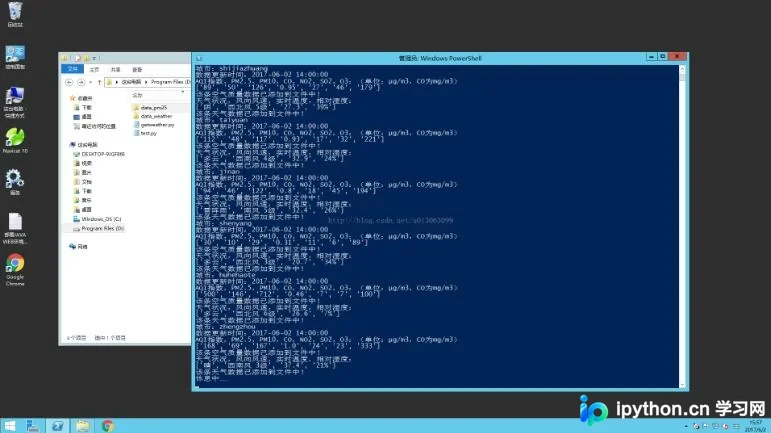
程序运行状态截图如下:
如需了解更多相关内容,请参考专题《python爬取功能汇总》。
以上就是本文的全部内容,希望能为读者的学习提供有益帮助,也欢迎大家继续支持本站。
免责声明:本文内容仅供参考,不代表本站观点。转载或引用请注明出处。









