

Python使用Matplotlib将饼图形状作为散点图标记的实现方法

发布时间:2026-10-13| 3人浏览过
本文介绍如何使用Python的Matplotlib库,将自定义的饼图扇区形状作为散点图的标记。通过计算不同半径和角度的坐标点,生成特定的多边形标记,并在散点图中应用不同颜色和大小进行展示,实现更丰富的数据可视化效果。
本文内容源自Matplotlib官方示例,主要演示如何在Python中结合Matplotlib库,使用自定义的饼图扇区形状作为散点图的标记。具体实现细节如下所述。
首先展示最终的运行效果。
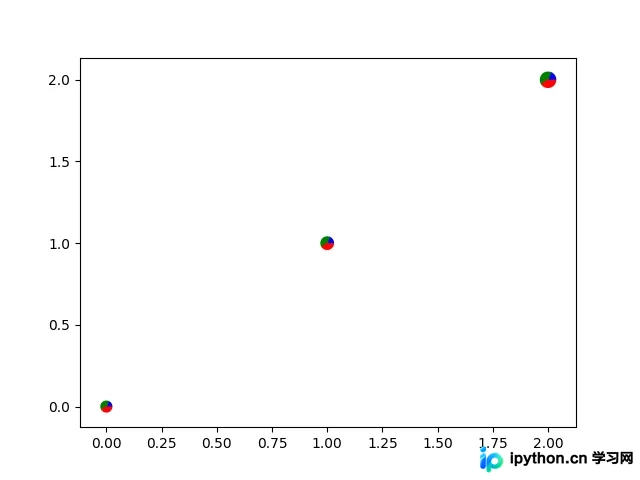
以下是完整的实现代码:
import numpy as np
import matplotlib.pyplot as plt

# first define the ratios
r1 = 0.2    # 20%
r2 = r1 + 0.4 # 40%

# define some sizes of the scatter marker
sizes = np.array([60, 80, 120])

# calculate the points of the first pie marker
#
# these are just the origin (0,0) +
# some points on a circle cos,sin
x = [0] + np.cos(np.linspace(0, 2 * np.pi * r1, 10)).tolist()
y = [0] + np.sin(np.linspace(0, 2 * np.pi * r1, 10)).tolist()
xy1 = list(zip(x, y))
s1 = np.max(xy1)

x = [0] + np.cos(np.linspace(2 * np.pi * r1, 2 * np.pi * r2, 10)).tolist()
y = [0] + np.sin(np.linspace(2 * np.pi * r1, 2 * np.pi * r2, 10)).tolist()
xy2 = list(zip(x, y))
s2 = np.max(xy2)

x = [0] + np.cos(np.linspace(2 * np.pi * r2, 2 * np.pi, 10)).tolist()
y = [0] + np.sin(np.linspace(2 * np.pi * r2, 2 * np.pi, 10)).tolist()
xy3 = list(zip(x, y))
s3 = np.max(xy3)

fig, ax = plt.subplots()
ax.scatter(range(3), range(3), marker=(xy1, 0),
      s=s1 ** 2 * sizes, facecolor='blue')
ax.scatter(range(3), range(3), marker=(xy2, 0),
      s=s2 ** 2 * sizes, facecolor='green')
ax.scatter(range(3), range(3), marker=(xy3, 0),
      s=s3 ** 2 * sizes, facecolor='red')

plt.show()
代码总结
以上是关于使用Python和Matplotlib绘制以饼图形状为标记的散点图的完整代码示例,希望能对读者有所帮助。如果读者感兴趣,可以进一步查阅本站的其他相关技术专题。若内容中有不足之处,欢迎在评论区留言指正。感谢大家的支持!
免责声明:本文内容仅供参考,不代表本站观点。转载或引用请注明出处。









