

Python matplotlib scatter 绘制散点图详解与实战

本文详细介绍如何使用 Python 的 matplotlib 库中的 scatter 方法绘制散点图。内容涵盖从最简单的数据可视化到基于多特征数据集的高级图表绘制,包括颜色、大小、标记形状等关键参数的配置,并深入解析 scatter 函数的签名与具体参数含义,帮助读者掌握数据可视化技巧。
本文分享利用 matplotlib 库中 scatter 方法绘制散点图的具体代码示例,供读者参考学习。
基础散点图绘制
1、基础绘制方式
在数据分析流程中,绘制散点图是常见且基础的需求。Python 中最主流的绘图工具为 matplotlib,其提供的 scatter 方法能够便捷地满足散点图的绘制要求。接下来我们将演示如何构建一个最基础的散点图。
所用数据格式如下所示:
0 746403 1 1263043 2 982360 3 1202602 ...
上述数据中,第一列代表 X 轴坐标值,第二列代表 Y 轴坐标值。基于此数据,我们进行绘图操作。
#!/usr/bin/env python
#coding:utf-8

import matplotlib.pyplot as plt

def pltpicture():
 file = "xxx"
 xlist = []
 ylist = []
 with open(file, "r") as f:
  for line in f.readlines():
   lines = line.strip().split()
   if len(lines) != 2 or int(lines[1]) < 100000:
    continue
   x, y = int(lines[0]), int(lines[1])
   xlist.append(x)
   ylist.append(y)

 plt.xlabel('X')
 plt.ylabel('Y')
 plt.scatter(xlist, ylist)
 plt.show()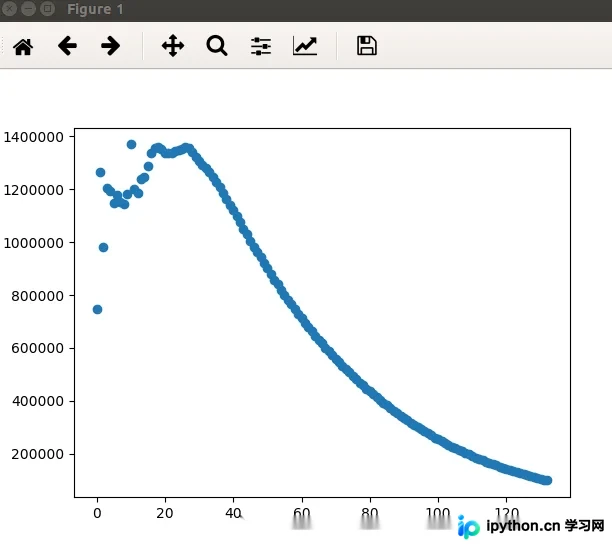
优化视觉效果与多特征绘图
2、优化视觉效果
前文生成的图像较为简单,未包含任何配置项。接下来,我们将使用另一份数据集来绘制视觉效果更佳的图表。该数据集源自网络公开资源,具体格式如下:
40920 8.326976 0.953952 3 14488 7.153469 1.673904 2 26052 1.441871 0.805124 1 75136 13.147394 0.428964 1 ...
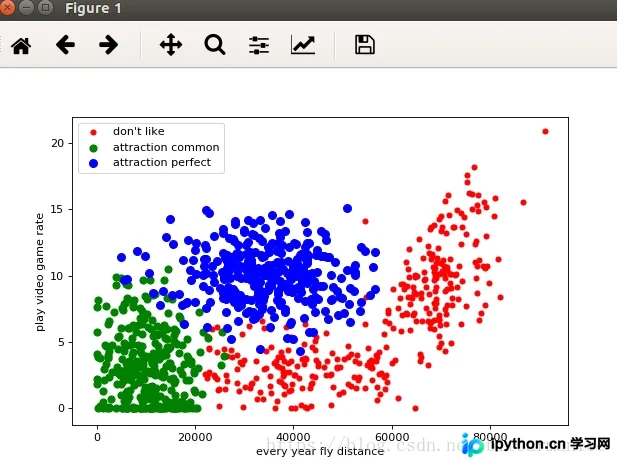
各列含义说明如下: 第一列:每年获取的飞行常客里程数; 第二列:玩视频游戏所消耗时间的百分比; 第三列:每周消费的冰淇淋公升数; 第四列为标签(label): 1 表示不喜欢的人; 2 表示魅力一般的人; 3 表示极具魅力的人。
我们将每年获取的飞行里程数作为 X 轴坐标,玩视频游戏所消耗的时间百分比作为 Y 轴坐标,绘制对应的散点图。
from matplotlib import pyplot as plt

file = "/home/mi/wanglei/data/datingTestSet2.txt"
label1X, label1Y, label2X, label2Y, label3X, label3Y = [], [], [], [], [], []

with open(file, "r") as f:
 for line in f:
  lines = line.strip().split()
  if len(lines) != 4:
   continue
  distance, rate, label = lines[0], lines[1], lines[3]
  if label == "1":
   label1X.append(distance)
   label1Y.append(rate)

  elif label == "2":
   label2X.append(distance)
   label2Y.append(rate)

  elif label == "3":
   label3X.append(distance)
   label3Y.append(rate)

plt.figure(figsize=(8, 5), dpi=80)
axes = plt.subplot(111)

label1 = axes.scatter(label1X, label1Y, s=20, c="red")
label2 = axes.scatter(label2X, label2Y, s=40, c="green")
label3 = axes.scatter(label3X, label3Y, s=50, c="blue")

plt.xlabel("every year fly distance")
plt.ylabel("play video game rate")
axes.legend((label1, label2, label3), ("don't like", "attraction common", "attraction perfect"), loc=2)

plt.show()
最终生成的效果图如下:
scatter 函数参数详解
3、scatter 函数参数详解
下面我们来查看 scatter 函数的具体签名定义:
def scatter(self, x, y, s=None, c=None, marker=None, cmap=None, norm=None,
    vmin=None, vmax=None, alpha=None, linewidths=None,
    verts=None, edgecolors=None,
    **kwargs):
  """
  Make a scatter plot of `x` vs `y`

  Marker size is scaled by `s` and marker color is mapped to `c`

  Parameters
  ----------
  x, y : array_like, shape (n, )
   Input data

  s : scalar or array_like, shape (n, ), optional
   size in points^2. Default is `rcParams['lines.markersize'] ** 2`.

  c : color, sequence, or sequence of color, optional, default: 'b'
   `c` can be a single color format string, or a sequence of color
   specifications of length `N`, or a sequence of `N` numbers to be
   mapped to colors using the `cmap` and `norm` specified via kwargs
   (see below). Note that `c` should not be a single numeric RGB or
   RGBA sequence because that is indistinguishable from an array of
   values to be colormapped. `c` can be a 2-D array in which the
   rows are RGB or RGBA, however, including the case of a single
   row to specify the same color for all points.

  marker : `~matplotlib.markers.MarkerStyle`, optional, default: 'o'
   See `~matplotlib.markers` for more information on the different
   styles of markers scatter supports. `marker` can be either
   an instance of the class or the text shorthand for a particular
   marker.

  cmap : `~matplotlib.colors.Colormap`, optional, default: None
   A `~matplotlib.colors.Colormap` instance or registered name.
   `cmap` is only used if `c` is an array of floats. If None,
   defaults to rc `image.cmap`.

  norm : `~matplotlib.colors.Normalize`, optional, default: None
   A `~matplotlib.colors.Normalize` instance is used to scale
   luminance data to 0, 1. `norm` is only used if `c` is an array of
   floats. If `None`, use the default :func:`normalize`.

  vmin, vmax : scalar, optional, default: None
   `vmin` and `vmax` are used in conjunction with `norm` to normalize
   luminance data. If either are `None`, the min and max of the
   color array is used. Note if you pass a `norm` instance, your
   settings for `vmin` and `vmax` will be ignored.

  alpha : scalar, optional, default: None
   The alpha blending value, between 0 (transparent) and 1 (opaque)

  linewidths : scalar or array_like, optional, default: None
   If None, defaults to (lines.linewidth,).

  verts : sequence of (x, y), optional
   If `marker` is None, these vertices will be used to
   construct the marker. The center of the marker is located
   at (0,0) in normalized units. The overall marker is rescaled
   by ``s``.

  edgecolors : color or sequence of color, optional, default: None
   If None, defaults to 'face'

   If 'face', the edge color will always be the same as
   the face color.

   If it is 'none', the patch boundary will not
   be drawn.

   For non-filled markers, the `edgecolors` kwarg
   is ignored and forced to 'face' internally.

  Returns
  -------
  paths : `~matplotlib.collections.PathCollection`

  Other parameters
  ----------------
  kwargs : `~matplotlib.collections.Collection` properties

  See Also
  --------
  plot : to plot scatter plots when markers are identical in size and
   color

  Notes
  -----

  * The `plot` function will be faster for scatterplots where markers
   don't vary in size or color.

  * Any or all of `x`, `y`, `s`, and `c` may be masked arrays, in which
   case all masks will be combined and only unmasked points will be
   plotted.

   Fundamentally, scatter works with 1-D arrays; `x`, `y`, `s`, and `c`
   may be input as 2-D arrays, but within scatter they will be
   flattened. The exception is `c`, which will be flattened only if its
   size matches the size of `x` and `y`.

  Examples
  --------
  .. plot:: mpl_examples/shapes_and_collections/scatter_demo.py

  """
各参数的具体含义如下:
x 和 y 必须是长度相同的数组。 s 参数可以是标量,或者是与 x、y 长度相同的数组,用于指定散点的大小,默认值为 20。 c 参数代表颜色(color),用于指定点的颜色。 marker 参数用于指定散点的形状。
以上内容为本文的全部介绍,希望能为读者的学习提供有益帮助,同时也欢迎大家继续支持本站。
免责声明:本文内容仅供参考,不代表本站观点。转载或引用请注明出处。









