

Python matplotlib绘制3D条形图(含阴影控制)实例

发布时间:2026-10-13| 1人浏览过
本文介绍如何使用Python的matplotlib库绘制3D条形图,重点演示通过bar3d函数的shade参数控制阴影显示。代码包含生成模拟数据、创建两个子图分别展示有阴影和无阴影的效果,并调用plt.show()渲染图形。
本文提供的示例代码主要展示如何利用Python结合matplotlib库绘制3D条形图,并对比显示带有阴影与不带阴影的视觉效果。
首先查看最终的图形演示效果:
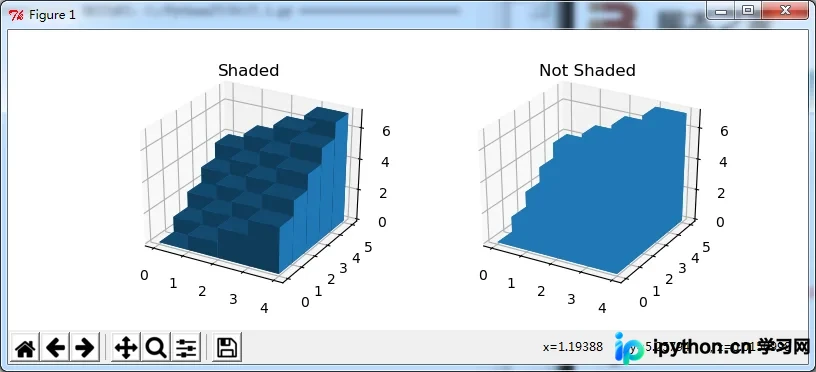
完整的实现代码如下:
import numpy as np
import matplotlib.pyplot as plt
from mpl_toolkits.mplot3d import Axes3D


# setup the figure and axes
fig = plt.figure(figsize=(8, 3))
ax1 = fig.add_subplot(121, projection='3d')
ax2 = fig.add_subplot(122, projection='3d')

# fake data
_x = np.arange(4)
_y = np.arange(5)
_xx, _yy = np.meshgrid(_x, _y)
x, y = _xx.ravel(), _yy.ravel()

top = x + y
bottom = np.zeros_like(top)
width = depth = 1

ax1.bar3d(x, y, bottom, width, depth, top, shade=True)
ax1.set_title('Shaded')

ax2.bar3d(x, y, bottom, width, depth, top, shade=False)
ax2.set_title('Not Shaded')

plt.show()
其中,shade参数设置为True或False,用于控制条形图阴影的可见性。
总结
以上是关于使用Python和matplotlib绘制3D条形图的完整代码示例,希望能对大家有所帮助。如果读者感兴趣,可以继续阅读本站的其他相关技术文章。如有任何疑问或建议,欢迎在评论区留言反馈。感谢各位的支持!
免责声明:本文内容仅供参考,不代表本站观点。转载或引用请注明出处。









