

Python使用Matplotlib绘制三维散点图详解流程

本文详细介绍如何在Python中使用Matplotlib库绘制三维散点图。通过导入mpl_toolkits.mplot3d模块,利用ax.scatter3D函数处理x、y、z坐标数据。文章包含两个完整示例,演示随机数据集生成、颜色映射、透明度调整及坐标轴标签设置,帮助开发者快速掌握3D可视化技巧。
Matplotlib简介与三维绘图基础
Matplotlib简介
Matplotlib是Python中一个广泛使用的绘图库,支持生成静态图像、动态动画及交互式图表。它内置了丰富的功能和分析工具,可用于处理各种图形和图表数据。
若需绘制三维图形,Matplotlib提供了相应支持。当面对包含大量三维变量的数据集时,通过散点图展示其分布情况,即形成3D散点图。实现这一功能需借助Matplotlib的mplot3d工具包。
该工具包提供了相关函数,用于接收X、Y和Z坐标的数据集并进行绘制。
根据对三维图形具体属性的需求,可能需要传入额外的参数以定制图表效果。
Matplotlib最初仅支持二维绘图。约在1.0版本发布时,通过在二维显示层上叠加三维绘图工具,构建了一套实用但功能相对有限的三维可视化工具集。只需导入作为基本安装一部分的mplot3d工具包,即可启用三维图表功能。
最简单的三维图形是由(x, y, z)三元组构成的线或簇组成的散点图。这些图形可通过ax.plot3D和ax.scatter3D函数生成,其调用方式与典型的二维图表非常相似。
为了在二维页面上营造深度感,散点的透明度会根据距离进行调整。
示例1:基础三维散点图绘制
示例1:基础三维散点图绘制
# importing the necessary libraries
import numpy as np
import matplotlib.pyplot as plt
from mpl_toolkits import mplot3d
# generating  random dataset
z = np.random.randint(80, size =(55))
x = np.random.randint(60, size =(55))
y = np.random.randint(64, size =(55))
# Creating figures for the plot
fig = plt.figure(figsize = (10, 7))
ax = plt.axes(projection ="3d")
# Creating a plot using the random datasets
ax.scatter3D(x, y, z, color = "red")
plt.title("3D scatter plot")
# display the  plot
plt.show()
运行结果展示
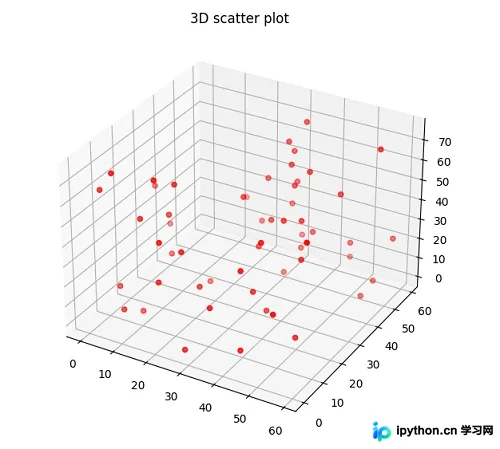
代码解析
在上述示例中,我们利用ax.scatter3D()函数创建了三维绘图。首先导入了numpy、matplotlib以及mpl_toolkits等必要库。接着,使用np.random.randint()函数生成了x、y、z坐标的随机数数据集。随后,调用ax.scatter3D()函数,传入x、y、z坐标,并将点的颜色设置为红色。最后,通过plt.show()函数显示生成的图表。
示例2:高级三维散点图(含颜色映射与网格)
示例2:高级三维散点图(含颜色映射与网格)
# importing the necessary libraries
from mpl_toolkits import mplot3d
import matplotlib.pyplot as plt
import numpy as np
# Creating random dataset
z = 4 * np.tan(np.random.randint(10, size =(500))) + np.random.randint(100, size =(500))
x = 4 * np.cos(z) + np.random.normal(size = 500)
y = 4 * np.sin(z) + 4 * np.random.normal(size = 500)
# Creating figure
fig = plt.figure(figsize = (16, 12))
ax = plt.axes(projection ="3d")
# Add x, and y gridlines for the figure
ax.grid(b = True, color ='blue',linestyle ='-.', linewidth = 0.5,alpha = 0.3)
# Creating the color map for the plot
my_cmap = plt.get_cmap('hsv')
# Creating the 3D plot
sctt = ax.scatter3D(x, y, z,alpha = 0.8,c = (x + y + z),cmap = my_cmap,marker ='^')
plt.title("3D scatter plot in Python")
ax.set_xlabel('X-axis', fontweight ='bold')
ax.set_ylabel('Y-axis', fontweight ='bold')
ax.set_zlabel('Z-axis', fontweight ='bold')
fig.colorbar(sctt, ax = ax, shrink = 0.6, aspect = 5)
# display the plot
plt.show()
运行结果展示
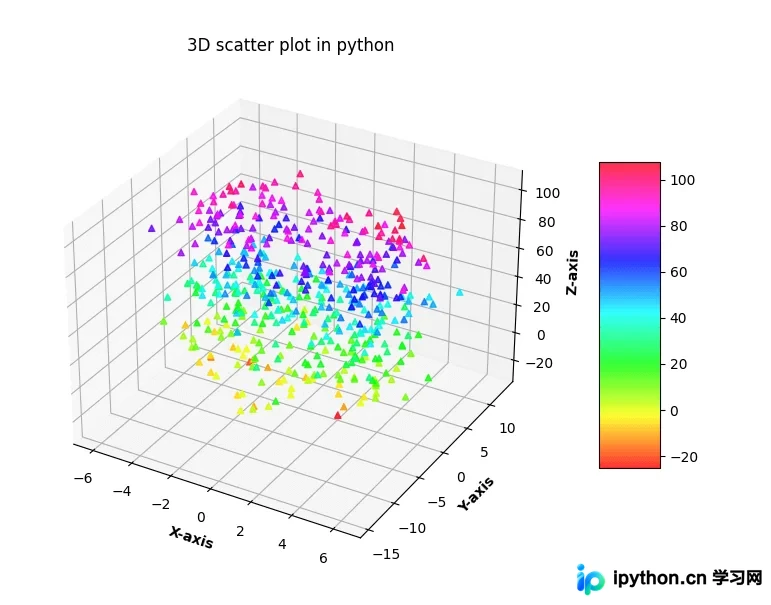
代码解析
在上面的代码中,我们使用ax.scatter3D()函数绘制了三维图形。首先生成x、y、z坐标的随机数据集,并使用标记“^”进行绘制。通过set_xlabel、set_ylabel和set_zlabel函数分别为各个坐标轴添加标签。此外,代码还展示了如何生成复杂的z值(基于正切函数和随机噪声),并应用颜色映射(cmap)和透明度(alpha)来增强视觉效果。
至此,关于Python使用Matplotlib绘制三维散点图的详细流程介绍完毕。如需了解更多相关内容,可搜索本站过往文章或继续浏览后续文章。感谢大家的支持!
免责声明:本文内容仅供参考,不代表本站观点。转载或引用请注明出处。









