解决Python定时任务时间漂移与阻塞主线程问题

深入剖析Python定时任务中时间漂移与主线程阻塞的核心成因,提供基于单调时钟绝对时间对齐的漂移补偿算法,结合多线程与异步协程实现调度解耦,并给出APScheduler生产级配置与选型方案。
while True: do_job(); time.sleep(interval) 结构存在两个隐蔽缺陷:任务本身的执行耗时会累加到休眠间隔中,导致执行时刻单调向后推迟(时间漂移);同时同步休眠会卡死当前主线程,导致程序无法响应控制信号与外部事件。解决这两个问题的核心路径是:采用单调时钟(time.monotonic())建立绝对时间序列基准进行动态补偿消除漂移,并借助独立线程池或异步协程与调度循环解耦,保障主线程即时响应。
一、问题复现:为什么简易定时循环必然产生漂移与阻塞?
编写后台定时脚本时,开发者通常希望任务以严格恒定的周期(例如每隔 10 秒)准时触发。然而,使用标准库的相对延时函数往往会违背这一初衷。我们先通过一个常见的代码切片观察其运行轨迹:
import time

# 常见但存在缺陷的写法
def naive_scheduler(interval=1.0):
    while True:
        job_start = time.time()
        # 模拟业务逻辑:即使耗时很短,也会破坏时间基准
        time.sleep(0.1)  # 假设施行业务操作耗时 100ms
        print(f"触发时间戳: {time.time():.3f}")
        time.sleep(interval)  # 相对休眠 1.0s
上述代码暴露了两个根源性问题:
-
执行耗时的累积效应导致时间漂移(Time Drift):
每次循环的实际周期为
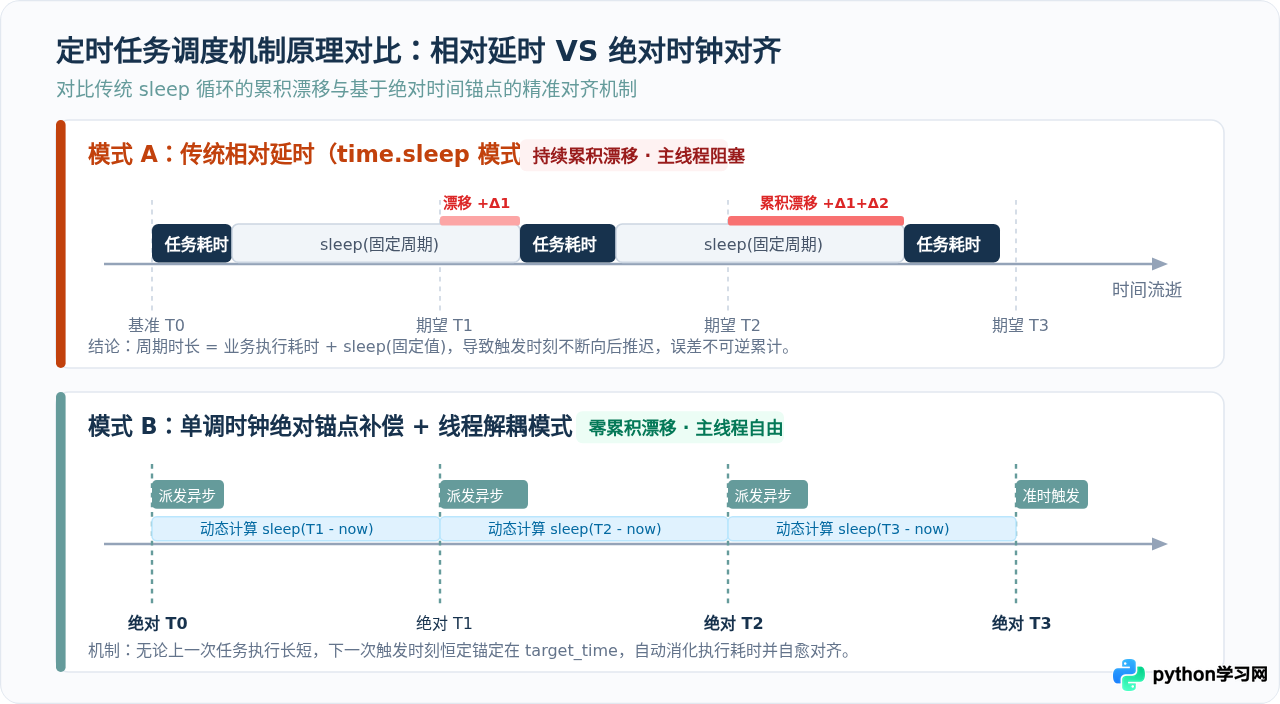
实际耗时 = 业务运行时间 (0.1s) + 休眠时间 (1.0s) = 1.1s。每个周期都会产生 100 毫秒的正向漂移。循环 10 次后,任务落后基准时间 1 秒;循环 1000 次后,落后幅度达到 100 秒。定时任务的执行时间点会离最初预期的整分整秒越来越远。 -
同步挂起导致主线程阻塞(Main Thread Blocking):
time.sleep()会让当前线程交出 CPU 调度权并进入不可中断的挂起状态。如果这段逻辑运行在主线程中,主线程将无法处理键盘中断(Ctrl+C 经常需要等待休眠结束才生效)、无法监听网络套接字或运行用户界面。
二、核心对策:基于单调时钟的绝对时间漂移补偿算法
消除时间漂移的关键,在于把“基于上一轮结束时间的相对休眠”转变为“基于固定时间序列的绝对时间对齐”。
2.1 选用 time.monotonic() 杜绝时钟跳跃
在 Python 中计算时间差值时,必须优先使用 time.monotonic() 或 time.monotonic_ns(),而不是 time.time()。因为 time.time() 返回的是系统挂钟时间(Wall Clock Time),易受网络时间协议(NTP)同步校准、闰秒调整或人工修改系统时间的影响。一旦时钟发生回拨或跃变,基于挂钟时间的休眠计算就会产生剧烈跳动甚至永久死锁。而单调时钟保证时间永远单向递增,不受外部时间调整影响。
2.2 绝对时间序列的动态休眠推导
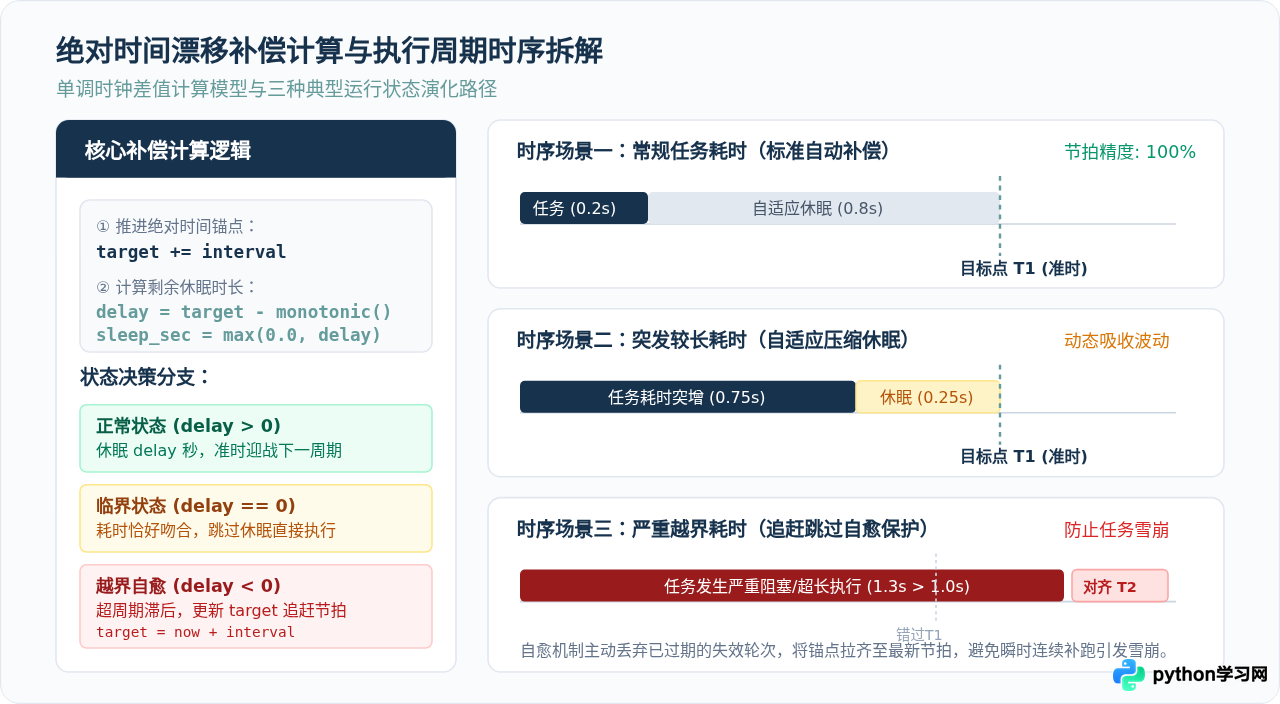
在初始化阶段,调度器记录起始锚点 target = time.monotonic()。进入循环后,每个周期严格累加步长:target += interval。此时动态计算休眠时长:
sleep_duration = target - time.monotonic()根据计算结果,调度器做出三种状态分支处理:
- 若
sleep_duration > 0:说明任务耗时小于周期间隔,休眠剩余时间即可恰好在下一个锚点醒来。 - 若
sleep_duration == 0:任务耗时恰好等于周期间隔,无需休眠,直接进入下一轮。 - 若
sleep_duration < 0:说明单次任务耗时超过了周期时长,发生越界滞后。
三、架构解耦:消除主线程阻塞的并发方案
仅有时间补偿还不够。如果耗时业务直接在调度循环所在的线程中同步执行,调度循环本身的休眠计算就会被长任务拖垮。彻底消除阻塞必须实行“调度与执行解耦”。
3.1 方案一:后台独立线程 + 线程池派发(标准库生产解法)
这是生产环境中最实用的轻量级方案:
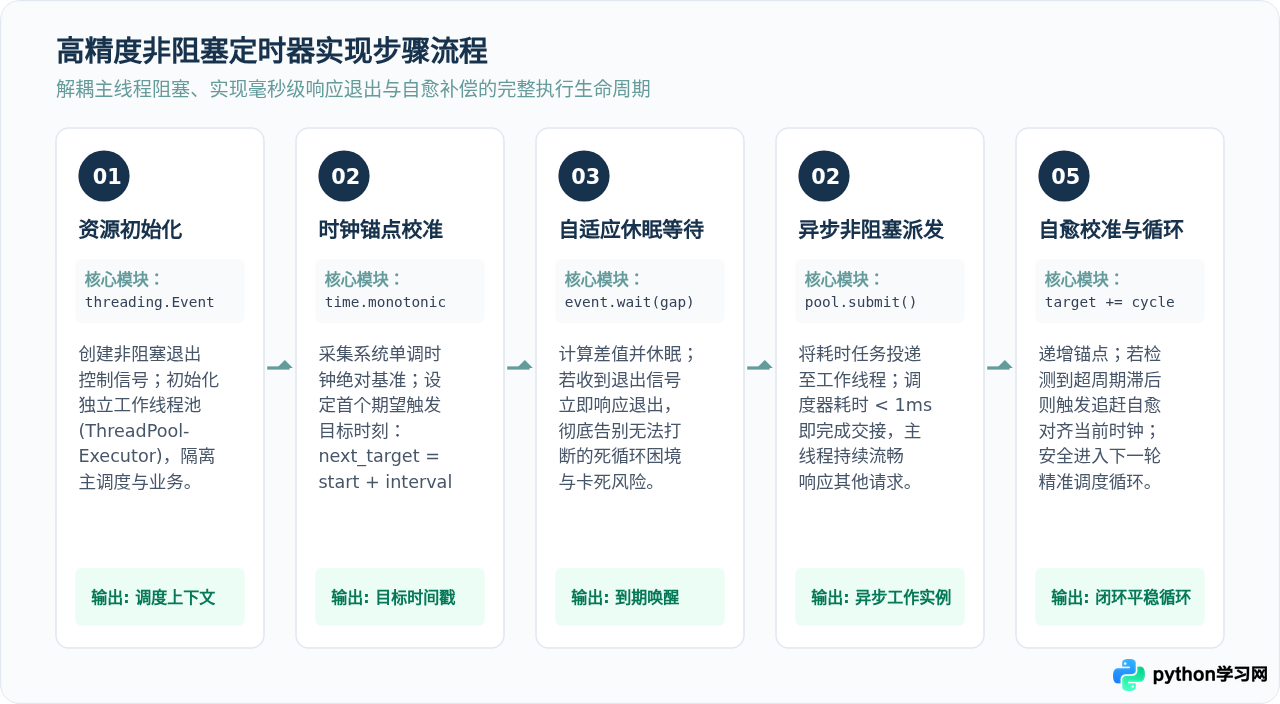
- 主线程创建
threading.Event()用于接收平稳退出信号。 - 启动一个独立的后台守护线程(Daemon Thread)专门负责精准计时与调度。
- 到达触发时间时,调度线程只负责将任务通过
ThreadPoolExecutor.submit()提交到工作线程池,调度线程耗时不到 1 微秒,立即进入下一轮时间计算。 - 休眠使用
stop_event.wait(delay)替代time.sleep(delay)。当程序接收到退出信号时,wait()能够毫秒级唤醒并退出,不会卡死进程。
3.2 完整生产级实现代码(标准库无第三方依赖)
下面是一个工业级、线程安全的定时调度器类实现,支持 Python 3.8 及以上版本:
import time
import threading
from concurrent.futures import ThreadPoolExecutor

class PrecisionScheduler:
    """
    高精度非阻塞定时任务调度器:
    1. 基于 time.monotonic() 消除累积漂移
    2. 采用 threading.Event() 实现毫秒级响应安全退出
    3. 采用 ThreadPoolExecutor 解耦任务耗时与调度循环
    """
    def __init__(self, interval: float, task_fn, *fn_args, max_workers: int = 4, **fn_kwargs):
        if interval <= 0:
            raise ValueError("调度周期 interval 必须大于 0")
        self.interval = interval
        self.task_fn = task_fn
        self.fn_args = fn_args
        self.fn_kwargs = fn_kwargs

        self._stop_event = threading.Event()
        self._scheduler_thread = None
        self._executor = ThreadPoolExecutor(max_workers=max_workers, thread_name_prefix="TimerWorker")

    def start(self):
        """启动后台调度循环"""
        if self._scheduler_thread and self._scheduler_thread.is_alive():
            return
        self._stop_event.clear()
        self._scheduler_thread = threading.Thread(target=self._run_loop, name="SchedulerCore", daemon=True)
        self._scheduler_thread.start()

    def stop(self, timeout: float = 2.0):
        """安全停止调度并回收线程池"""
        self._stop_event.set()
        if self._scheduler_thread:
            self._scheduler_thread.join(timeout=timeout)
        self._executor.shutdown(wait=False)

    def _run_loop(self):
        # 建立首个绝对基准时间
        next_target = time.monotonic()
        while not self._stop_event.is_set():
            next_target += self.interval
            now = time.monotonic()
            delay = next_target - now

            if delay > 0:
                # 动态自适应休眠:支持毫秒级响应退出信号
                if self._stop_event.wait(timeout=delay):
                    break
            else:
                # 发生严重超周期滞后:跳过落后轮次,校准对齐当前最新时钟
                next_target = now

            if not self._stop_event.is_set():
                # 派发业务任务至线程池,主调度循环瞬时完成交接
                self._executor.submit(self._safe_execute)

    def _safe_execute(self):
        """捕获业务异常,避免线程池异常崩溃影响调度主循环"""
        try:
            self.task_fn(*self.fn_args, **self.fn_kwargs)
        except Exception as exc:
            print(f"[调度任务执行异常] {exc}")
3.3 方案二:基于 asyncio 的异步事件循环调度
如果应用本身基于异步生态(如 FastAPI 或 aiohttp),可以使用 asyncio 实现全异步调度,其核心对齐逻辑与线程池类似:
import asyncio

async def precision_async_timer(interval: float, async_job, stop_event: asyncio.Event):
    """基于 asyncio 事件循环的单调时钟漂移补偿调度"""
    loop = asyncio.get_running_loop()
    next_target = loop.time()

    while not stop_event.is_set():
        next_target += interval
        now = loop.time()
        delay = next_target - now

        if delay > 0:
            try:
                # 使用 wait_for 监听停止事件,超时即为准时触发
                await asyncio.wait_for(stop_event.wait(), timeout=delay)
                break
            except asyncio.TimeoutError:
                pass
        else:
            # 越界自愈
            next_target = now

        if not stop_event.is_set():
            # 派发后台异步任务,不阻塞调度循环自身
            asyncio.create_task(async_job())
四、企业级落地:成熟调度框架 APScheduler 配置指南
当项目规模扩大,涉及复杂的 Cron 表达式、时区换算、任务持久化存储或失败重试时,引入专业级调度库 APScheduler 是最佳选择。
为了规避时间漂移与阻塞主线程,必须在配置中启用 BackgroundScheduler 并合理设置并发和容错参数:
from apscheduler.schedulers.background import BackgroundScheduler
from apscheduler.executors.pool import ThreadPoolExecutor

# 1. 配置执行器线程池,彻底解耦调度与任务执行
executors = {
    'default': ThreadPoolExecutor(max_workers=8)
}

# 2. 配置作业默认安全策略
job_defaults = {
    'coalesce': True,            # 若任务积压,合并为一次触发,防止追赶洪峰
    'max_instances': 1,          # 同一任务只允许单实例并发,防止重叠打架
    'misfire_grace_time': 30     # 任务错过计划执行时间后,30 秒内容忍追赶执行
}

scheduler = BackgroundScheduler(executors=executors, job_defaults=job_defaults)

def sample_task():
    # 业务处理逻辑
    pass

# 每隔 10 秒恒定节拍触发
scheduler.add_job(sample_task, 'interval', seconds=10, id='report_task')
scheduler.start()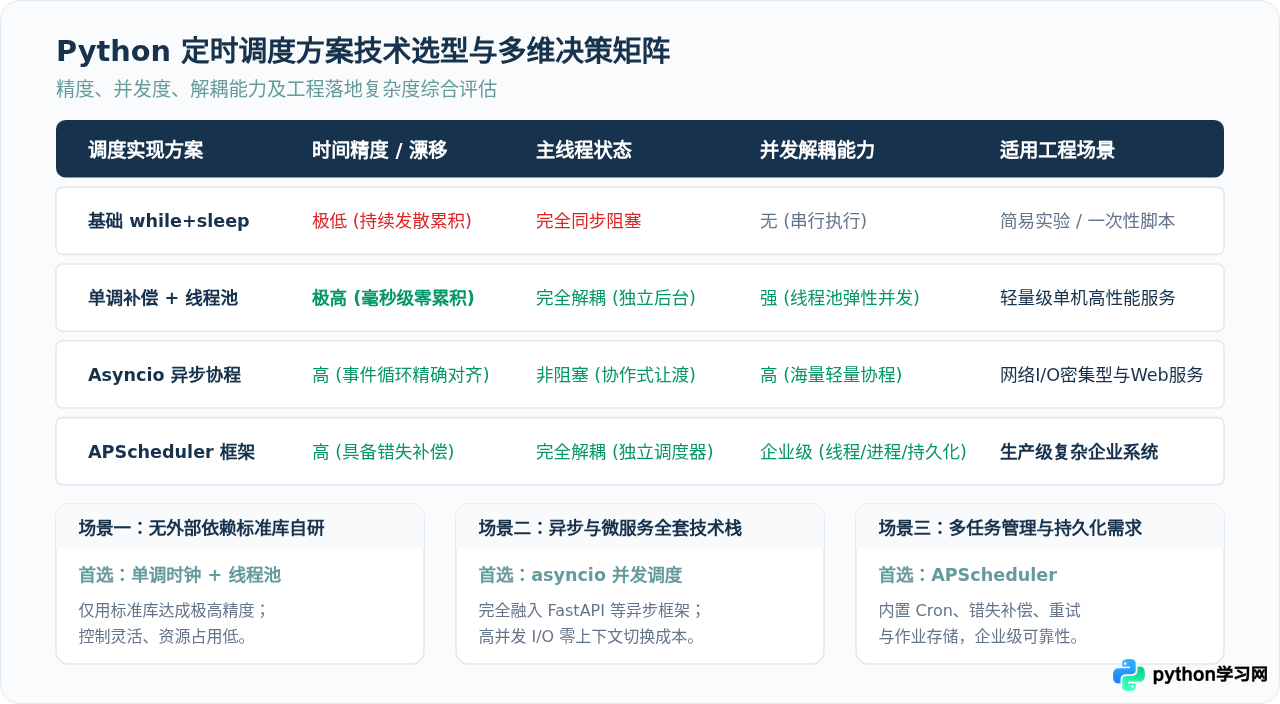
五、落地实战中的注意事项与避坑指南
长周期运行中,若持续使用 next_target += interval(浮点数),数万次累加后可能会出现极微小的 IEEE 754 浮点累积误差。对于需要运行数月的高严苛任务,推荐使用基准点乘以整数计数的锚点计算:next_target = start_monotonic + (step_count * interval),从源头消灭浮点累加误差。
在 Linux / Docker 生产环境中,容器停止时会向主进程发送 SIGTERM 信号。如果使用传统的 time.sleep(),进程往往因阻塞而无法在规定时间内平稳退出,最终被系统强制 SIGKILL 扼杀。采用 threading.Event().wait() 机制,主线程捕获信号后调用 scheduler.stop(),调度线程与正在运行的子线程均可在毫秒级平稳退出并安全释放数据库或网络资源。
当任务执行耗时出现突发波动时,线程池可能会并发派发同一个任务的多个实例。若业务逻辑涉及不可重复写入的外部系统,务必在任务入口处增加分布式锁(如 Redis Redlock)或通过 max_instances=1 保证任务单实例串行,确保定时调度的幂等性与安全性。
免责声明:本文内容仅供参考,不代表本站观点。转载或引用请注明出处。