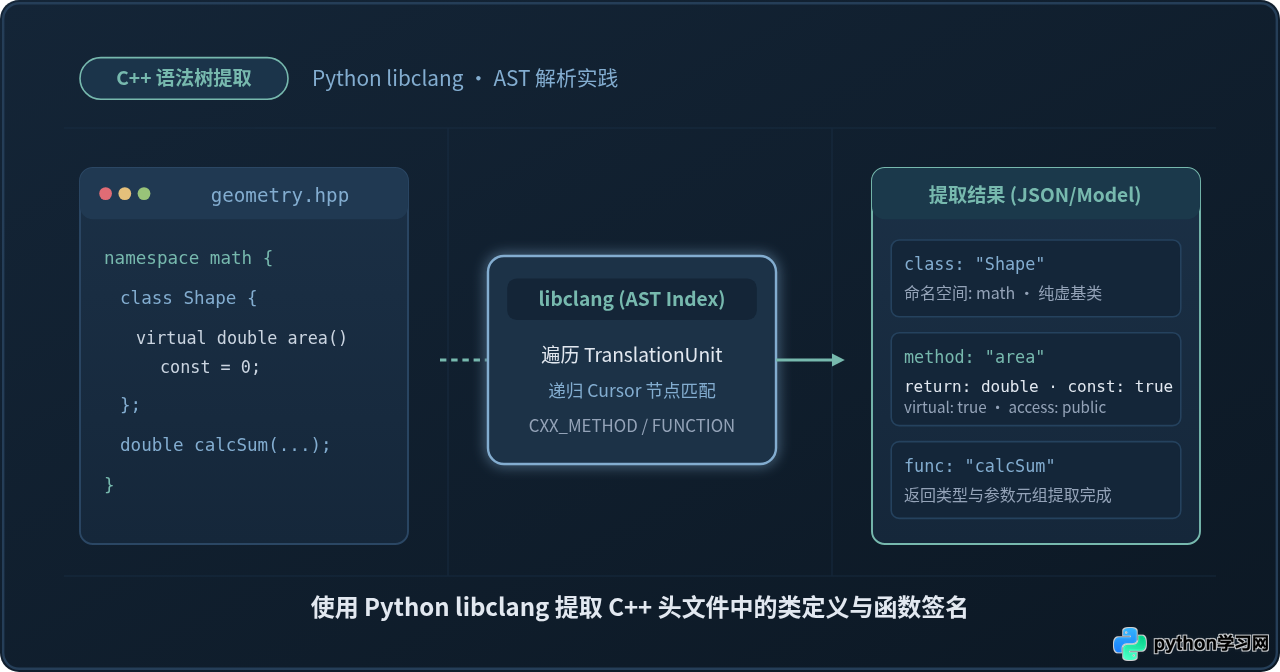
使用Python libclang提取C++头文件中的类定义与函数签名

详细讲解如何使用 Python libclang 绑定解析 C++ 头文件的抽象语法树(AST),准确提取命名空间、类结构、成员方法与独立函数签名,包含完整代码与避坑指南。
const)和默认形参层出不穷,单纯使用正则表达式或字符串切分极易产生误判与遗漏。本文将介绍如何使用 LLVM/Clang 官方的 Python 接口 libclang(clang.cindex),借助编译器原生的抽象语法树(AST)遍历能力,零歧义、结构化地提取 C++ 头文件中的类定义、基类关系、访问权限及完整的函数签名。
一、环境准备与 libclang 基础配置
libclang 是 LLVM 项目为简化 C/C++ 语法分析而暴露的高级 C 接口,而 Python 的 libclang 模块则是对该 C 接口的官方绑定。使用它时,我们既可以通过官方发布的预构建包快速安装,也可以直接连接系统已有的 Clang 动态库。
1. 安装 Python 绑定包
最简单直接的方法是通过 pip 安装官方打包的 libclang:
pip install libclang
该轮子(wheel)通常内置了对应版本的 libclang 动态链接库(Linux 下为 libclang.so,macOS 下为 libclang.dylib,Windows 下为 libclang.dll),免去了手动编译 LLVM 的繁琐过程。
2. 手动指定动态库路径(可选)
如果运行环境中已有自行编译或通过包管理器安装的特定版本 LLVM(如 /usr/lib/llvm-16/lib/libclang.so),可以通过 Config.set_library_file 显示指定库文件路径,确保解析行为与所用编译器版本严格一致:
from clang.cindex import Config

# 若需使用系统特定路径的动态库,可在导入其他对象前配置
Config.set_library_file("/usr/local/opt/llvm/lib/libclang.dylib")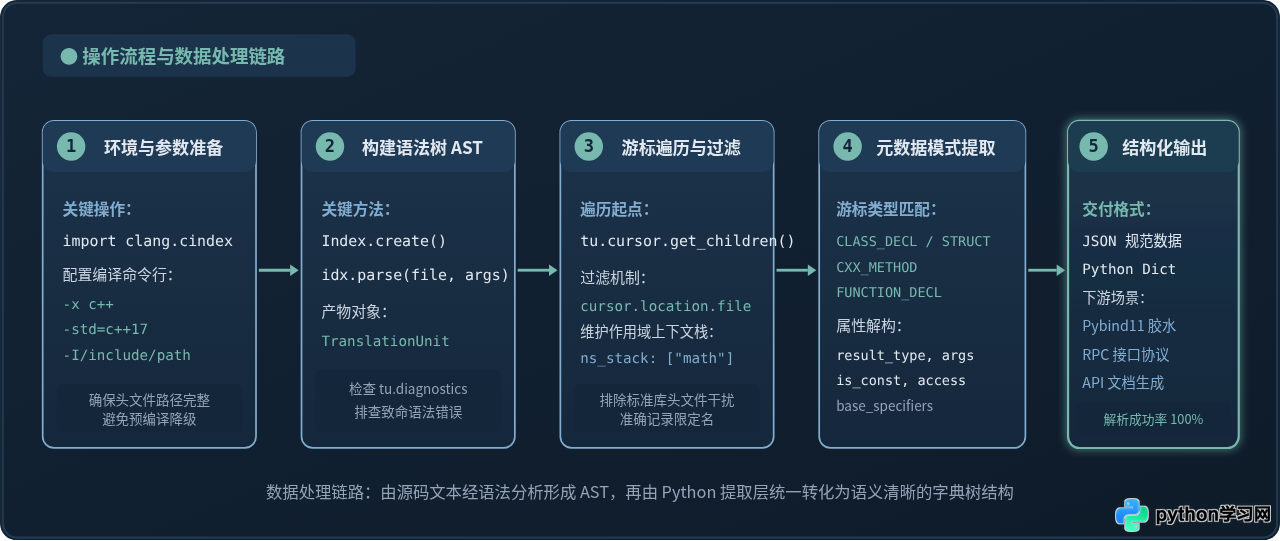
二、核心概念:TranslationUnit 与 AST 游标(Cursor)
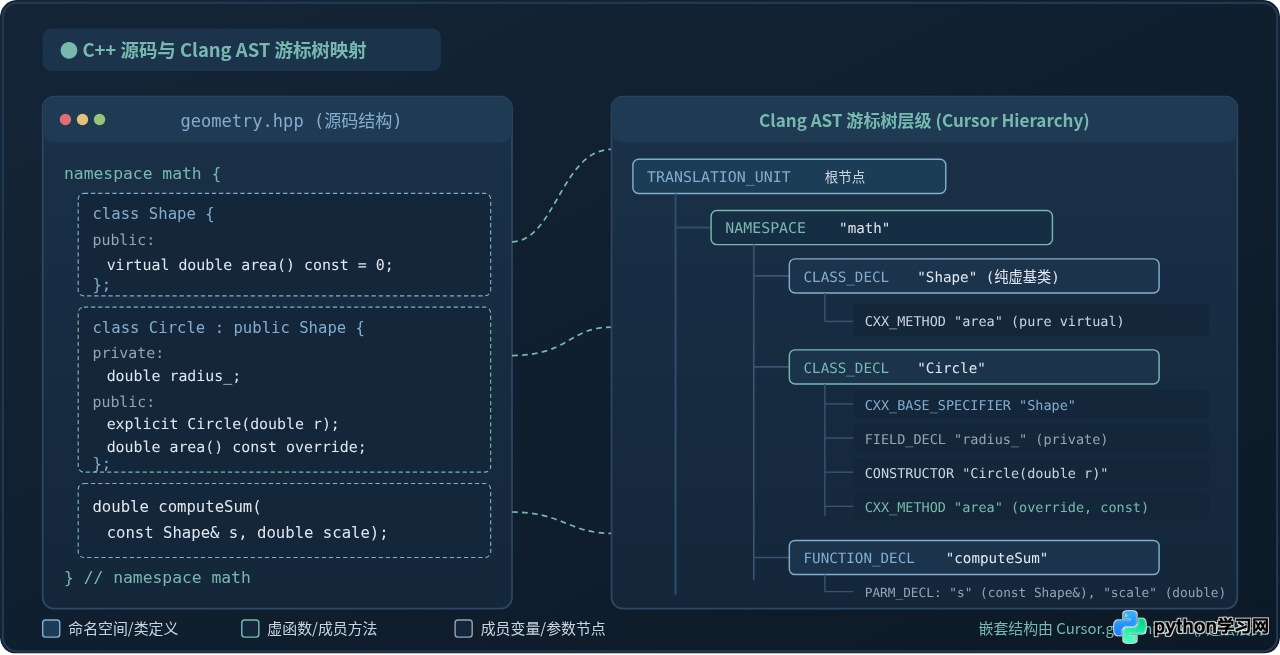
要准确提取目标内容,首先需要理解 libclang 是如何组织 C++ 代码信息的。解析器把整个头文件及其包含关系编译为一个编译单元(TranslationUnit),并将代码中的语法成分映射为树状的游标(Cursor)节点。
1. 什么是游标(Cursor)
Cursor 是 AST 的核心抽象,代表了语法树中的一个具体节点。无论是命名空间、类声明、成员变量还是方法,都是一个具有特定种类(CursorKind)的游标。
cursor.kind:节点的类型枚举,用于判断当前节点是类、结构体还是函数。cursor.spelling:节点的名称标识符(如类名、函数名、参数名)。cursor.type:节点的类型对象,包括类型的字符串表示(type.spelling)和返回值类型等。cursor.location:节点在物理文件中的行列号,可用于精准过滤引入的标准库或第三方头文件。cursor.get_children():获取当前节点的直接子节点生成器,用于向下递归展开 AST。
2. 核心 CursorKind 枚举对应
| CursorKind 枚举名 | 对应 C++ 语法实体 | 提取关注属性 |
|---|---|---|
CursorKind.NAMESPACE |
命名空间(如 namespace math) |
spelling,用于维护全限定名前缀栈 |
CursorKind.CLASS_DECL / STRUCT_DECL |
类或结构体定义 | 类名、继承基类(CXX_BASE_SPECIFIER)、内部成员 |
CursorKind.CXX_METHOD |
类成员方法 | 返回类型、参数列表、is_const_method()、访问控制 |
CursorKind.CONSTRUCTOR / DESTRUCTOR |
构造函数 / 析构函数 | 参数列表、默认实参、访问修饰符 |
CursorKind.FUNCTION_DECL |
命名空间或全局自由函数 | 返回类型、函数名称、形参列表 |
CursorKind.PARM_DECL |
函数或方法的形参声明 | 参数名称(spelling)与参数类型(type.spelling) |
三、示例目标 C++ 头文件
为了验证提取逻辑的完整性,我们设计一份包含典型特性的 C++ 头文件 geometry.hpp。其中包含命名空间嵌套、抽象基类、继承派生、构造函数、常量虚方法以及全局计算函数:
// 示例文件:geometry.hpp
#pragma once
#include <string>
#include <vector>

namespace math {
namespace geometry {

class Shape {
public:
    virtual ~Shape() = default;
    virtual double calculateArea() const = 0;
    virtual std::string getShapeType() const = 0;
};

class Circle : public Shape {
private:
    double radius_;

public:
    explicit Circle(double radius);
    ~Circle() override = default;

    double calculateArea() const override;
    std::string getShapeType() const override;
    void setRadius(double radius);
    double getRadius() const;
};

struct Point {
    double x;
    double y;
    double distanceTo(const Point& other) const;
};

// 全局自由函数
double calculateTotalArea(const std::vector<Circle>& circles, double scale = 1.0);

} // namespace geometry
} // namespace math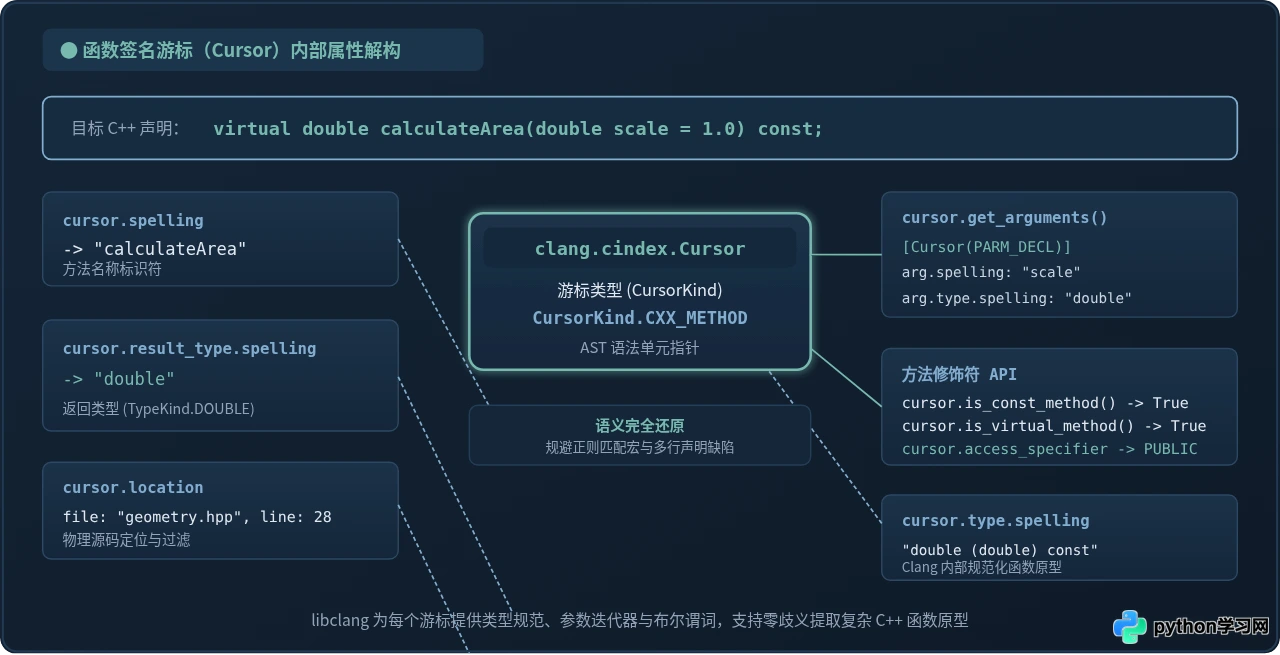
四、完整 Python 代码实现
下面给出完整的 Python 提取脚本 parse_header.py。代码通过构建 Clang 解析索引,利用递归遍历捕获命名空间层级,分离类定义与独立函数,并格式化输出完整的签名信息。
#!/usr/bin/env python3
# -*- coding: utf-8 -*-
"""
使用 Python libclang 解析 C++ 头文件
提取目标头文件中的类定义、基类继承、成员方法与独立函数签名
"""

import sys
import os
import json
from typing import List, Dict, Any, Optional
import clang.cindex
from clang.cindex import Index, Cursor, CursorKind, AccessSpecifier


def get_access_name(access_specifier: AccessSpecifier) -> str:
    """将访问控制枚举转换为易读的字符串标签"""
    mapping = {
        AccessSpecifier.PUBLIC: "public",
        AccessSpecifier.PROTECTED: "protected",
        AccessSpecifier.PRIVATE: "private"
    }
    return mapping.get(access_specifier, "unknown")


def parse_function_signature(cursor: Cursor) -> Dict[str, Any]:
    """提取函数或成员方法的详细签名属性"""
    # 提取参数列表
    parameters = []
    for arg in cursor.get_arguments():
        parameters.append({
            "name": arg.spelling,
            "type": arg.type.spelling
        })

    # 是否是类成员方法相关特性
    is_const = False
    is_virtual = False
    is_pure_virtual = False
    access = "none"

    if cursor.kind in (CursorKind.CXX_METHOD, CursorKind.CONSTRUCTOR, CursorKind.DESTRUCTOR):
        is_const = cursor.is_const_method()
        is_virtual = cursor.is_virtual_method()
        is_pure_virtual = cursor.is_pure_virtual_method()
        access = get_access_name(cursor.access_specifier)

    return {
        "name": cursor.spelling,
        "kind": cursor.kind.name,
        "return_type": cursor.result_type.spelling if cursor.kind != CursorKind.CONSTRUCTOR else "",
        "parameters": parameters,
        "is_const": is_const,
        "is_virtual": is_virtual,
        "is_pure_virtual": is_pure_virtual,
        "access": access,
        "line": cursor.location.line
    }


def parse_class_definition(cursor: Cursor) -> Dict[str, Any]:
    """提取类或结构体的定义、基类及全部成员方法"""
    bases = []
    methods = []
    fields = []

    for child in cursor.get_children():
        # 提取基类继承信息
        if child.kind == CursorKind.CXX_BASE_SPECIFIER:
            bases.append({
                "base_name": child.type.spelling,
                "access": get_access_name(child.access_specifier)
            })
        # 提取成员函数与构造/析构函数
        elif child.kind in (CursorKind.CXX_METHOD, CursorKind.CONSTRUCTOR, CursorKind.DESTRUCTOR):
            methods.append(parse_function_signature(child))
        # 提取成员字段
        elif child.kind == CursorKind.FIELD_DECL:
            fields.append({
                "name": child.spelling,
                "type": child.type.spelling,
                "access": get_access_name(child.access_specifier)
            })

    return {
        "name": cursor.spelling,
        "kind": "class" if cursor.kind == CursorKind.CLASS_DECL else "struct",
        "bases": bases,
        "methods": methods,
        "fields": fields,
        "line": cursor.location.line
    }


class CppHeaderParser:
    def __init__(self, header_path: str, compile_args: Optional[List[str]] = None):
        self.header_path = os.path.abspath(header_path)
        # 默认使用 C++17 标准并指定输入文件语言类型为 c++
        self.compile_args = compile_args or ["-x", "c++", "-std=c++17"]
        self.classes: List[Dict[str, Any]] = []
        self.functions: List[Dict[str, Any]] = []

    def parse(self) -> Dict[str, Any]:
        """执行语法树构建与遍历"""
        if not os.path.exists(self.header_path):
            raise FileNotFoundError(f"未找到目标头文件: {self.header_path}")

        index = Index.create()
        # 解析头文件生成 TranslationUnit
        tu = index.parse(self.header_path, args=self.compile_args)

        # 检查编译器输出的诊断信息(错误或警告)
        has_error = False
        for diag in tu.diagnostics:
            if diag.severity >= clang.cindex.Diagnostic.Error:
                has_error = True
                print(f"[警告/错误] 行 {diag.location.line}: {diag.spelling}", file=sys.stderr)

        # 从根节点递归遍历 AST
        namespace_stack: List[str] = []
        self._traverse(tu.cursor, namespace_stack)

        return {
            "file": self.header_path,
            "classes": self.classes,
            "functions": self.functions
        }

    def _traverse(self, cursor: Cursor, ns_stack: List[str]):
        """深度优先递归游标"""
        for child in cursor.get_children():
            # 关键过滤:仅处理目标头文件内部定义的节点,跳过 #include 引入的标准库
            if child.location.file and os.path.abspath(child.location.file.name) != self.header_path:
                continue

            if child.kind == CursorKind.NAMESPACE:
                # 压入命名空间栈
                ns_stack.append(child.spelling)
                self._traverse(child, ns_stack)
                ns_stack.pop()
            elif child.kind in (CursorKind.CLASS_DECL, CursorKind.STRUCT_DECL):
                # 过滤仅有前置声明而无定义的类(child.is_definition() 确保是完整声明)
                if child.is_definition():
                    class_data = parse_class_definition(child)
                    class_data["namespace"] = "::".join(ns_stack)
                    class_data["full_name"] = f"{class_data['namespace']}::{class_data['name']}" if class_data['namespace'] else class_data['name']
                    self.classes.append(class_data)
            elif child.kind == CursorKind.FUNCTION_DECL:
                func_data = parse_function_signature(child)
                func_data["namespace"] = "::".join(ns_stack)
                func_data["full_name"] = f"{func_data['namespace']}::{func_data['name']}" if func_data['namespace'] else func_data['name']
                self.functions.append(func_data)


if __name__ == "__main__":
    target_header = "geometry.hpp"
    parser = CppHeaderParser(target_header)
    result = parser.parse()
    print(json.dumps(result, indent=2, ensure_ascii=False))
示例执行命令与结果
在终端中运行该提取脚本:
python3 parse_header.py控制台将输出清晰的 JSON 结构化数据(以下为格式化输出示例):
{
  "file": "/workspace/geometry.hpp",
  "classes": [
    {
      "name": "Shape",
      "kind": "class",
      "namespace": "math::geometry",
      "full_name": "math::geometry::Shape",
      "bases": [],
      "methods": [
        {
          "name": "~Shape",
          "kind": "DESTRUCTOR",
          "return_type": "",
          "parameters": [],
          "is_const": false,
          "is_virtual": true,
          "is_pure_virtual": false,
          "access": "public",
          "line": 10
        },
        {
          "name": "calculateArea",
          "kind": "CXX_METHOD",
          "return_type": "double",
          "parameters": [],
          "is_const": true,
          "is_virtual": true,
          "is_pure_virtual": true,
          "access": "public",
          "line": 11
        }
      ],
      "fields": []
    },
    {
      "name": "Circle",
      "kind": "class",
      "namespace": "math::geometry",
      "full_name": "math::geometry::Circle",
      "bases": [
        {
          "base_name": "Shape",
          "access": "public"
        }
      ],
      "methods": [
        {
          "name": "Circle",
          "kind": "CONSTRUCTOR",
          "return_type": "",
          "parameters": [
            {
              "name": "radius",
              "type": "double"
            }
          ],
          "is_const": false,
          "is_virtual": false,
          "is_pure_virtual": false,
          "access": "public",
          "line": 21
        },
        {
          "name": "calculateArea",
          "kind": "CXX_METHOD",
          "return_type": "double",
          "parameters": [],
          "is_const": true,
          "is_virtual": true,
          "is_pure_virtual": false,
          "access": "public",
          "line": 24
        }
      ],
      "fields": [
        {
          "name": "radius_",
          "type": "double",
          "access": "private"
        }
      ]
    }
  ],
  "functions": [
    {
      "name": "calculateTotalArea",
      "kind": "FUNCTION_DECL",
      "namespace": "math::geometry",
      "full_name": "math::geometry::calculateTotalArea",
      "return_type": "double",
      "parameters": [
        {
          "name": "circles",
          "type": "const std::vector &"
        },
        {
          "name": "scale",
          "type": "double"
        }
      ],
      "line": 39
    }
  ]
}
五、常见问题排查与工程实践细节
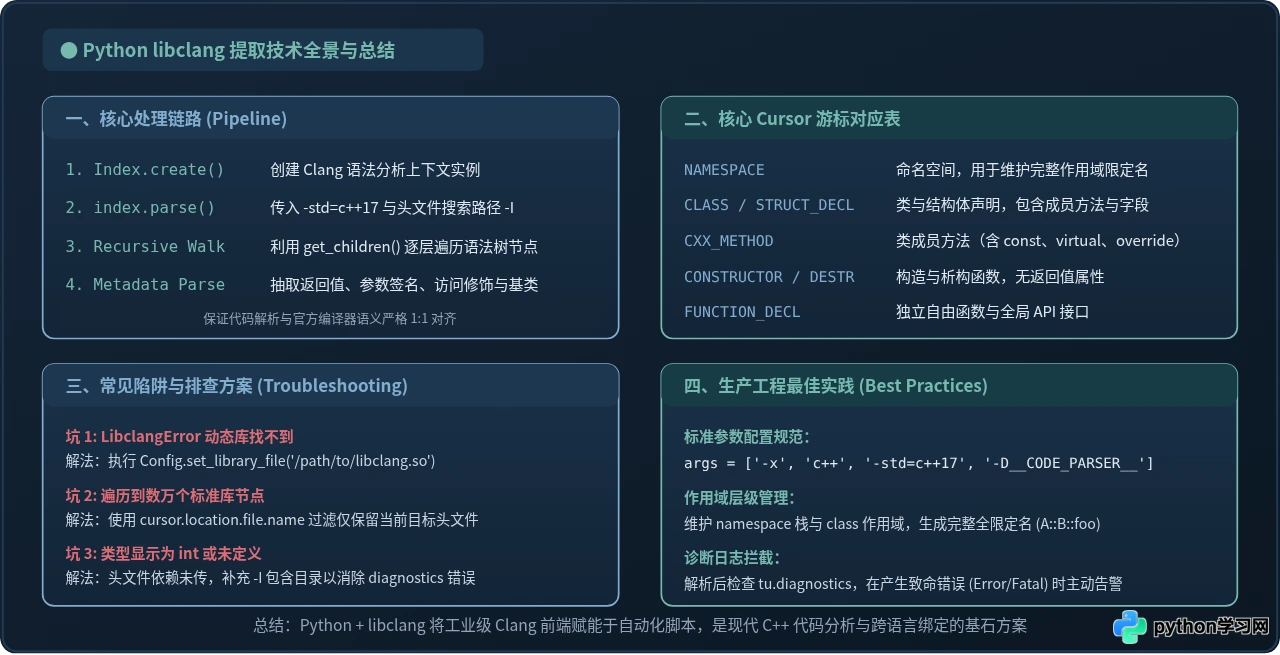
在实际工程项目中使用 libclang 处理庞大的 C++ 代码库时,往往会遇到一些典型问题,了解这些陷阱能帮助我们写出更健壮的提取逻辑:
int 或语法报错Clang 在默认情况下是严格的编译器。如果被解析的头文件中
#include <boost/...> 或引入了项目自定义头文件,而你没有在 compile_args 中添加对应的 -I /path/to/include,Clang 无法找到声明,会触发严重语法诊断,甚至降级推断未声明类型。始终检查 tu.diagnostics,确保无致命错误。
当头文件包含
#include <vector> 时,AST 根节点下会包含上万个标准库内部类与模板定义。必须通过判断 cursor.location.file.name 是否等于待解析文件的绝对路径,过滤掉一切来自包含头文件的语法节点。
在 C++ 头文件中,经常会出现类似
class Shape; 的前置声明。前置声明游标的 child.is_definition() 返回 False。如果不加以判断,会将前置声明当作一个没有任何方法和字段的空类处理。调用 is_definition() 可有效规避此类脏数据。
六、总结
使用 Python 配合 libclang 是解析 C++ 头文件的工业级方案。它克服了正则表达式在处理嵌套括号、运算符重载、模板参数和宏替换时的先天不足,直接站在编译器的角度理解代码结构。通过合理组织 Index.parse 参数、利用游标深度优先递归,并精准过滤目标源码文件,我们可以轻松构建出自动化胶水代码生成器、API 协议导出工具或工程级代码质量分析工具。
免责声明:本文内容仅供参考,不代表本站观点。转载或引用请注明出处。