

Python实现文本词频统计与词云可视化教程

发布时间:2026-10-14| 4人浏览过
本文介绍如何使用Python进行文本词频统计及词云可视化。通过jieba库进行中文分词,利用collections.Counter统计词频,并结合wordcloud库生成词云图片。文章提供了读取文本、提取关键词及绘制带遮罩词云的完整代码示例,涵盖参数配置与文件保存方法。
效果展示

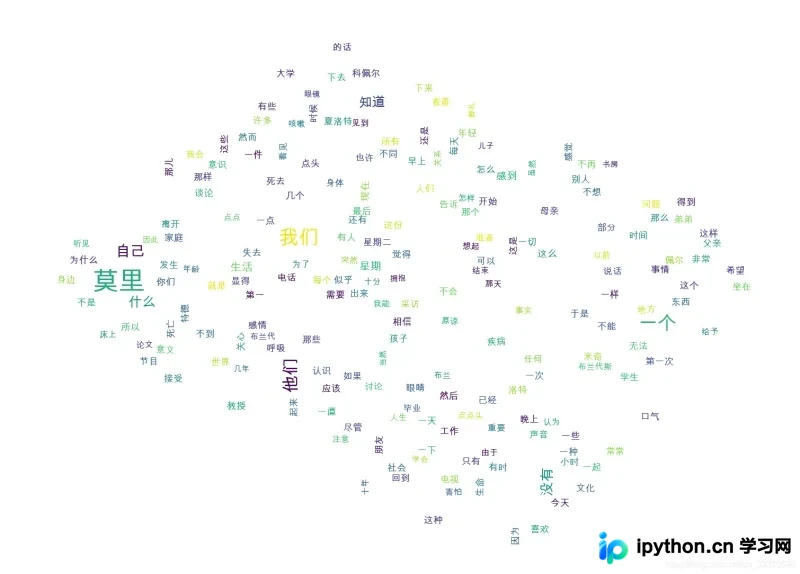
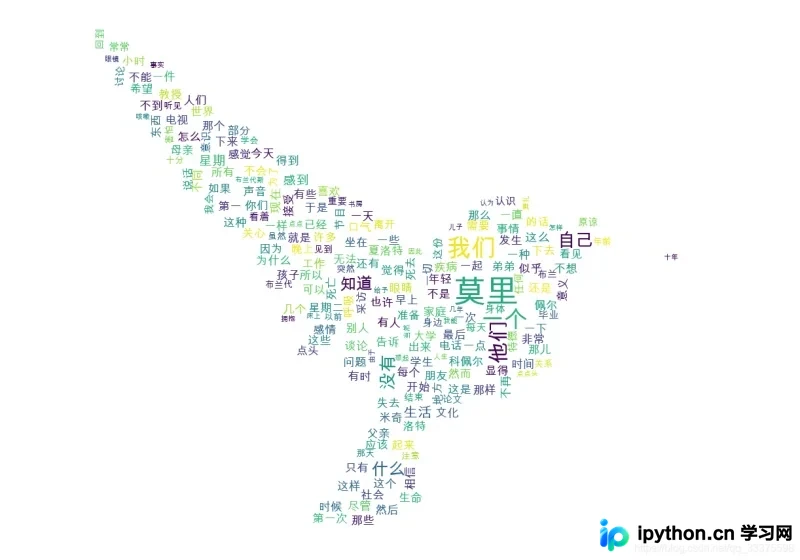
1 实现代码
首先定义读取文本文件的函数,指定编码格式为gbk以兼容常见中文文档:
def readText(text_file_path):
    with open(text_file_path, encoding='gbk') as f: #
        content = f.read()
    return content
接着处理文本内容以获取高频关键词,支持自定义关键词、停用词及多种分词模式:
def getRecommondArticleKeyword(text_content,  key_word_need_num = 10, custom_words = [], stop_words =[], query_pattern = 'searchEngine'):
    '''
    :param text_content: 文本字符串
    :param key_word_need_num: 需要的关键词数量
    :param custom_words: 自定义关键词
    :param stop_words: 不查询关键词
    :param query_pattern:
    precision:精确模式————试图将句子最精确地切开,适合文本分析;
    entire:全模式————把句子中所有的可以成词的词语都扫描出来, 速度非常快,但是不能解决歧义;
    searchEngine:搜索引擎模式————在精确模式的基础上,对长词再次切分,提高召回率,适合用于搜索引擎分词;
    paddle模式————利用PaddlePaddle深度学习框架,训练序列标注(双向GRU)网络模型实现分词。同时支持词性标注。
    :return:
    '''
    # jieba.enable_paddle()
    # paddle.fluid.install_check.run_check()
    if not isinstance(text_content, str):
        raise ValueError('文本字符串类型错误!')
    if not isinstance(key_word_need_num, int):
        raise ValueError('关键词个数类型错误!')
    if not isinstance(custom_words, list):
        raise ValueError('自定义关键词类型错误!')
    if not isinstance(stop_words, list):
        raise ValueError('屏蔽关键词类型错误!')
    if not isinstance(query_pattern, str):
        raise ValueError('查询模式类型错误!')

    # 添加自定义关键词
    for word in custom_words:
        jieba.add_word(word)

    if query_pattern == 'searchEngine':
        key_words = jieba.cut_for_search(text_content)
    elif query_pattern == 'entire':
        key_words = jieba.cut(text_content, cut_all=True, use_paddle=True)
    elif query_pattern == 'precision':
        key_words = jieba.cut(text_content, cut_all=False, use_paddle=True)
    else:
        return []

    # print("拆分后的词: %s" % " ".join(key_words))

    # 过滤后的关键词
    stop_words = set(stop_words)
    word_count = Counter()
    for word in key_words:
        if len(word) > 1 and word not in stop_words:
            word_count[word] += 1

    # res_words = list()
    # for data in word_count.most_common(key_word_need_num):
    #     res_words.append(data[0])
    # return res_words

    return word_count
最后根据统计结果绘制词云图片,支持背景遮罩与图片保存功能:
def drawWordsCloud(word_count, save_img_filePath='', img_mask_filePath=''):
    # print(word_count)
    # print(type(word_count))

    if len(img_mask_filePath) != 0:
        img_mask = np.array(Image.open(img_mask_filePath)) #打开遮罩图片,将图片转换为数组
        wc = wordcloud.WordCloud(font_path='/Library/Fonts/Arial Unicode.ttf',# 设置中文字体,词云默认字体是“DroidSansMono.ttf字体库”,不支持中文
                                 background_color="white",  # 设置背景颜色
                                 max_words=200,  # 设置最大显示的字数
                                 max_font_size=50,  # 设置字体最大值
                                 random_state=30,  # 设置有多少种随机生成状态,即有多少种配色方案
                                 width=400,
                                 height=200,
                                 mask=img_mask
                                 )
    else:
        wc = wordcloud.WordCloud(font_path='/Library/Fonts/Arial Unicode.ttf',# 设置中文字体,词云默认字体是“DroidSansMono.ttf字体库”,不支持中文
                                 background_color="white",  # 设置背景颜色
                                 max_words=200,  # 设置最大显示的字数
                                 max_font_size=50,  # 设置字体最大值
                                 random_state=30,  # 设置有多少种随机生成状态,即有多少种配色方案
                                 width=400,
                                 height=200
                                 )
    # 绘图
    wc.generate_from_frequencies(word_count)   #从字典生成词云
    plt.imshow(wc)      #显示词云
    plt.axis('off')     #关闭坐标轴
    plt.show()          #显示图像

    # 保存图片
    if len(save_img_filePath) != 0:
        wc.to_file(save_img_filePath)
    else:
        pass
2 完整代码
#-*- coding : utf-8-*-
import jieba
from collections import Counter
import paddle

import wordcloud    #词云展示库
import matplotlib.pyplot as plt     #图像展示库

import time

from PIL import Image
import numpy as np

def timer(func):
    def calculateTime(*args, **kwargs):
        t = time.perf_counter()
        result = func(*args, **kwargs)
        print(f'func {func.__name__} coast time:{time.perf_counter() - t:.8f} s')
        return result
    return calculateTime

def readText(text_file_path):
    with open(text_file_path, encoding='gbk') as f: #
        content = f.read()
    return content

@timer
def getRecommondArticleKeyword(text_content,  key_word_need_num = 10, custom_words = [], stop_words =[], query_pattern = 'searchEngine'):
    '''
    :param text_content: 文本字符串
    :param key_word_need_num: 需要的关键词数量
    :param custom_words: 自定义关键词
    :param stop_words: 不查询关键词
    :param query_pattern:
    precision:精确模式————试图将句子最精确地切开,适合文本分析;
    entire:全模式————把句子中所有的可以成词的词语都扫描出来, 速度非常快,但是不能解决歧义;
    searchEngine:搜索引擎模式————在精确模式的基础上,对长词再次切分,提高召回率,适合用于搜索引擎分词;
    paddle模式————利用PaddlePaddle深度学习框架,训练序列标注(双向GRU)网络模型实现分词。同时支持词性标注。
    :return:
    '''
    # jieba.enable_paddle()
    # paddle.fluid.install_check.run_check()
    if not isinstance(text_content, str):
        raise ValueError('文本字符串类型错误!')
    if not isinstance(key_word_need_num, int):
        raise ValueError('关键词个数类型错误!')
    if not isinstance(custom_words, list):
        raise ValueError('自定义关键词类型错误!')
    if not isinstance(stop_words, list):
        raise ValueError('屏蔽关键词类型错误!')
    if not isinstance(query_pattern, str):
        raise ValueError('查询模式类型错误!')

    # 添加自定义关键词
    for word in custom_words:
        jieba.add_word(word)

    if query_pattern == 'searchEngine':
        key_words = jieba.cut_for_search(text_content)
    elif query_pattern == 'entire':
        key_words = jieba.cut(text_content, cut_all=True, use_paddle=True)
    elif query_pattern == 'precision':
        key_words = jieba.cut(text_content, cut_all=False, use_paddle=True)
    else:
        return []

    # print("拆分后的词: %s" % " ".join(key_words))

    # 过滤后的关键词
    stop_words = set(stop_words)
    word_count = Counter()
    for word in key_words:
        if len(word) > 1 and word not in stop_words:
            word_count[word] += 1

    # res_words = list()
    # for data in word_count.most_common(key_word_need_num):
    #     res_words.append(data[0])
    # return res_words

    return word_count

def drawWordsCloud(word_count, save_img_filePath='', img_mask_filePath=''):
    # print(word_count)
    # print(type(word_count))

    if len(img_mask_filePath) != 0:
        img_mask = np.array(Image.open(img_mask_filePath)) #打开遮罩图片,将图片转换为数组
        wc = wordcloud.WordCloud(font_path='/Library/Fonts/Arial Unicode.ttf',# 设置中文字体,词云默认字体是“DroidSansMono.ttf字体库”,不支持中文
                                 background_color="white",  # 设置背景颜色
                                 max_words=200,  # 设置最大显示的字数
                                 max_font_size=50,  # 设置字体最大值
                                 random_state=30,  # 设置有多少种随机生成状态,即有多少种配色方案
                                 width=400,
                                 height=200,
                                 mask=img_mask
                                 )
    else:
        wc = wordcloud.WordCloud(font_path='/Library/Fonts/Arial Unicode.ttf',# 设置中文字体,词云默认字体是“DroidSansMono.ttf字体库”,不支持中文
                                 background_color="white",  # 设置背景颜色
                                 max_words=200,  # 设置最大显示的字数
                                 max_font_size=50,  # 设置字体最大值
                                 random_state=30,  # 设置有多少种随机生成状态,即有多少种配色方案
                                 width=400,
                                 height=200
                                 )
    # 绘图
    wc.generate_from_frequencies(word_count)   #从字典生成词云
    plt.imshow(wc)      #显示词云
    plt.axis('off')     #关闭坐标轴
    plt.show()          #显示图像

    # 保存图片
    if len(save_img_filePath) != 0:
        wc.to_file(save_img_filePath)
    else:
        pass


if __name__ == '__main__':
    pass
    # /Users/mac/Downloads/work/retailSoftware/公司项目/test.txt
    text_file_path = "/Users/mac/Downloads/电子书/编程思想/相约星期二/相约星期二.txt"
    # text_file_path = "/Users/mac/Downloads/work/retailSoftware/公司项目/test3.txt"
    text_content = readText(text_file_path)
    # print(text_content)
    # print(JNI_API_getRecommondArticleKeyword(text_content))
    img_mask_filePath = '/Users/mac/Desktop/截屏2021-08-20 下午4.02.10.png'
    img_save_filePath = '/Users/mac/Downloads/test9.png'
    drawWordsCloud(getRecommondArticleKeyword(text_content), img_save_filePath, img_mask_filePath)
以上即为Python统计词频并绘制词云图的完整实现。如需了解更多相关技术内容,可参考本站其他文章或继续浏览后续章节,感谢支持。
免责声明:本文内容仅供参考,不代表本站观点。转载或引用请注明出处。









