

Python使用面向对象方法绘制分类散点图并添加图例

发布时间:2026-10-13| 6人浏览过
本文介绍在Python中利用面向对象方式绘制分类散点图的方法。通过读取数据集,按标签分类存储特征数据,并使用Matplotlib分别绘制不同类别的散点。重点演示如何通过创建散点对象并传递给legend函数,实现自定义图例的添加,适用于需要清晰展示多类别数据分布的场景。
Python分类散点图绘制与图例添加示例
本文分享一个使用Python绘制散点图并结合循环与分类方法添加图例的实例,供读者参考。
import matplotlib.pyplot as plt
import kNN

plt.rcParams['font.sans-serif']=['Simhei']
plt.rcParams['axes.unicode_minus']=False

datingDataMat, datingLabels = kNN.file2matrix('datingTestSet2.txt')

plt.figure()
type1_x = []  #一共有3类,所以定义3个空列表准备接受数据
type1_y = []
type2_x = []
type2_y = []
type3_x = []
type3_y = []

for i in range(len(datingLabels)):     #1000组数据,i循环1000次
  if datingLabels[i] == '1':        #根据标签进行数据分类,注意标签此时是字符串
    type1_x.append(datingDataMat[i][0]) #取的是样本数据的第一列特征和第二列特征
    type1_y.append(datingDataMat[i][1])

  if datingLabels[i] == '2':
    type2_x.append(datingDataMat[i][0])
    type2_y.append(datingDataMat[i][1])

  if datingLabels[i] == '3':
    type3_x.append(datingDataMat[i][0])
    type3_y.append(datingDataMat[i][1])

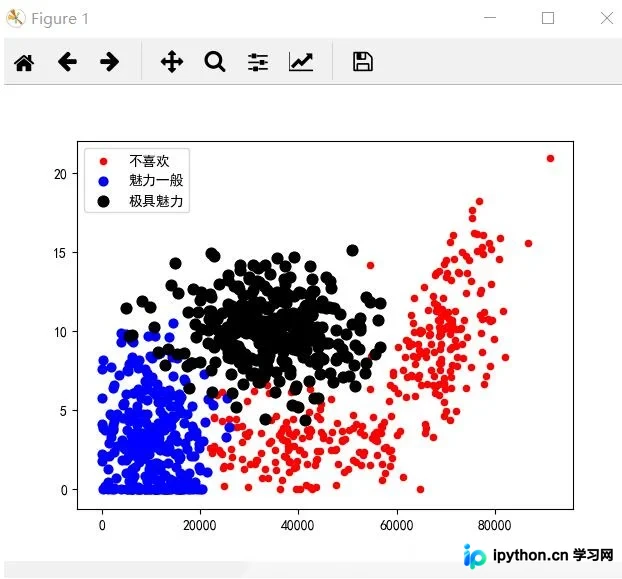
plt.scatter(type1_x, type1_y, s=20, c='r', label='不喜欢')
plt.scatter(type2_x, type2_y, s=40, c='b', label='魅力一般')
plt.scatter(type3_x, type3_y, s=60, c='k', label='极具魅力')

plt.legend()
plt.show()
采用面向对象的编程风格进行实现:
import matplotlib.pyplot as plt
import kNN

plt.rcParams['font.sans-serif']=['Simhei']
plt.rcParams['axes.unicode_minus']=False

datingDataMat, datingLabels = kNN.file2matrix('datingTestSet2.txt')

plt.figure()
axes = plt.subplot(111)

type1_x = []
type1_y = []
type2_x = []
type2_y = []
type3_x = []
type3_y = []

for i in range(len(datingLabels)):
  if datingLabels[i] == '1':
    type1_x.append(datingDataMat[i][0])
    type1_y.append(datingDataMat[i][1])

  if datingLabels[i] == '2':
    type2_x.append(datingDataMat[i][0])
    type2_y.append(datingDataMat[i][1])

  if datingLabels[i] == '3':
    type3_x.append(datingDataMat[i][0])
    type3_y.append(datingDataMat[i][1])

type1 = axes.scatter(type1_x, type1_y, s=20, c='r')
type2 = axes.scatter(type2_x, type2_y, s=40, c='b')
type3 = axes.scatter(type3_x, type3_y, s=60, c='k')

plt.legend((type1, type2, type3), ('不喜欢', '魅力一般', '极具魅力'))
plt.show()
以上为本文的全部内容,希望能为读者的学习提供有益帮助,同时也欢迎大家继续支持本站。
免责声明:本文内容仅供参考,不代表本站观点。转载或引用请注明出处。









