

Python matplotlib通过plt.scatter画空心圆标记出特定的点方法

发布时间:2026-10-13| 4人浏览过
本文介绍如何在Python中使用matplotlib库的plt.scatter函数绘制散点图,并通过设置color为空、利用edgecolors参数及marker='o'来添加特定大小的空心圆标记,以突出显示特定点。
在使用Python绘制散点图时,若需对特定点进行标记,例如在部分点外围添加空心圆,可直接利用plt.scatter函数实现。
import matplotlib.pyplot as plt

x = [[1, 3], [2, 5]]
y = [[4, 7], [6, 3]]

for i in range(len(x)):

  plt.plot(x[i], y[i], color='r')
  plt.scatter(x[i], y[i], color='b')
  plt.scatter(x[i], y[i], color='', marker='o', edgecolors='g', s=200) # 把 corlor 设置为空,通过edgecolors来控制颜色
效果展示
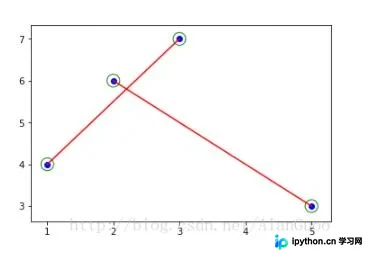
以上就是Python matplotlib通过plt.scatter绘制空心圆标记特定点的完整方法,供读者参考,并欢迎继续支持本站。
免责声明:本文内容仅供参考,不代表本站观点。转载或引用请注明出处。









