

Python网络股票信息爬取Demo:基础实现与进度条优化

发布时间:2026-10-13| 2人浏览过
本文提供基于Python的股票信息爬取示例,涵盖基础抓取逻辑及加入进度条优化的完整代码。通过requests和BeautifulSoup解析网页,提取股票列表及详细信息并保存至文件。示例展示了如何处理编码、异常捕获及实时进度反馈,供开发者参考学习网络数据采集技巧。
具体实现代码如下所示:
import requests
from bs4 import BeautifulSoup
import traceback
import re

def getHTMLText(url):
 try:
  r = requests.get(url)
  r.raise_for_status()
  r.encoding = r.apparent_encoding
  return r.text
 except:
  return ""

def getStockList(lst, stockURL):
 html = getHTMLText(stockURL)
 soup = BeautifulSoup(html, 'html.parser')
 a = soup.find_all('a')
 for i in a:
  try:
   href = i.attrs['href']
   lst.append(re.findall(r"[s][hz]\d{6}", href)[0])
  except:
   continue

def getStockInfo(lst, stockURL, fpath):
 for stock in lst:
  url = stockURL + stock + ".html"
  html = getHTMLText(url)
  try:
   if html=="":
    continue
   infoDict = {}
   soup = BeautifulSoup(html, 'html.parser')
   stockInfo = soup.find('div',attrs={'class':'stock-bets'})

   name = stockInfo.find_all(attrs={'class':'bets-name'})[0]
   infoDict.update({'股票名称': name.text.split()[0]})

   keyList = stockInfo.find_all('dt')
   valueList = stockInfo.find_all('dd')
   for i in range(len(keyList)):
    key = keyList[i].text
    val = valueList[i].text
    infoDict[key] = val

   with open(fpath, 'a', encoding='utf-8') as f:
    f.write( str(infoDict) + '\n' )
  except:
   traceback.print_exc()
   continue

def main():
 stock_list_url = 'http://quote.eastmoney.com/stocklist.html'
 stock_info_url = 'https://gupiao.baidu.com/stock/'
 output_file = 'D:/BaiduStockInfo.txt'
 slist=[]
 getStockList(slist, stock_list_url)
 getStockInfo(slist, stock_info_url, output_file)

main()
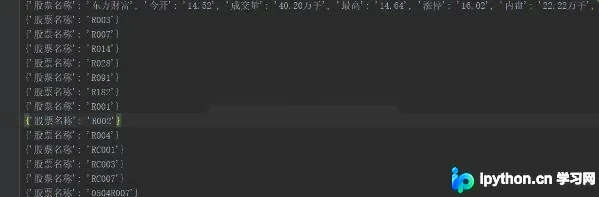
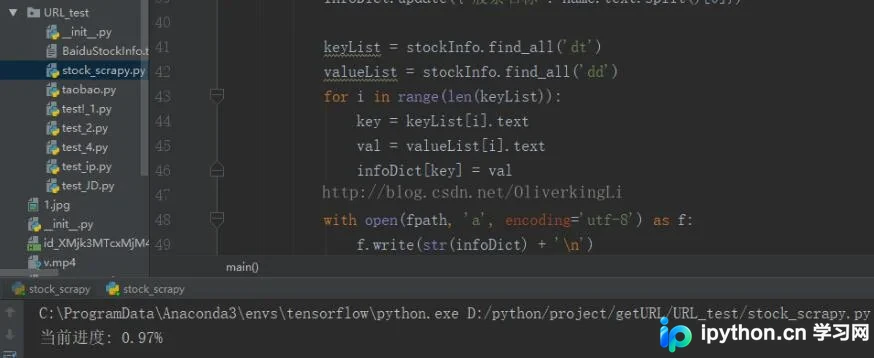
对代码进行优化,并加入进度条显示功能
import requests
from bs4 import BeautifulSoup
import traceback
import re
def getHTMLText(url, code="utf-8"):
 try:
  r = requests.get(url)
  r.raise_for_status()
  r.encoding = code
  return r.text
 except:
  return ""
def getStockList(lst, stockURL):
 html = getHTMLText(stockURL, "GB2312")
 soup = BeautifulSoup(html, 'html.parser')
 a = soup.find_all('a')
 for i in a:
  try:
   href = i.attrs['href']
   lst.append(re.findall(r"[s][hz]\d{6}", href)[0])
  except:
   continue
def getStockInfo(lst, stockURL, fpath):
 count = 0
 for stock in lst:
  url = stockURL + stock + ".html"
  html = getHTMLText(url)
  try:
   if html == "":
    continue
   infoDict = {}
   soup = BeautifulSoup(html, 'html.parser')
   stockInfo = soup.find('div', attrs={'class': 'stock-bets'})
   name = stockInfo.find_all(attrs={'class': 'bets-name'})[0]
   infoDict.update({'股票名称': name.text.split()[0]})
   keyList = stockInfo.find_all('dt')
   valueList = stockInfo.find_all('dd')
   for i in range(len(keyList)):
    key = keyList[i].text
    val = valueList[i].text
    infoDict[key] = val
   with open(fpath, 'a', encoding='utf-8') as f:
    f.write(str(infoDict) + '\n')
    count = count + 1
    print("\r当前进度: {:.2f}%".format(count * 100 / len(lst)), end="")
  except:
   count = count + 1
   print("\r当前进度: {:.2f}%".format(count * 100 / len(lst)), end="")
   continue
def main():
 stock_list_url = 'http://quote.eastmoney.com/stocklist.html'
 stock_info_url = 'https://gupiao.baidu.com/stock/'
 output_file = 'BaiduStockInfo.txt'
 slist = []
 getStockList(slist, stock_list_url)
 getStockInfo(slist, stock_info_url, output_file)
main()
以上这篇使用python爬虫实现网络股票信息爬取的demo就是小编分享给大家的全部内容了,希望能给大家一个参考,也希望大家多多支持本站。
免责声明:本文内容仅供参考,不代表本站观点。转载或引用请注明出处。









