

Python爬取安居客二手房数据实战:从列表页到详情页的完整解析

本文详细讲解如何利用Python的requests和BeautifulSoup库,系统性地爬取安居客郑州地区的二手房源数据。内容涵盖列表页HTML结构分析、房源链接提取、分页逻辑处理(递归调用与下一页判断)以及详情页数据抓取。通过具体代码示例,展示如何构建完整的爬虫流程,包括请求头设置、DOM节点定位及数据清洗,为地理信息分析提供数据支持。
本文旨在通过实例演示,展示如何获取网络数据。

接下来正式进入爬虫代码编写环节。首先需要对目标网站的结构进行分析:以河南省郑州市的二手房信息为例,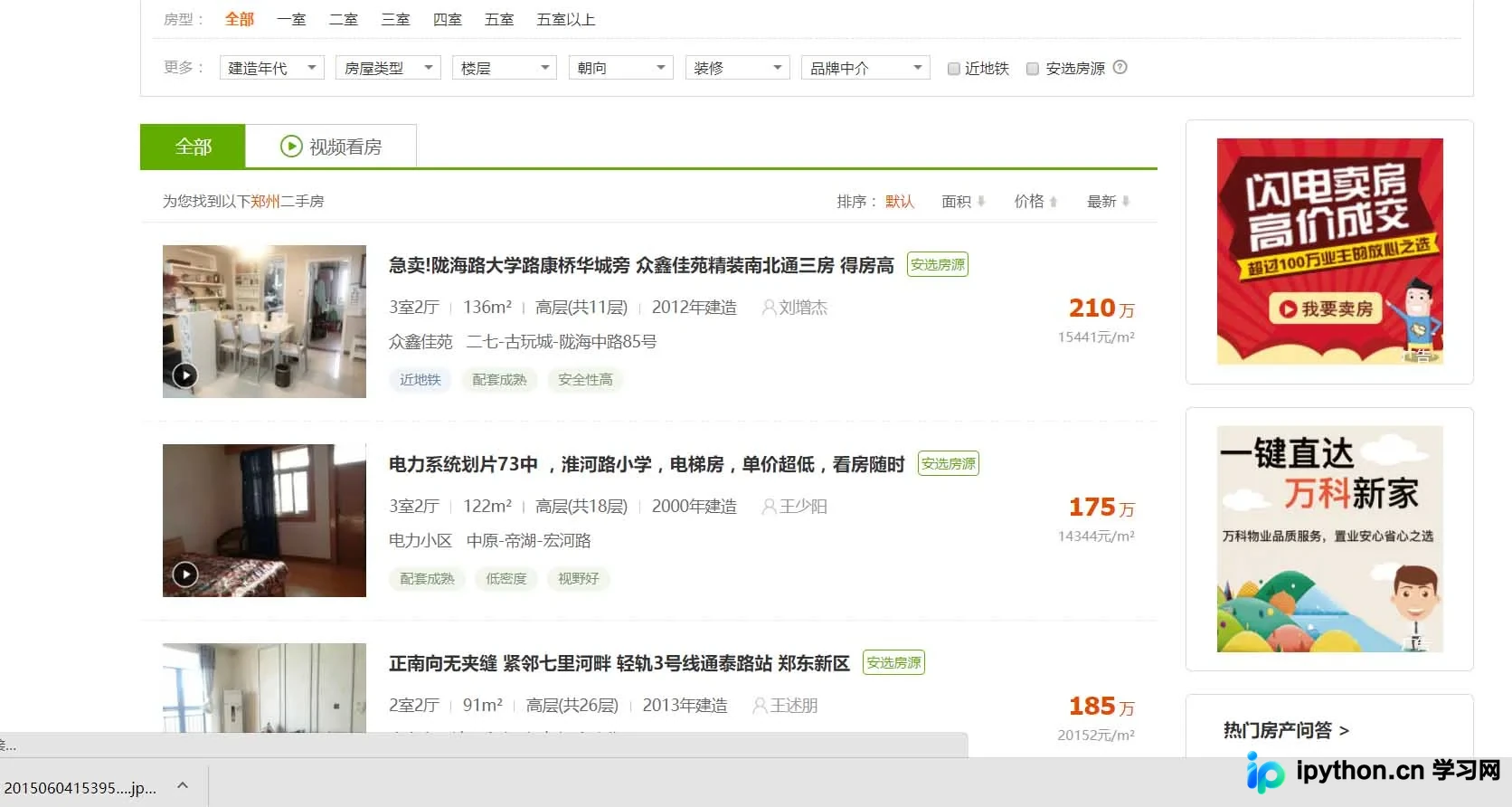 。
。
观察该页面可见,房源信息以列表形式呈现。从展示的数据可以看出,郑州地区的二手房价格相对较高,对于应届毕业生而言,购房压力较大。

回归技术主题,从上述列表页点击进入具体房源后,页面结构发生变化。
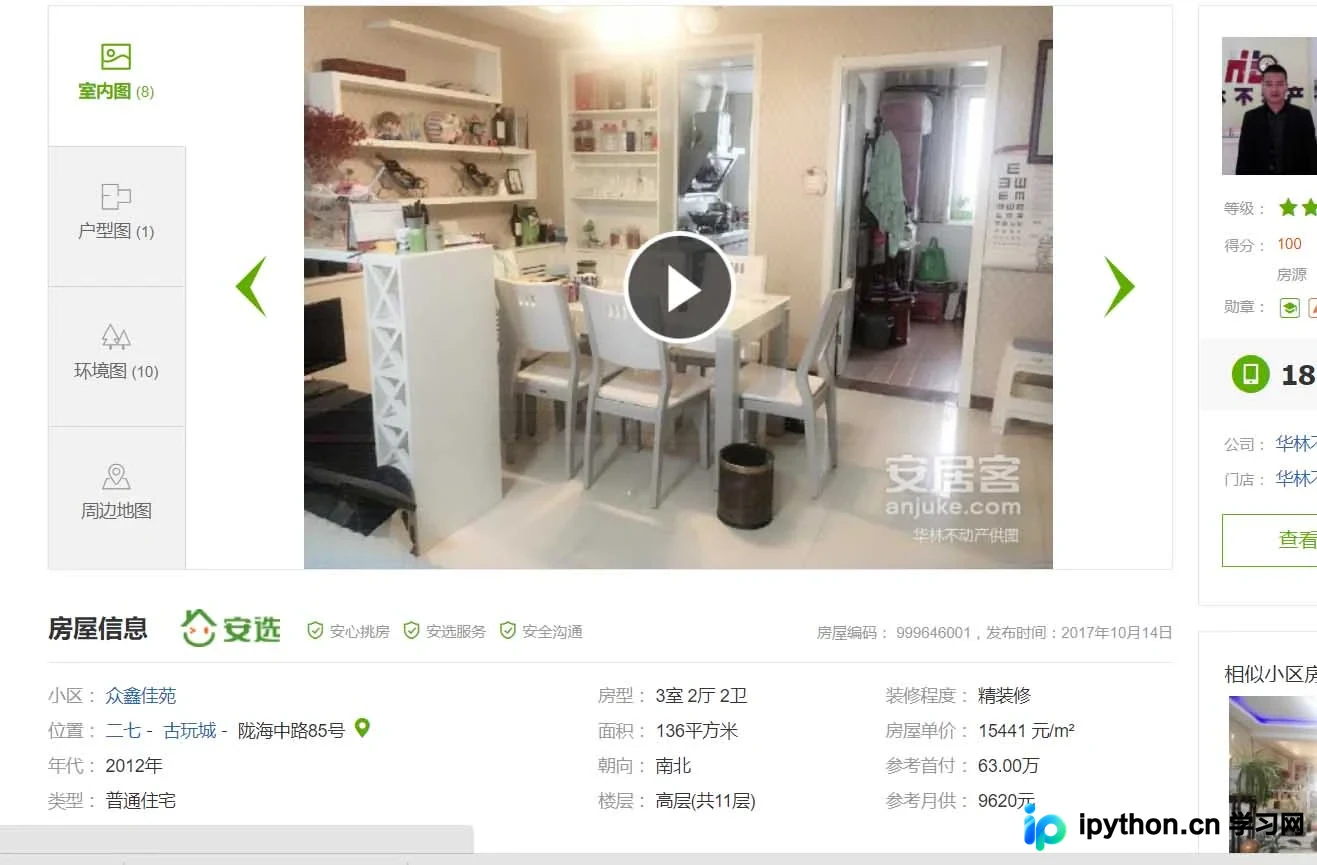
此时展示的是房源的详细信息。我们的目标是将郑州地区所有二手房的房源信息完整获取,并存储至数据库中。作为地理信息系统相关从业者,这些数据具有一定的应用价值,具体用途此处暂不展开。正式操作前,确定使用Python 3.6版本,结合requests库进行网络请求,并利用BeautifulSoup模块解析HTML页面。首先通过requests模块发起请求:
# 网页的请求头
header = {
'user-agent': 'Mozilla/5.0 (Windows NT 10.0; WOW64) AppleWebKit/537.36 (KHTML, like Gecko) Chrome/60.0.3112.113 Safari/537.36'
}
# url链接
url = 'https://zhengzhou.anjuke.com/sale/'
response = requests.get(url, headers=header)
print(response.text)
执行上述代码后,即可获取该网站的HTML源代码。
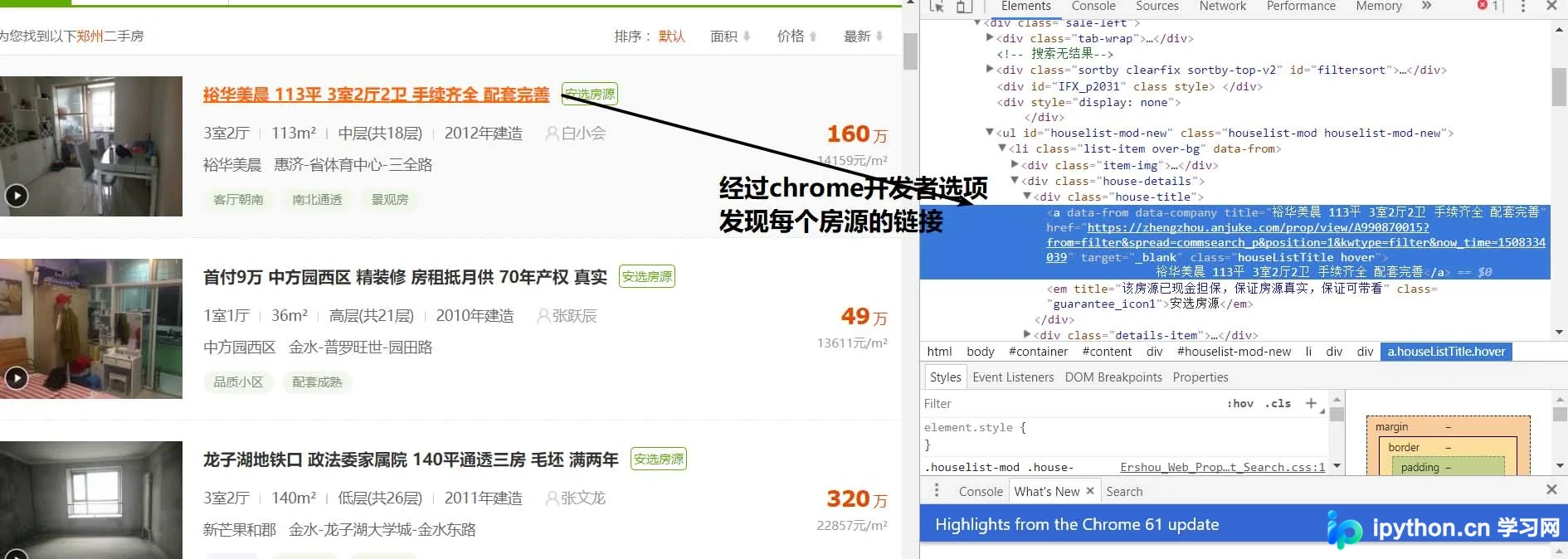
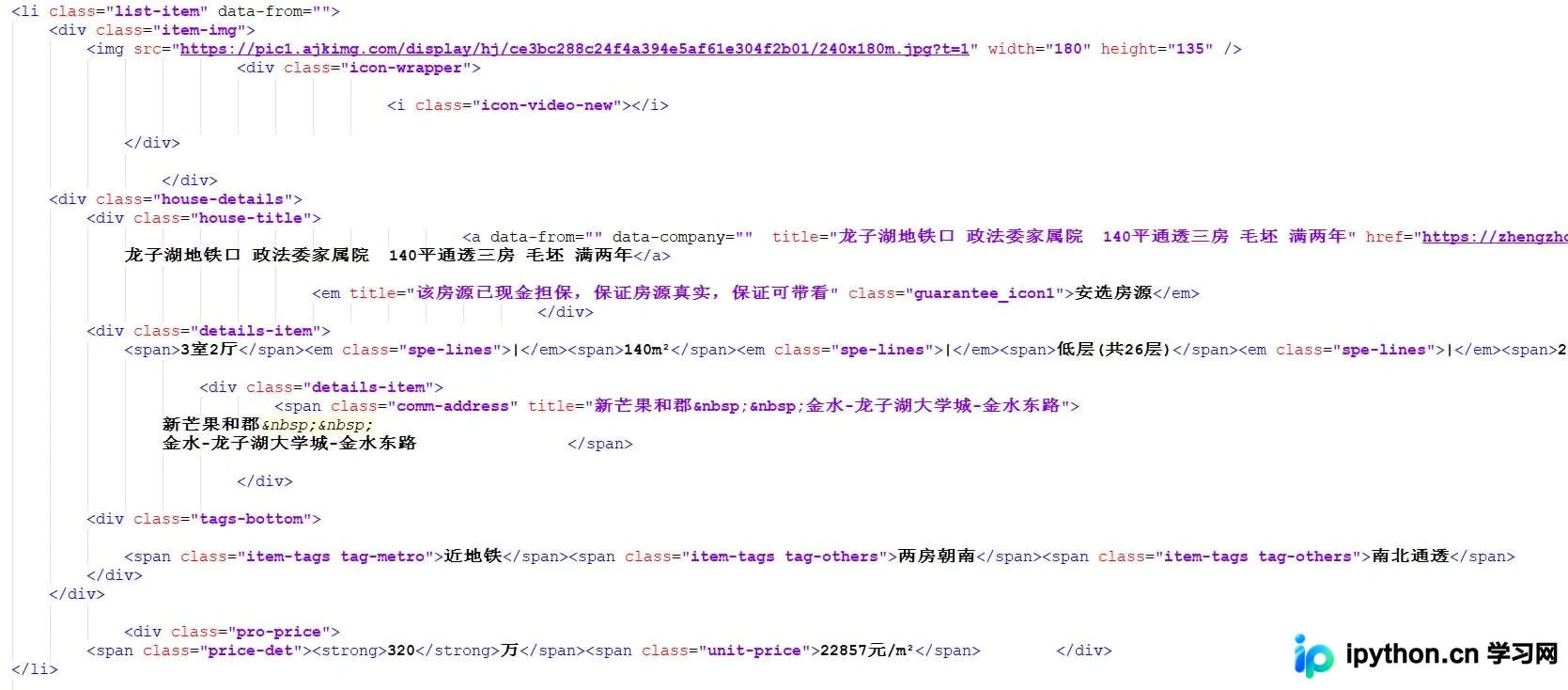 通过代码分析可知,每条房源信息均包裹在class属性为“list-item”的li标签内。因此,我们可以利用BeautifulSoup包提取这些节点。
# 通过BeautifulSoup进行解析出每个房源详细列表并进行打印
soup = BeautifulSoup(response.text, 'html.parser')
result_li = soup.find_all('li', {'class': 'list-item'})
for i in result_li:
  print(i)
通过打印输出结果,可以验证提取效果并减少后续代码量。继续执行提取操作。
# 通过BeautifulSoup进行解析出每个房源详细列表并进行打印
soup = BeautifulSoup(response.text, 'html.parser')
result_li = soup.find_all('li', {'class': 'list-item'})
# 进行循环遍历其中的房源详细列表
for i in result_li:
  # 由于BeautifulSoup传入的必须为字符串,所以进行转换
  page_url = str(i)
  soup = BeautifulSoup(page_url, 'html.parser')
  # 由于通过class解析的为一个列表,所以只需要第一个参数
  result_href = soup.find_all('a', {'class': 'houseListTitle'})[0]
  print(result_href.attrs['href'])
此时,我们可以获取到各个房源对应的URL链接,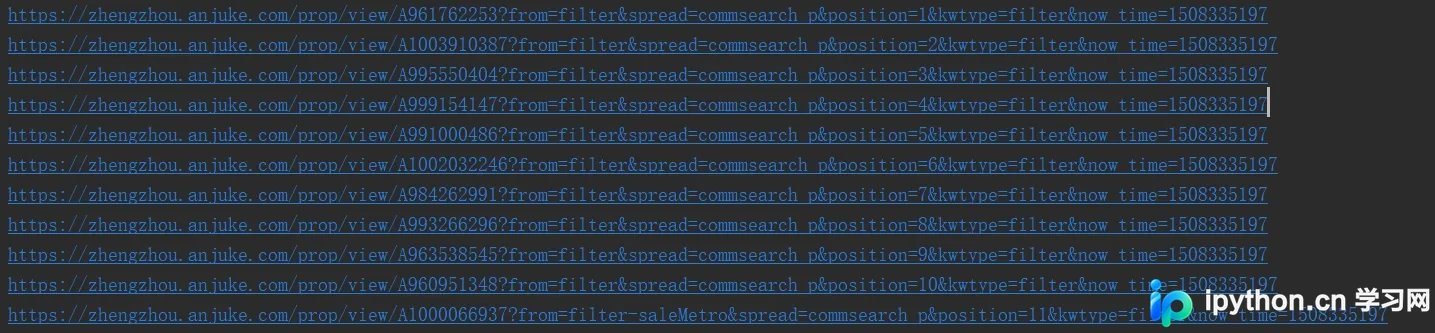 。
。
按照常规逻辑,下一步应进入详情页进行深度分析。但在深入之前,需先解决分页爬取的问题,即判断当前页面是否存在下一页。
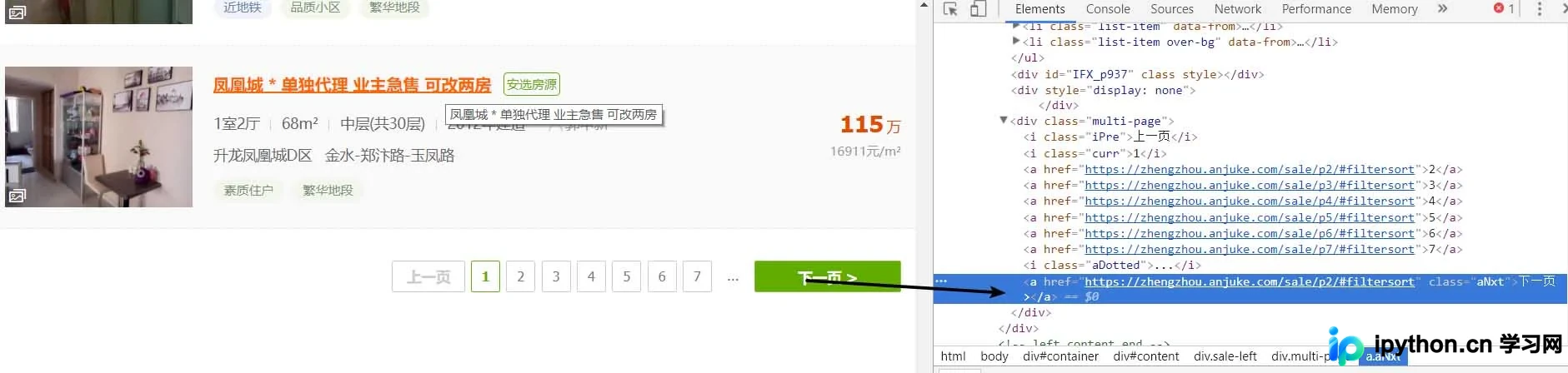
采用相同的方法分析分页逻辑,发现下一页的处理方式与列表页类似。因此,我们可以沿用之前的逻辑继续处理。
# 进行下一页的爬取
result_next_page = soup.find_all('a', {'class': 'aNxt'})
if len(result_next_page) != 0:
  print(result_next_page[0].attrs['href'])
else:
  print('没有下一页了')
当存在下一页时,网页中对应的是一个a标签;若无下一页,则变为i标签。基于此特征,我们可以完善代码逻辑,并将上述功能封装为一个独立函数。
import requests
from bs4 import BeautifulSoup

# 网页的请求头
header = {
  'user-agent': 'Mozilla/5.0 (Windows NT 10.0; WOW64) AppleWebKit/537.36 (KHTML, like Gecko) Chrome/60.0.3112.113 Safari/537.36'
}

def get_page(url):
  response = requests.get(url, headers=header)

  # 通过BeautifulSoup进行解析出每个房源详细列表并进行打印
  soup = BeautifulSoup(response.text, 'html.parser')
  result_li = soup.find_all('li', {'class': 'list-item'})

  # 进行下一页的爬取
  result_next_page = soup.find_all('a', {'class': 'aNxt'})
  if len(result_next_page) != 0:
    # 函数进行递归
    get_page(result_next_page[0].attrs['href'])
  else:
    print('没有下一页了')

  # 进行循环遍历其中的房源详细列表
  for i in result_li:
    # 由于BeautifulSoup传入的必须为字符串,所以进行转换
    page_url = str(i)
    soup = BeautifulSoup(page_url, 'html.parser')
    # 由于通过class解析的为一个列表,所以只需要第一个参数
    result_href = soup.find_all('a', {'class': 'houseListTitle'})[0]
    # 先不做分析,等一会进行详细页面函数完成后进行调用
    print(result_href.attrs['href'])


if __name__ == '__main__':
  # url链接
  url = 'https://zhengzhou.anjuke.com/sale/'
  # 页面爬取函数调用
  get_page(url)
完成列表页处理后,开始进行详情页的数据爬取。
由于编写过程中遇到环境中断(如断电)等情况,先附上部分运行结果,后续细节将在空闲时补充。
import requests
from bs4 import BeautifulSoup

# 网页的请求头
header = {
  'user-agent': 'Mozilla/5.0 (Windows NT 10.0; WOW64) AppleWebKit/537.36 (KHTML, like Gecko) Chrome/60.0.3112.113 Safari/537.36'
}

def get_page(url):
  response = requests.get(url, headers=header)

  # 通过BeautifulSoup进行解析出每个房源详细列表并进行打印
  soup_idex = BeautifulSoup(response.text, 'html.parser')
  result_li = soup_idex.find_all('li', {'class': 'list-item'})

  # 进行循环遍历其中的房源详细列表
  for i in result_li:
    # 由于BeautifulSoup传入的必须为字符串,所以进行转换
    page_url = str(i)
    soup = BeautifulSoup(page_url, 'html.parser')
    # 由于通过class解析的为一个列表,所以只需要第一个参数
    result_href = soup.find_all('a', {'class': 'houseListTitle'})[0]
    # 详细页面的函数调用
    get_page_detail(result_href.attrs['href'])


  # 进行下一页的爬取
  result_next_page = soup_idex.find_all('a', {'class': 'aNxt'})
  if len(result_next_page) != 0:
    # 函数进行递归
    get_page(result_next_page[0].attrs['href'])
  else:
    print('没有下一页了')

# 进行字符串中空格,换行,tab键的替换及删除字符串两边的空格删除
def my_strip(s):
  return str(s).replace(" ", "").replace("\n", "").replace("\t", "").strip()
# 由于频繁进行BeautifulSoup的使用,封装一下,很鸡肋
def my_Beautifulsoup(response):
  return BeautifulSoup(str(response), 'html.parser')


# 详细页面的爬取
def get_page_detail(url):
  response = requests.get(url, headers=header)
  if response.status_code == 200:
    soup = BeautifulSoup(response.text, 'html.parser')
    # 标题什么的一大堆,哈哈
    result_title = soup.find_all('h3', {'class': 'long-title'})[0]
    result_price = soup.find_all('span', {'class': 'light info-tag'})[0]
    result_house_1 = soup.find_all('div', {'class': 'first-col detail-col'})
    result_house_2 = soup.find_all('div', {'class': 'second-col detail-col'})
    result_house_3 = soup.find_all('div', {'class': 'third-col detail-col'})
    soup_1 = my_Beautifulsoup(result_house_1)
    soup_2 = my_Beautifulsoup(result_house_2)
    soup_3 = my_Beautifulsoup(result_house_3)
    result_house_tar_1 = soup_1.find_all('dd')
    result_house_tar_2 = soup_2.find_all('dd')
    result_house_tar_3 = soup_3.find_all('dd')
    '''
    文博公寓,省实验中学,首付只需70万,大三房,诚心卖,价可谈 270万
    宇泰文博公寓 金水-花园路-文博东路4号 2010年 普通住宅
    3室2厅2卫 140平方米 南北 中层(共32层)
    精装修 19285元/m² 81.00万
    '''
    print(my_strip(result_title.text), my_strip(result_price.text))
    print(my_strip(result_house_tar_1[0].text),
       my_strip(my_Beautifulsoup(result_house_tar_1[1]).find_all('p')[0].text),
       my_strip(result_house_tar_1[2].text), my_strip(result_house_tar_1[3].text))
    print(my_strip(result_house_tar_2[0].text), my_strip(result_house_tar_2[1].text),
       my_strip(result_house_tar_2[2].text), my_strip(result_house_tar_2[3].text))
    print(my_strip(result_house_tar_3[0].text), my_strip(result_house_tar_3[1].text),
       my_strip(result_house_tar_3[2].text))

if __name__ == '__main__':
  # url链接
  url = 'https://zhengzhou.anjuke.com/sale/'
  # 页面爬取函数调用
  get_page(url)
在编写博客代码的过程中,对get_page函数进行了调整:将下一页的递归调用置于函数末尾,并封装了两个未详细介绍的辅助函数。
此外,数据存储至MySQL数据库的部分尚未实现,后续将持续跟进更新,感谢关注。
以上即为Python爬取安居客二手房网站数据的完整实例讲解,希望能对读者有所帮助,欢迎大家支持。
免责声明:本文内容仅供参考,不代表本站观点。转载或引用请注明出处。









