

Python使用xlrd库将Excel数据导入SQLite数据库

发布时间:2026-10-13| 3人浏览过
本文介绍如何利用Python的xlrd库解析Excel文件,并通过sqlite3模块将数据写入SQLite数据库。示例代码展示了如何遍历工作表、处理数据类型转换(如Unicode转UTF-8、Float转Int),并执行插入操作。该方法适用于简单的数据格式转换场景,注意防范SQL注入风险。
本文详细介绍如何使用Python将Excel文件转换为SQLite数据库,供读者参考实践。
关于Python环境的安装与配置此处不再赘述,开发者可根据个人习惯选择如pydev等开发环境。
在Python中解析Excel文件需依赖第三方库,本文选用xlrd库进行处理。
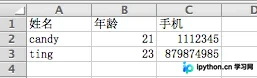
首先查看待处理的Excel文件内容,具体数据如下所示。
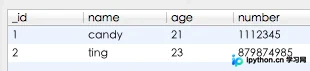
接着展示转换后生成的SQLite数据库结构及数据,结果如下。
以下是实现该转换功能的完整源代码。
#!/usr/bin/python
# encoding=utf-8
'''''
Created on 2013-4-2
@author: ting
'''
from xlrd import open_workbook
import sqlite3
import types
def read_excel(sheet):
  # 判断有效sheet
  if sheet.nrows > 0 and sheet.ncols > 0:
    for row in range(1, sheet.nrows):
      row_data = []
      for col in range(sheet.ncols):
        data = sheet.cell(row, col).value
        # excel表格内容数据类型转换 float->int,unicode->utf-8
        if type(data) is types.UnicodeType: data = data.encode("utf-8")
        elif type(data) is types.FloatType: data = int(data)
        row_data.append(data)
      check_data_length(row_data)
# 检查row_data长度
def check_data_length(row_data):
  if len(row_data) == 3:
    insert_sqlite(row_data)
def insert_sqlite(row_data):
  # 打开数据库(不存在时会创建数据库)
  con = sqlite3.connect("test.db")
  cur = con.cursor()
  try:
    cur.execute("create table if not exists contacts(_id integer primary key "\
            "autoincrement,name text,age integer,number integer)")
    # 插入数据不要使用拼接字符串的方式,容易收到sql注入攻击
    cur.execute("insert into contacts(name,age,number) values(?,?,?)", row_data)
    con.commit()
  except sqlite3.Error as e:
    print "An error occurred: %s", e.args[0]
  finally:
    cur.close
    con.close
xls_file = "test.xls"
book = open_workbook(xls_file)
for sheet in book.sheets():
  read_excel(sheet)
print "------ Done ------"
如需了解更多Python相关技术,推荐阅读本站专题:《Python常见数据库操作技巧汇总》、《Python数据结构与算法教程》、《Python函数使用技巧总结》、《Python字符串操作技巧汇总》、《Python入门与进阶经典教程》以及《Python文件与目录操作技巧汇总》。
希望本文提供的代码示例对您的Python编程学习有所帮助。
免责声明:本文内容仅供参考,不代表本站观点。转载或引用请注明出处。









