

Python3 Tkinter结合SQLite实现登录与注册功能详解

发布时间:2026-10-13| 5人浏览过
本文介绍如何使用Python3的Tkinter库与SQLite数据库,构建一个包含登录和注册功能的图形界面。通过设计包含用户名、密码、邮箱及错误次数限制的数据库表,利用Tkinter布局控件实现交互界面,并演示完整的代码逻辑与运行效果,适用于Python初学者参考学习。
Python3 Tkinter结合SQLite实现登录与注册功能详解
本文分享了一个基于Python3 Tkinter与SQLite技术栈实现的登录及注册界面示例,供读者参考学习。
开发环境配置为Ubuntu14系统,Python3.4版本,并使用Pycharm2018作为集成开发工具。
数据库结构设计
第一步是进行数据库结构设计。
数据库文件命名为login.db,其中包含以下字段:用户名、密码、邮箱地址,以及记录密码输入错误次数的字段。当错误次数累计达到三次时,系统将锁定该账户。
create table loginuser (
 username varchar(30) NOT NULL PRIMARY KEY ,
 password varchar(16) NOT NULL ,
 email varchar NOT NULL ,
 loginerror int
);
登录与注册界面实现
接下来使用Tkinter模块构建登录界面。
主程序文件命名为login.py。
代码部分首先展示登录界面的实现逻辑。
随后展示注册界面的相关代码。
from tkinter import *
import sqlite3
import tkinter.messagebox as messagebox


class LoginPage:
  """登录界面"""
  def __init__(self, master):
    self.root = master
    self.root.geometry('400x200+600+400')
    self.root.title('项目资源管理平台Alpha0.1')
    self.conn = sqlite3.connect('data/login.db')
    self.username = StringVar()
    self.password = StringVar()
    self.page = Frame(self.root)
    self.creatapage()

  def creatapage(self):
    """界面布局"""
    Label(self.page).grid(row=0)
    Label(self.page, text='用户名:').grid(row=1, stick=W, pady=10)
    Entry(self.page, textvariable=self.username).grid(row=1, column=1, stick=E)
    Label(self.page, text='密码:').grid(row=2, stick=W, pady=10)
    Entry(self.page, textvariable=self.password, show='*').grid(row=2, stick=E, column=1)
    Button(self.page, text='登录', command=self.login).grid(row=3, stick=W, pady=10)
    Button(self.page, text='注册账号', command=self.register).grid(row=3, stick=E, column=1)
    self.page.pack()

  def login(self):
    """登录功能"""
    curs = self.conn.cursor()
    query = "select username, password, loginerror from loginuser where username='%s'" % self.username.get()
    curs.execute(query) # 返回一个迭代器
    c = curs.fetchall() # 接收全部信息
    if len(c) == 0:
      messagebox.showerror('登录失败', '账户不存在')
    else:
      us, pw, lerror = c[0]
      if lerror >= 3:
        messagebox.showwarning('登录失败', '账户已被锁定')
      elif us == self.username.get() and pw == self.password.get():
        self.conn.close()
        messagebox.showinfo('登录成功', '欢迎:%s' % us)
      else:
        messagebox.showwarning('登录失败', '密码错误')

  def register(self):
    """注册功能跳转"""
    self.conn.close()
    self.page.destroy()
    RegisterPage(self.root)


class RegisterPage:
  """注册界面"""
  def __init__(self, master=None):
    self.root = master
    self.root.title('账号注册')
    self.root.geometry('400x250')
    self.conn = sqlite3.connect('data/login.db')
    self.username = StringVar()
    self.password0 = StringVar() # 第一次输入密码
    self.password1 = StringVar() # 第二次输入密码
    self.email = StringVar()
    self.page = Frame(self.root)
    self.createpage()

  def createpage(self):
    """界面布局"""
    Label(self.page).grid(row=0)
    Label(self.page, text="账号:").grid(row=1, stick=W, pady=10)
    Entry(self.page, textvariable=self.username).grid(row=1, column=1, stick=E)
    Label(self.page, text="密码:").grid(row=2, stick=W, pady=10)
    Entry(self.page, textvariable=self.password0, show='*').grid(row=2, column=1, stick=E)
    Label(self.page, text="再次输入:").grid(row=3, stick=W, pady=10)
    Entry(self.page, textvariable=self.password1, show='*').grid(row=3, column=1, stick=E)
    Label(self.page, text="Email*:").grid(row=4, stick=W, pady=10)
    Entry(self.page, textvariable=self.email).grid(row=4, column=1, stick=E)
    Button(self.page, text="返回", command=self.repage).grid(row=5, stick=W, pady=10)
    Button(self.page, text="注册", command=self.register).grid(row=5, column=1, stick=E)
    self.page.pack()

  def repage(self):
    """返回登录界面"""
    self.page.destroy()
    self.conn.close()
    LoginPage(self.root)

  def register(self):
    """注册"""
    if self.password0.get() != self.password1.get():
      messagebox.showwarning('错误', '密码核对错误')
    elif len(self.username.get()) == 0 or len(self.password0.get()) == 0 or len(self.email.get()) == 0:
      messagebox.showerror("错误", "不能为空")
    else:
      curs = self.conn.cursor()
      query = 'insert into loginuser values (?,?,?,?)'
      val = [self.username.get(), self.password0.get(), self.email.get(), 0]
      try:
        curs.execute(query, val)
        self.conn.commit()
        self.conn.close()
        messagebox.showinfo("成功", "注册成功,按确定返回登录界面")
        self.page.destroy()
        LoginPage(self.root)
      except sqlite3.IntegrityError:
        messagebox.showerror("注册失败", "该账户已存在")


if __name__ == '__main__':
  root = Tk()
  LoginPage(root)
  root.mainloop()
程序运行效果展示
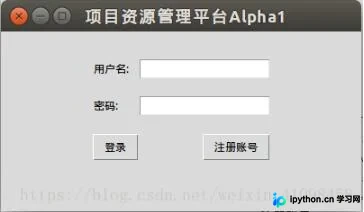
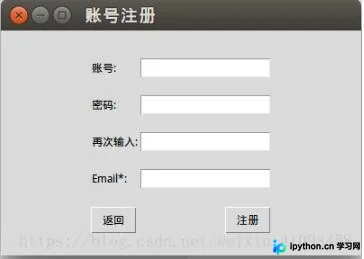
第三部分展示程序的实际运行效果。
登录界面的运行截图如下:
注册界面的运行截图如下:
以上内容为本文的全部分享,希望能为读者的学习提供一定帮助,同时也欢迎继续支持本站获取更多技术资源。
免责声明:本文内容仅供参考,不代表本站观点。转载或引用请注明出处。









