

Python sqlite3模块数据库操作实战:建表、插入、更新与查询

发布时间:2026-10-13| 4人浏览过
本文详解Python内置sqlite3模块的数据库操作流程。通过内存数据库与本地文件数据库两个实例,演示如何创建数据表、使用executemany批量插入CSV数据、执行记录更新以及查询结果统计。代码涵盖建表、插入、更新及查询完整生命周期,适合初学者掌握SQLite基础应用。
sqlite3模块基础:建表、插入与查询统计
首先介绍如何使用Python内置的sqlite3模块来创建数据库表,并向其中插入数据。接着演示如何从表中检索所有行,并统计输出行的总数。
#!/usr/bin/env python3
#创建SQLite3内存数据库,并创建带有四个属性的sales表
#sqlite3模块,提供了一个轻量级的基于磁盘的数据库,不需要独立的服务器进程
import sqlite3
#使用‘:memory:'在内存中创建了一个数据库,创建了连接对象con来代表数据库
con = sqlite3.connect(':memory:')
#创建表名为sales的表,将这个字符串赋值给query
query = """CREATE TABLE sales
      (customer VARCHAR(20),
      product VARCHAR(40),
      amount FLOAT,
      date DATE);"""
#使用连接对象的execute()方法执行query中的SQL命令
con.execute(query)
#使用连接对象的commit()方法将修改提交(保存)到数据库
con.commit()
#向表中插入几行数据
data = [('Richard Lucas','Notepad',2.50,'2019-01-02'),
    ('Jenny Kim','Binder',4.15,'2019-01-05'),
    ('Svetlana Crow','Printer',155.75,'2019-02-03'),
    ('Stephen Randolph','Computer',679.40,'2019-02-20')]
#将插入语句赋给变量statement,?是占位符
statement = "INSERT INTO sales VALUES(?,?,?,?)"
#因为有四个占位符,这里就需要提供一个包含4个值的元组,executemany()方法为data中的每个数据元组执行
#statement中的SQL命令,这里执行了四次insert命令
con.executemany(statement,data)
#将修改保存到数据库
con.commit()
#查询sales表,并将命令结果赋值给一个光标对象cursor,光标对象有execute、executemany、fetchone、
#fetchmany和fetchall方法
cursor = con.execute("SELECT * FROM sales")
#返回结果集中的所有行
rows = cursor.fetchall()
print(rows)
print('………………')
#查询结果中行的数量
row_counter = 0
for row in rows:
  print(row)
  row_counter += 1
print('………………')
print('Number of rows: %d' % (row_counter))
在Spyder集成开发环境的右下角控制台打印出的执行结果如下:
[('Richard Lucas', 'Notepad', 2.5, '2019-01-02'), ('Jenny Kim', 'Binder', 4.15, '2019-01-05'), ('Svetlana Crow', 'Printer', 155.75, '2019-02-03'), ('Stephen Randolph', 'Computer', 679.4, '2019-02-20')]
………………
('Richard Lucas', 'Notepad', 2.5, '2019-01-02')
('Jenny Kim', 'Binder', 4.15, '2019-01-05')
('Svetlana Crow', 'Printer', 155.75, '2019-02-03')
('Stephen Randolph', 'Computer', 679.4, '2019-02-20')
………………
Number of rows: 4
从CSV导入数据至本地数据库
接下来,继续利用Python内置的sqlite3模块,演示如何向已存在的表中插入新的数据记录。
本次操作使用的数据源文件名为“CSV测试数据.csv”。
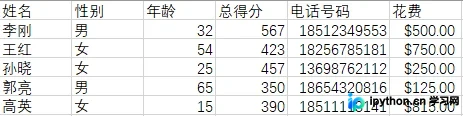
将本地文件“CSV测试数据.csv”中的数据导入到本地数据库文件football_game.db中。
#!/usr/bin/env python3
#创建SQLite3内存数据库,并创建带有四个属性的sales表
#sqlite3模块,提供了一个轻量级的基于磁盘的数据库,不需要独立的服务器进程
import sqlite3
import csv
input_file = "F://python入门//数据1//CSV测试数据.csv"
#为一个简单的本地数据库football_game.db创建连接,football_game.db为数据库名称
con = sqlite3.connect('football_game.db')
#创建了一个光标
c = con.cursor()
#如果表名存在,则删除它
drop_table = """DROP TABLE IF EXISTS football_game;"""
c.execute(drop_table)
con.commit()
#创建表名为football_game的表,将这个字符串赋值给create_table
create_table = """CREATE TABLE IF NOT EXISTS football_game
      (name VARCHAR(20),
      sex VARCHAR(10),
      age INT,
      score INT,
      device_number VARCHAR(20),
      cost VARCHAR(20));"""
#使用连接对象的execute()方法执行create_table中的SQL命令
c.execute(create_table)
#使用连接对象的commit()方法将修改提交(保存)到数据库
con.commit()
#从CSV格式的输入文件中读取要加载到数据库中的数据,创建file_reader对象,用于存储CSV中的数据集
file_reader = csv.reader(open(input_file,'r'),delimiter=',')
#从输入文件中读入第一行
header = next(file_reader,None)
#将输入的所有数据进行循环,先是每行循环,再是每列循环
for row in file_reader:
  data = []
  for column_index in range(len(header)):
    data.append(row[column_index])
  print(data)
  c.execute("INSERT INTO football_game VALUES(?,?,?,?,?,?)",data)
#将修改保存到数据库
con.commit()
print('………………')
#执行选择所有数据的SQL
output = c.execute("SELECT * FROM football_game")
#返回结果集中的所有行,返回的是一个大的列表
rows = output.fetchall()
print(rows)
print('………………')
for row in rows:
  output = []
  for column_index in range(len(row)):
    output.append(str(row[column_index]))
  print(output)
在Spyder右下角控制台打印出的执行结果如下:
['李刚', '男', '32', '567', '18512349553', '$500.00 ']
['王红', '女', '54', '423', '18256785181', '$750.00 ']
['孙晓', '女', '25', '457', '13698762112', '$250.00 ']
['郭亮', '男', '65', '350', '18654320816', '$125.00 ']
['高英', '女', '15', '390', '18511113141', '$815.00 ']
………………
[('李刚', '男', 32, 567, '18512349553', '$500.00 '), ('王红', '女', 54, 423, '18256785181', '$750.00 '), ('孙晓', '女', 25, 457, '13698762112', '$250.00 '), ('郭亮', '男', 65, 350, '18654320816', '$125.00 '), ('高英', '女', 15, 390, '18511113141', '$815.00 ')]
………………
['李刚', '男', '32', '567', '18512349553', '$500.00 ']
['王红', '女', '54', '423', '18256785181', '$750.00 ']
['孙晓', '女', '25', '457', '13698762112', '$250.00 ']
['郭亮', '男', '65', '350', '18654320816', '$125.00 ']
['高英', '女', '15', '390', '18511113141', '$815.00 ']
数据表记录的更新操作
随后,演示如何使用Python内置的sqlite3模块来更新数据表中的现有记录。
本次更新操作同样基于名称为“CSV测试数据.csv”的数据源文件。
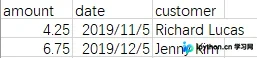
具体执行更新表记录的代码逻辑如下:
#!/usr/bin/env python3
#创建SQLite3内存数据库,并创建带有四个属性的sales表
#sqlite3模块,提供了一个轻量级的基于磁盘的数据库,不需要独立的服务器进程
import sqlite3
import csv
input_file = "F://python入门//数据1//CSV测试数据.csv"
#使用‘:memory:'在内存中创建了一个数据库,创建了连接对象con来代表数据库
con = sqlite3.connect(':memory:')
#创建表名为sales的表,将这个字符串赋值给query
query = """CREATE TABLE IF NOT EXISTS sales
      (customer VARCHAR(20),
      product VARCHAR(40),
      amount FLOAT,
      date DATE);"""
#使用连接对象的execute()方法执行query中的SQL命令
con.execute(query)
#使用连接对象的commit()方法将修改提交(保存)到数据库
con.commit()
#向表中插入几行数据
data = [('Richard Lucas','Notepad',2.50,'2019-01-02'),
    ('Jenny Kim','Binder',4.15,'2019-01-05'),
    ('Svetlana Crow','Printer',155.75,'2019-02-03'),
    ('Stephen Randolph','Computer',679.40,'2019-02-20')]
#for tuple in data:
#  print(tuple)
#将插入语句赋给变量statement,?是占位符
statement = "INSERT INTO sales VALUES(?,?,?,?)"
#因为有四个占位符,这里就需要提供一个包含4个值的元组,executemany()方法为data中的每个数据元组执行
#statement中的SQL命令,这里执行了四次insert命令
con.executemany(statement,data)
#将修改保存到数据库
con.commit()
#读取CSV文件并更新特定的行
file_reader = csv.reader(open(input_file,'r'),delimiter=',')
#从输入文件中读入第一行
header = next(file_reader,None)
#将输入的所有数据进行循环,先是每行循环,再是每列循环
for row in file_reader:
  data = []
  for column_index in range(len(header)):
    data.append(row[column_index])
  con.execute("UPDATE sales SET amount=?,date=? where customer=?;",data)
#将修改保存到数据库
con.commit()
#查询sales表,并将命令结果赋值给一个光标对象cursor,光标对象有execute、executemany、fetchone、
#fetchmany和fetchall方法
cursor = con.execute("SELECT * FROM sales")
#返回结果集中的所有行
rows = cursor.fetchall()
print(rows)
print('………………')
for row in rows:
  output = []
  for column_index in range(len(row)):
    output.append(str(row[column_index]))
  print(output)
在Spyder右下角控制台打印出的执行结果如下:
[('Richard Lucas', 'Notepad', 4.25, '2019-11-05'), ('Jenny Kim', 'Binder', 6.75, '2019-12-05'), ('Svetlana Crow', 'Printer', 155.75, '2019-02-03'), ('Stephen Randolph', 'Computer', 679.4, '2019-02-20')]
………………
['Richard Lucas', 'Notepad', '4.25', '2019-11-05']
['Jenny Kim', 'Binder', '6.75', '2019-12-05']
['Svetlana Crow', 'Printer', '155.75', '2019-02-03']
['Stephen Randolph', 'Computer', '679.4', '2019-02-20']
以上就是本文的全部内容,希望对大家的学习有所帮助,也希望大家多多支持本站。
免责声明:本文内容仅供参考,不代表本站观点。转载或引用请注明出处。









