

Python操作SQLite数据库实战:创建、插入与查询详解

发布时间:2026-10-15| 6人浏览过
本文详细介绍如何使用Python内置的sqlite3模块进行SQLite数据库操作。内容涵盖数据库文件的创建、数据表的建立、记录的插入以及数据的查询与结果处理。通过具体代码示例,演示了从连接数据库到执行SQL语句的完整流程,并介绍了使用SqliteStudio可视化工具辅助开发的方法,适合初学者快速掌握Python与SQLite的基本交互技巧。
前言
本文将重点讲解以下几个核心内容:
主要考点为SQLite数据库的基本操作:
- 第一步是创建SQLite数据库文件;
- 第二步是向数据表中插入具体记录;
- 第三步涉及其他常见的数据库操作指令。
以下是相关的面试题解析:
- 面试题一:如何创建SQLite数据库?
- 面试题二:如何向SQLite表中插入数据?
- 面试题三:如何查询SQLite表中的数据?
1. 创建SQLite数据库
# coding=utf-8
# _author__ = 孤寒者
import sqlite3
import os
dbPath = 'data.sqlite'
if not os.path.exists(dbPath):
    conn = sqlite3.connect(dbPath)
    c = conn.cursor()
    c.execute('''create table persons
              (id int primary key not null,
               name text not null,
               age int not null,
               address char(100),
               salary real);''')
    conn.commit()
    conn.close()
    print('创建数据库成功')
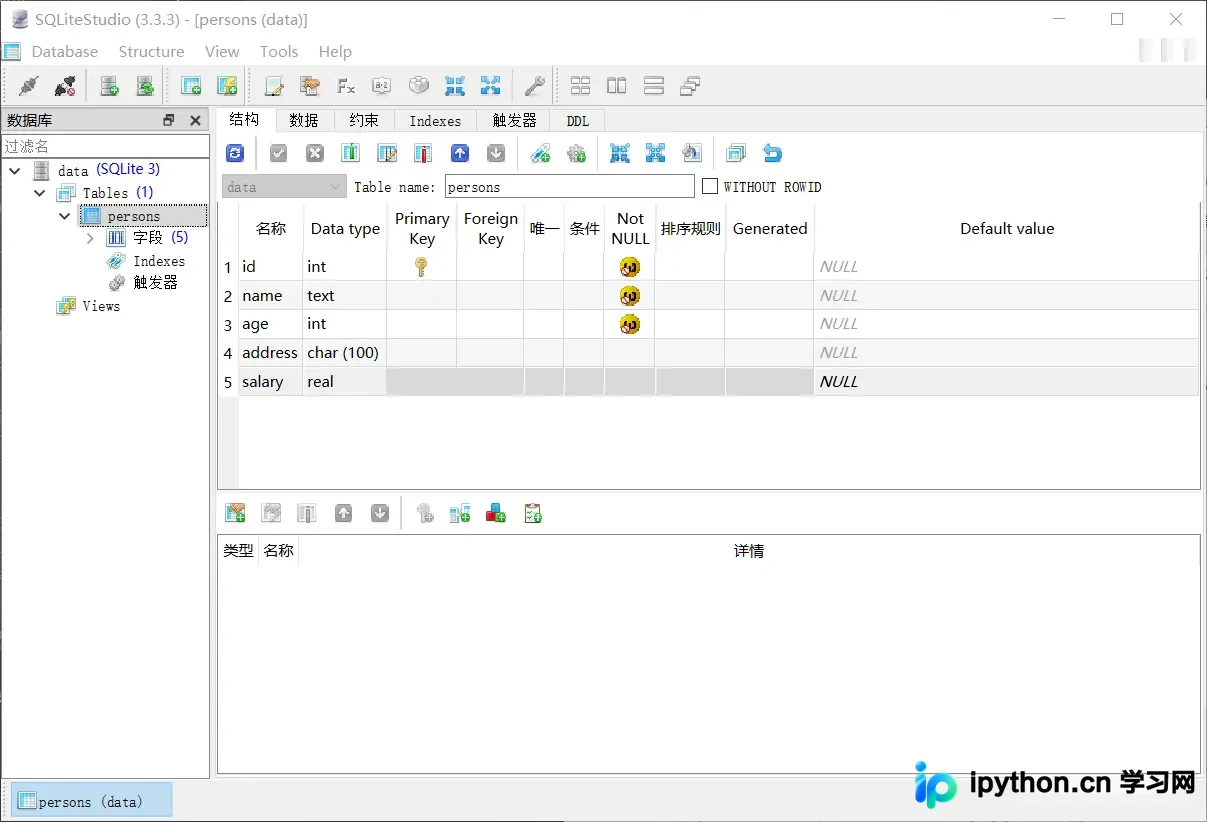
- 通过上述代码操作,我们已成功创建了SQLite数据库文件,并在其中建立了一张数据表。
- 为了直观查看创建的表结构,推荐使用SqliteStudio。这是一款SQLite数据库的可视化管理工具,是开发基于SQLite的应用程序时的必备软件。该工具无需安装,下载解压后即可直接使用,体积小巧且功能实用,提供绿色中文版本。相较于其他SQLite管理工具,个人更倾向于使用这款工具,因其方便易用,是一个支持中文的独立可执行文件。
2. 向SQLite表中插入数据
# coding=utf-8
import sqlite3
dbPath = 'data.sqlite'
conn = sqlite3.connect(dbPath)
c = conn.cursor()
# 首先将表中数据全部删除
c.execute('delete from persons')
# 插入数据
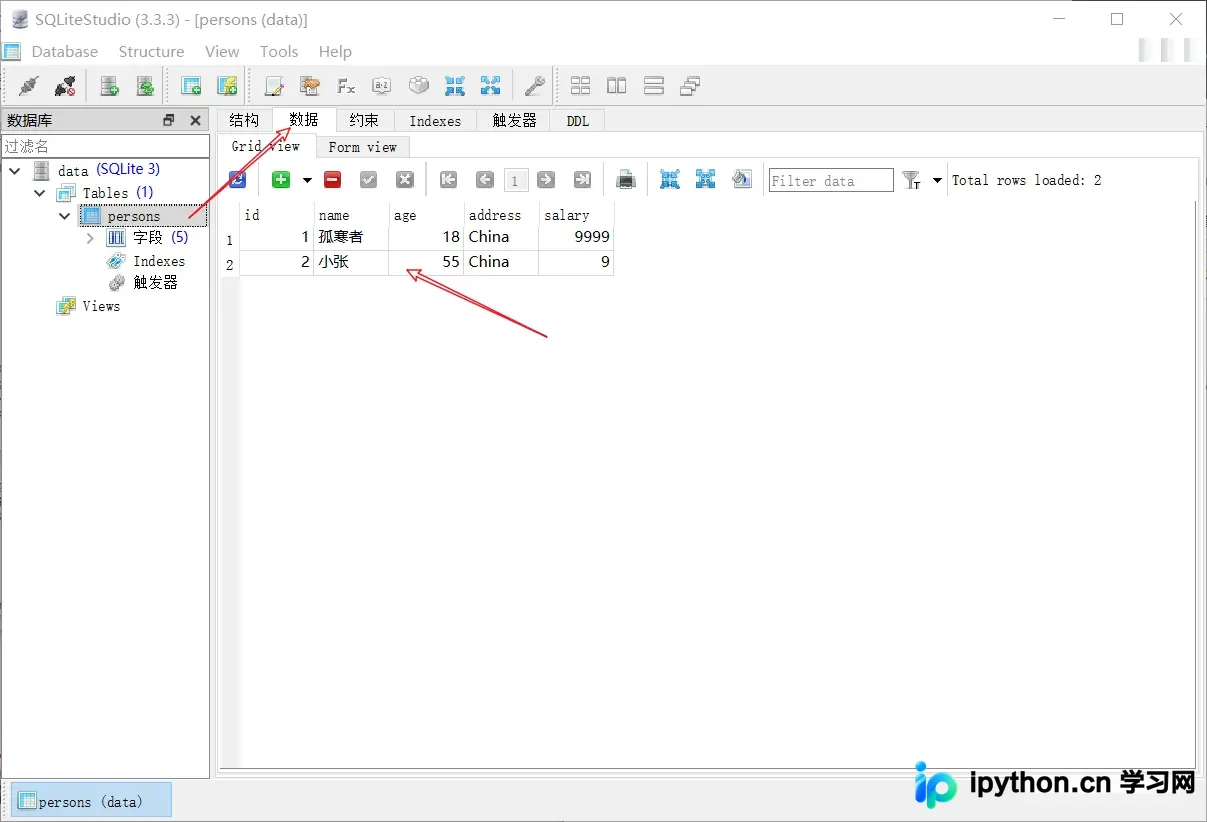
c.execute('''
insert into persons(id,name,age,address,salary)
values(1, '孤寒者', 18, 'China', 9999)
''')
c.execute('''
insert into persons(id,name,age,address,salary)
values(2, '小张', 55, 'China', 9)
''')
conn.commit()
print('insert success')
3. 查询SQLite表中的数据
# coding=utf-8
import sqlite3
dbPath = 'data.sqlite'
conn = sqlite3.connect(dbPath)
c = conn.cursor()
persons = c.execute('select name,age,address,salary from persons order by age')

# 打印查询结果发现是个Cursor对象(可迭代对象)
print(type(persons))

result = []
for person in persons:
    value = {}
    value['name'] = person[0]
    value['age'] = person[1]
    value['address'] = person[2]
    result.append(value)
conn.close()
print(type(result))
print(result)

# 我们也可以使用前面学习的json模块使这个list类型的result转为字符串类型
# 网络传输需要使用字符串类型
import json
resultStr = json.dumps(result, ensure_ascii=False)
print(resultStr)
总结
使用sqlite3模块提供的API即可操作SQLite数据库,该模块为Python内置模块,无需单独安装即可使用。
到此,关于Python练习操作SQLite数据库的文章介绍完毕。如需了解更多Python操作SQLite的相关内容,建议搜索本站历史文章或继续浏览后续相关文章,希望大家今后多多支持本站!
免责声明:本文内容仅供参考,不代表本站观点。转载或引用请注明出处。









