

Python Cartopy基础使用指南:从投影设置到区域地图绘制

本文详细介绍Python中Cartopy模块的基础使用方法。内容涵盖从Basemap迁移至Cartopy的原因,投影类型(如PlateCarree)与中心经度的设置,海岸线与海洋特征的绘制,以及经纬度坐标轴的定制与显示。此外,还讲解了如何绘制指定区域的局部地图,并提供了一个封装好的地图绘制函数,方便读者直接调用进行地理数据可视化。
前言
在Python中绘制常用地图底图,通常依赖于Basemap或Cartopy模块。由于Basemap是基于Python 2开发的库,目前已停止维护,因此本文简要介绍Cartopy模块的一些基础操作。
首先,我们需要导入相关的模块。
import numpy as np
import matplotlib.pyplot as plt
import cartopy.crs as ccrs
import cartopy.feature as cfeature
from cartopy.mpl.ticker import LongitudeFormatter, LatitudeFormatter
接下来介绍参数projection,该命令可配合ccrs设置投影类型,此处以方形投影为例。其中central_longitude参数用于设定投影中心位置,其设置规则与Basemap类似,详情可参考之前的文章。
ax=plt.axes(projection=ccrs.PlateCarree(central_longitude=0))
在设置好绘制类型后,即可绘制地图的各个特征要素。代码如下:
#ax.add_feature(cfeature.LAKES.with_scale(scale))
ax.add_feature(cfeature.OCEAN.with_scale(scale))
#ax.add_feature(cfeature.RIVERS.with_scale(scale))
#ax.add_feature(cfeature.LAND.with_scale(scale),lw=0.5)
ax.add_feature(cfeature.COASTLINE.with_scale(scale),lw=2)
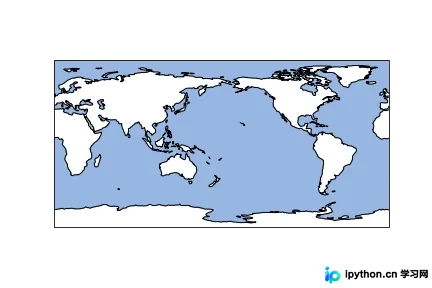
参数scale用于指定地图分辨率,目前支持10m、50m和110m;参数lw用于设置线条粗细。此处我们绘制海岸线和海洋,效果图如下:
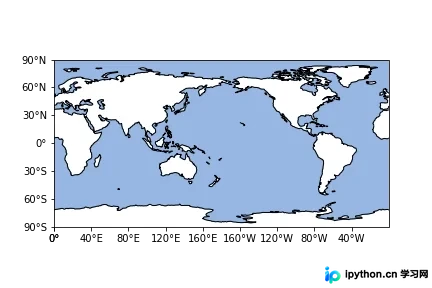
地图绘制完成后,经纬度是不可或缺的要素。在该模块中,可以通过引入特定命令同时设置坐标轴标签,并改变刻度表示形式,具体操作如下:
ax.set_xticks(np.arange(0,361,40), crs=ccrs.PlateCarree())
ax.set_yticks(np.arange(-90,90+30,30), crs=ccrs.PlateCarree())
#zero_direction_label用来设置经度的0度加不加E和W
lon_formatter = LongitudeFormatter(zero_direction_label=False)
lat_formatter = LatitudeFormatter()
ax.xaxis.set_major_formatter(lon_formatter)
ax.yaxis.set_major_formatter(lat_formatter)
运行后的效果图如下所示:
如果希望调整坐标轴的线条粗细,可以引入以下命令。
ax.outline_patch.set_visible(False)
ax.spines['bottom'].set_visible(True)
ax.spines['left'].set_visible(True)
ax.spines['right'].set_visible(True)
ax.spines['top'].set_visible(True)
ax.spines['bottom'].set_linewidth(2.5);###设置底部坐标轴的粗细
ax.spines['left'].set_linewidth(2.5);####设置左边坐标轴的粗细
ax.spines['right'].set_linewidth(2.5);###设置右边坐标轴的粗细
ax.spines['top'].set_linewidth(2.5);####设置上部坐标轴的粗细
需要注意的是,该模块下的坐标轴控制方式与常规有所不同。因此,我们需要先关闭默认的控制,然后开启常规的坐标轴设置。
二、区域地图的绘制
当我们需要研究某一小块区域时,可以绘制区域地图。此时可以引入以下命令:
ax.set_extent(box,crs=ccrs.PlateCarree())
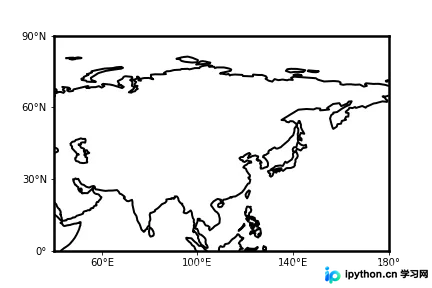
其中box参数用于定义绘制区域,crs参数用于指定投影类型。其他命令基本保持不变。若将box设置为[40, 180, 0, 90],可得到如下效果图:
总结
为方便各位读者使用,我编写了一个绘制地图的函数,大家可以直接调用。此处示例为方形投影,若希望绘制其他投影类型,只需修改函数中的相关参数即可。代码如下:
def map_make(scale,box,xstep,ystep):
  ax=plt.axes(projection=ccrs.PlateCarree(central_longitude=180))
  a = (box[1]-box[0])//xstep
  x_start = box[1] - a*xstep
  a = (box[3]-box[2])//ystep
  y_start = box[3] - a*ystep
  ax.set_extent(box,crs=ccrs.PlateCarree())
  #ax.add_feature(cfeature.LAKES.with_scale(scale))
  #ax.add_feature(cfeature.OCEAN.with_scale(scale))
  #ax.add_feature(cfeature.RIVERS.with_scale(scale))
  #ax.add_feature(cfeature.LAND.with_scale(scale),lw=0.5)
  ax.add_feature(cfeature.COASTLINE.with_scale(scale),lw=2)

  ax.set_xticks(np.arange(x_start,box[1]+xstep,xstep), crs=ccrs.PlateCarree())
  ax.set_yticks(np.arange(y_start,box[3]+ystep,ystep), crs=ccrs.PlateCarree())
  #zero_direction_label用来设置经度的0度加不加E和W
  lon_formatter = LongitudeFormatter(zero_direction_label=False)
  lat_formatter = LatitudeFormatter()
  ax.xaxis.set_major_formatter(lon_formatter)
  ax.yaxis.set_major_formatter(lat_formatter)
  #添加网格线
  ax.grid()

  ax.outline_patch.set_visible(False)
  ax.spines['bottom'].set_visible(True)
  ax.spines['left'].set_visible(True)
  ax.spines['right'].set_visible(True)
  ax.spines['top'].set_visible(True)
  ax.spines['bottom'].set_linewidth(2.5);###设置底部坐标轴的粗细
  ax.spines['left'].set_linewidth(2.5);####设置左边坐标轴的粗细
  ax.spines['right'].set_linewidth(2.5);###设置右边坐标轴的粗细
  ax.spines['top'].set_linewidth(2.5);####设置上部坐标轴的粗细

  return ax
到此,这篇关于Python Cartopy基础使用详解的文章就介绍到这里。更多相关Python Cartopy内容,请搜索本站以前的文章或继续浏览下面的相关文章。希望大家以后多多支持本站!
免责声明:本文内容仅供参考,不代表本站观点。转载或引用请注明出处。









