

TensorFlow矩阵运算实战:乘法、点乘与累加操作详解

本文深入解析TensorFlow中的核心矩阵运算。通过具体代码实例,演示如何使用tf.matmul进行多维矩阵乘法,利用tf.multiply实现元素级点乘及广播机制,并掌握tf.reduce_sum按指定轴进行行/列累加的方法。
矩阵乘法:tf.matmul
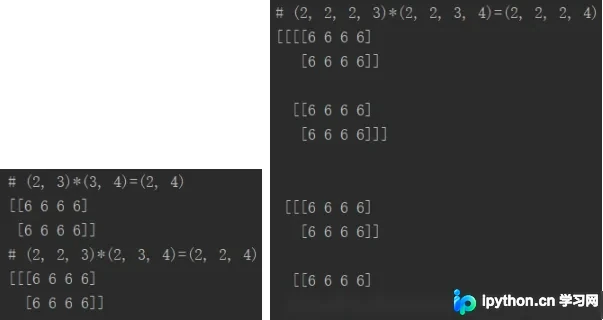
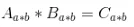
在TensorFlow中,矩阵乘法通过 tf.matmul 函数实现。其核心规则在于维度匹配:进行矩阵相乘时,左矩阵的列数必须等于右矩阵的行数。对于多维矩阵(如3D或4D),乘法仅作用于最后两维,前序维度被视为排列的批次或独立矩阵组。
以下代码展示了从2D到4D矩阵的乘法操作。通过构造形状匹配的常量矩阵,我们可以直观看到输出结果的形状变化:
import tensorflow as tf

a_2d = tf.constant([1]*6, shape=[2, 3])
b_2d = tf.constant([2]*12, shape=[3, 4])
c_2d = tf.matmul(a_2d, b_2d)
a_3d = tf.constant([1]*12, shape=[2, 2, 3])
b_3d = tf.constant([2]*24, shape=[2, 3, 4])
c_3d = tf.matmul(a_3d, b_3d)
a_4d = tf.constant([1]*24, shape=[2, 2, 2, 3])
b_4d = tf.constant([2]*48, shape=[2, 2, 3, 4])
c_4d = tf.matmul(a_4d, b_4d)

with tf.Session() as sess:
 tf.global_variables_initializer().run()
 print("# {}*{}={} \n{}".
  format(a_2d.eval().shape, b_2d.eval().shape, c_2d.eval().shape, c_2d.eval()))
 print("# {}*{}={} \n{}".
  format(a_3d.eval().shape, b_3d.eval().shape, c_3d.eval().shape, c_3d.eval()))
 print("# {}*{}={} \n{}".
  format(a_4d.eval().shape, b_4d.eval().shape, c_4d.eval().shape, c_4d.eval()))
元素级点乘:tf.multiply
与矩阵乘法不同,tf.multiply 执行的是对应位置元素的相乘(Hadamard积)。其输出矩阵的形状始终与输入矩阵相同。该函数支持广播机制:当一方为常数或等长向量时,TensorFlow会自动将其扩维以匹配另一方。
以下示例演示了相同形状矩阵的点乘,以及常数或向量与多维矩阵的点乘:
a_2d = tf.constant([1]*6, shape=[2, 3])
b_2d = tf.constant([2]*6, shape=[2, 3])
c_2d = tf.multiply(a_2d, b_2d)
a_3d = tf.constant([1]*12, shape=[2, 2, 3])
b_3d = tf.constant([2]*12, shape=[2, 2, 3])
c_3d = tf.multiply(a_3d, b_3d)
a_4d = tf.constant([1]*24, shape=[2, 2, 2, 3])
b_4d = tf.constant([2]*24, shape=[2, 2, 2, 3])
c_4d = tf.multiply(a_4d, b_4d)
with tf.Session() as sess:
 tf.global_variables_initializer().run()
 print("# {}*{}={} \n{}".
  format(a_2d.eval().shape, b_2d.eval().shape, c_2d.eval().shape, c_2d.eval()))
 print("# {}*{}={} \n{}".
  format(a_3d.eval().shape, b_3d.eval().shape, c_3d.eval().shape, c_3d.eval()))
 print("# {}*{}={} \n{}".
  format(a_4d.eval().shape, b_4d.eval().shape, c_4d.eval().shape, c_4d.eval()))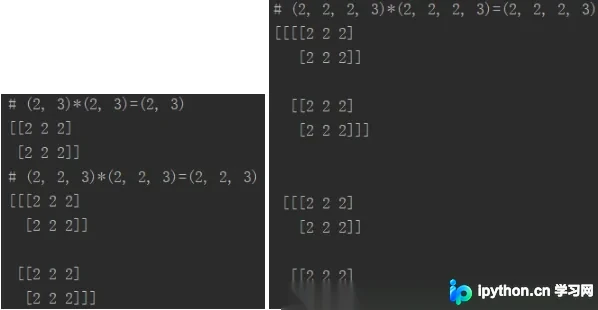

广播机制演示
当点乘的一方是标量常数或一维向量时,TensorFlow会自动进行广播。以下代码展示了常数 k 和向量 l 与不同维度矩阵 a_2d, a_3d, a_4d 的点乘操作:
a_2d = tf.constant([1]*6, shape=[2, 3])
k = tf.constant(2)
l = tf.constant([2, 3, 4])
b_2d_1 = tf.multiply(k, a_2d) # tf.multiply(a_2d, k) is also ok
b_2d_2 = tf.multiply(l, a_2d) # tf.multiply(a_2d, l) is also ok
a_3d = tf.constant([1]*12, shape=[2, 2, 3])
b_3d_1 = tf.multiply(k, a_3d) # tf.multiply(a_3d, k) is also ok
b_3d_2 = tf.multiply(l, a_3d) # tf.multiply(a_3d, l) is also ok
a_4d = tf.constant([1]*24, shape=[2, 2, 2, 3])
b_4d_1 = tf.multiply(k, a_4d) # tf.multiply(a_4d, k) is also ok
b_4d_2 = tf.multiply(l, a_4d) # tf.multiply(a_4d, l) is also ok

with tf.Session() as sess:
 tf.global_variables_initializer().run()
 print("# {}*{}={} \n{}".
  format(k.eval().shape, a_2d.eval().shape, b_2d_1.eval().shape, b_2d_1.eval()))
 print("# {}*{}={} \n{}".
  format(l.eval().shape, a_2d.eval().shape, b_2d_2.eval().shape, b_2d_2.eval()))
 print("# {}*{}={} \n{}".
  format(k.eval().shape, a_3d.eval().shape, b_3d_1.eval().shape, b_3d_1.eval()))
 print("# {}*{}={} \n{}".
  format(l.eval().shape, a_3d.eval().shape, b_3d_2.eval().shape, b_3d_2.eval()))
 print("# {}*{}={} \n{}".
  format(k.eval().shape, a_4d.eval().shape, b_4d_1.eval().shape, b_4d_1.eval()))
 print("# {}*{}={} \n{}".
  format(l.eval().shape, a_4d.eval().shape, b_4d_2.eval().shape, b_4d_2.eval()))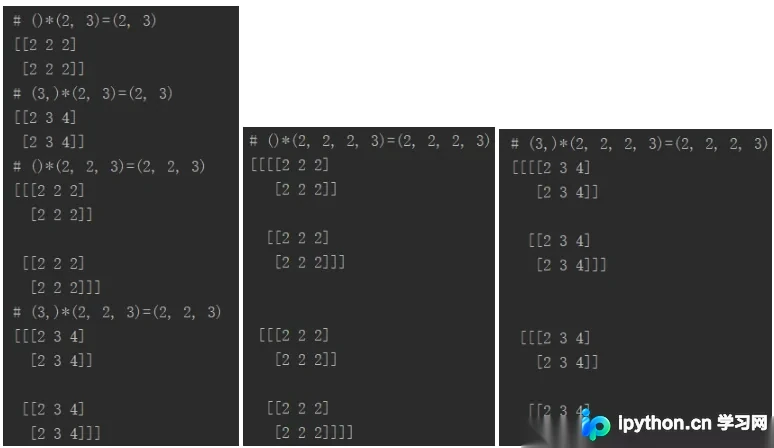
累加运算:tf.reduce_sum
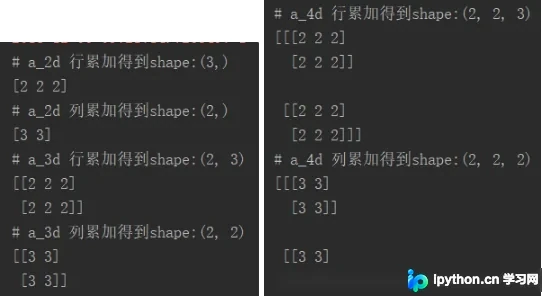
矩阵累加通常用于降维或求和统计,通过 tf.reduce_sum 函数实现。关键在于指定 axis 参数:指定轴上的维度将被压缩,其他维度保持不变。例如,对2D矩阵按 axis=0 累加得到行向量,按 axis=1 累加得到列向量。
以下代码演示了如何对2D、3D和4D矩阵进行指定轴的累加:
a_2d = tf.constant([1]*6, shape=[2, 3])
d_2d_1 = tf.reduce_sum(a_2d, axis=0)
d_2d_2 = tf.reduce_sum(a_2d, axis=1)
a_3d = tf.constant([1]*12, shape=[2, 2, 3])
d_3d_1 = tf.reduce_sum(a_3d, axis=1)
d_3d_2 = tf.reduce_sum(a_3d, axis=2)
a_4d = tf.constant([1]*24, shape=[2, 2, 2, 3])
d_4d_1 = tf.reduce_sum(a_4d, axis=2)
d_4d_2 = tf.reduce_sum(a_4d, axis=3)

with tf.Session() as sess:
 tf.global_variables_initializer().run()
 print("# a_2d 行累加得到shape:{}\n{}".format(d_2d_1.eval().shape, d_2d_1.eval()))
 print("# a_2d 列累加得到shape:{}\n{}".format(d_2d_2.eval().shape, d_2d_2.eval()))
 print("# a_3d 行累加得到shape:{}\n{}".format(d_3d_1.eval().shape, d_3d_1.eval()))
 print("# a_3d 列累加得到shape:{}\n{}".format(d_3d_2.eval().shape, d_3d_2.eval()))
 print("# a_4d 行累加得到shape:{}\n{}".format(d_4d_1.eval().shape, d_4d_1.eval()))
 print("# a_4d 列累加得到shape:{}\n{}".format(d_4d_2.eval().shape, d_4d_2.eval()))
总结
掌握TensorFlow的矩阵运算规则是进行深度学习开发的基础。通过 tf.matmul 处理线性变换,利用 tf.multiply 进行元素级操作及广播,并使用 tf.reduce_sum 实现数据聚合,可以灵活应对各种张量处理需求。理解维度匹配与广播机制,能有效避免常见的形状错误。
以上就是TensorFlow矩阵运算实例(矩阵相乘,点乘,行/列累加)的详细内容,更多关于TensorFlow矩阵运算的资料请关注本站其它相关文章!
免责声明:本文内容仅供参考,不代表本站观点。转载或引用请注明出处。









