

TensorFlow命名空间与TensorBoard可视化详解

发布时间:2026-10-14| 3人浏览过
本文介绍TensorFlow中tf.name_scope与tf.variable_scope的区别,演示如何通过命名空间整理TensorBoard计算图节点。通过修改代码示例,展示如何在TensorBoard中展开和查看特定命名空间下的运算节点,提升可视化清晰度。
TensorFlow命名空间函数基础
一、命名空间函数
tf.name_scope与tf.variable_scope区别
tf.variable_scope
tf.name_scope
先以下面的代码说明两者的区别

 # 命名空间管理函数
'''
说明tf.variable_scope和tf.name_scope的区别
'''
def manage_namespace():
 with tf.variable_scope("foo"):
  # 在命名空间foo下获取变量"bar",于是得到的变量名称为"foo/bar"。
  a = tf.get_variable("bar",[1]) #获取变量名称为“bar”的变量
  print a.name  #输出:foo/bar:0
 with tf.variable_scope("bar"):
  # 在命名空间bar下获取变量"bar",于是得到的变量名称为"bar/bar"。
  a = tf.get_variable("bar",[1])
  print a.name  #输出:bar/bar:0
 with tf.name_scope("a"):
  # 使用tf.Variable函数生成变量会受tf.name_scope影响,于是得到的变量名称为"a/Variable"。
  a = tf.Variable([1]) #新建变量
  print a.name  #输出:a/Variable:0

  # 使用tf.get_variable函数生成变量不受tf.name_scope影响,于是变量并不在a这个命名空间中。
  a = tf.get_variable("b",[1])
  print a.name  #输出:b:0
 with tf.name_scope("b"):
  # 使用tf.get_variable函数生成变量不受tf.name_scope影响,所以这里将试图获取名称
  # 为“b”的变量。然而这个变量已经被声明了,于是这里会报重复声明的错误
  tf.get_variable("b",[1])#提示错误
TensorBoard计算图查看方法
二、TensorBoard计算图查看
1. 以下代码实例中,未指定任何命名空间。
未指定命名空间的计算图示例
def practice_num1():
# 练习1: 构建简单的计算图
 input1 = tf.constant([1.0, 2.0, 3.0],name="input1")
 input2 = tf.Variable(tf.random_uniform([3]),name="input2")
 output = tf.add_n([input1,input2],name = "add")

#生成一个写日志的writer,并将当前的tensorflow计算图写入日志
 writer = tf.summary.FileWriter(ROOT_DIR + "/log",tf.get_default_graph())
 writer.close()
关于如何使用TensorBoard的过程此处不再赘述。下面查看未指明命名空间时的运算图结构。
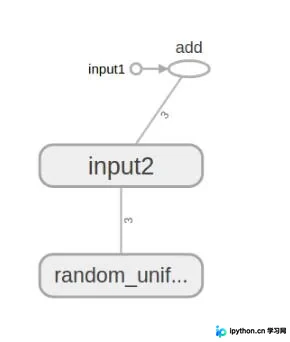
指定命名空间后的代码修改
2. 修改代码以指定命名空间后的效果如下。
使用命名空间整理节点
def practice_num1_modify():
 #将输入定义放入各自的命名空间中,从而使得tensorboard可以根据命名空间来整理可视化效果图上的节点
 # 练习1: 构建简单的计算图
 with tf.name_scope("input1"):
  input1 = tf.constant([1.0, 2.0, 3.0],name="input1")
 with tf.name_scope("input2"):
  input2 = tf.Variable(tf.random_uniform([3]),name="input2")
 output = tf.add_n([input1,input2],name = "add")

#生成一个写日志的writer,并将当前的tensorflow计算图写入日志
 writer = tf.summary.FileWriter(ROOT_DIR + "/log",tf.get_default_graph())
 writer.close()
查看运算图结果。
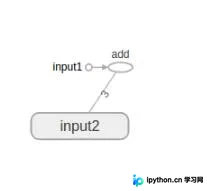
上图仅包含两个命名空间的节点。我们可以点击名称为“input2”的图标上的“+”号,以展开该命名空间下的内容。
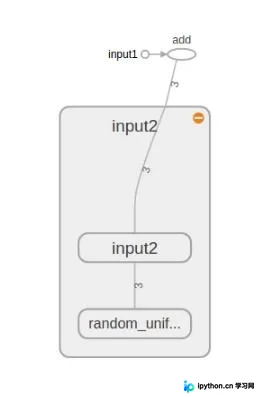
命名空间对可视化的影响
效果:通过命名空间可以整理可视化效果图上的节点,使可视化的效果更加清晰。
以上这篇TensorFlow命名空间和TensorBoard图节点实例就是小编分享给大家的全部内容了,希望能给大家一个参考,也希望大家多多支持本站。
免责声明:本文内容仅供参考,不代表本站观点。转载或引用请注明出处。









