Python httpx库怎么异步获取网页跳转状态码

深入讲解在 Python 中使用 httpx 异步客户端获取网页重定向跳转状态码的具体方法,涵盖 follow_redirects 参数配置、response.history 重定向链解析、单跳快速探测与异常排查完整方案。
在 Python 中使用 httpx 异步客户端获取网页重定向(如 301、302、307、308)状态码,主要有两种解决路径:如果需要自动跟踪跳转并拿到每一跳的历史状态码,可以在请求时传入 follow_redirects=True,随后遍历最终响应对象的 response.history 列表读取前序状态码;如果只想探测初始链接是否发生跳转而不需要获取最终落地页内容,则保持默认的 follow_redirects=False,客户端在收到首个 30x 响应时便会直接返回,此时可直接从当前响应对象的 response.status_code 属性中读取跳转状态码。
一、认识 httpx 异步客户端的重定向默认行为
很多从同步库 requests 转向 httpx 的开发者容易产生一个惯性误区:认为客户端发出 GET 请求时会自动顺着重定向一路跟到最终页面。事实上,httpx 为了更精细地控制连接开销与请求安全,在默认情况下是不自动追踪重定向的,其内部参数默认值为 follow_redirects=False(在早期版本中为 allow_redirects=False)。
这一设计意味着当目标网址配置了 HTTP 到 HTTPS 的强制升级(常见为 301 永久重定向),或者业务登录页跳转(常见为 302 临时重定向)时,默认发出的异步请求拿到的响应对象本身就是一个 30x 响应,而不会继续发起下一次网络握手。这也为我们按需获取状态码提供了清晰的切入点。
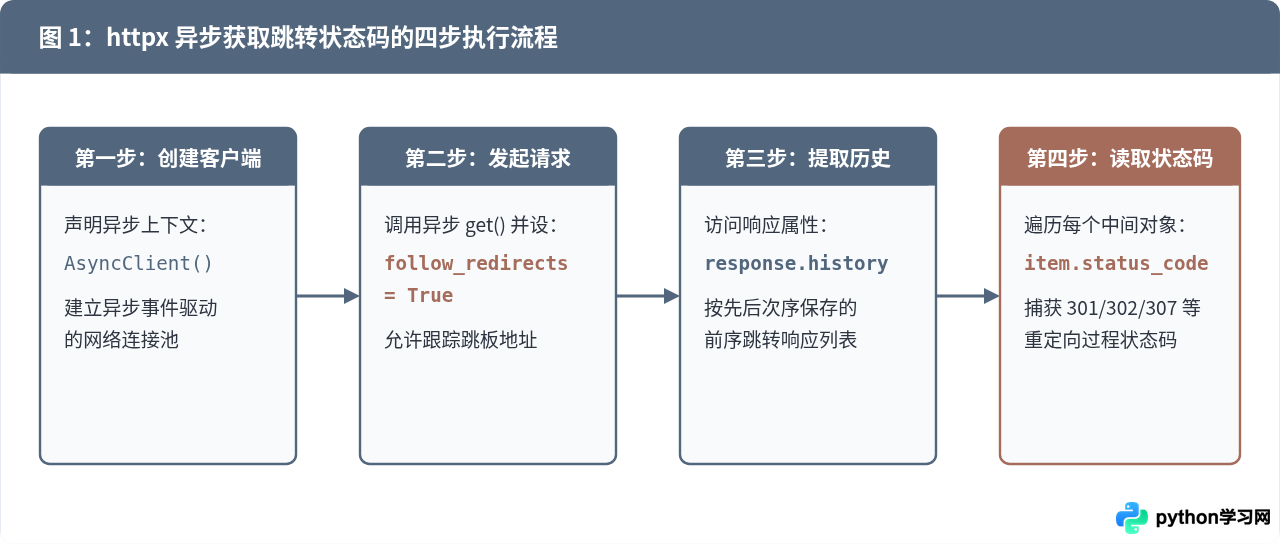
二、核心方法一:启用 follow_redirects 并解析 response.history
在多数日常业务场景中,我们既希望获取最终目标页面的正文数据(如 200 OK 页面),又需要记录请求究竟经历了哪些跳转阶段、每一步的状态码是什么。此时应显式声明 follow_redirects=True。
客户端接收到重定向响应后会自动发起对 Location 头部对应地址的新请求,并将沿途的所有历史响应按发生顺序保存在最终响应对象的 history 列表中。每一个历史元素都是完整的 httpx.Response 实例。
import asyncio
import httpx

async def fetch_redirect_chain(target_url: str):
    # 使用异步上下文管理器管理客户端生命周期
    async with httpx.AsyncClient() as client:
        # 显式开启重定向跟踪
        response = await client.get(target_url, follow_redirects=True)

        # 1. 检查是否存在跳转历史
        if response.history:
            print(f"检测到请求共发生了 {len(response.history)} 次跳转:")
            for index, historical_resp in enumerate(response.history, start=1):
                redirect_code = historical_resp.status_code
                request_url = historical_resp.url
                next_location = historical_resp.headers.get("location", "未指定")
                print(f"  [第 {index} 跳] 状态码: {redirect_code} | 请求地址: {request_url} -> 跳转至: {next_location}")
        else:
            print("该请求直接到达目标地址,未发生重定向。")

        # 2. 最终目标页面的状态码与地址
        print(f"最终落地页状态码: {response.status_code} | 最终地址: {response.url}")

if __name__ == "__main__":
    # 以常见的 http 协议向 https 自动跳转为例
    test_url = "http://httpbin.org/redirect/2"
    asyncio.run(fetch_redirect_chain(test_url))
上述代码运行后,如果网址经过两次 302 临时重定向才进入目标页,输出会清晰展现每一次跳转的原始状态码:
示例输出:
检测到请求共发生了 2 次跳转:
  [第 1 跳] 状态码: 302 | 请求地址: http://httpbin.org/redirect/2 -> 跳转至: /relative-redirect/1
  [第 2 跳] 状态码: 302 | 请求地址: http://httpbin.org/relative-redirect/1 -> 跳转至: /get
最终落地页状态码: 200 | 最终地址: http://httpbin.org/get
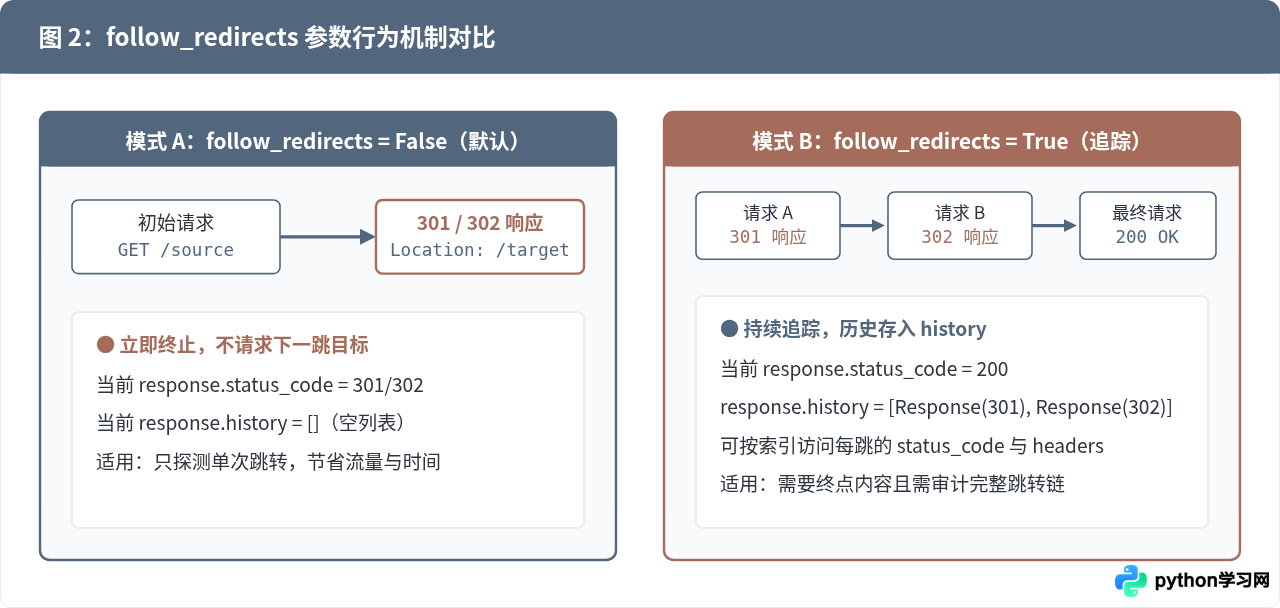
三、核心方法二:关闭重定向直接捕获单跳状态码
在网络巡检、死链检测或大规模并发爬虫场景中,我们的目标往往仅仅是判断某一批 URL 是否发生了 301 或 302,并不关心重定向之后网页的具体 HTML。如果让客户端跟踪重定向,不仅会额外发送多次网络请求、消耗带宽,还会拖慢并发处理速度。
此时保持 follow_redirects=False 是最高效的选择。配合 response.is_redirect 属性,可以直接完成判断:
import asyncio
import httpx

async def inspect_single_hop(url: str):
    async with httpx.AsyncClient() as client:
        # 不跟随重定向,收到第一个响应立即返回
        response = await client.get(url, follow_redirects=False)

        # 配合内置布尔属性 is_redirect 进行判断
        if response.is_redirect:
            print(f"URL 发生跳转!状态码: {response.status_code}")
            print(f"目标重定向地址 (Location): {response.headers.get('Location')}")
        else:
            print(f"URL 未发生跳转,当前直接返回状态码: {response.status_code}")

if __name__ == "__main__":
    asyncio.run(inspect_single_hop("http://github.com"))
response.is_redirect 是 httpx 提供的便捷属性,当且仅当响应状态码为 301、302、303、307 或 308 且响应头中包含有效的 Location 字段时,该属性才返回 True。这种方式比手动写 if response.status_code in (301, 302, 303, 307, 308): 更加严谨。
四、深入解析:httpx.Response 对象及其 history 属性的结构
为了在实际业务中稳定提取数据,有必要清晰了解 response.history 中存储的具体对象形式。图 3 展示了对象模型之间的引用关系:
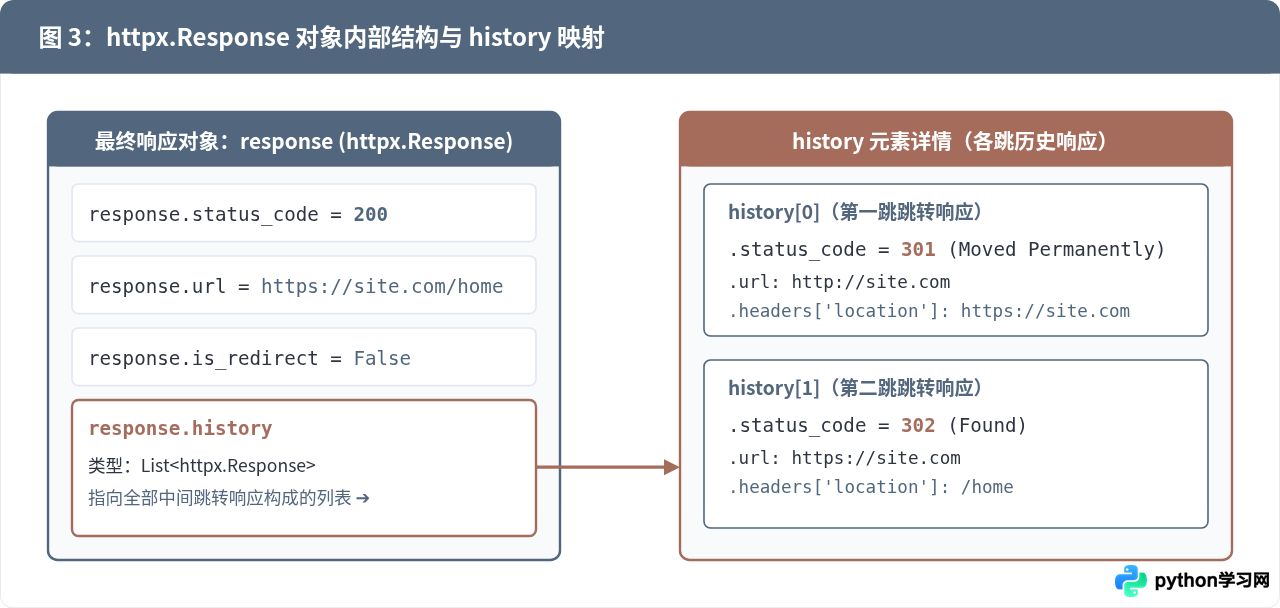
从数据结构可以看出,response.history 是一个标准 Python 列表:
- 列表索引顺序:
response.history[0]永远代表最初始发出的那个请求对应的响应结果;最后一个元素则是到达终点页面前的那一次跳板响应。 - 各跳状态码提取:使用列表推导式
[r.status_code for r in response.history]即可快速提取纯数字形式的状态码序列,例如[301, 302]。 - 响应头读取:通过
r.headers.get("Location")可以获取跳转目标。由于 HTTP 头部字段大小写不敏感,在 httpx 中无论写"location"还是"Location"都能正确取得值。
五、异常处理、限制跳转次数与并发采集
在网络实际请求中,如果不加控制地启用重定向,可能会遭遇“重定向死循环”(例如页面 A 跳转到 B,B 又跳回 A),最终导致程序卡死或耗尽系统连接。为了编写出高健壮性的异步代码,需要合理配置 max_redirects 参数并捕获 httpx.TooManyRedirects 异常。
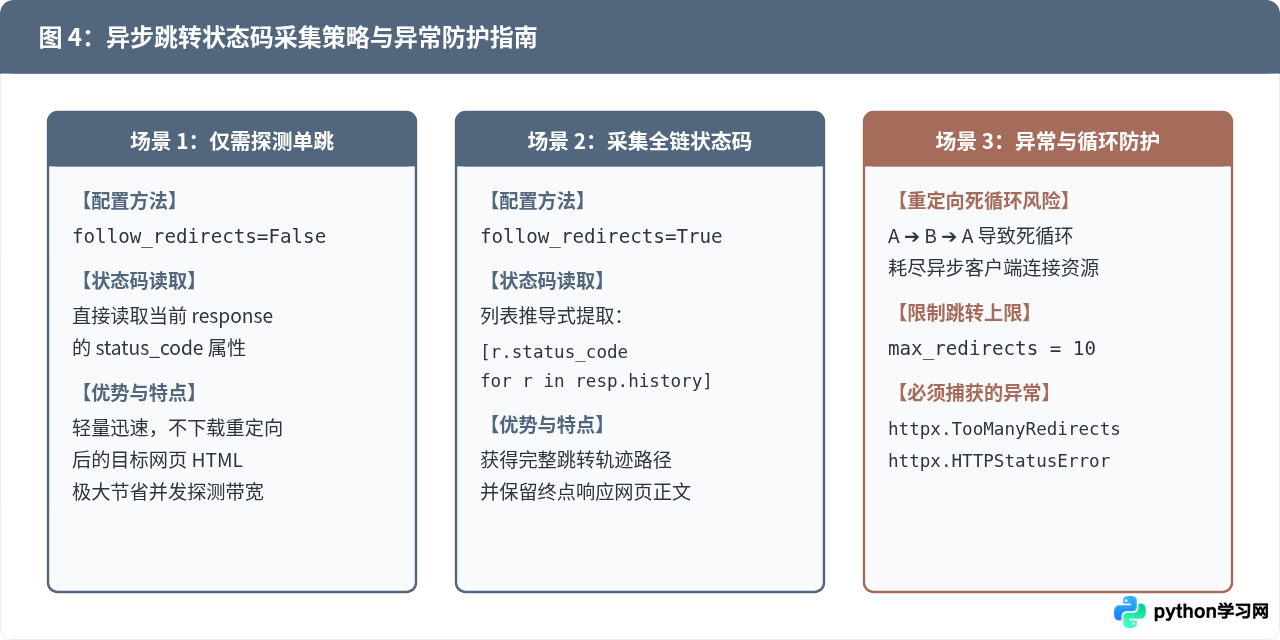
下面是一个包含并发控制与异常处理的完整批量探测脚本:
import asyncio
import httpx

async def safe_get_redirect_codes(client: httpx.AsyncClient, url: str):
    try:
        response = await client.get(url, follow_redirects=True)
        # 收集整个链路的状态码清单
        chain_codes = [h.status_code for h in response.history]
        return {
            "url": url,
            "redirect_codes": chain_codes,
            "final_code": response.status_code,
            "final_url": str(response.url),
            "status": "success"
        }
    except httpx.TooManyRedirects:
        # 重定向次数超出 max_redirects 限制
        return {"url": url, "error": "TooManyRedirects: 重定向次数超限或存在死循环", "status": "failed"}
    except httpx.RequestError as exc:
        # 网络波动、DNS解析失败等常规网络异常
        return {"url": url, "error": f"网络请求异常: {exc}", "status": "failed"}

async def main():
    target_urls = [
        "http://httpbin.org/redirect/1",
        "http://httpbin.org/status/200",
        "http://httpbin.org/redirect/3",
    ]

    # 在 AsyncClient 初始化时统一设置限制:最多允许跳转 5 次,超时时间 10 秒
    limits = httpx.Limits(max_keepalive_connections=20, max_connections=50)
    async with httpx.AsyncClient(max_redirects=5, timeout=10.0, limits=limits) as client:
        # 利用 asyncio.gather 实现高并发批量执行
        tasks = [safe_get_redirect_codes(client, u) for u in target_urls]
        results = await asyncio.gather(*tasks)

        for item in results:
            if item["status"] == "success":
                print(f"目标 [{item['url']}] 跳转码序列: {item['redirect_codes']} | 最终状态: {item['final_code']}")
            else:
                print(f"目标 [{item['url']}] 检测失败: {item['error']}")

if __name__ == "__main__":
    asyncio.run(main())
避坑提示:在 httpx.AsyncClient 中,max_redirects 参数必须在初始化 AsyncClient(max_redirects=...) 时传入,而不能作为单个 client.get() 方法调用的参数。如果不设置,默认的最大跳转次数限制为 20 次。
六、总结
在 Python 中使用 httpx 异步获取网页跳转状态码,关键在于区分场景并选择匹配的参数配置:
- 若需要完整链路审计或终点内容,使用
await client.get(url, follow_redirects=True),并通过response.history获取每一个中间跳转响应的.status_code和.headers['location']。 - 若仅需要判断首跳是否跳转以降低带宽,使用默认的
follow_redirects=False,直接检查response.is_redirect与response.status_code。 - 在大规模批量检测时,务必在
httpx.AsyncClient(max_redirects=N)中设置上限并捕获httpx.TooManyRedirects,以防御恶意或故障网站的重定向死循环。
免责声明:本文内容仅供参考,不代表本站观点。转载或引用请注明出处。