

Python怎么批量调用并执行多个脚本文件

系统讲解在Python中批量调用和执行多个脚本文件的实用方法。从subprocess串行与并行调度,到执行上下文隔离、依赖顺序控制以及工作目录陷阱排查,提供完整可复用的代码方案与架构解析。
在日常数据清洗、自动化运维、爬虫任务或测试流程中,我们经常会把业务拆分成多个功能独立的 .py 脚本文件。逐一在终端手动执行不仅枯燥低效,还极易出现漏跑或先后顺序混乱的问题。使用 Python 编写一个总控调度脚本(Master Script)来统一管理和批量执行这些子脚本,是构建轻量化流水线最直接可靠的方案。
要实现高效稳健的批量执行,核心在于解决三个关键点:自动化发现目标脚本文件、建立完全隔离的子进程环境、以及妥善捕获各脚本的执行状态与退出码。下面我们将从最基础的串行执行开始,逐步展开并发调度、依赖编排与生产级避坑实践。
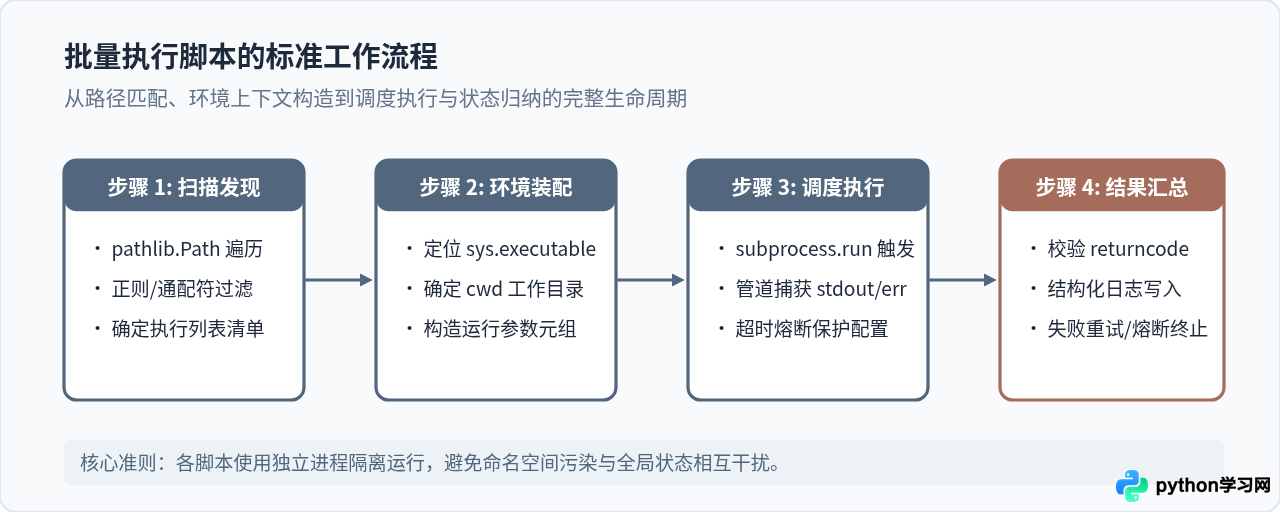
一、基于 subprocess 的基础串行执行
很多初学者容易想到使用 os.system('python script.py'),但这种方式无法精确捕获输出内容,也难以对错误异常做出严密处理。现代 Python 标准库中最推荐的工具是 subprocess 模块。
通过 subprocess.run(),我们可以为每一个脚本拉起一个完全独立的 Python 解释器子进程。子进程即使发生严重报错或者调用了 sys.exit(),也不会导致主调度程序崩溃,而且内存彼此隔离,不会发生全局变量污染。
下面是一个标准的串行批量调用实现。脚本会自动扫描指定目录下的所有 .py 文件并依次执行:
import sys
import subprocess
from pathlib import Path

def run_scripts_sequentially(script_dir: str):
    target_dir = Path(script_dir).resolve()
    # 按文件名排序,排除当前脚本本身
    scripts = sorted([p for p in target_dir.glob("*.py") if p.name != Path(__file__).name])

    print(f"发现待执行脚本共 {len(scripts)} 个")
    results = []

    for script_path in scripts:
        print(f"\n>>> 正在执行: {script_path.name}")

        # 构造执行命令:确保使用当前环境相同的解释器
        cmd = [sys.executable, str(script_path)]

        try:
            # cwd 参数极其关键:确保脚本内部使用相对路径时基于其自身所在目录
            proc = subprocess.run(
                cmd,
                cwd=script_path.parent,
                capture_output=True,
                text=True,
                timeout=120  # 单脚本最长执行超时时间(秒)
            )

            success = (proc.returncode == 0)
            results.append({
                "script": script_path.name,
                "success": success,
                "returncode": proc.returncode,
                "stdout": proc.stdout.strip(),
                "stderr": proc.stderr.strip()
            })

            if success:
                print(f"[成功] {script_path.name} 执行完成")
            else:
                print(f"[失败] {script_path.name} 返回码: {proc.returncode}")
                print(f"错误详情:\n{proc.stderr.strip()}")

        except subprocess.TimeoutExpired:
            print(f"[超时] {script_path.name} 执行超过限额被强制中止")
            results.append({"script": script_path.name, "success": False, "reason": "timeout"})
        except Exception as e:
            print(f"[异常] 启动失败: {e}")
            results.append({"script": script_path.name, "success": False, "reason": str(e)})

    return results

if __name__ == "__main__":
    # 传入脚本所在目录进行批量执行
    run_scripts_sequentially("./tasks")
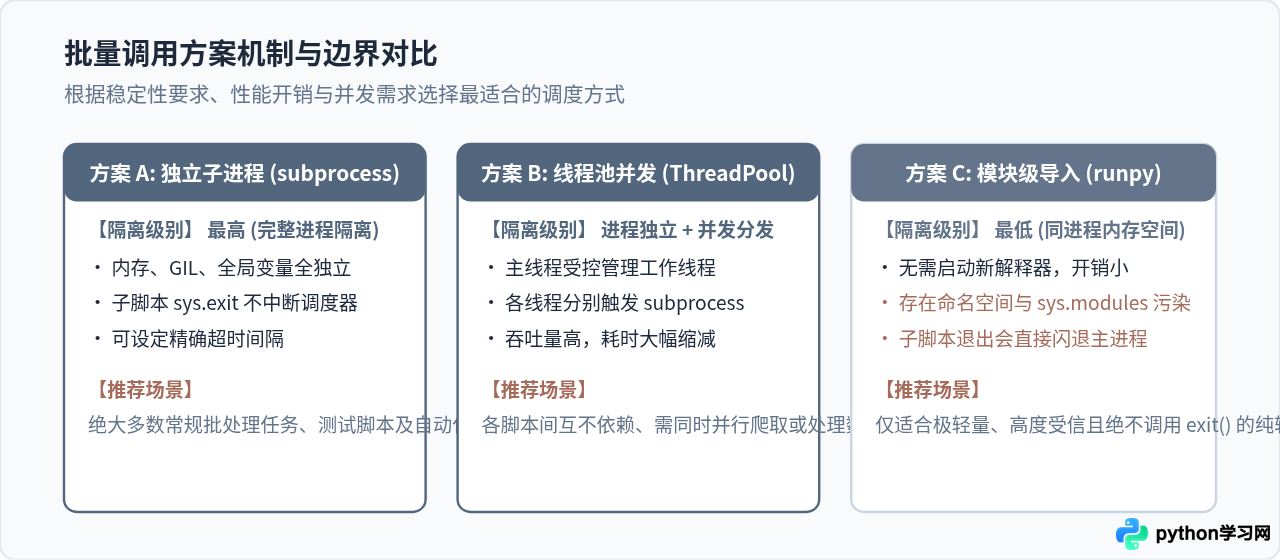
二、三种批量调用机制的技术选型对比
除了上述的 subprocess.run,在 Python 社区中还存在多进程池分发以及模块级动态导入(如 runpy)等方式。不同机制在隔离深度、资源占用及出错边界上存在显著差异。
三、进阶方案:利用并发加速无依赖脚本的批量执行
当我们要批量调用的脚本多达数十个,且彼此之间没有先后顺序依赖时(例如分别清洗不同城市的天气数据或独立导出日报表格),串行执行会导致总等待时间线性累加。
由于子脚本是作为外部独立子进程运行的,主进程所做的工作主要是派发命令并等待 I/O 返回。因此,借助 concurrent.futures.ThreadPoolExecutor 管理子进程并发,是资源开销极小且调度效率极高的做法:
import sys
import subprocess
import time
from pathlib import Path
from concurrent.futures import ThreadPoolExecutor, as_completed

def execute_single_script(script_path: Path) -> dict:
    start_time = time.time()
    cmd = [sys.executable, str(script_path)]

    try:
        proc = subprocess.run(
            cmd,
            cwd=script_path.parent,
            capture_output=True,
            text=True,
            timeout=180
        )
        duration = round(time.time() - start_time, 2)
        return {
            "script": script_path.name,
            "status": "SUCCESS" if proc.returncode == 0 else "FAILED",
            "returncode": proc.returncode,
            "duration": duration,
            "stderr": proc.stderr.strip()
        }
    except subprocess.TimeoutExpired:
        return {
            "script": script_path.name,
            "status": "TIMEOUT",
            "duration": round(time.time() - start_time, 2)
        }

def run_scripts_concurrently(script_dir: str, max_workers: int = 4):
    target_dir = Path(script_dir).resolve()
    scripts = sorted([p for p in target_dir.glob("task_*.py")])

    print(f"启动并发调度: 目标脚本 {len(scripts)} 个,最大并行度: {max_workers}")

    with ThreadPoolExecutor(max_workers=max_workers) as executor:
        future_to_script = {executor.submit(execute_single_script, p): p for p in scripts}

        for future in as_completed(future_to_script):
            res = future.result()
            print(f"[{res['status']}] {res['script']} (耗时: {res['duration']}s)")
            if res['status'] == "FAILED":
                print(f"  ↳ 错误概要: {res.get('stderr', '')[:120]}...")

if __name__ == "__main__":
    run_scripts_concurrently("./batch_jobs", max_workers=4)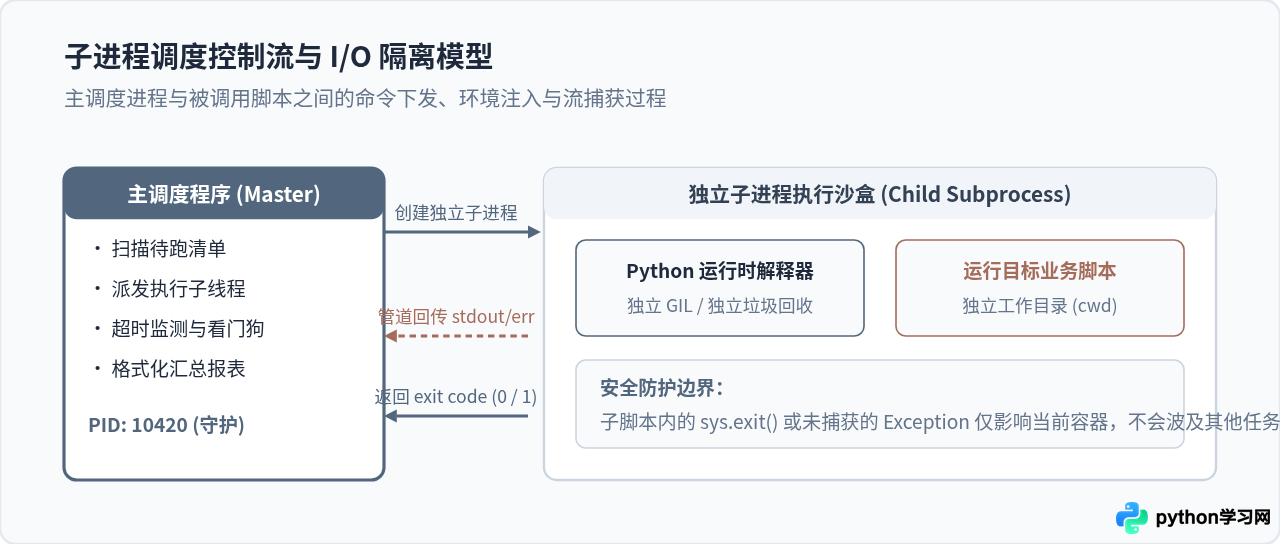
四、有依赖关系的脚本编排与顺序控制
很多实际工程任务要求严格按步骤进行。例如,必须先执行 01_download.py 获取原始数据,接着执行 02_clean.py 清理缺失值,最后执行 03_export.py 导出分析结果。如果前序步骤失败,后续步骤绝不能盲目启动。
对于这种场景,我们可以使用分阶段清单编排,并在检测到前置脚本返回码非零时立即触发熔断机制:
import sys
import subprocess
from pathlib import Path

def run_pipeline_stages(pipeline: list):
    """
    pipeline 结构示例:
    [
        {"name": "数据准备", "script": "01_fetch_data.py", "critical": True},
        {"name": "特征工程", "script": "02_build_features.py", "critical": True},
        {"name": "生成报告", "script": "03_render_report.py", "critical": False}
    ]
    """
    base_dir = Path(__file__).resolve().parent

    for stage in pipeline:
        script_file = base_dir / stage["script"]
        print(f"\n=== 阶段启动: {stage['name']} ({stage['script']}) ===")

        if not script_file.exists():
            print(f"错误: 脚本文件不存在: {script_file}")
            if stage.get("critical", True):
                print("关键步骤缺失,流水线强行终止。")
                return False
            continue

        res = subprocess.run([sys.executable, str(script_file)], cwd=base_dir)

        if res.returncode != 0:
            print(f"阶段 {stage['name']} 失败,返回码: {res.returncode}")
            if stage.get("critical", True):
                print("关键任务失败,阻断后续执行!")
                return False
            else:
                print("非关键步骤失败,允许继续流转。")
        else:
            print(f"阶段 {stage['name']} 成功完成。")

    print("\n全部流水线阶段执行完毕。")
    return True
五、生产环境批量调用的关键避坑要点
重点防范陷阱:很多在本地开发环境能跑通的脚本,放在批量调度器中却频繁报 FileNotFoundError 或 ModuleNotFoundError,90% 以上源于以下三点原因:
- 1. 工作目录(CWD)偏差:当被调用的脚本内部使用了相对路径(例如
open('data.csv'))时,它默认基于的是启动调度程序时的终端当前目录,而非脚本文件所在目录。解决方法是在subprocess.run时显式传入cwd=script_path.parent。 - 2. 解释器不一致(虚拟环境失效):在代码中不要直接写命令字符串
['python', 'xxx.py']。因为系统环境变量中的python可能会指向系统全局 Python,导致虚拟环境中已安装的依赖包找不到。必须使用sys.executable获取当前正在运行的解释器绝对路径。 - 3. 缓冲区溢出导致死锁:如果子脚本产生了海量的文本输出,使用
subprocess.Popen手动读取管道时若处理不当,可能造成管道缓冲区填满从而永久阻塞挂起。推荐使用subprocess.run(capture_output=True)或将输出直接重定向到磁盘日志文件中。
六、总结与落地建议
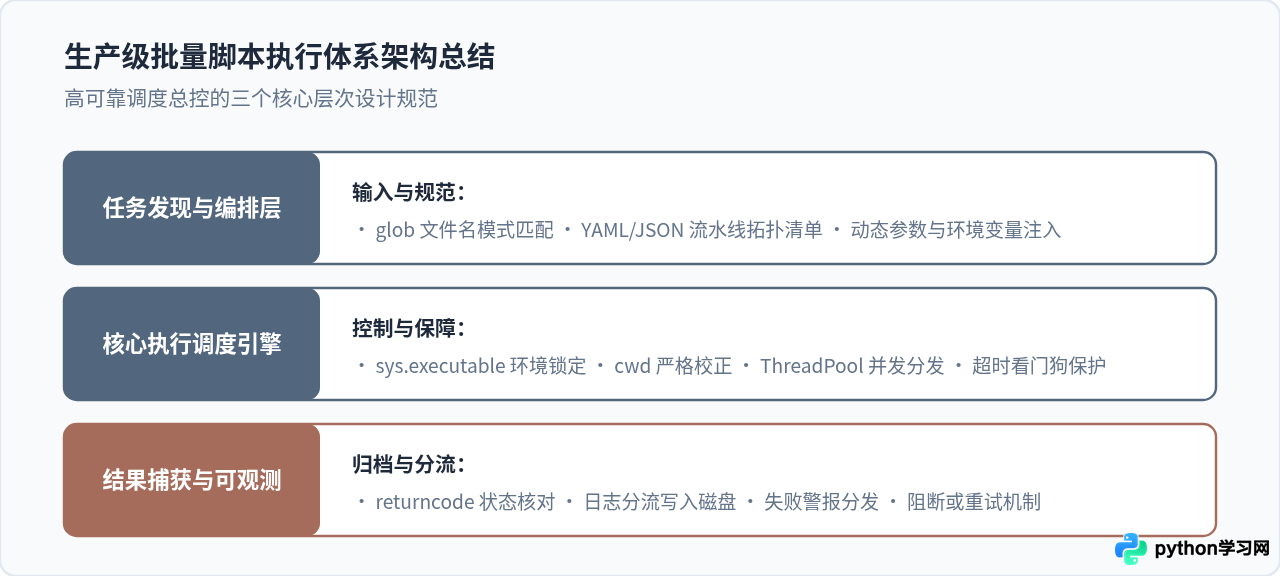
批量调用 Python 脚本并不是单纯地写一个循环去跑 os.system,而是要把各子脚本看作一个个独立的执行单元:
- 轻量级串行批处理:优先使用
pathlib.Path配合subprocess.run,务必带上sys.executable和cwd=script_path.parent。 - 无依赖的密集型批量任务:使用
ThreadPoolExecutor配合subprocess.run,设定合理的max_workers,能够在几行代码内获得数倍的执行速度提升。 - 有先后依赖的数据流水线:使用带顺序的字典列表配置每个阶段,显式设定关键(critical)属性,一旦失败立即终止后续流程,确保数据一致性。
免责声明:本文内容仅供参考,不代表本站观点。转载或引用请注明出处。









