

怎么利用Python爬虫自动抓取资讯并跟踪商品价格

利用Python实现网络资讯的自动汇总与电商商品价格跟踪,核心在于建立一条“请求网页、精准解析数据、结构化入库、周期巡检并触发通知”的完整自动化链条。无论是监控新闻动态还是捕捉心仪商品的优惠降价,其底层逻辑都是通过模拟网络通信获取数据并对比历史变动。本文将详细演示从基础环境搭建、页面解析提取、历史数据存储,到最终自动化运行与变动提醒的完整实践过程。
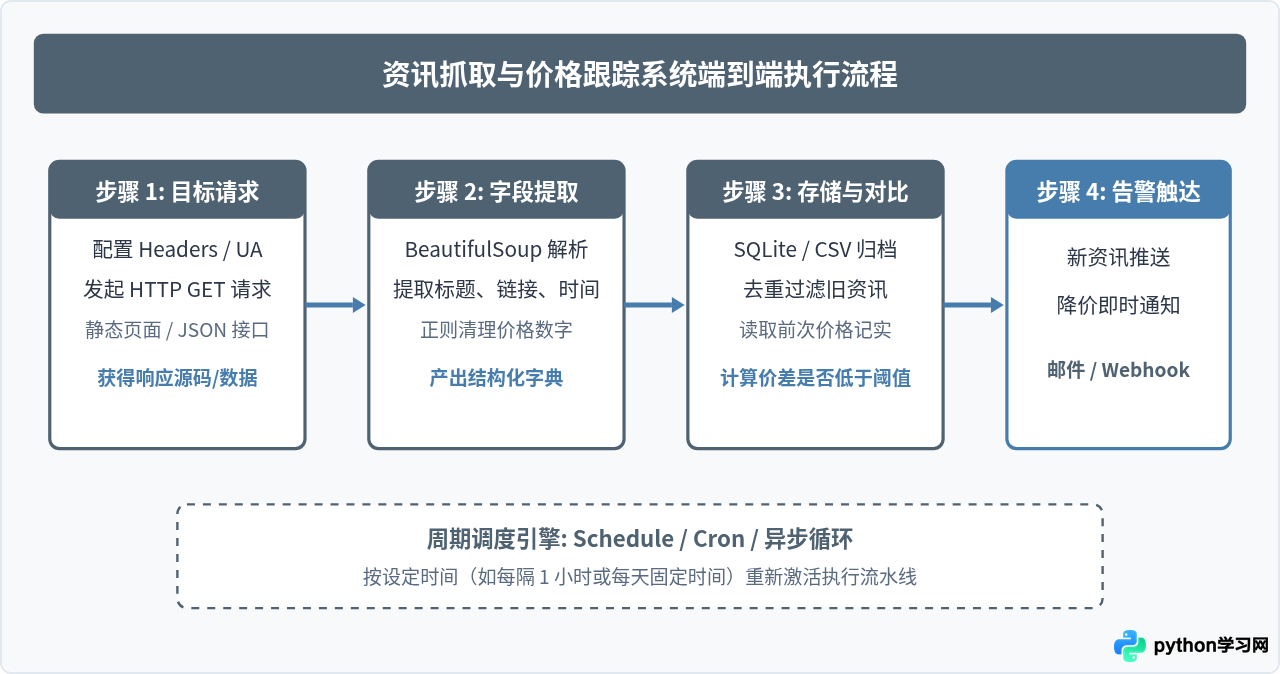
一、环境准备与依赖安装
在开始编写代码之前,我们需要准备运行环境。Python 3.8 及以上版本均可满足要求。对于通用的资讯抓取与价格跟踪任务,基础依赖主要包括用于发送网络请求的 requests 库,以及用于解析 HTML 结构的 beautifulsoup4。此外,为了实现轻量级定时调度,可以使用 schedule 库。
打开终端或命令行工具,执行以下命令安装所需依赖:
pip install requests beautifulsoup4 schedule为了让网络请求更像真实的浏览器访问,避免被目标站点的防护机制直接拒绝,爬虫发起请求时必须携带标准请求头(Headers),尤其是 User-Agent。
二、自动抓取新闻资讯的实现
资讯类网站(如行业媒体、新闻门户、博客列表)通常具有固定的列表页结构。爬虫的任务是获取列表页 HTML,遍历文章卡片节点,提取出标题、原文链接以及发布时间,并过滤掉已经抓取过的重复内容。
以下为一个典型的新闻资讯列表抓取脚本,我们以标准文章列表结构为例进行解析:
import requests
from bs4 import BeautifulSoup
import time

HEADERS = {
    'User-Agent': 'Mozilla/5.0 (Windows NT 10.0; Win64; x64) AppleWebKit/537.36 (KHTML, like Gecko) Chrome/118.0.0.0 Safari/537.36'
}

def fetch_news(target_url):
    """
    抓取资讯列表页,返回包含标题和链接的列表
    """
    try:
        response = requests.get(target_url, headers=HEADERS, timeout=10)
        response.raise_for_status()
        response.encoding = response.apparent_encoding
    except requests.RequestException as e:
        print(f"请求失败: {e}")
        return []

    soup = BeautifulSoup(response.text, 'html.parser')
    news_list = []

    # 假设新闻项位于 class 为 'news-item' 的标签内
    items = soup.select('.news-item')
    for item in items:
        title_tag = item.select_one('.news-title a')
        time_tag = item.select_one('.news-time')

        if title_tag:
            title = title_tag.get_text(strip=True)
            link = title_tag.get('href', '')
            pub_time = time_tag.get_text(strip=True) if time_tag else "未知"

            news_list.append({
                'title': title,
                'link': link,
                'time': pub_time
            })

    return news_list

# 示例调用
if __name__ == '__main__':
    url = "https://example.com/news"  # 替换为目标资讯地址
    articles = fetch_news(url)
    print(f"成功抓取到 {len(articles)} 条资讯:")
    for art in articles[:3]:
        print(f"- [{art['time']}] {art['title']} -> {art['link']}")
在解析资讯列表时,需要注意相对路径的处理。如果提取出的 link 属性是类似 /article/1001.html 的相对路径,建议使用 Python 内置的 urllib.parse.urljoin(target_url, link) 将其转为完整的绝对 URL。
三、商品价格跟踪与变动计算
商品价格与资讯不同,价格是动态变动的单项数值。进行价格跟踪的核心在于两点:一是精准提取出纯数字金额;二是在本地或数据库中记录每次采样的价格,并与上一次或历史最低价进行比较。
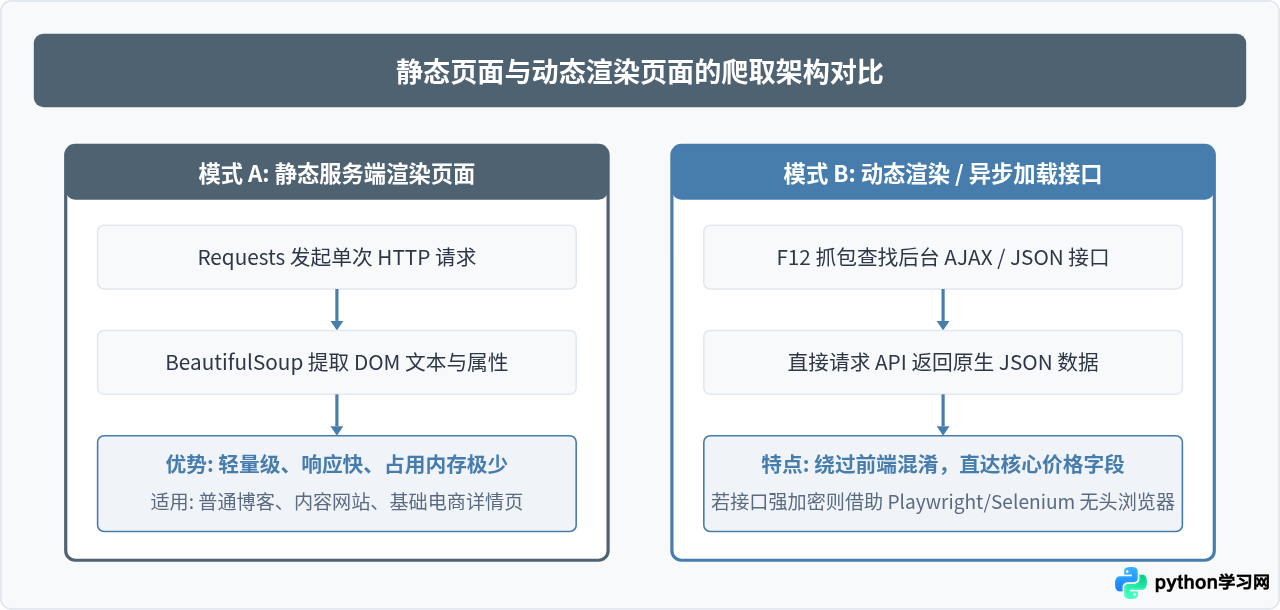
许多电商平台在 HTML 中直接展示价格,但夹杂着货币符号“¥”或折扣说明文本。我们需要使用正则表达式提取出纯数值并转换为 float 类型:
import requests
from bs4 import BeautifulSoup
import re

def parse_price(raw_text):
    """
    从带有货币符号的字符串中提取数值,例如 '¥ 2,999.00' -> 2999.0
    """
    clean_text = raw_text.replace(',', '')
    match = re.search(r'\d+(\.\d+)?', clean_text)
    if match:
        return float(match.group(0))
    return None

def fetch_product_price(product_url):
    """
    抓取商品详情页当前价格
    """
    headers = {
        'User-Agent': 'Mozilla/5.0 (Windows NT 10.0; Win64; x64) AppleWebKit/537.36 (KHTML, like Gecko) Chrome/118.0.0.0 Safari/537.36'
    }
    response = requests.get(product_url, headers=headers, timeout=10)
    response.raise_for_status()

    soup = BeautifulSoup(response.text, 'html.parser')

    # 假设商品价格标签拥有 class='price-tag'
    price_tag = soup.select_one('.price-tag')
    if not price_tag:
        raise ValueError("未找到价格节点,页面结构可能发生变化")

    price = parse_price(price_tag.get_text())
    return price
四、历史数据存储与降价判断逻辑
抓取到数据后,必须进行持久化存储。对于个人或小团队项目,Python 内置的 sqlite3 是最可靠的选择:免安装服务、单文件存储,支持 SQL 关系查询。我们可以设计一张包含抓取时间、商品ID与价格的数据表。
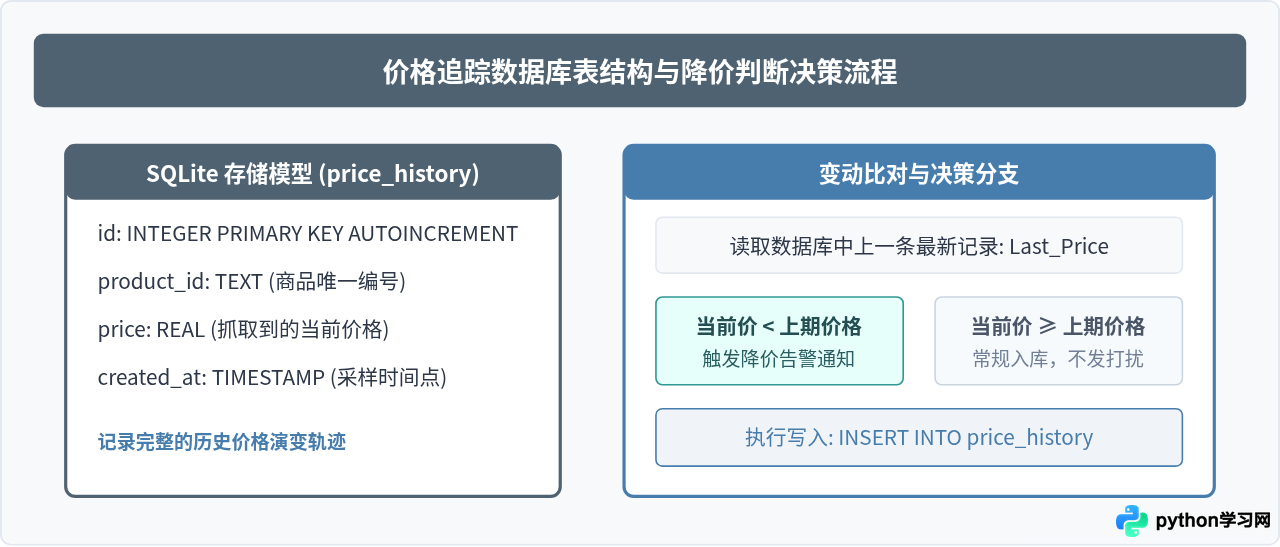
下面是维护数据库与比对价格的完整模块代码:
import sqlite3
from datetime import datetime

DB_FILE = 'tracker.db'

def init_db():
    """初始化数据库表"""
    conn = sqlite3.connect(DB_FILE)
    cursor = conn.cursor()
    cursor.execute('''
        CREATE TABLE IF NOT EXISTS price_history (
            id INTEGER PRIMARY KEY AUTOINCREMENT,
            product_id TEXT NOT NULL,
            price REAL NOT NULL,
            created_at TIMESTAMP NOT NULL
        )
    ''')
    conn.commit()
    conn.close()

def check_and_update_price(product_id, current_price, target_threshold=None):
    """
    检查价格变动,若发生降价或低于预期阈值则返回提醒消息
    """
    conn = sqlite3.connect(DB_FILE)
    cursor = conn.cursor()

    # 查询上一轮的价格
    cursor.execute('''
        SELECT price FROM price_history
        WHERE product_id = ?
        ORDER BY id DESC LIMIT 1
    ''', (product_id,))
    row = cursor.fetchone()

    alert_msg = None
    if row:
        last_price = row[0]
        if current_price < last_price:
            drop_amount = round(last_price - current_price, 2)
            alert_msg = f"商品 [{product_id}] 降价啦!原价: ¥{last_price},现价: ¥{current_price},直降 ¥{drop_amount}!"
    else:
        alert_msg = f"商品 [{product_id}] 首次加入监控,当前价格为: ¥{current_price}"

    # 达标心理预期阈值告警
    if target_threshold and current_price <= target_threshold:
        alert_msg = (alert_msg or "") + f" 已达到预期购买价 ¥{target_threshold}!"

    # 记录当前价格
    cursor.execute('''
        INSERT INTO price_history (product_id, price, created_at)
        VALUES (?, ?, ?)
    ''', (product_id, current_price, datetime.now().strftime('%Y-%m-%d %H:%M:%S')))

    conn.commit()
    conn.close()

    return alert_msg
五、自动化定时任务与通知渠道集成
一个实用的跟踪系统不能依赖人工手动点击运行,必须依托系统定时服务实现全自动运转。在 Python 中,可以通过两种方式实现:
- Python 代码内轻量级调度:使用
schedule库,适合常驻在云主机或个人电脑后台执行。 - 操作系统级原生调度:在 Linux/macOS 环境下配置
Crontab,在 Windows 下配置“任务计划程序”。原生定时器不会占用常驻内存,进程崩溃后也不影响下次启动。
下面演示通过 schedule 库将资讯采集与价格监控组合在一起的入口程序:
import schedule
import time

def job_monitor():
    print(f"[{time.strftime('%Y-%m-%d %H:%M:%S')}] 开始执行巡检任务...")

    # 1. 抓取资讯
    news_items = fetch_news("https://example.com/tech-news")
    if news_items:
        print(f"抓取到最新资讯 {len(news_items)} 条,首条: {news_items[0]['title']}")

    # 2. 跟踪商品价格
    try:
        current_price = fetch_product_price("https://example.com/product/12345")
        alert = check_and_update_price(product_id="P12345", current_price=current_price, target_threshold=2500.0)
        if alert:
            send_notification("价格监控提醒", alert)
    except Exception as e:
        print(f"价格跟踪异常: {e}")

def send_notification(title, content):
    """
    发送通知,例如利用企业微信机器人、钉钉机器人或邮件
    """
    print(f"【通知触发】{title} -> {content}")
    # 此处可接入 requests.post(webhook_url, json={...}) 发送消息

# 设置调度策略: 每隔 2 小时运行一次
schedule.every(2).hours.do(job_monitor)

# 首次立即执行一次
job_monitor()

if __name__ == '__main__':
    print("定时监控服务已启动...")
    while True:
        schedule.run_pending()
time.sleep(1)电商平台对于高频价格抓取较为敏感。在实际部署过程中,建议将请求间隔设定在合理范围(如 1~3 小时一次),切勿使用毫秒级并发循环。每次请求之间加入 time.sleep(random.uniform(2, 5)) 随机延迟,并规范设置合法的请求头信息,以维护目标服务器的正常运行。
六、总结与技术全景
综上所述,利用 Python 构建资讯抓取与价格追踪系统,不仅能帮我们摆脱繁琐的人工重复刷新,还能实时掌握第一手信息与促销底价。整个系统的各个模块分工明确:从数据源探测、解析提取、持久化存储到定时调度通知,构成了一个闭环的技术体系。
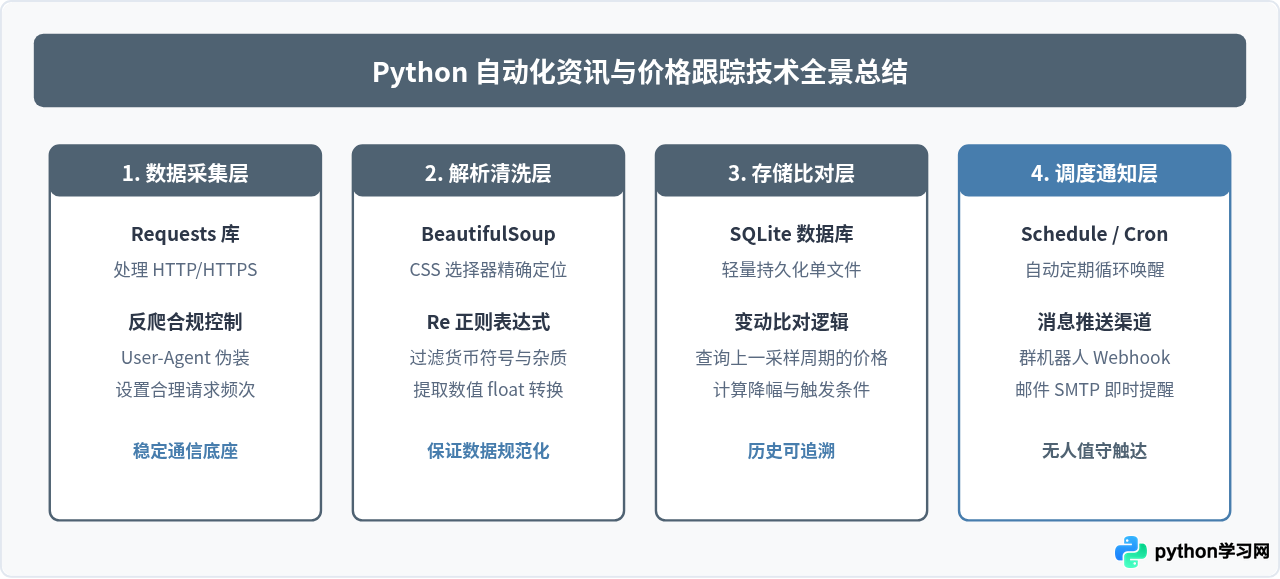
免责声明:本文内容仅供参考,不代表本站观点。转载或引用请注明出处。









