

Python OpenCV实现图像标注局部放大功能详解

本文介绍如何使用Python和OpenCV开发图像标注工具中的局部放大功能。通过同步主窗口与放大窗口的鼠标操作,实现矩形框标注的精准微调。详细解析了鼠标在不同窗口下的行为逻辑、坐标映射机制及代码实现细节,帮助开发者提升标注效率。
该功能旨在优化基于OpenCV的图像标注工具的使用体验。
为何需要局部放大视图?
在图像数据标注过程中,一次性实现精准标注往往难度较大,通常需要多次微调才能达到理想效果。当标注目标尺寸较小时,即便经过微调也难以保证精度,因此引入局部放大窗口显得尤为必要,它允许用户对特定标注区域进行放大查看,从而辅助精细调整。
程序运行逻辑
本文以矩形框作为标注信息的示例,因为矩形框是图像标注中最基础且常用的形态。其他复杂标注形态的设计思路与此类似。
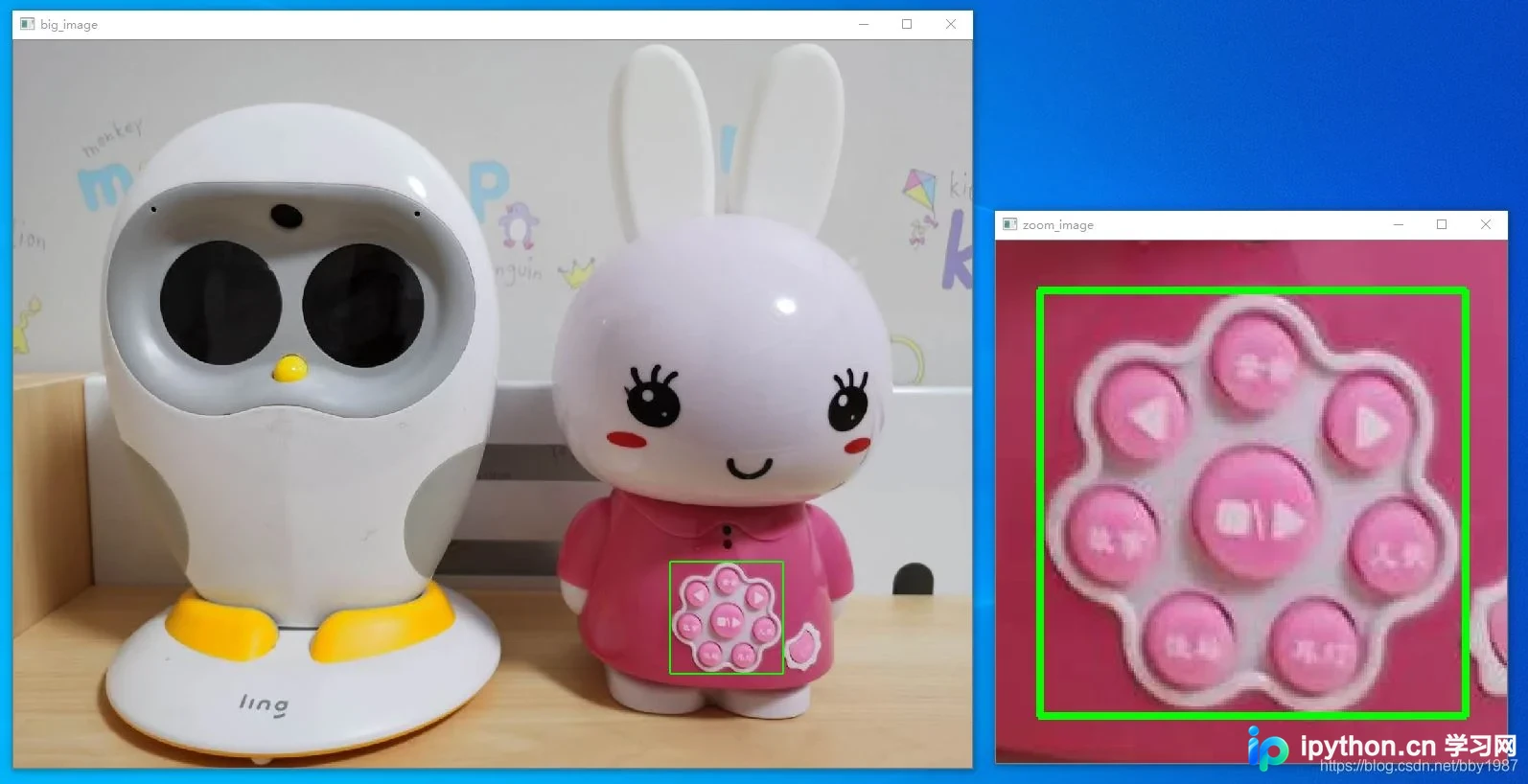
程序的核心逻辑在于实现两个窗口间鼠标操作的同步映射。控制主要依据两个维度:一是当前鼠标位于主窗口还是放大窗口;二是具体的鼠标操作行为。其中,主窗口负责显示完整的原始大图,而放大窗口则专门用于展示局部放大的细节区域。
- 鼠标位于主窗口时的行为
- 鼠标移动事件:以当前鼠标位置(current_pt)为中心,截取并显示一块放大区域,其显示范围由参数default_zoom_image_size决定。为确保以current_pt为中心向四周均能获取到default_zoom_image_size一半大小的图像数据,current_pt的有效活动范围被限制在大图内部,需减去相当于default_zoom_image_size一半宽度的边缘区域。在此有效范围内,current_pt直接对应鼠标当前坐标;若鼠标进入边缘区域,current_pt则被修正为距离鼠标当前位置最近的边界点。
- 鼠标绘制矩形框:在主窗口中,按下左键并拖动即可绘制矩形框,且绘制的矩形框严格限制在大图边界之内。
- 删除矩形框:存在两种触发删除的情况:一是左键绘制出的矩形框面积为零(即未形成有效区域);二是点击鼠标右键。
- 鼠标位于放大窗口时的行为
- 鼠标移动事件:在放大窗口中,此操作不执行任何动作。
- 鼠标绘制矩形框:在放大窗口中,按下左键并拖动可绘制矩形框。此时矩形框允许超出放大窗口的显示边界,但依然受到大图实际边界的约束,不会超出大图范围。
- 删除矩形框:在放大窗口中,删除矩形框的条件与主窗口一致,即上述两种情况。
- 鼠标点击事件:无论是左键还是右键点击,在放大窗口中均可用于选中当前的current_pt中心点。
总体而言,在主窗口中的操作可以较为随意,因为除了矩形框的绘制外,原始图像本身保持不变。而在放大窗口中的操作则需相对谨慎,否则界面会因频繁刷新而变得混乱,导致无法有效操作。因此,当在主窗口绘制矩形框时,放大窗口会随之动态更新以显示对应区域;而在放大窗口内绘制矩形框时,放大窗口保持静止(避免视觉干扰)。
程序代码示例
理解上述逻辑后,阅读下方代码将变得相对容易。此处省略细枝末节,仅强调一个关键设计点:我们需要分别为两个窗口编写独立的鼠标回调函数。
在深入理解本程序细节之前,先回顾一下单纯绘制矩形框的基础代码,这有助于理解后续实现:OpenCV-Python中绘制矩形框的方法cv2.rectangle()。
# -*- coding: utf-8 -*-
import cv2


class Rect(object):
    def __init__(self, pt1=(0, 0), pt2=(0, 0)):
        self.tl = pt1
        self.br = pt2
        self.regularize()

    def regularize(self):
        """
        make sure tl = TopLeft point, br = BottomRight point
        """
        tl = (min(self.tl[0], self.br[0]), min(self.tl[1], self.br[1]))
        br = (max(self.tl[0], self.br[0]), max(self.tl[1], self.br[1]))
        self.tl = tl
        self.br = br

    def get_center(self):
        """
        get center point of Rect
        """
        center_x = (self.tl[0] + self.br[0]) // 2
        center_y = (self.tl[1] + self.br[1]) // 2
        return center_x, center_y

    def get_width(self):
        """
        get width of Rect
        """
        return abs(self.br[0] - self.tl[0])

    def get_height(self):
        """
        get height of Rect
        """
        return abs(self.br[1] - self.tl[1])

    def height_over_width(self):
        """
        ratio of height over width
        """
        return self.get_height() / self.get_width()

    def get_area(self):
        """
        get area of Rect
        """
        return self.get_width() * self.get_height()


class DrawZoom(object):
    def __init__(self, image, color,
                 current_pt=(0, 0),
                 default_zoom_image_size=(256, 256)):
        self.original_image = image
        self.color = color
        self.thickness = 2
        self.current_pt = current_pt
        self.default_zoom_image_size = default_zoom_image_size

        self.rect_in_big_image = Rect()
        self.rect_in_zoom_image = Rect()
        self.zoom_offset = (0, 0)

        self.is_drawing_big = False
        self.is_drawing_zoom = False
        self.exist_rect = False

        self.big_image = image.copy()
        self.zoom_image = None
        self.zoom_image_backup = None
        self.get_zoom_image()

    def get_image_height(self):
        """
        get height of big image
        """
        return self.original_image.shape[0]

    def get_image_width(self):
        """
        get width of big image
        """
        return self.original_image.shape[1]

    def get_margin_height(self):
        """
        get height of margin. in the margin area of big image, coordinate of
        current_pt does NOT change
        """
        return self.default_zoom_image_size[0] // 2

    def get_margin_width(self):
        """
        get width of margin
        """
        return self.default_zoom_image_size[1] // 2

    def get_zoom_image(self, height_ratio_expand=0.2, width_ratio_expand=0.2):
        """
        get zoom image for two cases: the rect exists or not.
        height_ratio_expand and width_ratio_expand are used for expanding some
        area of rect
        """
        if not self.exist_rect:
            self.get_zoom_image_for_current_pt()
        elif self.rect_in_big_image.get_area() > 0:
            self.get_zoom_image_for_rect(height_ratio_expand,
                                         width_ratio_expand)

    def get_zoom_image_for_current_pt(self):
        """
        get zoom image for current mouse point (when rect does not exist)
        """
        # (x, y) is center coordinate
        x = max(self.current_pt[0], self.get_margin_width())
        x = min(x, self.get_image_width() - self.get_margin_width())
        y = max(self.current_pt[1], self.get_margin_height())
        y = min(y, self.get_image_height() - self.get_margin_height())

        tl_x = x - self.get_margin_width()
        tl_y = y - self.get_margin_height()
        br_x = x + self.get_margin_width()
        br_y = y + self.get_margin_height()
        tl_x, tl_y, br_x, br_y = self.shrink_rect(tl_x, tl_y, br_x, br_y)
        self.zoom_image = self.big_image[tl_y:br_y, tl_x:br_x]
        self.zoom_image_backup = self.original_image[tl_y:br_y, tl_x:br_x]
        self.zoom_offset = (tl_x, tl_y)

    def get_zoom_image_for_rect(self, height_ratio_expand, width_ratio_expand):
        """
        get zoom image when rect exists
        """
        if self.rect_in_big_image.get_area() == 0:
            return None
        height_over_width_for_win_zoom = \
            self.default_zoom_image_size[1] / self.default_zoom_image_size[0]
        center = self.rect_in_big_image.get_center()
        if self.rect_in_big_image.height_over_width() > \
                height_over_width_for_win_zoom:
            half_height = int(0.5 * (1 + height_ratio_expand) *
                              self.rect_in_big_image.get_height())
            half_width = int(half_height / height_over_width_for_win_zoom)
        else:
            half_width = int(0.5 * (1 + width_ratio_expand) *
                             self.rect_in_big_image.get_width())
            half_height = int(half_width * height_over_width_for_win_zoom)
        tl_x = center[0] - half_width
        tl_y = center[1] - half_height
        br_x = center[0] + half_width
        br_y = center[1] + half_height
        tl_x, tl_y, br_x, br_y = self.shrink_rect(tl_x, tl_y, br_x, br_y)
        self.zoom_image = self.big_image[tl_y:br_y, tl_x:br_x]
        self.zoom_image_backup = self.original_image[tl_y:br_y, tl_x:br_x]
        self.zoom_offset = (tl_x, tl_y)

    @staticmethod
    def clip(value, low, high):
        """
        clip value between low and high
        """
        output = max(value, low)
        output = min(output, high)
        return output

    def shrink_point(self, x, y):
        """
        shrink point (x, y) to inside big image
        """
        x_shrink = self.clip(x, 0, self.get_image_width())
        y_shrink = self.clip(y, 0, self.get_image_height())
        return x_shrink, y_shrink

    def shrink_rect(self, pt1_x, pt1_y, pt2_x, pt2_y):
        """
        shrink rect to inside big image
        """
        pt1_x = self.clip(pt1_x, 0, self.get_image_width())
        pt1_y = self.clip(pt1_y, 0, self.get_image_height())
        pt2_x = self.clip(pt2_x, 0, self.get_image_width())
        pt2_y = self.clip(pt2_y, 0, self.get_image_height())
        rect = Rect((pt1_x, pt1_y), (pt2_x, pt2_y))
        rect.regularize()
        tl_x, tl_y = rect.tl
        br_x, br_y = rect.br
        return tl_x, tl_y, br_x, br_y

    def reset_big_image(self):
        """
        reset big_image (for show) using original image
        """
        self.big_image = self.original_image.copy()

    def reset_zoom_image(self):
        """
        reset zoom_image (for show) using the zoom image backup
        """
        self.zoom_image = self.zoom_image_backup.copy()

    def draw_rect_in_big_image(self):
        """
        draw rect in big image
        """
        cv2.rectangle(self.big_image,
                      self.rect_in_big_image.tl, self.rect_in_big_image.br,
                      color=self.color, thickness=self.thickness)

    def draw_rect_in_zoom_image(self):
        """
        draw rect in zoom image
        """
        cv2.rectangle(self.zoom_image,
                      self.rect_in_zoom_image.tl, self.rect_in_zoom_image.br,
                      color=self.color, thickness=self.thickness)

    def update_drawing_big(self):
        """
        update drawing big image, and map the corresponding area to zoom image
        """
        if self.exist_rect:
            self.draw_rect_in_big_image()
        self.get_zoom_image()

    def update_drawing_zoom(self):
        """
        update drawing big and zoom image when drawing rect in zoom image
        """
        if self.exist_rect:
            self.draw_rect_in_big_image()
            self.draw_rect_in_zoom_image()


def onmouse_big_image(event, x, y, flags, draw_zoom):
    if event == cv2.EVENT_LBUTTONDOWN:
        # pick first point of rect
        draw_zoom.is_drawing_big = True
        draw_zoom.rect_in_big_image.tl = (x, y)
        draw_zoom.exist_rect = True
    elif draw_zoom.is_drawing_big and event == cv2.EVENT_MOUSEMOVE:
        # pick second point of rect and draw current rect
        draw_zoom.rect_in_big_image.br = draw_zoom.shrink_point(x, y)
        draw_zoom.reset_big_image()
        draw_zoom.update_drawing_big()
    elif event == cv2.EVENT_LBUTTONUP:
        # finish drawing current rect
        draw_zoom.is_drawing_big = False
        draw_zoom.rect_in_big_image.br = draw_zoom.shrink_point(x, y)
        draw_zoom.rect_in_big_image.regularize()
        if draw_zoom.rect_in_big_image.get_area() == 0:
            draw_zoom.reset_big_image()
            draw_zoom.rect_in_big_image = Rect()
            draw_zoom.exist_rect = False
        draw_zoom.update_drawing_big()
    elif (not draw_zoom.is_drawing_big) and event == cv2.EVENT_RBUTTONDOWN:
        # right button down to erase current rect
        draw_zoom.rect_in_big_image = Rect()
        draw_zoom.exist_rect = False
        draw_zoom.reset_big_image()
        draw_zoom.update_drawing_big()
    else:
        # default case: mouse move without rect
        draw_zoom.current_pt = (x, y)
        draw_zoom.update_drawing_big()


def onmouse_zoom_image(event, x, y, flags, draw_zoom):
    if event == cv2.EVENT_LBUTTONDOWN:
        # pick first point of rect
        draw_zoom.is_drawing_zoom = True
        draw_zoom.rect_in_zoom_image.tl = (x, y)
        draw_zoom.rect_in_big_image.tl = (x + draw_zoom.zoom_offset[0],
                                          y + draw_zoom.zoom_offset[1])
        draw_zoom.exist_rect = True
    elif draw_zoom.is_drawing_zoom and event == cv2.EVENT_MOUSEMOVE:
        # pick second point of rect and draw current rect
        draw_zoom.rect_in_zoom_image.br = (x, y)
        draw_zoom.rect_in_big_image.br = draw_zoom.shrink_point(
            x + draw_zoom.zoom_offset[0], y + draw_zoom.zoom_offset[1])
        draw_zoom.reset_zoom_image()
        draw_zoom.reset_big_image()
        draw_zoom.update_drawing_zoom()
    elif event == cv2.EVENT_LBUTTONUP:
        # finish drawing current rect
        draw_zoom.is_drawing_zoom = False
        draw_zoom.rect_in_big_image.br = draw_zoom.shrink_point(
            x + draw_zoom.zoom_offset[0], y + draw_zoom.zoom_offset[1])
        draw_zoom.rect_in_big_image.regularize()
        if draw_zoom.rect_in_big_image.get_area() == 0:
            draw_zoom.reset_big_image()
            draw_zoom.rect_in_big_image = Rect()
            draw_zoom.rect_in_zoom_image = Rect()
            draw_zoom.exist_rect = False
            draw_zoom.current_pt = draw_zoom.shrink_point(
                x + draw_zoom.zoom_offset[0], y + draw_zoom.zoom_offset[1])
        draw_zoom.update_drawing_big()
    elif (not draw_zoom.is_drawing_big) and event == cv2.EVENT_RBUTTONDOWN:
        # right button down to erase current rect
        draw_zoom.rect_in_big_image = Rect()
        draw_zoom.rect_in_zoom_image = Rect()
        draw_zoom.exist_rect = False
        draw_zoom.reset_big_image()
        draw_zoom.current_pt = draw_zoom.shrink_point(
            x + draw_zoom.zoom_offset[0], y + draw_zoom.zoom_offset[1])
        draw_zoom.update_drawing_big()
    else:
        # mousemove in zoom image will not change the content of image
        pass


if __name__ == '__main__':
    WIN_NAME_BIG = 'big_image'
    WIN_NAME_ZOOM = 'zoom_image'
    image = cv2.imread('1.jpg')
    draw_zoom = DrawZoom(image, (0, 255, 0))
    cv2.namedWindow(WIN_NAME_BIG, 0)
    cv2.namedWindow(WIN_NAME_ZOOM, 0)
    cv2.setMouseCallback(WIN_NAME_BIG, onmouse_big_image, draw_zoom)
    cv2.setMouseCallback(WIN_NAME_ZOOM, onmouse_zoom_image, draw_zoom)
    while True:
        cv2.imshow(WIN_NAME_BIG, draw_zoom.big_image)
        cv2.imshow(WIN_NAME_ZOOM, draw_zoom.zoom_image)
        key = cv2.waitKey(30)
        if key == 27:  # ESC
            break
    cv2.destroyAllWindows()
运行结果展示:
总结
至此,关于Python OpenCV实现图像局部放大功能的介绍已完成。如需了解更多相关OpenCV局部放大技巧,欢迎查阅本站往期文章或继续浏览后续内容。感谢大家的支持!
免责声明:本文内容仅供参考,不代表本站观点。转载或引用请注明出处。









