

Python Pygame 实现俄罗斯方块完整源码与示例

发布时间:2026-10-14| 6人浏览过
本文提供基于 Python 和 Pygame 库的俄罗斯方块游戏完整实现代码。内容涵盖方块类与建筑类的定义、7种基本形状随机生成逻辑、碰撞检测、下落控制及屏幕绘制更新机制。通过具体代码示例,展示如何利用 Pygame 快速构建经典方块消除游戏,适合 Python 初学者进行图形界面与游戏逻辑的学习参考。
Python Pygame 俄罗斯方块实现概述
本文分享了使用 Python 结合 Pygame 库开发俄罗斯方块游戏的完整代码示例,供读者参考学习。
具体实现源码如下所示:
核心代码逻辑与结构
# coding : utf-8

#: pip install pygame
import random
import sys
import pygame

#: 颜色定义
COLOR_WHITE = (255, 255, 255)
COLOR_BLACK = (0, 0, 0)

class Block:
 """小块"""
 width = 24
 height = 24

 @staticmethod
 def draw(s, left, top, color, bg_color):
  pygame.draw.rect(s, bg_color, pygame.Rect(left, top, Block.width, Block.height))
  pygame.draw.rect(s, color, pygame.Rect(left, top, Block.width - 1, Block.height - 1))


class Building:
 """积木"""

 def __init__(self):
  """
  方块的7种基本形状
  每次初始化随机选择一个形状
  @:return True / False
  """
  self.form = random.choice(
   [
    [
     [0, 0, 0, 0, 0],
     [0, 0, 1, 0, 0],
     [0, 1, 1, 1, 0],
     [0, 0, 0, 0, 0],
     [0, 0, 0, 0, 0]
    ],
    [
     [0, 0, 0, 0, 0],
     [0, 0, 0, 0, 0],
     [1, 1, 1, 1, 0],
     [0, 0, 0, 0, 0],
     [0, 0, 0, 0, 0]
    ],
    [
     [0, 0, 0, 0, 0],
     [0, 1, 1, 0, 0],
     [0, 0, 1, 1, 0],
     [0, 0, 0, 0, 0],
     [0, 0, 0, 0, 0]
    ],
    [
     [0, 0, 0, 0, 0],
     [0, 0, 1, 1, 0],
     [0, 1, 1, 0, 0],
     [0, 0, 0, 0, 0],
     [0, 0, 0, 0, 0]
    ],
    [
     [0, 0, 0, 0, 0],
     [0, 1, 1, 0, 0],
     [0, 0, 1, 0, 0],
     [0, 0, 1, 0, 0],
     [0, 0, 0, 0, 0]
    ],
    [
     [0, 0, 0, 0, 0],
     [0, 0, 1, 1, 0],
     [0, 0, 1, 0, 0],
     [0, 0, 1, 0, 0],
     [0, 0, 0, 0, 0]
    ],
    [
     [0, 0, 0, 0, 0],
     [0, 1, 1, 0, 0],
     [0, 1, 1, 0, 0],
     [0, 0, 0, 0, 0],
     [0, 0, 0, 0, 0]
    ]
   ])

 def __getitem__(self, pos):
  return self.form[pos]

 def __setitem__(self, key, value):
  self.form[key] = value


class Layout:
 """棋盘"""

 def __init__(self):
  self.block_x_count = 16;
  self.block_y_count = 22;
  self.layout = [[0 if 1 < i < self.block_x_count - 2 and j < self.block_y_count - 2 else 1
      for i in range(self.block_x_count)] for j in range(self.block_y_count)]

 @property
 def size(self):
  """返回棋盘屏幕大小(width,height)"""
  return (self.block_x_count * Block.width, self.block_y_count * Block.height)

 def create_new_building(self):
  """
  创建新的积木,初始化位置为第5,0格, 速度为4
  :return: 返回是否无空间创建了
  """
  self.building = Building()
  self.building_left, self.building_top = 5, 0 #
  self.drop_speed = 3
  print(self.test_building_touch_wall())
  return self.test_building_touch_wall()

 @property
 def speed(self):
  return self.drop_speed

 def test_building_touch_wall(self, x_offset=0, y_offset=0):
  """
  积木是否已经触底/墙壁
  具体操作:
  判断积木最后一排的1,是否在当前棋牌对应的位置是也是1
  @:param x_offset: x的偏移量 移动时可以传入1/-1来判断
  @:param y_offset: y的偏移量 正常下落时可以传入1来判断
  """
  for i in range(4, -1, -1):
   for j in range(5):
    if self.building[i][j]:
     if self.layout[i + self.building_top + y_offset][j + self.building_left + x_offset]:
      return True
  return False

 def move_left_right(self, x):
  """
  左右移动
  @:param x: 移动量 x_offset
  """
  #: 移动时不能撞墙
  if not self.test_building_touch_wall(x_offset=x):
   self.building_left += x

 def down_build(self):
  """ 盒子的自动下移 """
  self.building_top += 1

 def direct_down(self):
  """ 手动快速降落 """
  self.drop_speed = 50

 def convert_building(self):
  """
  * 扭转盒子的总方位 (右转)
  具体操作:
  把第一竖排的倒序给第一横排的
  把第二竖排的倒序给第二横排的
  后面同理.
  """
  new_box = [[0 for i in range(5)] for j in range(5)]
  for i in range(5):
   for j in range(4, -1, -1):
    new_box[i][j] = self.building[4 - j][i]
  self.building = new_box

 def clear_full_lines(self):
  """消除满行的所有行"""
  new_layout = [[0 if 1 < i < self.block_x_count - 2 and j < self.block_y_count - 2 else 1
      for i in range(self.block_x_count)] for j in range(self.block_y_count)]

  row_len = self.block_x_count - 4
  new_row = self.block_y_count - 2 - 1
  for cur_row in range(self.block_y_count - 2 - 1, 0, -1):
   if sum(self.layout[cur_row][2:self.block_x_count - 2]) < row_len:
    new_layout[new_row] = self.layout[cur_row]
    new_row -= 1
  self.layout = new_layout

 def put_building_to_layout(self):
  """将积木放到棋盘里"""
  for i in range(4, -1, -1):
   for j in range(5):
    if self.building[i][j]:
     self.layout[i + self.building_top][j + self.building_left] = 1
  #: 这里会调用消除函数
  self.clear_full_lines()

 def draw_building(self, s):
  """
  显示积木
  @:param s : pygame = screen
  """
  cur_left, cur_top = self.building_left * Block.width, self.building_top * Block.height
  for i in range(5):
   for j in range(5):
    # 只画积木实体,不管盒子本身
    if self.building[j][i]:
     Block.draw(s, cur_left + i * Block.width, cur_top + j * Block.height, COLOR_BLACK, COLOR_WHITE)

 def draw(self, s):
  """
  显示棋盘
  @:param s : pygame = screen
  """
  for i in range(self.block_x_count):
   for j in range(self.block_y_count):
    if self.layout[j][i] == 0:
     Block.draw(s, i * Block.width, j * Block.height, COLOR_WHITE, COLOR_BLACK)
    else:
     Block.draw(s, i * Block.width, j * Block.height, COLOR_BLACK, COLOR_WHITE)


# -------------------------------------------------------------------
# Main
# -------------------------------------------------------------------
def main():
 #: 初始化
 while True:
  layout = Layout()
  layout.create_new_building()
  pygame.init()
  pygame.display.set_caption('俄罗斯方块')
  screen = pygame.display.set_mode((layout.size), 0, 32)
  is_over = False
  #: 单局游戏循环开始 [结束后直接重新开始]
  while not is_over:
   #: 处理游戏消息
   for e in pygame.event.get():
    if e.type == pygame.QUIT:
     sys.exit()
    #: 处理按键
    if e.type == pygame.KEYDOWN:
     if e.key == pygame.K_UP:
      layout.convert_building()
     if e.key == pygame.K_DOWN:
      layout.direct_down()
     if e.key == pygame.K_LEFT:
      layout.move_left_right(-1)
     if e.key == pygame.K_RIGHT:
      layout.move_left_right(1)
   #: 是否碰触底部地面了,是 -> 融合背景 否 -> 继续下落
   if layout.test_building_touch_wall(y_offset=1):
    layout.put_building_to_layout()
    is_over = layout.create_new_building()
   else:
    layout.down_build()
   #: 绘制
   layout.draw(screen)
   layout.draw_building(screen)
   pygame.display.update()
   #: 速度
   pygame.time.Clock().tick(layout.speed)


if __name__ == '__main__':
 main()
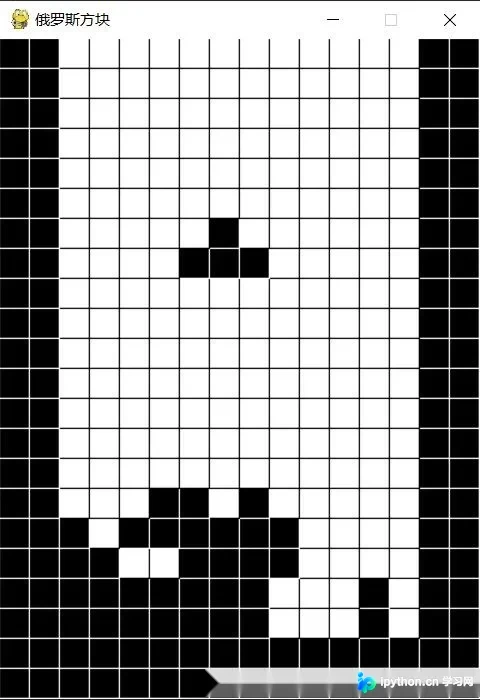
运行效果展示
程序运行后的实际效果如图所示:
如需了解更多俄罗斯方块相关开发内容,可访问专题:俄罗斯方块游戏集合 进行深入学习。
以上即为本文分享的全部内容,希望能为读者的编程学习提供有益帮助。欢迎继续支持本站获取更多技术资源。
免责声明:本文内容仅供参考,不代表本站观点。转载或引用请注明出处。









