

Python使用Turtle库绘制数码管风格日期与时间

发布时间:2026-10-14| 2人浏览过
本文介绍如何使用Python的Turtle库绘制数码管风格的日期和时间。通过定义drawLine、drawDight和drawDate函数,利用turtle库的画笔控制功能,实现数字的图形化显示。代码包含获取当前系统时间并转换为特定格式输出的逻辑,适合Python初学者学习图形编程。
Python绘制数码管日期概述
本文分享一个使用Python绘制数码管风格日期的完整示例,供读者参考学习。
以下是具体的实现源码:
核心功能包含三个函数:drawLine用于绘制单条线段,drawDight用于绘制单个数字,drawDate用于绘制完整的日期字符串。
具体实现代码如下:
数码管绘制代码实现
import turtle, time


def drawLine(draw):
 turtle.pendown() if draw else turtle.penup()
 turtle.fd(40)
 turtle.right(90)


def drawDight(dight):
 drawLine(True) if dight in [2, 3, 4, 5, 6, 8, 9] else drawLine(False)
 drawLine(True) if dight in [0, 1, 3, 4, 5, 6, 7, 8, 9] else drawLine(False)
 drawLine(True) if dight in [0, 2, 3, 5, 6, 8, 9] else drawLine(False)
 drawLine(True) if dight in [0, 2, 6, 8] else drawLine(False)
 turtle.left(90)
 drawLine(True) if dight in [0, 4, 5, 6, 8, 9] else drawLine(False)
 drawLine(True) if dight in [0, 2, 3, 5, 6, 7, 8, 9] else drawLine(False)
 drawLine(True) if dight in [0, 1, 2, 3, 4, 7, 8, 9] else drawLine(False)
 turtle.right(180)
 turtle.penup()
 turtle.fd(20)


def drawDate(date):
 turtle.pencolor("red")
 for i in date:
  if i == '-':
   turtle.write('年', font=("微软雅黑", 32, "normal"))
   turtle.pencolor("green")
   turtle.fd(80)
  elif i == '=':
   turtle.write('月', font=("微软雅黑", 32, "normal"))
   turtle.pencolor("blue")
   turtle.fd(80)
  elif i == '+':
   turtle.write('日', font=("微软雅黑", 32, "normal"))
   turtle.pencolor("red")
   turtle.fd(80)
  elif i == '/':
   turtle.write('时', font=("微软雅黑", 32, "normal"))
   turtle.pencolor("green")
   turtle.fd(80)
  elif i == '*':
   turtle.write('分', font=("微软雅黑", 32, "normal"))
   turtle.pencolor("blue")
   turtle.fd(80)
  elif i == '.':
   turtle.write('秒', font=("微软雅黑", 32, "normal"))
   turtle.fd(80)
  else:
   drawDight(eval(i))


if __name__ == '__main__':
 # turtle.setup() 我用的是pycharm,所以没有设置画布,idle下需要设置
 turtle.penup()
 turtle.fd(-350)
 turtle.pensize(5)
 turtle.speed(1000) # 速度再大也没感觉了
 drawDate(time.strftime('%Y-%m=%d+', time.localtime()))
 # 这里千万不要用time.gmtime()),获取的是UTC时区(0时区)的struct_time
 # 踩了半天坑

 turtle.right(90)
 turtle.fd(120)
 turtle.right(90)
 turtle.fd(660)
 turtle.right(180)
 drawDate(time.strftime('%H/%M*%S.', time.localtime()))
 turtle.hideturtle()
 turtle.done()
程序运行后的视觉效果如下图所示:
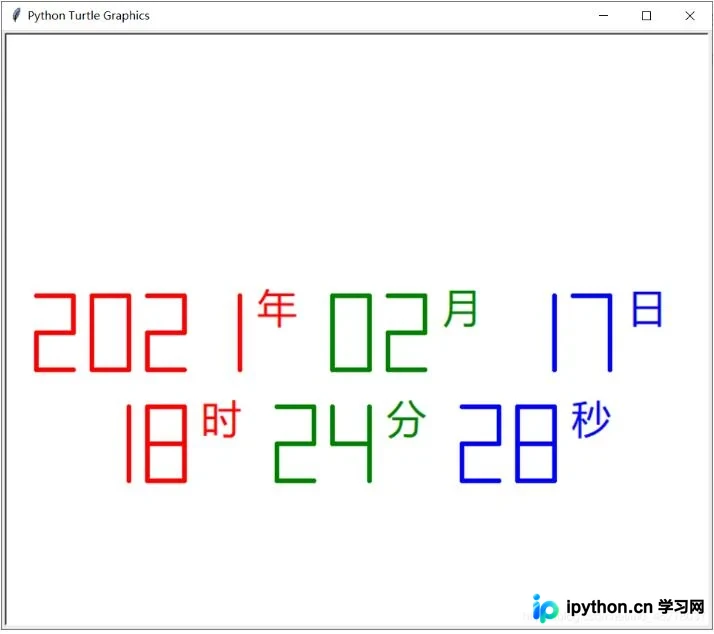
以上就是本文的全部内容,希望能为读者的Python学习提供有益的帮助,同时也欢迎大家继续支持本站。
免责声明:本文内容仅供参考,不代表本站观点。转载或引用请注明出处。









