

PyGame 模块初始化与文本显示完整指南

发布时间:2026-10-16| 6人浏览过
本文详解 PyGame 模块初始化方法,重点介绍 pygame.init() 的使用及其返回值含义,并结合 pygame.get_init() 验证初始化状态。此外,文章提供了在 PyGame 窗口中显示文本的七个关键步骤,涵盖从创建显示表面、加载字体到渲染文字及更新屏幕的完整流程,帮助开发者快速掌握基础图形界面构建。
PyGame 模块初始化方法
PyGame 是一个专为游戏开发设计的 Python 扩展库,其底层基于 SDL 库构建,从而赋予了 Python 开发游戏所需的完整功能。PyGame 包含众多功能模块,在使用这些模块执行具体操作前,必须首先对它们进行初始化。所有模块既可以单独逐个初始化,也可以一次性全部初始化。本文主要介绍如何一次性初始化所有已导入的模块。
实现初始化的核心方法如下:
- 调用 pygame.init() 可初始化所有模块。该函数不接受任何参数,执行后返回一个包含两个整数的元组 (numpass, numfail),分别代表成功初始化的模块数量和失败的模块数量。
- 调用 pygame.get_init() 用于检测 PyGame 模块是否已经成功初始化。若已初始化,返回 True,否则返回 False。
初始化模块示例代码
示例 1 展示了如何初始化所有 PyGame 模块并输出成功初始化的模块数量。
# importing the library
import pygame
# initializing all the imported
# pygame modules
(numpass,numfail) = pygame.init()
# printing the number of modules
# initialized successfully
print('Number of modules initialized successfully:',
      numpass)
检查初始化状态示例
示例 2 演示了如何使用 pygame.get_init() 函数来检查 PyGame 模块的初始化状态。
# importing the library
import pygame
# initializing the modules
pygame.init()
# checking the initialization
is_initialized = pygame.get_init()
# printing the result
print('Is pygame modules initialized:',
	is_initialized)
PyGame 窗口文本显示流程
接下来介绍在 PyGame 窗口中显示文本的具体实现方法。
文本显示七步法
在 PyGame 窗口上成功显示文本需要遵循以下 7 个基本步骤:
- 第一步,使用 pygame.display.set_mode() 方法创建一个指定尺寸的显示表面对象。
- 第二步,使用 pygame.font.Font() 方法创建一个字体对象,指定字体文件和字号。
- 第三步,利用字体对象的 render() 方法创建一个文本表面对象(Surface),在该对象上绘制指定颜色和内容的文本。
- 第四步,通过调用文本表面对象的 get_rect() 方法,为文本创建一个矩形对象(Rect)。
- 第五步,通过设置矩形对象的 center 属性值,确定文本在窗口中的具体位置。
- 第六步,使用显示表面对象的 blit() 方法,将文本表面对象绘制(复制)到显示表面上。
- 第七步,调用 pygame.display.update() 方法更新显示表面,使文本在 PyGame 窗口中可见。
完整文本显示代码实现
# import pygame module in this program
import pygame
# activate the pygame library
# initiate pygame and give permission
# to use pygame's functionality.
pygame.init()
# define the RGB value for white,
# green, blue colour .
white = (255, 255, 255)
green = (0, 255, 0)
blue = (0, 0, 128)
# assigning values to X and Y variable
X = 400
Y = 400
# create the display surface object
# of specific dimension..e(X, Y).
display_surface = pygame.display.set_mode((X, Y))
# set the pygame window name
pygame.display.set_caption('坚果show')
# create a font object.
# 1st parameter is the font file
# which is present in pygame.
# 2nd parameter is size of the font
font = pygame.font.Font('freesansbold.ttf', 32)
# create a text surface object,
# on which text is drawn on it.
text = font.render('坚果', True, green, blue)
# create a rectangular object for the
# text surface object
textRect = text.get_rect()
# set the center of the rectangular object.
textRect.center = (X // 2, Y // 2)
# infinite loop
while True:
	# completely fill the surface object
	# with white color
	display_surface.fill(white)
	# copying the text surface object
	# to the display surface object
	# at the center coordinate.
	display_surface.blit(text, textRect)
	# iterate over the list of Event objects
	# that was returned by pygame.event.get() method.
	for event in pygame.event.get():
		# if event object type is QUIT
		# then quitting the pygame
		# and program both.
		if event.type == pygame.QUIT:
			# deactivates the pygame library
			pygame.quit()
			# quit the program.
			quit()
		# Draws the surface object to the screen.
		pygame.display.update()
完成上述代码编写后,运行程序即可看到效果。
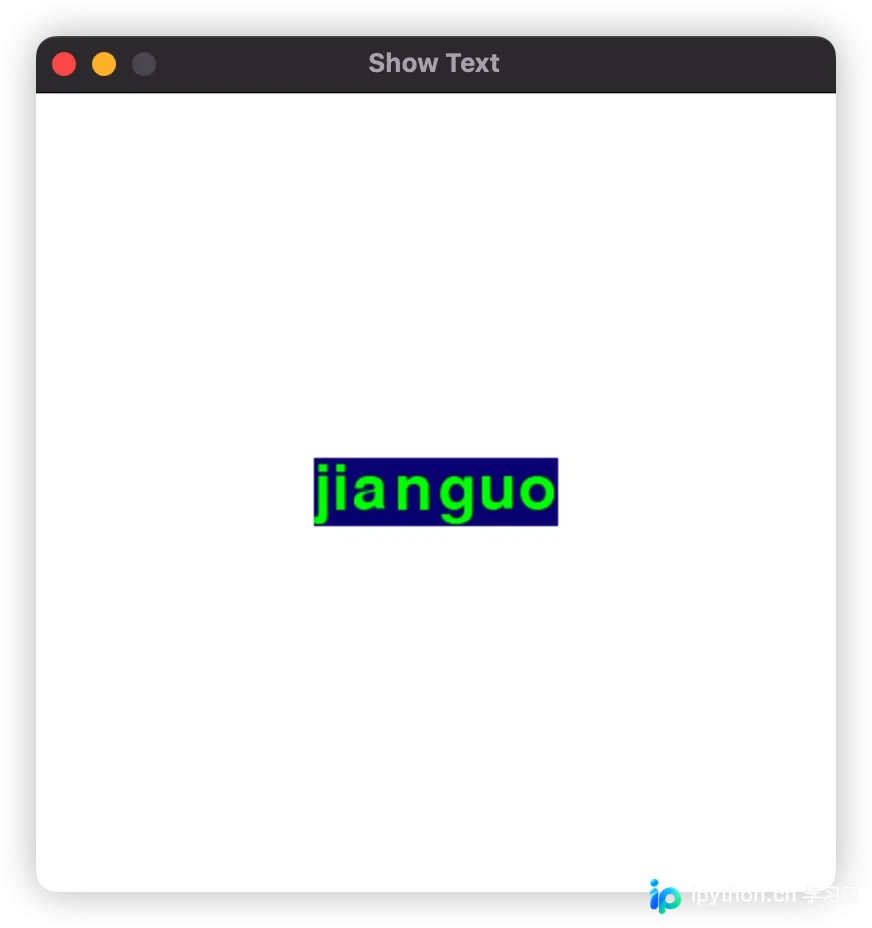
至此,关于 PyGame 模块初始化及文本显示的介绍完毕。如需了解更多 PyGame 初始化相关内容,建议查阅本站过往文章或继续浏览后续教程。感谢大家的支持!
免责声明:本文内容仅供参考,不代表本站观点。转载或引用请注明出处。









