

Python实现水果忍者游戏:Pygame基础教程

发布时间:2026-10-14| 6人浏览过
本文介绍如何使用Python和Pygame库开发简易版水果忍者游戏。教程涵盖窗口设置、水果随机生成、碰撞检测、生命值管理及游戏主循环等核心模块。通过解析关键代码,帮助开发者掌握2D游戏开发的基本流程与逻辑实现。
水果忍者游戏的核心玩法在于尽可能多地切开屏幕上抛出的水果。
本项目使用Python进行简单模拟。玩家通过鼠标操作来切割水果,但需注意水果中隐藏炸弹,一旦切开三次炸弹,游戏即判定失败。
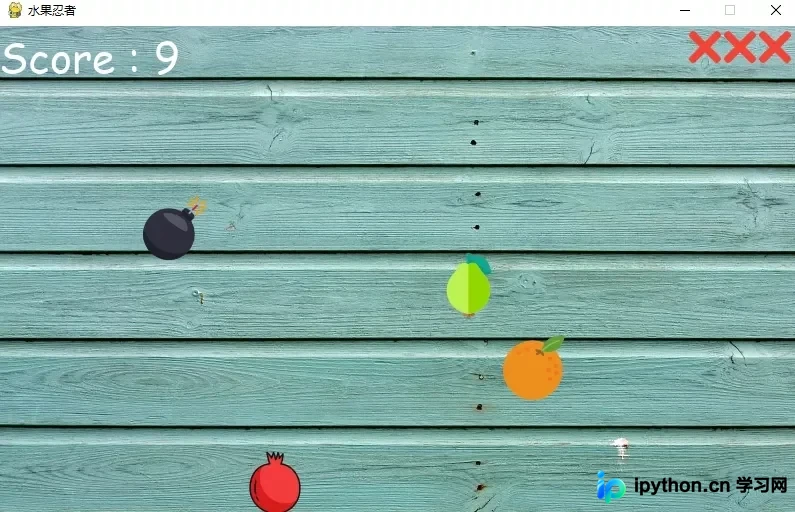
一、需要导入的包
import pygame, sys
import os
import random
二、窗口界面设置
# 游戏窗口
WIDTH = 800
HEIGHT = 500
FPS = 15             # gameDisplay的帧率,1/12秒刷新一次
pygame.init()
pygame.display.set_caption('水果忍者') # 标题
gameDisplay = pygame.display.set_mode((WIDTH, HEIGHT)) # 固定窗口大小
clock = pygame.time.Clock()

# 用到的颜色
WHITE = (255,255,255)
BLACK = (0,0,0)
RED = (255,0,0)
GREEN = (0,255,0)
BLUE = (0,0,255)

background = pygame.image.load('背景.jpg') # 背景
font = pygame.font.Font(os.path.join(os.getcwd(), 'comic.ttf'), 42) # 字体
score_text = font.render('Score : ' + str(score), True, (255, 255, 255)) # 得分字体样式
三、随机生成水果位置
def generate_random_fruits(fruit):
    fruit_path = "images/" + fruit + ".png"
    data[fruit] = {
        'img': pygame.image.load(fruit_path),
        'x' : random.randint(100,500),
        'y' : 800,
        'speed_x': random.randint(-10,10),
        'speed_y': random.randint(-80, -60),
        'throw': False,
        't': 0,
        'hit': False,
    }

    if random.random() >= 0.75:
        data[fruit]['throw'] = True
    else:
        data[fruit]['throw'] = False

data = {}
for fruit in fruits:
generate_random_fruits(fruit)- 该函数负责随机生成水果并保存其相关数据。
- 变量'x'和'y分别存储水果在横坐标和纵坐标上的初始位置。
- Speed_x和speed_y用于存储水果在x轴和y轴方向的移动速度,同时控制水果的对角线运动轨迹。
- throw属性用于判断生成的水果坐标是否位于游戏区域外。若坐标超出范围,则该水果将被丢弃。
- data字典用于存放所有随机生成水果的详细数据。
四、绘制字体
font_name = pygame.font.match_font('comic.ttf')

def draw_text(display, text, size, x, y):
    font = pygame.font.Font(font_name, size)
    text_surface = font.render(text, True, WHITE)
    text_rect = text_surface.get_rect()
    text_rect.midtop = (x, y)
gameDisplay.blit(text_surface, text_rect)- Draw_text函数用于在屏幕上渲染并显示文字。
- get_rect()方法返回一个Rect对象,用于获取文本的矩形区域。
- X和y参数指定文字在X方向和Y方向的具体位置坐标。
- blit()方法用于在屏幕指定的位置绘制图像或写入文字内容。
五、玩家生命的提示
# 绘制玩家的生命
def draw_lives(display, x, y, lives, image) :
  for i in range(lives) :
    img = pygame.image.load(image)
    img_rect = img.get_rect()
    img_rect.x = int(x + 35 * i)
    img_rect.y = y
    display.blit(img, img_rect)
def hide_cross_lives(x, y):
gameDisplay.blit(pygame.image.load("images/red_lives.png"), (x, y))- img_rect用于获取十字图标在屏幕上的(x,y)坐标,通常位于最右上方。
- img_rect.x属性设置下一个十字图标与前一个图标之间的水平间距为35像素。
- img_rect.y属性负责确定十字图标从屏幕顶部开始的垂直位置。
六、游戏开始与结束的画面
def show_gameover_screen():
    gameDisplay.blit(background, (0,0))
    draw_text(gameDisplay, "FRUIT NINJA!", 90, WIDTH / 2, HEIGHT / 4)
    if not game_over :
        draw_text(gameDisplay,"Score : " + str(score), 50, WIDTH / 2, HEIGHT /2)

    draw_text(gameDisplay, "Press a key to begin!", 64, WIDTH / 2, HEIGHT * 3 / 4)
    pygame.display.flip()
    waiting = True
    while waiting:
        clock.tick(FPS)
        for event in pygame.event.get():
            if event.type == pygame.QUIT:
                pygame.quit()
            if event.type == pygame.KEYUP:
waiting = False- show_gameover_screen()函数用于显示初始游戏画面及游戏结束画面。
- pygame.display.flip()用于更新屏幕显示;若未传递参数,则更新整个屏幕。
- pygame.event.get()用于返回存储在pygame事件队列中的所有事件。
- 当检测到的事件类型等于quit时,pygame将执行退出操作。
- event.KEYUP事件表示按键被按下并释放时触发的事件。
七、游戏主循环
first_round = True
game_over = True
game_running = True
while game_running :
    if game_over :
        if first_round :
            show_gameover_screen()
            first_round = False
        game_over = False
        player_lives = 3
        draw_lives(gameDisplay, 690, 5, player_lives, 'images/red_lives.png')
        score = 0

    for event in pygame.event.get():

        if event.type == pygame.QUIT:
            game_running = False

    gameDisplay.blit(background, (0, 0))
    gameDisplay.blit(score_text, (0, 0))
    draw_lives(gameDisplay, 690, 5, player_lives, 'images/red_lives.png')

    for key, value in data.items():
        if value['throw']:
            value['x'] += value['speed_x']
            value['y'] += value['speed_y']
            value['speed_y'] += (1 * value['t'])
            value['t'] += 1

            if value['y'] <= 800:
                gameDisplay.blit(value['img'], (value['x'], value['y']))
            else:
                generate_random_fruits(key)

            current_position = pygame.mouse.get_pos()

            if not value['hit'] and current_position[0] > value['x'] and current_position[0] < value['x']+60 \
                    and current_position[1] > value['y'] and current_position[1] < value['y']+60:
                if key == 'bomb':
                    player_lives -= 1
                    if player_lives == 0:
                        hide_cross_lives(690, 15)
                    elif player_lives == 1 :
                        hide_cross_lives(725, 15)
                    elif player_lives == 2 :
                        hide_cross_lives(760, 15)

                    if player_lives < 0 :
                        show_gameover_screen()
                        game_over = True

                    half_fruit_path = "images/explosion.png"
                else:
                    half_fruit_path = "images/" + "half_" + key + ".png"

                value['img'] = pygame.image.load(half_fruit_path)
                value['speed_x'] += 10
                if key != 'bomb' :
                    score += 1
                score_text = font.render('Score : ' + str(score), True, (255, 255, 255))
                value['hit'] = True
        else:
            generate_random_fruits(key)

    pygame.display.update()
    clock.tick(FPS)

pygame.quit()- 这是游戏的主循环逻辑。
- 如果切开的炸弹数量超过3个,game_over变量将终止游戏,并结束循环。
- game_running变量用于管理游戏主循环的运行状态。
- 当检测到事件类型为退出时,游戏窗口将被关闭。
- 在该游戏循环中,屏幕内的水果会动态显示。
- 若水果未被切开,则无特殊反应;若水果被切开,则在该位置显示半切开的水果图像。
- 如果用户切开了三次炸弹,将显示GAME OVER信息,并重置窗口状态。
- clock.tick()用于保持循环以正确的速度运行,确保循环每1/12秒更新一次。
源码和素材可在公众号 Python客栈 后台回复 切水果 获取。感兴趣的读者可尝试运行。
更多关于python的文章,欢迎关注python客栈。

以上就是python 写一个水果忍者游戏的详细内容,更多关于python 水果忍者的资料请关注本站其它相关文章!
免责声明:本文内容仅供参考,不代表本站观点。转载或引用请注明出处。









