

Python爬取免费代理IP并验证有效性示例

本文介绍使用Python爬取免费代理IP网站数据并生成JSON文件的方法。通过lxml模块提取IP和端口,利用requests库向百度发起请求以验证代理可用性,并将有效IP及耗时写入文件。代码包含分页抓取、延时处理及异常捕获,旨在为小型爬虫项目提供低成本的动态IP解决方案。
在进行大规模数据爬取时,IP被封禁是常见挑战。尽管可以通过设置请求间隔来降低被检测的风险,但高频访问仍可能导致IP被封。为此,使用动态IP隐藏真实地址成为必要手段。对于商业项目,建议直接调用平台提供的动态IP API服务;而对于学习或小规模测试项目,可以参考本文介绍的自行构建代理池的方法。
简述
本示例演示如何编写一个简单的Python爬虫,从免费IP网站抓取IP信息并保存为JSON文档,以便在其他爬取项目中调用。为了保证IP的有效性,建议采用“现爬现用”的策略,即在爬取其他目标网站时,实时从生成的JSON文件中提取IP,并在验证阶段筛选出响应时间较短且可用的IP地址进行存储。
实现
本方案以https://www.xicidaili.com/nn/作为数据源,通过尝试访问http://www.baidu.com/来验证IP的有效性。数据提取环节选用lxml模块,当然也可以使用re模块进行正则匹配,此处仅演示lxml的用法。在访问数据源前,需通过Fiddler等工具监听浏览器流量,获取正确的User-Agent头信息以模拟正常访问。例如,使用Proxy SwitchyOmega插件配合Fiddler,从监听数据中提取User-Agent并复制作为请求头。
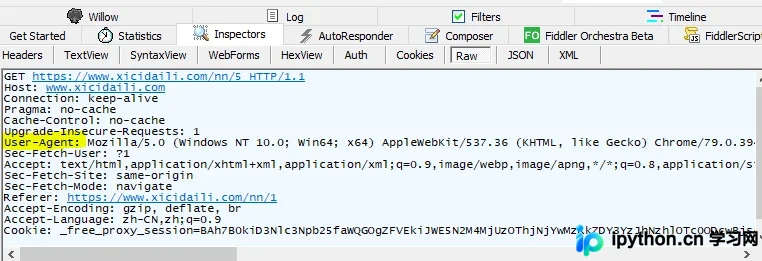
引入模块
import requests
from lxml import etree
import time
import json
获取所有数据
def get_all_proxy(page):
  url = 'https://www.xicidaili.com/nn/%s'%page
  headers = {
    'User-Agent': 'Mozilla/5.0 (Windows NT 6.1; Win64; x64) AppleWebKit/537.36 (KHTML, like Gecko) Chrome/68.0.3440.106 Safari/537.36',
  }
  response = requests.get(url, headers=headers)
  html_ele = etree.HTML(response.text)
  ip_eles = html_ele.xpath('//table[@id="ip_list"]/tr/td[2]/text()')
  port_ele = html_ele.xpath('//table[@id="ip_list"]/tr/td[3]/text()')
  print(ip_eles)
  proxy_list = []
  for i in range(0,len(ip_eles)):
    check_all_proxy(ip_eles[i],port_ele[i])
  return proxy_list
对数据进行筛选:
def check_all_proxy(host,port):
  type = 'http'
  proxies = {}
  proxy_str = "%s://@%s:%s" % (type, host, port)
  valid_proxy_list = []
  url = 'http://www.baidu.com/'
  proxy_dict = {
      'http': proxy_str,
      'https': proxy_str
    }
  try:
      start_time = time.time()
      response = requests.get(url, proxies=proxy_dict, timeout=5)
      if response.status_code == 200:
        end_time = time.time()
        print('代理可用:' + proxy_str)
        print('耗时:' + str(end_time - start_time))
        proxies['type'] = type
        proxies['host'] = host
        proxies['port'] = port
        proxiesJson = json.dumps(proxies)
        with open('verified_y.json', 'a+') as f:
          f.write(proxiesJson + '\n')
        print("已写入:%s" % proxy_str)
        valid_proxy_list.append(proxy_str)
      else:
        print('代理超时')
  except:
      print('代理不可用--------------->'+proxy_str)
运行程序:
if __name__ == '__main__':
  for i in range(1,11): #选取前十页数据使用
    proxy_list = get_all_proxy(i)
    time.sleep(20)
    print(valid_proxy_list)
生成的json文件:
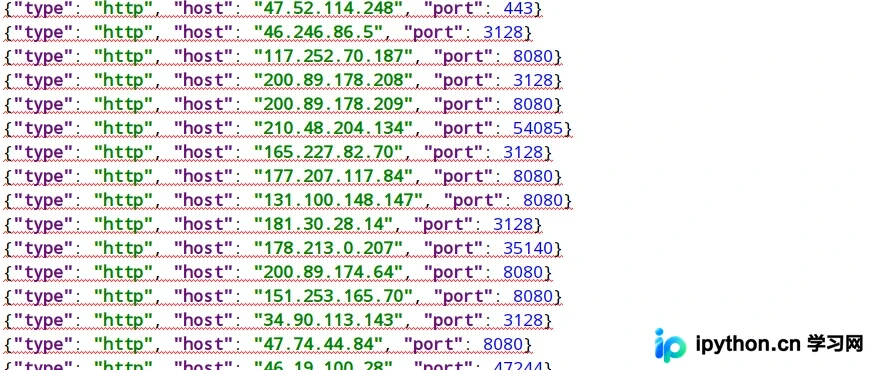
以上即为Python爬取代理IP的完整示例。如需了解更多相关技术细节,请持续关注本站发布的其他Python爬虫教程。
免责声明:本文内容仅供参考,不代表本站观点。转载或引用请注明出处。









