

Python基于Pygame实现简易飞机大作战游戏教程

发布时间:2026-10-14| 3人浏览过
本文介绍使用Python和Pygame库开发简易飞机大作战游戏的完整过程。内容涵盖环境配置、游戏素材准备、核心代码逻辑解析及运行方法。通过示例代码展示敌机移动、玩家控制及碰撞检测机制,适合Python初学者快速掌握游戏开发基础。
游戏运行环境与启动方式
本教程演示如何使用Pygame库开发一款简易的飞机大作战游戏,该示例代码结构清晰,非常适合编程新手入门学习。需要注意的是,该项目无法通过双击文件直接运行,必须在命令行环境中进入游戏所在目录,执行命令“python game.py”方可启动游戏。目前尚不清楚导致无法直接运行的具体原因,建议始终通过命令行方式运行。
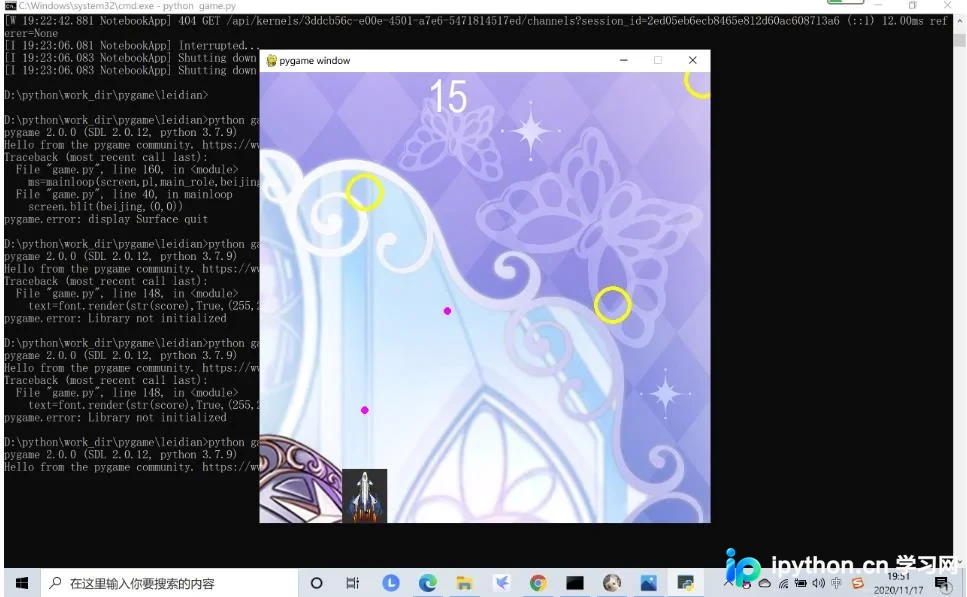
游戏运行后的界面截图如下所示。在视觉表现上,为了简化演示,系统使用黄色的圆形图形来代表敌机。
核心代码逻辑解析
以下是实现该游戏的核心代码片段,展示了初始化、事件监听及主循环逻辑。
import pygame,sys,time,random,math

def init():
 pygame.init()
 size = width, height =600,600
 screen =pygame.display.set_mode(size)
 plx=270
 ply=528
 beijing =pygame.image.load("beijing.jpg")
 main_role =pygame.image.load("main_role.jpg")
 font=pygame.font.SysFont("arial",60)

 return screen,[plx,ply],main_role,beijing,font

def mainloop(screen,pl,main_role,beijing,shots,ms,ecs): #每刷新一次,调用一次
 for event in pygame.event.get():
 if event.type == pygame.QUIT:
 pygame.quit()
 elif event.type ==pygame.KEYDOWN:
 if event.key ==pygame.K_LEFT:
 ms=[0,pl]

 #move(0,pl)
 elif event.key ==pygame.K_RIGHT:
 ms=[1,pl]
 #move(1,pl)
 elif event.key == pygame.K_UP:
 ms=[2,pl]
 #move(2,pl)
 elif event.key ==pygame.K_DOWN:
 ms=[3,pl]
 #move(3,pl)

 elif event.key==pygame.K_SPACE:
 ecope(pl,ecs)
 elif event.type ==pygame.KEYUP:
 ms=[-1,-1]
 screen.blit(beijing,(0,0))
 for i in range(len(shots)):
 pygame.draw.circle(screen,(255,255,0),shots[i],25,5)
 for i in range(len(ecs)):
 pygame.draw.circle(screen,(255,0,255),ecs[i],5,5)
 screen.blit(main_role,(pl[0],pl[1]))

 return ms

def ecope(pl,ecs):
 ecs.append([pl[0]+30,pl[1]])

def move(key,pl):
 if key==0:pl[0]=pl[0]-10
 elif key==1:pl[0]=pl[0]+10
 elif key==2:pl[1]=pl[1]-10
 elif key==3:pl[1]=pl[1]+10

 if pl[0]<0:pl[0]=0
 if pl[0]>540:pl[0]=540
 if pl[1]<0:pl[1]=0
 if pl[1]>528:pl[1]=528

def update_shot(shots,m,ms,ecs):
 if m==60:
 x=random.randint(0,59)*10
 y=0
 shots.append([x,y])
 t=[]
 t2=[]
 if m%2==0:
 for i in range(len(ecs)):
 ecs[i][1]=ecs[i][1]-6
 if ecs[i][1]<0:
 t2.append(i)
 for i in range(len(t2)):

 ecs.pop(t2[i])


 for i in range(len(shots)):
 shots[i][1]=shots[i][1]+5
 if shots[i][1]>600:
 t.append(i)
 for i in range(len(t)):
 shots.pop(t[i])


 if ms!=[-1,-1]:
 move(ms[0],ms[1])


def block_detect(pl,shots):
 #pl[x,y]
 '''
 shots
 [
 [sx0,sy0],
 [sx1,sy1],
 .......

 ]
 '''
 for i in range(len(shots)):
 nx,ny=shots[i][0],shots[i][1]
 x,y=pl[0]+30,pl[1]+36
 s=math.sqrt((nx-x)**2+(ny-y)**2)
 if s<55:
 return True
 return False

def attack_detect(ecs,shots,score):
 h=[]
 h1=[]
 h2=[]
 for i in range(len(ecs)):
 for j in range(len(shots)):
 lx,ly=ecs[i][0],ecs[i][1]
 cx,cy=shots[j][0],shots[j][1]
 d=math.sqrt((lx-cx)**2+(ly-cy)**2)
 if d<30:
 h.append([i,j])

 for i in range(len(h)):
 h1.append(h[i][0])
 h2.append(h[i][1])
 h1=list(set(h1))
 h2=list(set(h2))
 for i in range(len(h1)):
 ecs.pop(h1[i])
 for i in range(len(h2)):
 shots.pop(h2[i])
 return score+len(h)


if __name__=="__main__":
 screen,pl,main_role,beijing,font=init()
 shots=[]
 ecs=[]
 score=0
 temp=time.time()
 m=0
 ms=[-1,-1]
 while True :

 text=font.render(str(score),True,(255,255,255))
 rect=text.get_rect()
 rect.center=(250,30)

 if (time.time()-temp)>0.03:

 m=m+1
 temp=time.time()
 update_shot(shots,m,ms,ecs)
 if m==60:
 m=0

 ms=mainloop(screen,pl,main_role,beijing,shots,ms,ecs)
 screen.blit(text,rect)
 score=attack_detect(ecs,shots,score)
 pygame.display.update()

 if block_detect(pl,shots):
 pygame.quit()
游戏素材准备
游戏运行所需的背景图片、玩家角色及音效等素材文件需单独准备,具体素材列表可参考项目目录。

如果您对Python游戏开发感兴趣,欢迎点击专题《python小游戏》查看更多相关学习资源。
以上就是本文关于Python基于Pygame实现飞机大作战游戏的全部内容,希望这些代码和解析能对您的学习有所帮助。如果您觉得有用,请多多支持本站。
免责声明:本文内容仅供参考,不代表本站观点。转载或引用请注明出处。









