

Python正则匹配含换行符图片URL失败原因及re.S标志解法

本文分析Python中使用正则表达式匹配网页图片URL时,因HTML源码包含换行符导致匹配失败的问题。通过对比单行与多行字符串匹配结果,指出默认模式下'.'不匹配换行符。解决方案为在re.compile中传入re.S标志,使点号匹配所有字符包括换行符,从而完美提取跨行显示的图片地址。
近期编写了一个Python脚本,用于抓取必应搜索首页http://cn.bing.com/的背景图片,并将其设置为电脑桌面壁纸。在执行过程中,利用正则表达式匹配图片URL地址时遇到了匹配失败的情况。
需要抓取的图片地址位置如下图所示:
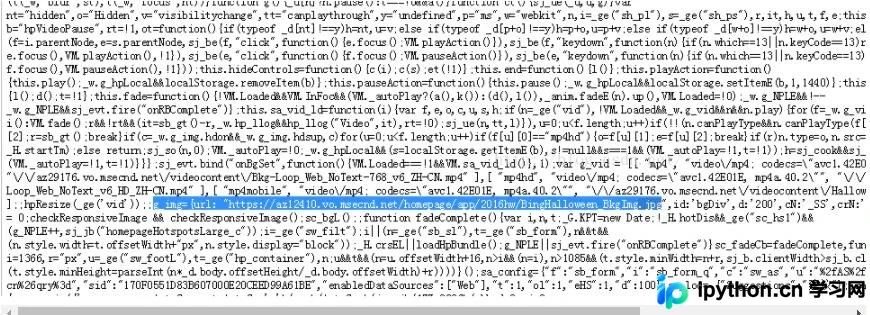
最初尝试使用如下正则模式进行匹配:
reg = re.compile('.*g_img={url: "(http.*?jpg)"')
无论怎样调整,该模式均无法匹配成功。随后,我将网页源码下载并保存至Notepad++中,利用其内置的正则查找功能,可以非常轻松地匹配到目标地址,具体效果如图所示:
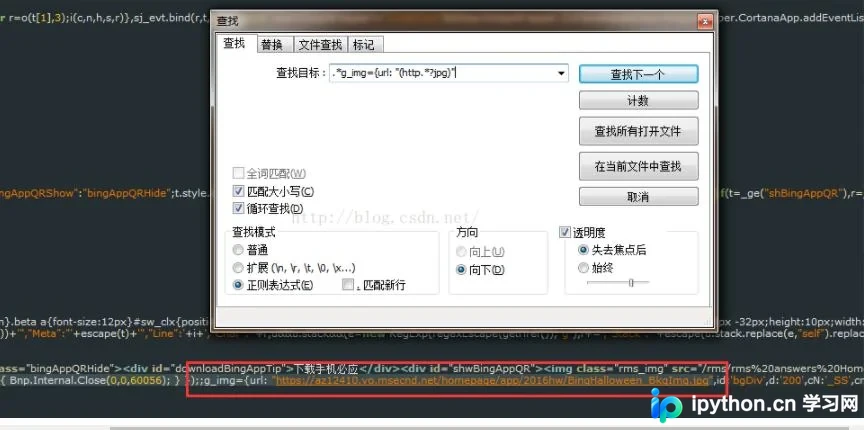
为了进一步排查问题,我编写了测试代码,将包含图片地址的那一行文本单独保存为一个字符串变量。测试结果显示匹配迅速成功,代码如下所示。其中变量data无法匹配,而变量line却可以成功匹配。
# -*-coding:utf-8-*-
import os
import re

f = open('bing.html','r')

line = r'''Bnp.Internal.Close(0,0,60056); } });;g_img={url: "https://az12410.vo.msecnd.net/homepage/app/2016hw/BingHalloween_BkgImg.jpg",id:'bgDiv',d:'200',cN'''
data = f.read().decode('utf-8','ignore').encode('gbk','ignore')

print " "

reg = re.compile('.*g_img={url: "(http.*?jpg)"')

if re.match(reg, data):
  m1 = reg.findall(data)
  print m1[0]
else:
  print("data Not match .")

print 20*'-'
#print line
if re.match(reg, line):
  m2 = reg.findall(line)
  print m2[0]
else:
  print("line Not match .")
由此可以看出,变量line和data存在显著差异。具体区别在于:data包含多行文本及换行符,而line仅为单行文本,不包含换行符。我在字符串line中手动添加了换行符后,该字符串也未能匹配成功。
至此,问题原因已明确,关键在于正则表达式对换行符的处理方式。
re.compile('.*g_img={url: "(http.*?jpg)"')。
查阅Python官方文档后,发现re.compile()函数支持第二个可选参数flags。该参数用于指定正则表达式常量,主要包括以下选项:
re.DEBUG Display debug information about compiled expression.
re.I
re.IGNORECASE Perform case-insensitive matching; expressions like [A-Z] will match lowercase letters, too. This is not affected by the current locale.
re.L


re.LOCALE Make \w, \W, \b, \B, \s and \S dependent on the current locale.
re.M


re.MULTILINE When specified, the pattern character '^' matches at the beginning of the string and at the beginning of each line (immediately following each newline); and the pattern character '$' matches at the end of the string and at the end of each line (immediately preceding each newline). By default, '^' matches only at the beginning of the string, and '$' only at the end of the string and immediately before the newline (if any) at the end of the string.
re.S


re.DOTALL Make the '.' special character match any character at all, including a newline; without this flag, '.' will match anything except a newline.re.U re.UNICODE Make \w, \W, \b, \B, \d, \D, \s and \S dependent on the Unicode character properties database.New in version 2.0.
re.X


re.VERBOSE This flag allows you to write regular expressions that look nicer and are more readable by allowing you to visually separate logical sections of the pattern and add comments. Whitespace within the pattern is ignored, except when in a character class or when preceded by an unescaped backslash. When a line contains a # that is not in a character class and is not preceded by an unescaped backslash, all characters from the leftmost such # through the end of the line are ignored.
针对当前问题,我们需要使用re.S标志。该标志的作用是让'.'匹配所有字符,包括换行符。因此,修改后的正则表达式如下:
reg = re.compile('.*g_img={url: "(http.*?jpg)"', re.S)
应用上述修改后,问题得以完美解决。
以上关于Python使用re正则表达式匹配网页中图片URL地址的方法分享完毕,希望能为读者提供参考,并欢迎大家继续支持本站。
免责声明:本文内容仅供参考,不代表本站观点。转载或引用请注明出处。









