

Python Matplotlib折线图坐标轴刻度自定义设置指南

发布时间:2026-10-13| 3人浏览过
本文介绍如何在Python Matplotlib中自定义折线图坐标轴刻度。通过xticks函数可设置整数或时间标签,利用FormatStrFormatter控制小数位数显示。提供完整代码示例,帮助开发者灵活调整图表展示效果,适用于数据分析与可视化场景。
在Python中使用Matplotlib绘制折线图时,有时需要调整坐标轴的刻度显示方式,例如将默认刻度改为整数显示。
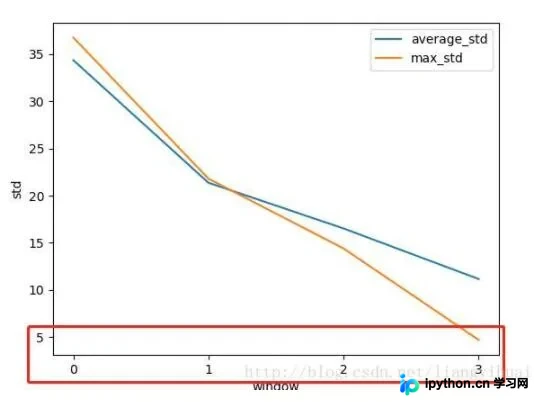
具体实现代码如下:
from matplotlib import pyplot as plt
import matplotlib.ticker as ticker
import numpy as np


def std_plot():
 overall_std = [34.369, 21.366, 16.516, 11.151]
 max_std = [36.769, 21.794, 14.390, 4.684]
 plt.figure()
 plt.plot(overall_std, label='average_std')

 plt.plot(max_std, label='max_std')
 plt.legend()
 plt.xlabel('window')
 plt.ylabel('std')
 plt.xticks(range(len(max_std)))
 # plt.gca().xaxis.set_major_formatter(ticker.FormatStrFormatter('%1.1f'))

 plt.show()

std_plot()
通过上述方法,可以自定义X轴刻度的显示样式,例如根据时间序列进行展示。只需调整相关参数即可实现:
plt.xticks(pd.date_range('2014-09-01','2014-09-30'),rotation=90)#设置时间标签显示格式
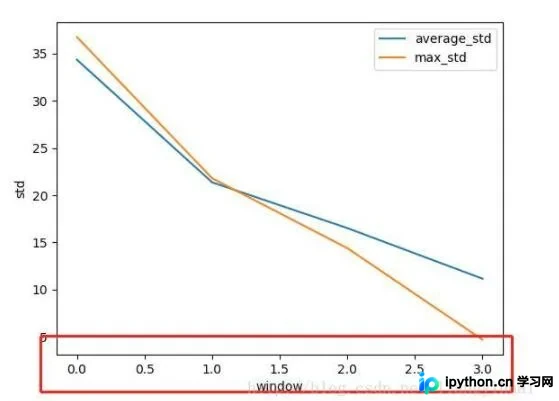
若希望刻度保留小数点后一位,可采用以下方式:
from matplotlib import pyplot as plt
import matplotlib.ticker as ticker
import numpy as np


def std_plot():
 overall_std = [34.369, 21.366, 16.516, 11.151]
 max_std = [36.769, 21.794, 14.390, 4.684]
 plt.figure()
 plt.plot(overall_std, label='average_std')

 plt.plot(max_std, label='max_std')
 plt.legend()
 plt.xlabel('window')
 plt.ylabel('std')
 # plt.xticks(range(len(max_std)))
 plt.gca().xaxis.set_major_formatter(ticker.FormatStrFormatter('%1.1f'))

 plt.show()


std_plot()
以上关于修改Python Plot折线图坐标轴刻度的方法分享完毕,希望能为读者提供参考,欢迎支持本站。
免责声明:本文内容仅供参考,不代表本站观点。转载或引用请注明出处。









