

基于Scrapy与PhantomJS实现动态网页数据爬取教程

发布时间:2026-10-13| 5人浏览过
本文介绍如何使用Scrapy框架结合PhantomJS处理动态加载网页数据。通过配置Selenium中间件拦截请求,利用JavaScript渲染页面源码,并在Spider中解析HTML提取商品信息。随后通过Item定义数据结构,利用Pipeline将数据写入SQLite数据库,完整演示从配置到入库的技术流程。
针对动态加载数据的抓取任务,通常可采用selenium或PhantomJS两种技术方案,本文示例选用PhantomJS作为无头浏览器解决方案。
目标抓取网址:
https://s.taobao.com/search?q=%E7%AC%94%E8%AE%B0%E6%9C%AC%E7%94%B5%E8%84%91&imgfile=&commend=all&ssid=s5-e&search_type=item&sourceId=tb.index&spm=a21bo.2017.201856-taobao-item.1&ie=utf8&initiative_id=tbindexz_20170306
第一步,配置爬虫中间件。
打开pipelines.py文件进行代码编辑:
from selenium import webdriver
from scrapy.http.response.html import HtmlResponse
from scrapy.http.response import Response
class SeleniumSpiderMiddleware(object):
  def __init__(self):
    self.driver = webdriver.PhantomJS()
  def process_request(self ,request ,spider):
    # 当引擎从调度器中取出request进行请求发送下载器之前
    # 会先执行当前的爬虫中间件 ,在中间件里面使用selenium
    # 请求这个request ,拿到动态网站的数据 然后将请求
    # 返回给spider爬虫对象
    if spider.name == 'taobao':
      # 使用爬虫文件的url地址
      spider.driver.get(request.url)
      for x in range(1 ,12 ,2):
        i = float(x) / 11
        # scrollTop 从上往下的滑动距离
        js = 'document.body.scrollTop=document.body.scrollHeight * %f' % i
        spider.driver.execute_script(js)
      response = HtmlResponse(url=request.url,
                  body=spider.driver.page_source,
                  encoding='utf-8',
                  request=request)
      # 这个地方只能返回response对象,当返回了response对象,那么可以直接跳过下载中间件,将response的值传递给引擎,引擎又传递给 spider进行解析
      return response
在配置项中,需确保middlewares模块处于启用状态。
接着编辑settings.py文件,
DOWNLOADER_MIDDLEWARES = {
  'taobaoSpider.middlewares.SeleniumSpiderMiddleware': 543,
}
启用相关设置。
第二步,执行数据抓取逻辑。
返回至Spider爬虫代码文件。
添加必要的库引入:
from selenium import webdriver
定义自定义属性:
def __init__(self):
  self.driver = webdriver.PhantomJS()
编写数据查找与分析逻辑:
def parse(self, response):
  div_info = response.xpath('//div[@class="info-cont"]')
  print(div_info)
  for div in div_info:
    title = div.xpath('.//div[@class="title-row "]/a/text()').extract_first('')
    # title = self.driver.find_element_by_class_name("title-row").text
    print('名称:', title)
    price = div.xpath('.//div[@class="sale-row row"]/div/span[2]/strong/text()').extract_first('')
第三步,将解析结果传输至Item对象:
在item.py文件中定义数据结构:
name = scrapy.Field()
price = scrapy.Field()
返回至spider.py爬虫文件:
添加模块引入:
from ..items import TaobaospiderItem
执行数据传送操作:
# 创建实例化对象。
item = TaobaospiderItem()
item['name'] = title
item['price'] = price
yield item
在配置文件中,启用:
ITEM_PIPELINES = {
  'taobaoSpider.pipelines.TaobaospiderPipeline': 300,
}
第四步,将数据持久化写入数据库:
进入管道文件进行开发。
引入数据库相关库:
import sqlite3
写入数据库的代码如下:
class TaobaospiderPipeline(object):
  def __init__(self):
    self.connect = sqlite3.connect('taobaoDB')
    self.cursor = self.connect.cursor()
    self.cursor.execute('create table if not exists taobaoTable (name text,price text)')
  def process_item(self, item, spider):
    self.cursor.execute('insert into taobaoTable (name,price)VALUES ("{}","{}")'.format(item['name'],item['price']))
    self.connect.commit()
    return item
  def close_spider(self):
    self.cursor.close()
    self.connect.close()
在配置文件中启用:
ITEM_PIPELINES = {
  'taobaoSpider.pipelines.TaobaospiderPipeline': 300,
}
由于前一步已开启管道传输配置,此处无需重复设置。
运行程序后,打开数据库检查数据写入情况。
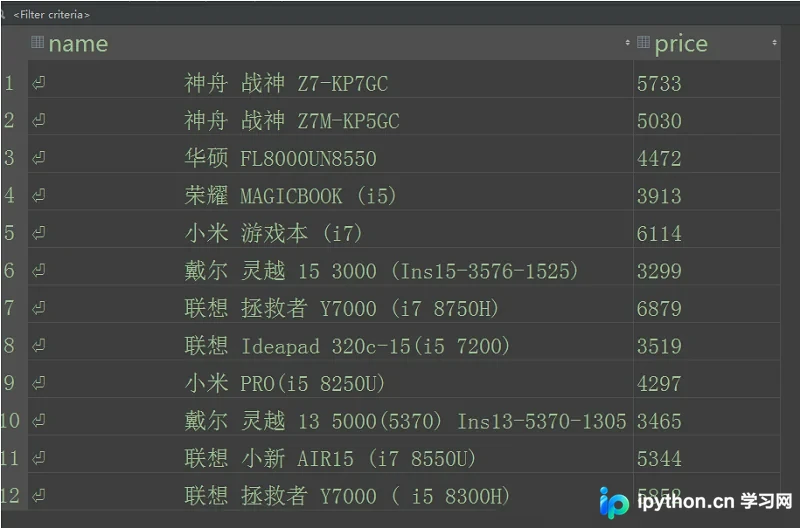
至此,整个抓取程序执行完毕。
附Spider爬虫文件完整代码:
# -*- coding: utf-8 -*-
import scrapy
from selenium import webdriver
from ..items import TaobaospiderItem
class TaobaoSpider(scrapy.Spider):
  name = 'taobao'
  allowed_domains = ['taobao.com']
  start_urls = ['https://s.taobao.com/search?q=%E7%AC%94%E8%AE%B0%E6%9C%AC%E7%94%B5%E8%84%91&imgfile=&commend=all&ssid=s5-e&search_type=item&sourceId=tb.index&spm=a21bo.2017.201856-taobao-item.1&ie=utf8&initiative_id=tbindexz_20170306']
  def __init__(self):
    self.driver = webdriver.PhantomJS()
  def parse(self, response):
    div_info = response.xpath('//div[@class="info-cont"]')
    print(div_info)
    for div in div_info:
      title = div.xpath('.//div[@class="title-row "]/a/text()').extract_first('')
      print('名称:', title)
      price = div.xpath('.//div[@class="sale-row row"]/div/span[2]/strong/text()').extract_first('')
      item = TaobaospiderItem()
      item['name'] = title
      item['price'] = price
      yield item
  def close(self,reason):
    print('结束了',reason)
    self.driver.quit()
参考Scrapy中文文档:http://scrapy-chs.readthedocs.io/zh_CN/latest/faq.html
总结
以上内容为本文全部讲解,旨在为读者学习或工作提供参考价值,感谢支持。如需了解更多相关信息,请参阅下方相关链接。
免责声明:本文内容仅供参考,不代表本站观点。转载或引用请注明出处。









