

Python实现黑客帝国风格字幕雨特效代码

发布时间:2026-10-13| 5人浏览过
本文提供使用Python和pygame库实现黑客帝国风格字幕雨效果的完整代码。通过随机生成文字颜色、大小、速度和位置,模拟经典电影中的数字雨场景。代码包含屏幕设置、字体加载及动画循环逻辑,适合Python初学者参考学习图形界面编程。
本文分享了一段使用Python实现字幕雨特效的具体代码,供读者参考学习。
####################################
#name : HACKER EMPIRE CAPTION RAIN
#import modules
try :
  import pygame
  import sys
  from pygame.locals import *
  from random import randint
except :
  print("Load modules error!!")
  exit()


#define some datas
SCREEN_WIDTH = 1366
SCREEN_HEIGHT = 768
LOW_SPEED = 30
HIGH_SPEED = 30
LOW_SIZE = 5
HIGH_SIZE = 30
FONT_SIZE = 40
FONT_NAME = "myfont.ttf"
FREQUENCE = 50
times = 0


#def random color
def randomcolor() :
  return (randint(0,255),randint(0,255),randint(0,255))


def randomspeed() :
  return randint(LOW_SPEED,HIGH_SPEED)


def randomposition() :
  return (randint(0,SCREEN_WIDTH),randint(0,SCREEN_HEIGHT))


def randomsize() :
  return randint(LOW_SIZE,HIGH_SIZE)


def randomoname() :
  return randint(0,100000)


def randomvalue() :
  return randint(0,9)#this is your own display number range


#class of sprite
class Word(pygame.sprite.Sprite) :
  def __init__(self,bornposition) :
    pygame.sprite.Sprite.__init__(self)
    self.value = randomvalue()
    self.font = pygame.font.Font(FONT_NAME,FONT_SIZE)
    self.image = self.font.render(str(self.value),True,randomcolor())
    self.speed = randomspeed()
    self.rect = self.image.get_rect()
    self.rect.topleft = bornposition
  def update(self) :
    self.rect = self.rect.move(0,self.speed)
    if self.rect.top > SCREEN_HEIGHT :
      self.kill()
#init the available modules
pygame.init()
screen = pygame.display.set_mode((SCREEN_WIDTH,SCREEN_HEIGHT))
pygame.display.set_caption("HACKER EMPIRE CAPTION RAIN")
clock = pygame.time.Clock()
group = pygame.sprite.Group()
group_count = SCREEN_WIDTH / FONT_SIZE


#mainloop
while True :
  time = clock.tick(FREQUENCE)
  for event in pygame.event.get() :
    if event.type == QUIT :
      pygame.quit()
      exit()
  screen.fill((0,0,0))
  for i in range(0,group_count) :
    group.add(Word((i * FONT_SIZE,-FONT_SIZE)))
  group.update()
  group.draw(screen)

  pygame.display.update()

  #save pictures
  #times += time
  #if times > 5000 :
    #pygame.image.save(screen,str(randomoname())+".png")


###########################
运行效果如下图所示:
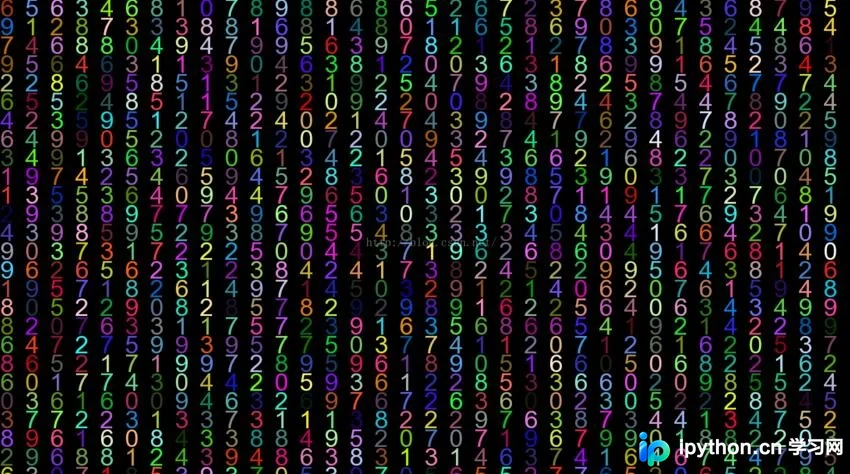
以上就是本文的全部内容,希望对大家的学习有所帮助,也希望大家多多支持本站。
免责声明:本文内容仅供参考,不代表本站观点。转载或引用请注明出处。









