

Python3中利用BoundedSemaphore限制线程并发数的实现

发布时间:2026-10-13| 7人浏览过
本文介绍Python3中如何使用BoundedSemaphore限制线程并发数量。通过示例代码展示如何初始化信号量并配合with语句在爬虫场景中控制同时活动的线程数,确保资源不被过度占用。
前言
近期在深入研习Python的过程中,我意识到掌握线程信号量的基础概念对于透彻理解Python多线程机制至关重要。为了帮助读者更好地应用这一知识,本文将详细讲解在Python3.X环境下如何使用信号量,并通过具体案例进行说明。
方法示例
在线程编程中,信号量的核心作用在于管理有限资源,确保在同一时刻只有指定数量的线程能够访问该资源,从而避免资源竞争或过载。
# -*- coding:utf-8 -*-
""" Created by FizLin on 2017/07/23/-下午10:59
 mail: https://github.com/Fiz1994
 信号量

 maxconnections = 5
...
pool_sema = BoundedSemaphore(value=maxconnections)
Once spawned, worker threads call the semaphore's acquire and release methods when they need to connect to the server:

pool_sema.acquire()
conn = connectdb()
... use connection ...
conn.close()
pool_sema.release()


"""
import threading
import time
import random

sites = ["https://www.baidu.com/", "https://github.com/Fiz1994", "https://stackoverflow.com/",
   "https://www.sogou.com/",
   "http://english.sogou.com/?b_o_e=1&ie=utf8&fr=common_index_nav&query="] * 20
sites_index = 0
maxconnections = 2
pool_sema = threading.BoundedSemaphore(value=maxconnections)


def test():
 with pool_sema:
  global sites_index, sites
  url = str(sites[sites_index])
  k = random.randint(10, 20)
  print("爬去: " + url + " 需要时间 : " + str(k))
  sites_index += 1
  # print(url)
  time.sleep(k)
  print('退出 ', url)


for i in range(100):
 threading.Thread(target=test).start()
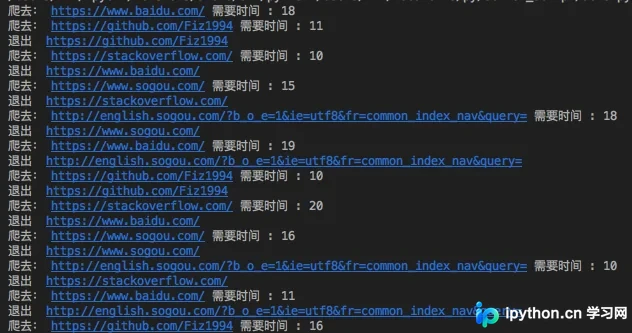
通过观察上述程序运行结果可以发现,无论启动多少线程,始终只有2个爬虫任务处于活跃执行状态,这体现了信号量对并发数的有效控制。
总结
以上就是本文关于Python3线程信号量使用方法的完整介绍。希望这些内容能为您的学习或工作提供有价值的参考。如果您在阅读过程中有任何疑问或想法,欢迎在下方留言交流,感谢大家对本站的支持。
免责声明:本文内容仅供参考,不代表本站观点。转载或引用请注明出处。









