

Node.js连接MySQL实战:mysql2与Sequelize全流程解析

本文详细讲解Node.js如何连接MySQL数据库。内容涵盖原生mysql2模块的基础使用、基于Promise的操作模式,以及Prepared Statement(预处理语句)和Connection Pools(连接池)的性能优化方案。同时深入介绍Sequelize ORM库的安装配置,演示从单表CRUD操作到一对多、多对多复杂关系映射的完整实践,帮助开发者快速构建高效稳定的数据库交互层。
准备条件与环境安装
在Node.js环境中连接MySQL,核心依赖于第三方驱动库。目前业界推荐使用 mysql2,它兼容原生的 mysql API,同时提供了更好的Promise支持和性能优化。
npm install mysql2
mysql2基础连接与查询
第1步:创建连接并执行查询
首先引入模块,建立数据库连接对象。通过 createConnection 方法传入主机地址、端口、用户名、密码及数据库名等参数,即可完成连接初始化。随后使用 query 方法发送SQL语句并处理回调结果。
const mysql = require('mysql2');

// 1. 创建数据库连接
const connection = mysql.createConnection({
  host: 'localhost',
  port: 3306,
  database: 'coderhub',
  user: 'root',
  password: 'YourPassword'
});

// 2. 执行SQL语句
const statement = `
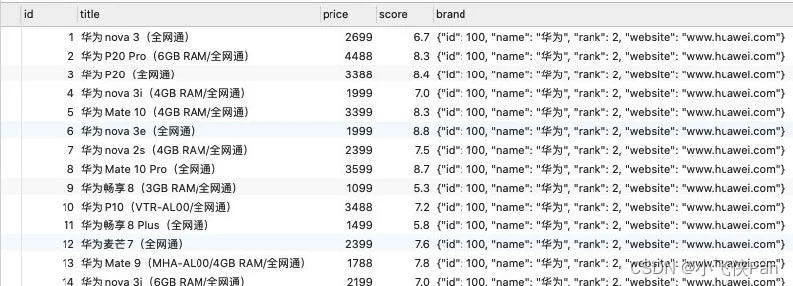
  SELECT * FROM products WHERE price > 6000;
`;
connection.query(statement, (err, results, fields) => {
  if (err) throw err;
  console.log(results);
  // 数据获取后主动断开连接,避免资源占用
  connection.end();
});
高级功能:预处理与连接池
Prepared Statement(预处理语句)
在涉及敏感数据或高频执行的场景下,直接使用字符串拼接SQL存在注入风险且效率较低。预处理语句通过将SQL结构发送给MySQL编译缓存,后续仅需传入参数占位符(?),不仅能防注入,还能复用执行计划提升性能。
第2步:使用占位符执行预处理
利用 connection.execute 替代 query,第一个参数为含 ? 的SQL模板,第二个参数为参数数组。
const statement = `
  SELECT * FROM products WHERE price > ? AND score > ?;
`;
connection.execute(statement, [6000, 7], (err, results) => {
  if (err) throw err;
  console.log(results);
});
Connection Pools(连接池)
在高并发Web应用中,每次请求都新建销毁连接会导致巨大的开销。连接池允许预创建一定数量的连接并在空闲时复用,通过 createPool 配置最大连接数限制(connectionLimit)。
第3步:配置并使用连接池
const mysql = require('mysql2');

// 1. 创建连接池,设置最大连接数为10
const connections = mysql.createPool({
  host: 'localhost',
  port: 3306,
  database: 'coderhub',
  user: 'root',
  password: 'YourPassword',
  connectionLimit: 10
});

// 2. 使用连接池执行查询
const statement = `
  SELECT * FROM products WHERE price > ? AND score > ?;
`;
connections.execute(statement, [6000, 7], (err, results) => {
  if (err) throw err;
  console.log(results);
});
Promise方式集成
为了获得更简洁的异步代码体验,可以使用 mysql2/promise。这将使得所有API调用返回标准的Promise对象,便于配合 async/await 使用。
const mysql = require('mysql2/promise');

// 使用promise版本的createPool
const connections = mysql.createPool({
  host: 'localhost',
  database: 'coderhub',
  user: 'root',
  password: 'YourPassword'
});

async function fetchData() {
  try {
    const [results, fields] = await connections.execute(
      'SELECT * FROM products WHERE price > ?',
      [6000]
    );
    console.log(results);
  } catch (err) {
    console.error('Error:', err.message);
  }
}
进阶应用:Sequelize ORM的使用
Sequelize是一个基于Node.js的功能强大的ORM框架,支持Postgres、MySQL等多种数据库。它能将JS对象映射为数据库表,大幅简化CRUD操作及复杂关系查询的开发成本。
安装依赖:需同时安装 sequelize 和 mysql2。
npm install sequelize mysql2
初始化连接
创建Sequelize实例并验证连接状态。
const { Sequelize } = require('sequelize');

const sequelize = new Sequelize('dbname', 'username', 'password', {
  host: 'localhost',
  dialect: 'mysql'
});

(async () => {
  try {
    await sequelize.authenticate();
    console.log('Connection has been established successfully.');
  } catch (error) {
    console.error('Unable to connect to the database:', error);
  }
})();
单表模型定义与操作
定义Model类继承自 Model,配置字段类型、约束及表名映射,即可自动管理该表数据。
const { Sequelize, DataTypes, Model, Op } = require('sequelize');

const sequelize = new Sequelize('mydb', 'root', 'pwd', {
  host: 'localhost',
  dialect: 'mysql'
});

class Product extends Model {}
Product.init({
  id: {
    type: DataTypes.INTEGER,
    primaryKey: true,
    autoIncrement: true
  },
  title: {
    type: DataTypes.STRING,
    allowNull: false
  },
  price: DataTypes.DOUBLE
}, {
  tableName: 'products',
  sequelize,
  createdAt: false,
  updatedAt: false
});

(async () => {
  await Product.sync(); // 同步表结构

  // 查询:价格大于等于5000
  const results = await Product.findAll({
    where: {
      price: { [Op.gte]: 5000 }
    }
  });
  console.log(results);
})().catch(console.error);
一对多关系操作
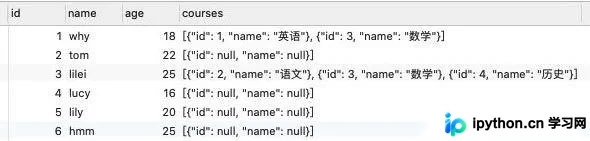
通过 belongsTo 和 hasMany 建立关联。在查询时通过 include 选项加载关联表数据。
class Brand extends Model {}
Brand.init({ name: DataTypes.STRING }, { sequelize, tableName: 'brand' });

class Product extends Model {}
Product.init({
  title: DataTypes.STRING,
  brandId: {
    type: DataTypes.INTEGER,
    references: { model: Brand, key: 'id' }
  }
}, { sequelize, tableName: 'products' });

// 建立关系:一个品牌有很多产品,产品属于一个品牌
Brand.hasMany(Product);
Product.belongsTo(Brand);

// 联合查询
const products = await Product.findAll({
  include: [Brand]
});
多对多关系操作
多对多需要中间表(Join Table)。定义 belongsToMany 时需指定 through 中间模型。
class Student extends Model {}
Student.init({ name: DataTypes.STRING }, { sequelize, tableName: 'students' });

class Course extends Model {};
Course.init({ name: DataTypes.STRING }, { sequelize, tableName: 'courses' });

class StudentCourse extends Model {};
StudentCourse.init({}, { sequelize, tableName: 'student_courses' });

// 双向关联
Student.belongsToMany(Course, { through: StudentCourse, foreignKey: 'studentId' });
Course.belongsToMany(Student, { through: StudentCourse, foreignKey: 'courseId' });

// 查询学生及其选课
const students = await Student.findAll({
  include: [Course]
});
以上就是Node.js中结合mysql2与Sequelize连接MySQL的详细内容,更多关于Node.js数据库连接优化的资料请关注本站其它相关文章!
免责声明:本文内容仅供参考,不代表本站观点。转载或引用请注明出处。









