

Python 数据相关性分析实战:三种核心算法与可视化

在数据探索阶段,明确特征变量之间的关联强度与方向是构建可靠模型的前提。本文基于 Python 生态,系统梳理 Pearson、Spearman 与 Kendall 三种相关系数的计算方法,展示如何通过 NumPy、SciPy 和 Pandas 快速求解,并结合线性回归与热力图技术,将抽象的相关性数值转化为直观的数据可视化结果。
Python 计算相关系数的核心方法
统计分析主要关注数据集中多个变量(或特征)的内在联系。选择合适的相关性度量方法取决于数据的分布形态与尺度类型。
第1步:使用 NumPy 快速获取相关系数矩阵
对于基础二维数据矩阵,np.corrcoef() 可直接返回对称的 Pearson 相关系数矩阵,适合初步摸底数据关系。
import numpy as np
x = np.arange(10, 20)
y = np.array([2, 1, 4, 5, 8, 12, 18, 25, 96, 48])

r = np.corrcoef(x, y)
print(r)
# [[1.         0.75864029]
#  [0.75864029 1.        ]]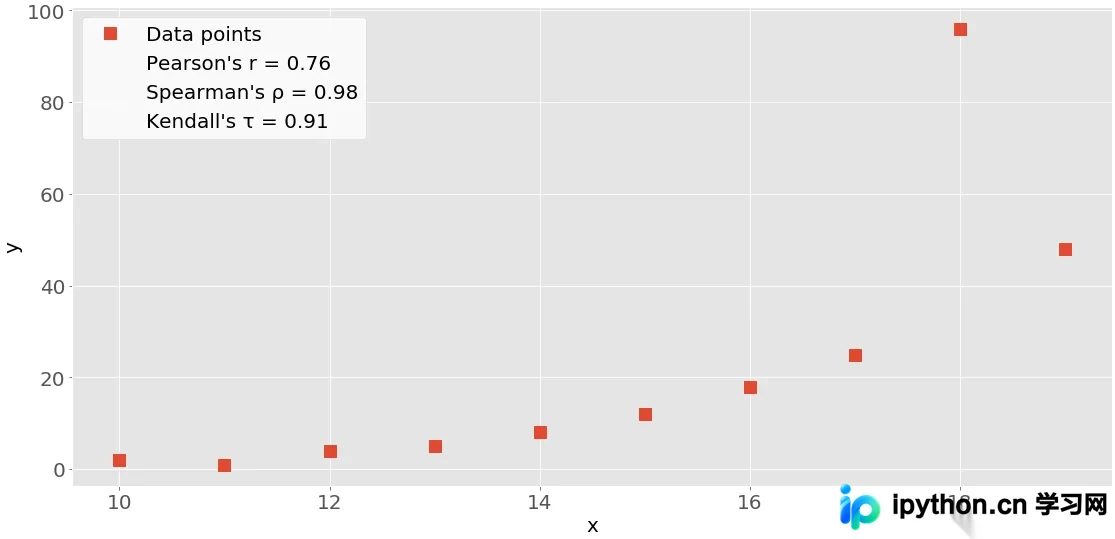
第2步:利用 SciPy 进行统计检验与参数提取
scipy.stats 模块不仅能计算系数,还能同步返回显著性 pvalue,用于评估相关性是否由随机波动引起。
import scipy.stats
pearson_res = scipy.stats.pearsonr(x, y)
spearman_res = scipy.stats.spearmanr(x, y)
kendall_res = scipy.stats.kendalltau(x, y)

print("Pearson:", pearson_res.correlation, "| P:", pearson_res.pvalue)
print("Spearman:", spearman_res.correlation, "| P:", spearman_res.pvalue)
print("Kendall:", kendall_res.correlation, "| P:", kendall_res.pvalue)
P 值越小(通常阈值设为 0.05),说明观测到的相关性越不可能来自随机抽样,具有统计学意义。仅需相关系数时,可通过索引 [0] 单独提取。
第3步:通过 Pandas 接口简化多列计算
处理表格型数据时,Pandas 的 .corr() 方法最为便捷。默认计算 Pearson 系数,支持通过 method 参数一键切换 Spearman 或 Kendall。
import pandas as pd
x_ser = pd.Series(range(10, 20))
y_ser = pd.Series([2, 1, 4, 5, 8, 12, 18, 25, 96, 48])

x_ser.corr(y_ser)                          # Pearson
x_ser.corr(y_ser, method='spearman')       # Spearman
x_ser.corr(y_ser, method='kendall')        # Kendall
等级相关与线性回归深度解析
第4步:处理排序数据与等级相关性验证
Pearson 依赖严格的线性假设与正态分布。当数据仅为排名顺序或存在明显异常值时,等级相关(Rank Correlation)更为稳健。它仅关注数据的相对大小顺序,而非绝对数值。
可借助 scipy.stats.rankdata() 查看序列的具体排序位置:
z = np.array([5, 3, 2, 1, 0, -2, -8, -11, -15, -16])
scipy.stats.rankdata(z)
# 输出完全单调递减的排名序列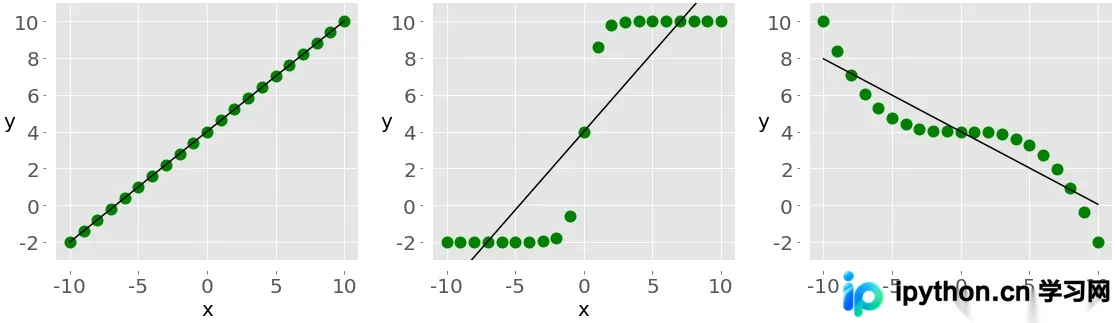
第5步:执行线性回归拟合并提取关键指标
线性回归旨在寻找最佳逼近数据分布的直线函数。调用 scipy.stats.linregress() 可同时获得斜率、截距、相关系数及相关统计量。
result = scipy.stats.linregress(x, y)
print(f"斜率: {result.slope:.4f}")
print(f"截距: {result.intercept:.4f}")
print(f"相关系数 r: {result.rvalue:.4f}")
print(f"P值: {result.pvalue:.4e}")
print(f"标准误差: {result.stderr:.4f}")
注意:原始草稿中 linregress(xy) 写法有误,正确调用应传入独立变量序列 linregress(x, y),此处已修正。
相关性结果的可视化呈现
第6步:绘制带趋势线的散点图表
可视化能直观暴露非线性偏离或离群点。结合回归线方程,可在散点图上叠加理论拟合轨迹。
import matplotlib.pyplot as plt
slope, intercept, r, p, stderr = scipy.stats.linregress(x, y)
equation = f'y={intercept:.2f}+{slope:.2f}x, r={r:.2f}'

fig, ax = plt.subplots()
ax.plot(x, y, linewidth=0, marker='s', label='Data points')
ax.plot(x, intercept + slope * x, label=equation)
ax.set_xlabel('x')
ax.set_ylabel('y')
ax.legend(facecolor='white')
plt.show()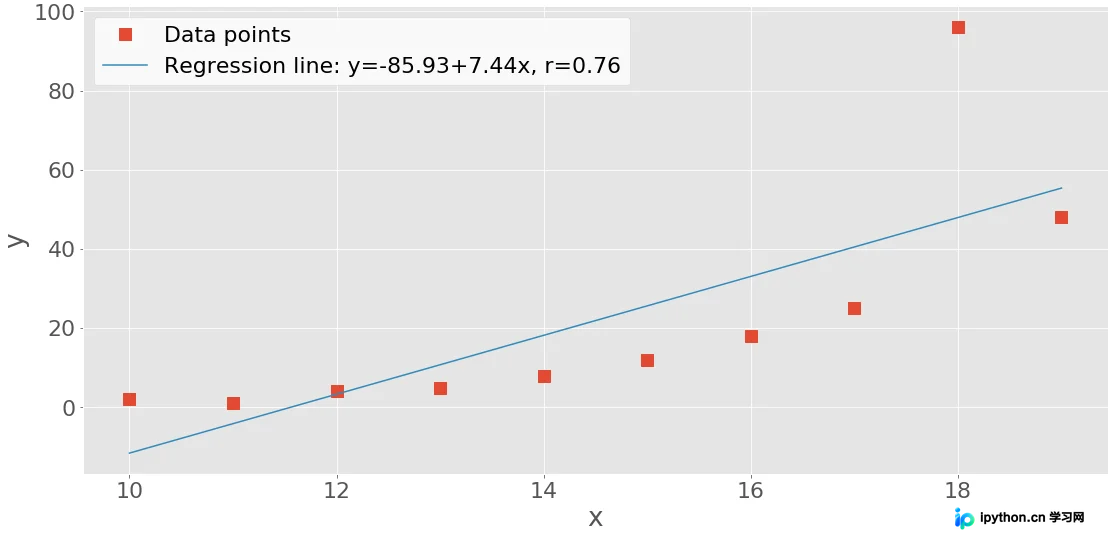
第7步:生成多维特征相关矩阵热图
当特征维度增加至三个以上时,矩阵形式配合颜色映射(Heatmap)是诊断多重共线性的首选方案。Matplotlib 原生 imshow 可精细控制刻度与文本标签,Seaborn 则提供极简的一键绘制体验。
# 构造三变量测试集
xyz = np.array([[10, 11, 12, 13, 14, 15, 16, 17, 18, 19],
                [2, 1, 4, 5, 8, 12, 18, 25, 96, 48],
                [5, 3, 2, 1, 0, -2, -8, -11, -15, -16]])
corr_matrix = np.corrcoef(xyz).round(decimals=2)

# Matplotlib 自定义热图
im = plt.imshow(corr_matrix)
im.set_clim(-1, 1)
for i in range(3):
    for j in range(3):
        plt.text(j, i, f'{corr_matrix[i, j]: .2f}', ha='center', va='center', color='red')
plt.colorbar(format='% .2f')
plt.show()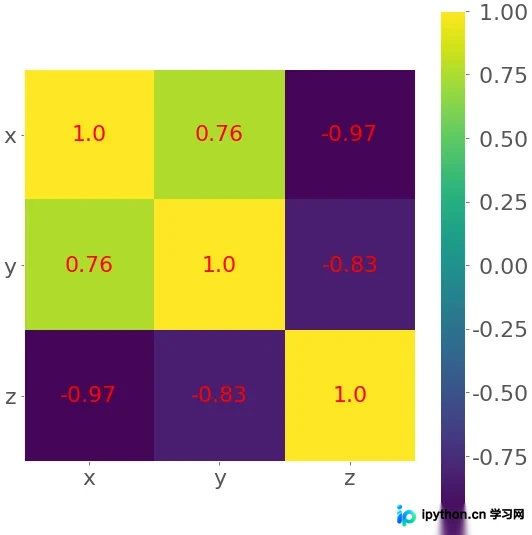
# Seaborn 快捷热图
import seaborn as sns
sns.heatmap(data=corr_matrix,
            annot_kws={'size':8, 'weight':'normal', 'color':'#253D24'})
plt.show()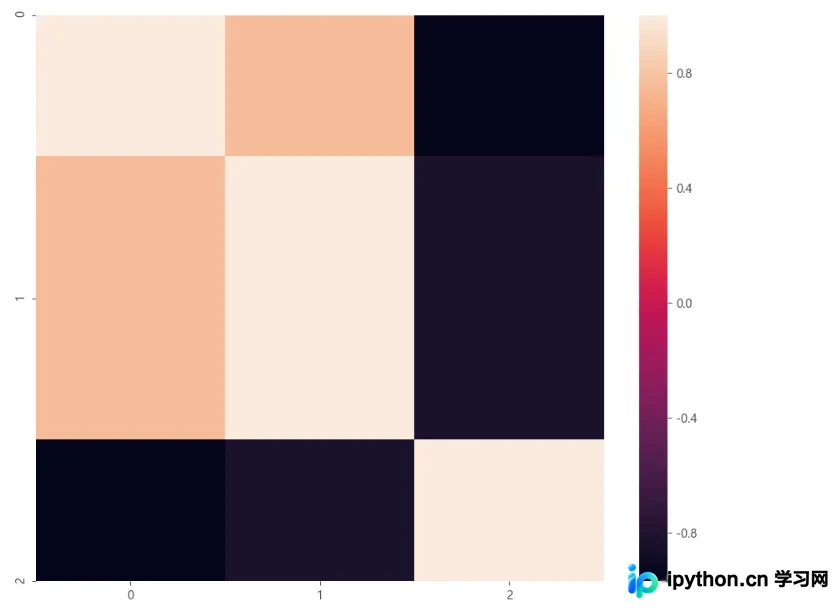
免责声明:本文内容仅供参考,不代表本站观点。转载或引用请注明出处。









