Python适合做什么项目?爬虫、运维脚本与Web开发的实际案例

深入剖析Python在网络爬虫、自动化运维脚本与Web应用开发三大经典领域的适用性,结合具体代码案例、实现步骤与工程边界,帮助开发者准确选型落地。
Python最适合用于需求变化快、追求交付效率、强依赖成熟工具链,且以I/O密集型任务为主的项目。在实际生产场景中,网络爬虫、自动化运维脚本和Web开发是其经过多年检验、落地成本最低的三大核心阵地。本文针对这三个典型方向,结合生产环境中的真实案例、可运行的工程示例代码与关键注意事项,直接讲透Python在各领域的实践方法、技术选型依据与性能适用边界。

一、网络数据采集(爬虫)的工程实践
网络爬虫是Python最直观的优势领域。在互联网数据获取场景中,目标网页的结构往往千差万别,且前端渲染逻辑经常调整。Python之所以成为爬虫开发的事实标准,主要原因在于:
- 极速开发与解析:
requests或httpx可以几行代码完成网络通信;BeautifulSoup4和lxml提供了容错率极高的DOM解析能力。 - 全生态工具链:如果遇到JavaScript动态渲染,无需换用其他语言,直接引入
playwright或selenium即可接管浏览器驱动。 - 原生数据处理能力:采集完成的脏数据可无缝转入
pandas清洗并导出为各类数据库或CSV格式,无需进行繁琐的跨语言接口转换。
实际案例:电商多页商品价格与库存采集脚本
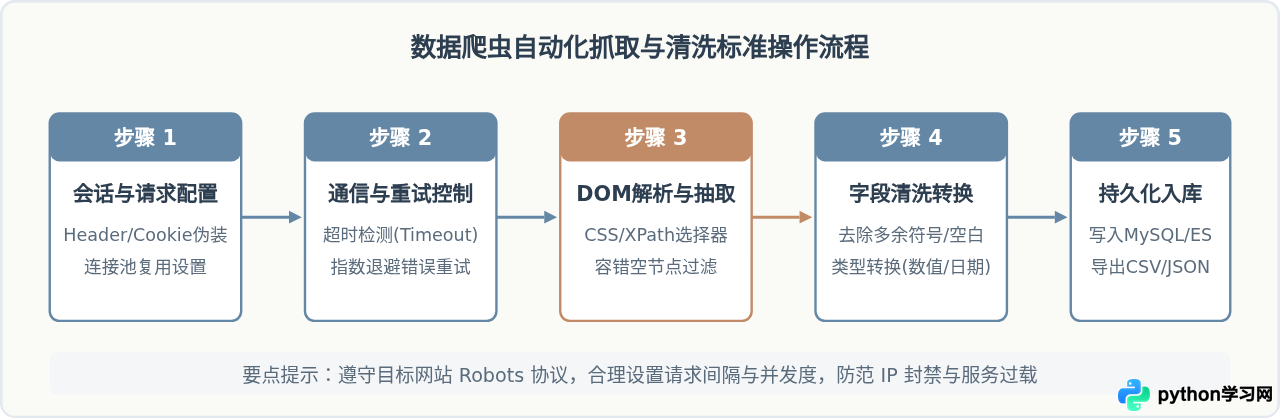
在实际业务中,企业经常需要监控竞品价格与上架状态。以下是一个具备生产可用要素的基础爬虫脚本,包含统一的请求头伪装、超时配置、状态码检验以及数据提取逻辑。
import requests
from bs4 import BeautifulSoup
import time
import logging

logging.basicConfig(level=logging.INFO, format="%(asctime)s [%(levelname)s] %(message)s")

class ProductCrawler:
    def __init__(self, base_url: str):
        self.base_url = base_url
        self.session = requests.Session()
        self.session.headers.update({
            "User-Agent": "Mozilla/5.0 (Windows NT 10.0; Win64; x64) AppleWebKit/537.36 (KHTML, like Gecko) Chrome/120.0.0.0 Safari/537.36",
            "Accept-Language": "zh-CN,zh;q=0.9,en;q=0.8"
        })

    def fetch_page(self, page_num: int, max_retries: int = 3) -> str:
        url = f"{self.base_url}/products?page={page_num}"
        for attempt in range(1, max_retries + 1):
            try:
                response = self.session.get(url, timeout=10)
                if response.status_code == 200:
                    return response.text
                elif response.status_code == 404:
                    logging.warning(f"页面未找到: {url}")
                    return ""
                logging.warning(f"请求失败 [{response.status_code}],重试第 {attempt} 次...")
            except requests.RequestException as e:
                logging.error(f"网络异常: {e},重试第 {attempt} 次...")
            time.sleep(2 * attempt)
        return ""

    def parse_products(self, html_content: str) -> list:
        if not html_content:
            return []
        soup = BeautifulSoup(html_content, "html.parser")
        items = []
        for card in soup.select("div.product-card"):
            title_node = card.select_one("h3.title")
            price_node = card.select_one("span.price")
            stock_node = card.select_one("span.stock-status")

            if title_node and price_node:
                items.append({
                    "title": title_node.get_text(strip=True),
                    "price": price_node.get_text(strip=True).replace("¥", ""),
                    "in_stock": "有货" in (stock_node.get_text(strip=True) if stock_node else "")
                })
        return items

if __name__ == "__main__":
    crawler = ProductCrawler(base_url="https://example-shop.com")
    html = crawler.fetch_page(page_num=1)
    results = crawler.parse_products(html)
    logging.info(f"成功解析 {len(results)} 条商品信息")
二、自动化运维与系统监控脚本的工程实践
在Linux/Windows服务器集群运维中,管理员经常需要编写自动化脚本。与传统的 Bash Shell 相比,Python脚本在以下方面具备显著优势:
- 强大的数据结构支持:Shell处理复杂的嵌套JSON、列表去重和字典映射极其繁琐,而Python原生支持字典、集合及丰富的方法。
- 出色的跨平台一致性:
pathlib与os.path抹平了Linux和Windows的路径分隔符差异,同一份运维脚本无需改动即可在混合服务器环境中执行。 - 系统级交互库丰富:
psutil可跨平台读取CPU、内存、网络IO和进程指标;paramiko可直接通过SSH协议远程批处理机器。
实际案例:服务器磁盘健康巡检与日志归档脚本
运维日常最常见的突发事故之一是系统盘或数据盘日志写满导致服务宕机。以下脚本利用 psutil 自动巡检指定挂载点的容量,当使用率超过警戒阈值时,自动压缩归档过期的日志文件,并向管理员终端或报警Webhook发送结构化警报。
import os
import shutil
import tarfile
import datetime
import psutil
import logging

logging.basicConfig(level=logging.INFO, format="%(asctime)s [%(levelname)s] %(message)s")

class StorageMaintainer:
    def __init__(self, mount_point: str = "/", threshold_percent: float = 85.0):
        self.mount_point = mount_point
        self.threshold_percent = threshold_percent

    def check_disk_usage(self) -> dict:
        usage = psutil.disk_usage(self.mount_point)
        current_percent = usage.percent
        logging.info(f"挂载点 [{self.mount_point}] 当前使用率: {current_percent}%")
        return {
            "total_gb": round(usage.total / (1024**3), 2),
            "free_gb": round(usage.free / (1024**3), 2),
            "percent": current_percent,
            "is_critical": current_percent >= self.threshold_percent
        }

    def archive_old_logs(self, log_dir: str, archive_dir: str, days_before: int = 7):
        if not os.path.exists(log_dir):
            logging.warning(f"日志目录不存在: {log_dir}")
            return

        os.makedirs(archive_dir, exist_ok=True)
        cutoff_date = datetime.datetime.now() - datetime.timedelta(days=days_before)
        timestamp = datetime.datetime.now().strftime("%Y%m%d_%H%M%S")
        archive_name = os.path.join(archive_dir, f"logs_backup_{timestamp}.tar.gz")

        files_to_compress = []
        for root, _, files in os.walk(log_dir):
            for file in files:
                file_path = os.path.join(root, file)
                if not file.endswith(".log"):
                    continue
                file_mtime = datetime.datetime.fromtimestamp(os.path.getmtime(file_path))
                if file_mtime < cutoff_date:
                    files_to_compress.append(file_path)

        if not files_to_compress:
            logging.info("未发现满足归档条件的超期日志文件")
            return

        with tarfile.open(archive_name, "w:gz") as tar:
            for file_path in files_to_compress:
                tar.add(file_path, arcname=os.path.basename(file_path))
                os.remove(file_path)
                logging.info(f"已清理原始文件: {file_path}")

        logging.info(f"成功归档 {len(files_to_compress)} 个文件至 {archive_name}")

if __name__ == "__main__":
    maintainer = StorageMaintainer(mount_point="/", threshold_percent=80.0)
    status = maintainer.check_disk_usage()
    if status["is_critical"]:
        logging.warning("磁盘空间触达阈值,启动自动清理程序...")
        maintainer.archive_old_logs(
            log_dir="/var/log/app_services",
            archive_dir="/backup/logs",
            days_before=3
        )
psutil 等外部依赖,建议使用 venv 封装或通过系统包管理器统一分发,并在脚本开头做环境依赖校验。
三、Web应用与API开发工程实践
在Web开发领域,Python凭借 FastAPI、Django 和 Flask 构建了层次分明的开发矩阵。它并不主打极端的微秒级并发,但在绝大多数企业中台、API网关、管理后台和敏捷业务系统中,具有极高的性价比:
- 类型驱动与自动化文档(FastAPI):利用现代Python的 Type Hints 与 Pydantic,开发者只需定义函数参数与返回值类型,框架即可自动生成交互式 OpenAPI (Swagger) 文档与严谨的入参校验。
- 全功能开箱即用(Django):自带强类型的ORM、安全认证机制、CSRF防护以及自动化管理后台,非常适合资源有限、希望数天内快速上线完整业务系统的团队。
- AI与数据能力天然集成:如果Web服务需要调用大语言模型、进行图像处理或提供数据报表接口,Python Web服务无需像Java或Node.js那样额外搭桥,可直接调用底层算法库。
实际案例:基于 FastAPI 构建微服务数据查询接口
以下示例展示了生产级API的基本架构:使用 Pydantic 进行请求结构校验,提供异步路由处理能力,并支持自动异常捕获。
from fastapi import FastAPI, HTTPException, Query
from pydantic import BaseModel, Field
from typing import Optional, List
import uvicorn

app = FastAPI(
    title="指标与运维数据查询API",
    description="提供服务器状态与采集数据的统一查询接口",
    version="1.0.0"
)

# 统一响应模型
class ServerMetric(BaseModel):
    hostname: str = Field(..., example="node-prod-01")
    cpu_percent: float = Field(..., ge=0, le=100, example=45.2)
    memory_percent: float = Field(..., ge=0, le=100, example=68.5)
    status: str = Field(..., example="HEALTHY")

# 模拟内存数据库
DATABASE: List[dict] = [
    {"hostname": "node-prod-01", "cpu_percent": 45.2, "memory_percent": 68.5, "status": "HEALTHY"},
    {"hostname": "node-prod-02", "cpu_percent": 91.0, "memory_percent": 88.2, "status": "WARNING"},
    {"hostname": "node-prod-03", "cpu_percent": 12.5, "memory_percent": 30.1, "status": "HEALTHY"},
]

@app.get("/api/v1/metrics", response_model=List[ServerMetric])
async def list_metrics(
    status_filter: Optional[str] = Query(None, description="按运行状态筛选,如 HEALTHY, WARNING")
):
    if status_filter:
        filtered = [m for m in DATABASE if m["status"] == status_filter.upper()]
        return filtered
    return DATABASE

@app.get("/api/v1/metrics/{hostname}", response_model=ServerMetric)
async def get_metric_by_host(hostname: str):
    for metric in DATABASE:
        if metric["hostname"] == hostname:
            return metric
    raise HTTPException(status_code=404, detail=f"未找到主机名为 {hostname} 的监控数据")

if __name__ == "__main__":
    # 生产环境通常采用: uvicorn main:app --host 0.0.0.0 --port 8000 --workers 4
    uvicorn.run(app, host="127.0.0.1", port=8000)

四、三大方向的技术选型与工程边界总结
明确一项技术“不能做什么”,往往比知道它“能做什么”更具工程价值。在评估是否选用Python承担项目时,可以参考以下决策依据:
| 技术方向 | 非常适合的场景 | 不适合或成本极高的场景 | 推荐选型替代方案 |
|---|---|---|---|
| 网络爬虫 | 异构网页解析、规则多变的竞品分析、小红书/电商日常监测、数据清洗联动 | 超高频全网抓取(亿级并发)、硬件资源极度受限的嵌入式抓取 | Go (Colly), Rust (Reqwest) |
| 运维脚本 | 服务器资源健康巡检、日志分析归档、多机批量部署与交互、数据库日常备份 | 需要编译为无环境依赖的独立微小二进制分发给无Python环境的客户端 | Go, Shell (极简单命令场景) |
| Web开发 | 企业运营后台、中台API、AI功能包装接口、轻量级SaaS服务原型 | 游戏高频物理帧同步服务器、微秒级超高频金融撮合系统、超巨型单体架构 | Java (Spring Boot), Go (Gin/Fiber), C++ |

综上所述,Python的威力不在于单核运算的极致纳秒级速度,而在于其作为“数字胶水语言”连接多样化软硬件生态的极高效率。只要认清I/O密集与业务敏捷的定位,遵循环境隔离与类型注解规范,Python在网络爬虫、自动化运维与Web服务项目中均能发挥出显著的工程价值与开发生产力。
免责声明:本文内容仅供参考,不代表本站观点。转载或引用请注明出处。