

Python爬虫数据清洗与存储:从抓取到存入MySQL的完整代码

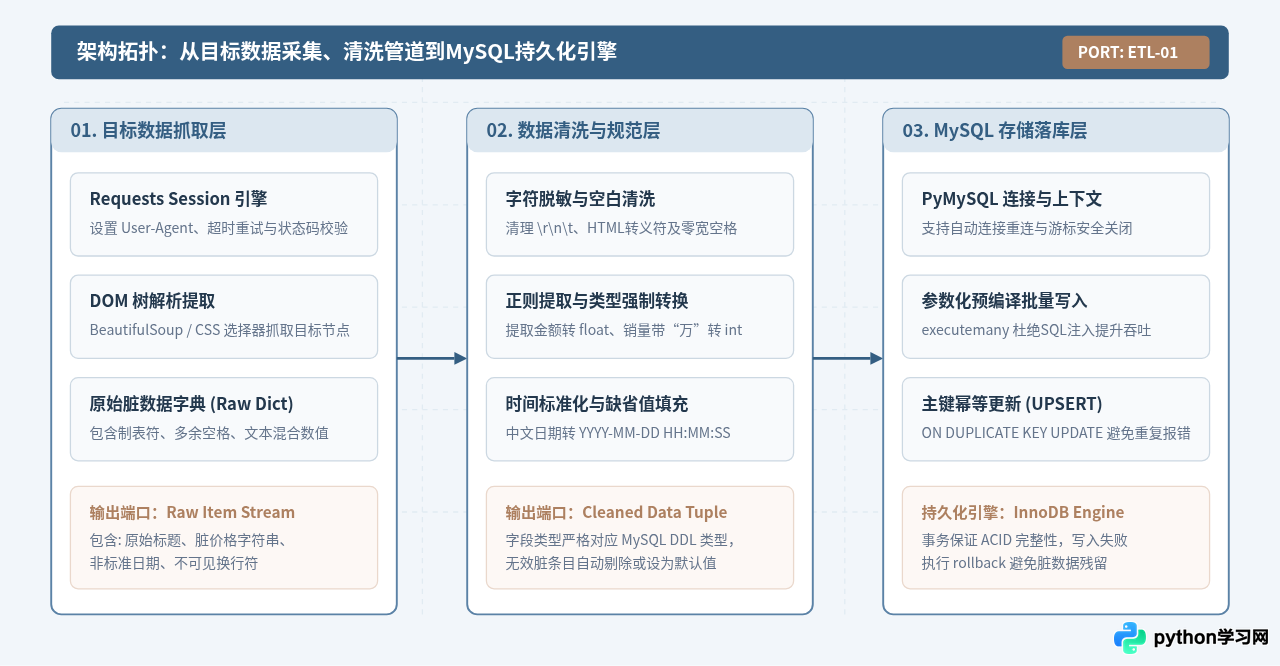
一、系统架构与数据流转拓扑
在工业化爬虫采集系统中,从页面抓取到最终落库绝不能采用“抓一行写一行”的粗暴拼串模式。整个链路通常解耦为三个阶段:首先是采集层,负责网络会话维系、防封禁请求头构造以及异常重试;其次是清洗转换层,负责去除不可见特殊符号、统一日期时间、提炼数值与枚举归一;最后是持久化存储层,利用事务和预编译参数化SQL,通过主键或唯一索引实现断点重抓时的无损幂等更新。
二、环境依赖与 MySQL 数据表设计
在执行抓取任务前,需在 Python 运行环境中安装必要的解析与数据库驱动库。推荐使用 PyMySQL 作为纯 Python 实现的 MySQL 驱动,其无需在操作系统层面编译 C 依赖,具备优异的兼容性。
1. 依赖库安装命令
pip install requests beautifulsoup4 pymysql cryptography2. MySQL 业务数据表 DDL 设计
数据表的设计决定了数据能否高效存储与检索。本例以典型的数据采集场景(图书电商商品条目)为例,建立名为 spider_books 的数据表。注意必须显式定义 UNIQUE KEY 唯一业务键(例如 book_id),并设置默认字符集为 utf8mb4,以完整支持 Emoji 与生僻汉字。
CREATE DATABASE IF NOT EXISTS `crawler_db` DEFAULT CHARACTER SET utf8mb4 COLLATE utf8mb4_unicode_ci;

USE `crawler_db`;

CREATE TABLE IF NOT EXISTS `spider_books` (
    `id` BIGINT UNSIGNED NOT NULL AUTO_INCREMENT COMMENT '自增主键',
    `book_id` VARCHAR(64) NOT NULL COMMENT '抓取目标业务唯一编号',
    `title` VARCHAR(255) NOT NULL COMMENT '清洗后的书名',
    `author` VARCHAR(128) NOT NULL DEFAULT '未知作者' COMMENT '作者',
    `price` DECIMAL(10, 2) NOT NULL DEFAULT 0.00 COMMENT '售价(数值型保留两位小数)',
    `rating` DECIMAL(3, 2) NOT NULL DEFAULT 0.00 COMMENT '评分(满分5分)',
    `review_count` INT UNSIGNED NOT NULL DEFAULT 0 COMMENT '评价数量',
    `publish_date` DATE DEFAULT NULL COMMENT '出版日期',
    `detail_url` VARCHAR(512) NOT NULL DEFAULT '' COMMENT '详情页链接',
    `created_at` DATETIME NOT NULL DEFAULT CURRENT_TIMESTAMP COMMENT '首次抓取落库时间',
    `updated_at` DATETIME NOT NULL DEFAULT CURRENT_TIMESTAMP ON UPDATE CURRENT_TIMESTAMP COMMENT '最后更新时间',
    PRIMARY KEY (`id`),
    UNIQUE KEY `uk_book_id` (`book_id`),
    KEY `idx_publish_date` (`publish_date`)
) ENGINE=InnoDB DEFAULT CHARSET=utf8mb4 COMMENT='爬虫图书采集规范数据表';FLOAT 或 DOUBLE 存储,因为浮点数运算在底层存在二进制舍入误差。务必使用定点数类型 DECIMAL(10, 2)。
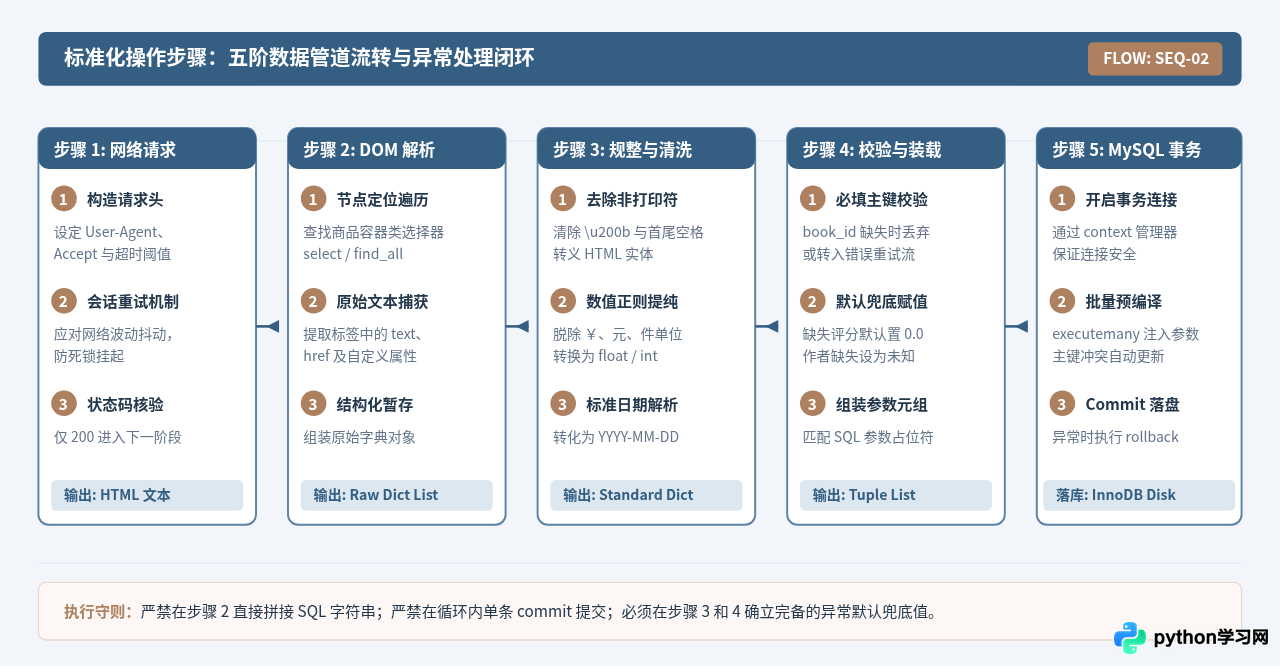
三、操作步骤与执行流程详解
从网络响应到最终数据库提交,需要遵循严格的阶段性步骤。任何跳过清洗校验直接拼接 SQL 的做法,都会导致脏数据破坏数据库完整性,甚至引发 SQL 注入风险。
四、关键字段清洗规则与清洗算子
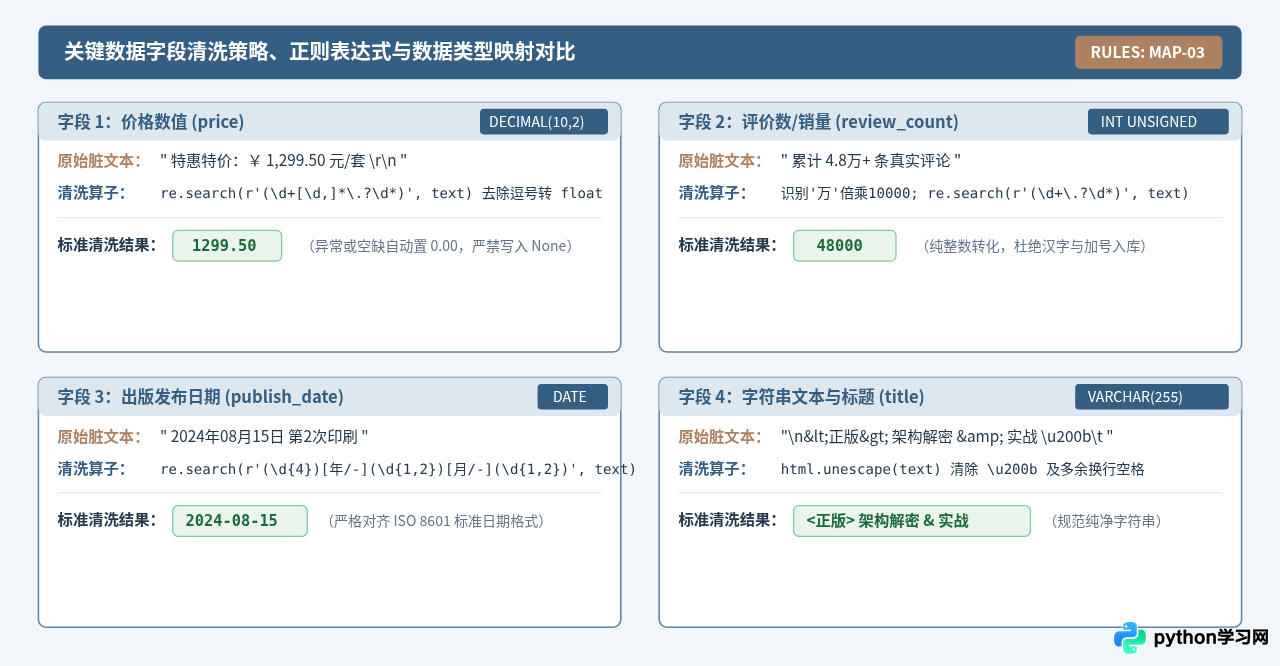
网络抓取的原始文本通常包含大量格式噪音。例如商品售价可能写作 "促销价:¥ 89.90 元/本",评论数可能表示为 "1.5万+条评价",出版时间混杂中文 "2024年10月01日出版"。下表及对照图展示了对应的清洗策略与目标数据库字段映射:
五、完整可运行 Python 代码
下面是完整的工程化 Python 脚本。代码被组织为三个高内聚模块:负责连接管理与参数化批处理的 MySQLPipeline、负责字段规则提纯与异常兜底的 DataCleaner、以及调度网络请求与 DOM 解析的 BookSpider。
# -*- coding: utf-8 -*-
"""
Python爬虫数据清洗与存储:从抓取到存入MySQL的完整脚本
环境依赖: pip install requests beautifulsoup4 pymysql cryptography
"""
import re
import html
import logging
from datetime import datetime
from typing import List, Dict, Any, Optional, Tuple
import requests
from bs4 import BeautifulSoup
import pymysql
from pymysql.cursors import DictCursor
# -------------------------------------------------------------
# 1. 全局日志与配置
# -------------------------------------------------------------
logging.basicConfig(
level=logging.INFO,
format="%(asctime)s [%(levelname)s] %(message)s",
datefmt="%Y-%m-%d %H:%M:%S"
)
logger = logging.getLogger(__name__)
DB_CONFIG = {
"host": "localhost",
"port": 3306,
"user": "root",
"password": "YourSecurePassword123!",
"database": "crawler_db",
"charset": "utf8mb4",
"autocommit": False, # 显式控制事务
}
# -------------------------------------------------------------
# 2. 数据清洗清洗算子模块 (DataCleaner)
# -------------------------------------------------------------
class DataCleaner:
"""负责将抓取的各种半结构化脏文本转换为符合MySQL规范的强类型数据"""
@staticmethod
def clean_text(raw_text: Optional[str]) -> str:
"""去除不可见零宽字符、多余空白符并反转义HTML实体"""
if not raw_text:
return ""
# 1. 反转义 HTML 实体 (例如 & -> &, < -> <)
text = html.unescape(raw_text)
# 2. 移除 Unicode 零宽字符与常见空白
text = re.sub(r"[\u200b\u200c\u200d\uFEFF]", "", text)
# 3. 压缩多个连续空白或换行符为单个空格
text = re.sub(r"\s+", " ", text).strip()
return text
@staticmethod
def parse_price(raw_price: Optional[str]) -> float:
"""从杂乱文本中提取金额浮点数(例如 '特惠: ¥1,280.50 元' -> 1280.50)"""
if not raw_price:
return 0.00
# 移除非数字和非小数点的字符(保留逗号以便处理)
match = re.search(r"(\d+[\d,]*\.?\d*)", raw_price)
if match:
clean_str = match.group(1).replace(",", "")
try:
return round(float(clean_str), 2)
except ValueError:
return 0.00
return 0.00
@staticmethod
def parse_rating(raw_rating: Optional[str]) -> float:
"""解析评分数据,确保落在 0.0 ~ 5.0 之间"""
if not raw_rating:
return 0.0
match = re.search(r"(\d+(\.\d+)?)", raw_rating)
if match:
try:
val = float(match.group(1))
return min(max(val, 0.0), 5.0)
except ValueError:
return 0.0
return 0.0
@staticmethod
def parse_review_count(raw_count: Optional[str]) -> int:
"""解析评价数量,识别 '3.2万+'、'1000+' 等表达"""
if not raw_count:
return 0
cleaned = raw_count.strip().replace(",", "")
# 处理带有“万”单位的数字
wan_match = re.search(r"(\d+(\.\d+)?)\s*万", cleaned)
if wan_match:
try:
return int(float(wan_match.group(1)) * 10000)
except ValueError:
return 0
# 普通整数匹配
int_match = re.search(r"(\d+)", cleaned)
if int_match:
try:
return int(int_match.group(1))
except ValueError:
return 0
return 0
@staticmethod
def parse_publish_date(raw_date: Optional[str]) -> Optional[str]:
"""将中文或非标日期字符串清洗为 YYYY-MM-DD 格式"""
if not raw_date:
return None
# 匹配 2023年05月20日 或 2023-5-20 或 2023/05/20
match = re.search(r"(\d{4})[年/-](\d{1,2})[月/-](\d{1,2})", raw_date)
if match:
year, month, day = match.groups()
try:
dt = datetime(int(year), int(month), int(day))
return dt.strftime("%Y-%m-%d")
except ValueError:
return None
return None
@classmethod
def clean_item(cls, raw_item: Dict[str, Any]) -> Optional[Dict[str, Any]]:
"""清洗整条字典记录,若唯一键缺失则判定为脏数据直接过滤"""
book_id = cls.clean_text(raw_item.get("raw_id"))
if not book_id:
logger.warning("跳过无效条目:缺少唯一键 book_id")
return None
title = cls.clean_text(raw_item.get("raw_title"))
if not title:
logger.warning(f"跳过无效条目:book_id={book_id} 缺少标题")
return None
return {
"book_id": book_id,
"title": title,
"author": cls.clean_text(raw_item.get("raw_author")) or "未知作者",
"price": cls.parse_price(raw_item.get("raw_price")),
"rating": cls.parse_rating(raw_item.get("raw_rating")),
"review_count": cls.parse_review_count(raw_item.get("raw_reviews")),
"publish_date": cls.parse_publish_date(raw_item.get("raw_date")),
"detail_url": cls.clean_text(raw_item.get("raw_url"))
}
# -------------------------------------------------------------
# 3. 数据库管理与批量落库模块 (MySQLPipeline)
# -------------------------------------------------------------
class MySQLPipeline:
"""管理 MySQL 数据库连接、表结构预检及幂等批量插入"""
def __init__(self, config: Dict[str, Any]):
self.config = config
self.connection = None
def connect(self):
"""建立数据库连接"""
if not self.connection or not self.connection.open:
self.connection = pymysql.connect(
host=self.config["host"],
port=self.config["port"],
user=self.config["user"],
password=self.config["password"],
database=self.config["database"],
charset=self.config["charset"],
autocommit=self.config.get("autocommit", False),
cursorclass=DictCursor
)
logger.info("成功连接至 MySQL 数据库")
def close(self):
"""安全断开连接"""
if self.connection and self.connection.open:
self.connection.close()
logger.info("MySQL 数据库连接已安全关闭")
def init_table(self):
"""初始化数据表结构"""
ddl = """
CREATE TABLE IF NOT EXISTS `spider_books` (
`id` BIGINT UNSIGNED NOT NULL AUTO_INCREMENT,
`book_id` VARCHAR(64) NOT NULL,
`title` VARCHAR(255) NOT NULL,
`author` VARCHAR(128) NOT NULL DEFAULT '未知作者',
`price` DECIMAL(10, 2) NOT NULL DEFAULT 0.00,
`rating` DECIMAL(3, 2) NOT NULL DEFAULT 0.00,
`review_count` INT UNSIGNED NOT NULL DEFAULT 0,
`publish_date` DATE DEFAULT NULL,
`detail_url` VARCHAR(512) NOT NULL DEFAULT '',
`created_at` DATETIME NOT NULL DEFAULT CURRENT_TIMESTAMP,
`updated_at` DATETIME NOT NULL DEFAULT CURRENT_TIMESTAMP ON UPDATE CURRENT_TIMESTAMP,
PRIMARY KEY (`id`),
UNIQUE KEY `uk_book_id` (`book_id`)
) ENGINE=InnoDB DEFAULT CHARSET=utf8mb4;
"""
self.connect()
with self.connection.cursor() as cursor:
cursor.execute(ddl)
self.connection.commit()
logger.info("数据表 `spider_books` 校验或创建就绪")
def save_batch(self, items: List[Dict[str, Any]]) -> int:
"""
批量持久化数据,采用 ON DUPLICATE KEY UPDATE 实现断点重爬幂等性
:param items: 清洗完成的标准字典列表
:return: 受影响行数
"""
if not items:
logger.info("待写入数据为空,跳过数据库操作")
return 0
insert_sql = """
INSERT INTO `spider_books` (
`book_id`, `title`, `author`, `price`, `rating`,
`review_count`, `publish_date`, `detail_url`
) VALUES (
%s, %s, %s, %s, %s, %s, %s, %s
)
ON DUPLICATE KEY UPDATE
`title` = VALUES(`title`),
`author` = VALUES(`author`),
`price` = VALUES(`price`),
`rating` = VALUES(`rating`),
`review_count` = VALUES(`review_count`),
`publish_date` = VALUES(`publish_date`),
`detail_url` = VALUES(`detail_url`);
"""
# 将字典转换为参数元组列表,严格保持字段顺序一致
data_tuples = [
(
item["book_id"],
item["title"],
item["author"],
item["price"],
item["rating"],
item["review_count"],
item["publish_date"],
item["detail_url"],
)
for item in items
]
self.connect()
affected_rows = 0
try:
with self.connection.cursor() as cursor:
# 使用 executemany 进行预编译批量插入
affected_rows = cursor.executemany(insert_sql, data_tuples)
self.connection.commit()
logger.info(f"事务提交成功,批量保存完成,受影响记录行数: {affected_rows}")
except Exception as e:
self.connection.rollback()
logger.error(f"数据库执行发生异常,事务已回滚: {e}", exc_info=True)
raise e
return affected_rows
# -------------------------------------------------------------
# 4. 爬虫调度与抓取解析模块 (BookSpider)
# -------------------------------------------------------------
class BookSpider:
"""管理 HTTP 抓取与 HTML 解析调度"""
def __init__(self):
self.session = requests.Session()
self.session.headers.update({
"User-Agent": (
"Mozilla/5.0 (Windows NT 10.0; Win64; x64) "
"AppleWebKit/537.36 (KHTML, like Gecko) "
"Chrome/120.0.0.0 Safari/537.36"
),
"Accept": "text/html,application/xhtml+xml,application/xml;q=0.9,*/*;q=0.8",
"Accept-Language": "zh-CN,zh;q=0.9,en;q=0.8",
})
def fetch_html(self, url: str, max_retries: int = 3, timeout: int = 10) -> Optional[str]:
"""抓取目标网页,带超时和指数回退重试机制"""
for attempt in range(1, max_retries + 1):
try:
response = self.session.get(url, timeout=timeout)
if response.status_code == 200:
# 避免编码识别错误,优先使用 apparent_encoding
response.encoding = response.apparent_encoding or "utf-8"
return response.text
logger.warning(f"请求失败 [{response.status_code}],正在进行第 {attempt} 次重试: {url}")
except requests.RequestException as e:
logger.warning(f"网络异常: {e},第 {attempt} 次重试...")
logger.error(f"在 {max_retries} 次尝试后仍未能抓取网页: {url}")
return None
def parse_books(self, html_content: str) -> List[Dict[str, Any]]:
"""从 HTML 文本中解析商品原始字段字典列表"""
soup = BeautifulSoup(html_content, "html.parser")
items = []
# 匹配图书条目卡片 (此处根据实际站点 class 选择器调整)
cards = soup.select(".book-card")
for card in cards:
# 提取可能包含脏格式的原始内容
raw_id = card.get("data-id")
title_el = card.select_one(".book-title")
author_el = card.select_one(".book-author")
price_el = card.select_one(".book-price")
rating_el = card.select_one(".book-rating")
reviews_el = card.select_one(".book-reviews")
date_el = card.select_one(".book-date")
link_el = card.select_one("a.book-link")
raw_item = {
"raw_id": raw_id,
"raw_title": title_el.get_text() if title_el else None,
"raw_author": author_el.get_text() if author_el else None,
"raw_price": price_el.get_text() if price_el else None,
"raw_rating": rating_el.get_text() if rating_el else None,
"raw_reviews": reviews_el.get_text() if reviews_el else None,
"raw_date": date_el.get_text() if date_el else None,
"raw_url": link_el.get("href") if link_el else ""
}
items.append(raw_item)
return items
# -------------------------------------------------------------
# 5. 主程序执行入口与端到端测试驱动
# -------------------------------------------------------------
def run_pipeline():
"""执行从模拟抓取、清洗到入库的全生命周期流转"""
logger.info(">>> 爬虫清洗与存储流水线启动 <<<")
# 模拟真实爬取得到的带有噪音的 HTML 字符串 (便于本地脱机验证)
mock_html = """
<div class="catalog">
<div class="book-card" data-id="BK-9801">
<div class="book-title"> <精通> Python 核心编程 & 实战 \u200b\t </div>
<div class="book-author"> 卫斯理 \n </div>
<div class="book-price"> 限时立减: ¥ 89.50 元/册 </div>
<div class="book-rating"> 综合评分: 4.85 分 </div>
<div class="book-reviews"> 累计 3.5万+ 评论 </div>
<div class="book-date"> 2024年03月15日 出版 </div>
<a class="book-link" href="https://example.com/books/9801">详情</a>
</div>
<div class="book-card" data-id="BK-9802">
<div class="book-title"> MySQL 8.0 性能调优宝典 </div>
<div class="book-author"> </div> <!-- 故意留空作者 -->
<div class="book-price"> 120.00 </div>
<div class="book-rating"> 暂无评分 </div>
<div class="book-reviews"> 850条评价 </div>
<div class="book-date"> 2023-11-05 </div>
<a class="book-link" href="https://example.com/books/9802">详情</a>
</div>
<div class="book-card" data-id=""> <!-- 缺少唯一业务键 -->
<div class="book-title"> 废弃无效数据条目 </div>
</div>
</div>
"""
spider = BookSpider()
pipeline = MySQLPipeline(DB_CONFIG)
# 1. 解析原始记录
raw_records = spider.parse_books(mock_html)
logger.info(f"解析到原始数据条目数: {len(raw_records)}")
# 2. 依次经过清洗管道
cleaned_records = []
for raw in raw_records:
clean_item = DataCleaner.clean_item(raw)
if clean_item:
cleaned_records.append(clean_item)
logger.info(f"清洗通过合规条目数: {len(cleaned_records)}")
# 3. 持久化存储入库
try:
pipeline.init_table()
pipeline.save_batch(cleaned_records)
except Exception as err:
logger.error(f"持久化处理失败: {err}")
finally:
pipeline.close()
logger.info(">>> 爬虫清洗与存储流水线执行完毕 <<<")
if __name__ == "__main__":
run_pipeline()
六、入库验证与工程注意事项
完成数据写入后,不能仅依赖 Python 脚本的输出日志,还需要登录 MySQL 客户端执行具体的 SQL 验证命令,核查清洗转换与幂等更新是否符合预期。
1. 数据库结果验证 SQL
-- 1. 查看总落库数据量
SELECT COUNT(*) AS total_books FROM `spider_books`;

-- 2. 检查价格与评价数是否转换为纯净数值
SELECT `book_id`, `title`, `author`, `price`, `rating`, `review_count`, `publish_date`
FROM `spider_books`
ORDER BY `id` DESC
LIMIT 5;

-- 3. 验证脏数据过滤情况(确保没有价格为负数或出版日期非法)
SELECT * FROM `spider_books` WHERE `price` < 0 OR `rating` > 5.0;
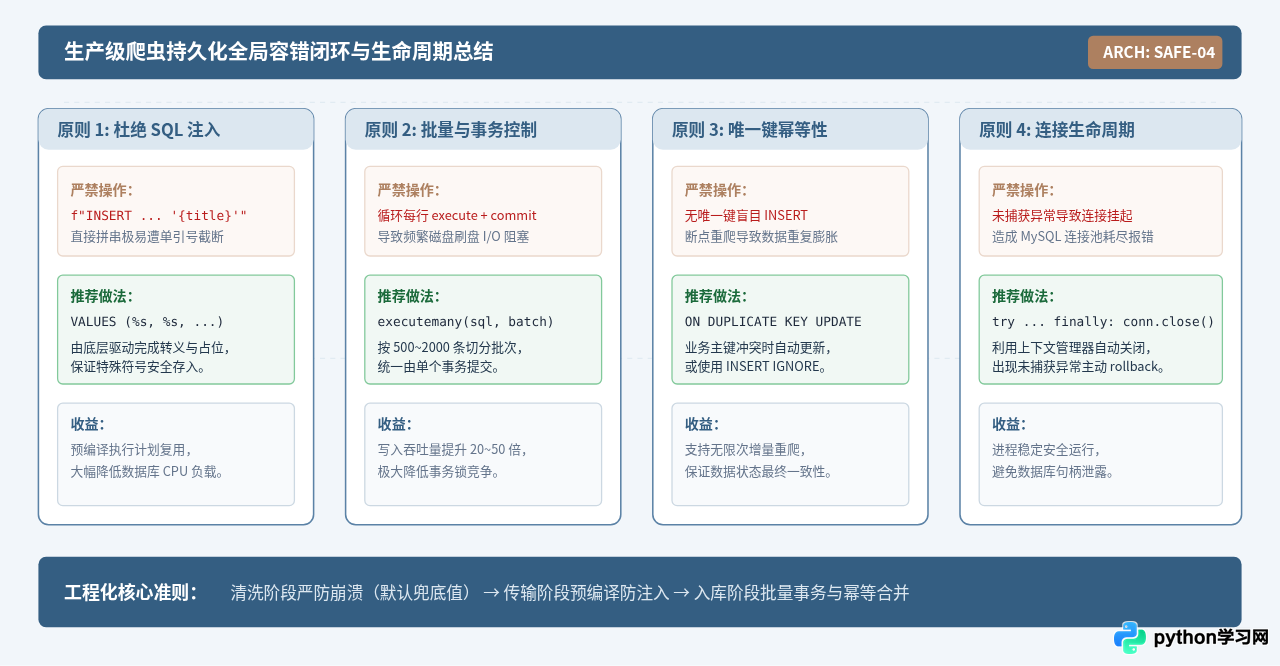
2. 核心架构安全与健壮性准则
3. 常见异常排查与解决建议
| 异常现象 | 根本原因 | 最佳解决方案 |
|---|---|---|
OperationalError (1366, "Incorrect string value") |
文本中包含 Emoji 表情或生僻字符,而 MySQL 库表编码仍为老旧的 utf8(最多3字节)。 |
将数据库、数据表及 PyMySQL 连接字符集统一修改为 utf8mb4。 |
DataError (1265, "Data truncated for column") |
价格或数值清洗不彻底,混入汉字;或字符串长度超过了 VARCHAR 设定的长度上限。 |
在 DataCleaner 中强制加入长度切片截断(如 text[:250])与正则全数字过滤。 |
InterfaceError (0, "") 或连接超时中断 |
抓取清洗耗时过长,超出了 MySQL 的 wait_timeout,导致连接被服务端主动切断。 |
采用批处理缓存:每次抓取满指定条数(如 1000 条)再按需建立连接并批量写入,或者启用 PyMySQL 带有自动重连的心跳校验机制。 |
免责声明:本文内容仅供参考,不代表本站观点。转载或引用请注明出处。









