

十分钟掌握Python核心语法:从基础到实战的快速入门指南

本教程专为具备一定编程基础的开发者设计,旨在10分钟内快速掌握Python核心特性。内容涵盖强类型与动态性、语法规范、列表字典等数据结构、字符串处理、流程控制、函数定义、类与异常处理,以及文件I/O和列表推导式等高级技巧。通过精选代码示例,帮助读者高效入门Python编程。
初试牛刀
如果你渴望学习Python却苦于缺乏简明全面的入门资料,本教程将用十分钟带你推开Python的大门。本文定位介于教程与速查手册之间,仅涵盖核心概念。要真正精通一门语言,动手实践不可或缺。鉴于假定你已具备编程基础,非Python特有的通用内容将略过。文中高亮关键字以助识别,因篇幅限制,部分说明直接辅以代码及简要注释。
Python的语言特性
Python是一种强类型(变量类型强制要求)、动态、隐式类型(无需显式声明变量)、大小写敏感(var与VAR视为不同变量)且面向对象(万物皆对象)的编程语言。
获取帮助
通过Python解释器可轻松获取帮助。若需了解对象工作原理,调用help(<object>)即可。此外,dir()可列出对象所有方法,<object>.__doc__则显示其文档字符串:
>>> help(5)
Help on int object:
(etc etc)
>>> dir(5)
['__abs__', '__add__', ...]
>>> abs.__doc__
'abs(number) -> number
Return the absolute value of the argument.'
语法
Python无需强制语句终止符,代码块由缩进界定。缩进标志代码块开始,逆缩进标志结束。语句以冒号(:)结尾并开启新缩进层级。单行注释以井号(#)开头,多行注释可用多行字符串表示。赋值(将对象绑定至名称)使用等号(“=”),双等号(“==”)用于相等判断,“+=”和”-=”用于增减运算(值由右侧确定),此规则适用于字符串等多种数据类型。支持单行多变量赋值,例如:
>>> myvar = 3
>>> myvar += 2
>>> myvar
5
>>> myvar -= 1
>>> myvar
4
"""This is a multiline comment.
The following lines concatenate the two strings."""
>>> mystring = "Hello"
>>> mystring += " world."
>>> print mystring
Hello world.
# This swaps the variables in one line(!).
# It doesn't violate strong typing because values aren't
# actually being assigned, but new objects are bound to
# the old names.
>>> myvar, mystring = mystring, myvar
数据类型
Python内置列表(list)、元组(tuple)和字典(dictionaries)三种基本数据结构,集合(sets)自Python2.5版本起成为内建类型。列表类似一维数组(可嵌套形成多维结构),字典为关联数组(哈希表),元组为不可变一维数组。Python数组可混合元素类型(如整数、字符串、嵌套列表/字典/元组)。索引从0开始,支持负数索引(-1为末尾)。数组元素还可指向函数。用法示例:
>>> sample = [1, ["another", "list"], ("a", "tuple")]
>>> mylist = ["List item 1", 2, 3.14]
>>> mylist[0] = "List item 1 again" # We're changing the item.
>>> mylist[-1] = 3.21 # Here, we refer to the last item.
>>> mydict = {"Key 1": "Value 1", 2: 3, "pi": 3.14}
>>> mydict["pi"] = 3.15 # This is how you change dictionary values.
>>> mytuple = (1, 2, 3)
>>> myfunction = len
>>> print myfunction(mylist)
3
使用:运算符可访问数组切片,左侧为空表示从头开始,右侧为空表示至末尾结束。负数索引表示从后向前计数(-1为最后一项),例如:
>>> mylist = ["List item 1", 2, 3.14]
>>> print mylist[:]
['List item 1', 2, 3.1400000000000001]
>>> print mylist[0:2]
['List item 1', 2]
>>> print mylist[-3:-1]
['List item 1', 2]
>>> print mylist[1:]
[2, 3.14]
# Adding a third parameter, "step" will have Python step in
# N item increments, rather than 1.
# E.g., this will return the first item, then go to the third and
# return that (so, items 0 and 2 in 0-indexing).
>>> print mylist[::2]
['List item 1', 3.14]
字符串
Python字符串可用单引号(‘)或双引号(“)界定,且可在一种引号字符串内使用另一种(如“He said ‘hello'.”)。多行字符串可用三个连续单引号(”')或双引号(“”")表示。通过u”This is a unicode string”语法可使用Unicode字符串。利用取模运算符(%)和元组可通过变量填充字符串:在目标字符串中从左至右用%s指代变量位置,或使用字典替代,示例如下:
>>>print "Name: %s\
Number: %s\
String: %s" % (myclass.name, 3, 3 * "-")
Name: Poromenos
Number: 3
String: ---
strString = """This is
a multiline
string."""
# WARNING: Watch out for the trailing s in "%(key)s".
>>> print "This %(verb)s a %(noun)s." % {"noun": "test", "verb": "is"}
This is a test.
流程控制
Python使用if、for和while进行流程控制。无select语句,改用if实现。for用于枚举列表元素。生成数字列表可使用range(<number>)函数。以下展示相关语法示例:
rangelist = range(10)
>>> print rangelist
[0, 1, 2, 3, 4, 5, 6, 7, 8, 9]
for number in rangelist:
# Check if number is one of
# the numbers in the tuple.
if number in (3, 4, 7, 9):
# "Break" terminates a for without
# executing the "else" clause.
break
else:
# "Continue" starts the next iteration
# of the loop. It's rather useless here,
# as it's the last statement of the loop.
continue
else:
# The "else" clause is optional and is
# executed only if the loop didn't "break".
pass # Do nothing
if rangelist[1] == 2:
print "The second item (lists are 0-based) is 2"
elif rangelist[1] == 3:
print "The second item (lists are 0-based) is 3"
else:
print "Dunno"
while rangelist[1] == 1:
pass
函数
函数通过“def”关键字声明。可选参数置于必选参数之后,可赋予默认值。命名参数需赋值。函数可返回元组(利用元组拆包返回多值)。Lambda函数为单语句特殊函数,参数按引用传递,但对不可变类型(如元组、整数、字符串)无法修改,因仅传递内存地址,旧对象丢弃后变量才绑定新对象,故不可变类型是被替换而非改变(译者注:Python参数传递本质为引用传递,但表现类似值传递)。例如:
# 作用等同于 def funcvar(x): return x + 1
funcvar = lambda x: x + 1
>>> print funcvar(1)
2
# an_int 和 a_string 是可选参数,它们有默认值
# 如果调用 passing_example 时只指定一个参数,那么 an_int 缺省为 2 ,a_string 缺省为 A default string。如果调用 passing_example 时指定了前面两个参数,a_string 仍缺省为 A default string。
# a_list 是必备参数,因为它没有指定缺省值。
def passing_example(a_list, an_int=2, a_string="A default string"):
a_list.append("A new item")
an_int = 4
return a_list, an_int, a_string
>>> my_list = [1, 2, 3]
>>> my_int = 10
>>> print passing_example(my_list, my_int)
([1, 2, 3, 'A new item'], 4, "A default string")
>>> my_list
[1, 2, 3, 'A new item']
>>> my_int
10
类/p>
Python支持有限多继承。私有变量和方法可通过至少两个前导下划线和最多一个尾随下划线声明(如“__spam”,此为惯例非强制)。可为类实例任意命名。示例:
class MyClass(object):
common = 10
def __init__(self):
self.myvariable = 3
def myfunction(self, arg1, arg2):
return self.myvariable
# This is the class instantiation
>>> classinstance = MyClass()
>>> classinstance.myfunction(1, 2)
3
# This variable is shared by all classes.
>>> classinstance2 = MyClass()
>>> classinstance.common
10
>>> classinstance2.common
10
# Note how we use the class name
# instead of the instance.
>>> MyClass.common = 30
>>> classinstance.common
30
>>> classinstance2.common
30
# This will not update the variable on the class,
# instead it will bind a new object to the old
# variable name.
>>> classinstance.common = 10
>>> classinstance.common
10
>>> classinstance2.common
30
>>> MyClass.common = 50
# This has not changed, because "common" is
# now an instance variable.
>>> classinstance.common
10
>>> classinstance2.common
50
# This class inherits from MyClass. The example
# class above inherits from "object", which makes
# it what's called a "new-style class".
# Multiple inheritance is declared as:
# class OtherClass(MyClass1, MyClass2, MyClassN)
class OtherClass(MyClass):
# The "self" argument is passed automatically
# and refers to the class instance, so you can set
# instance variables as above, but from inside the class.
def __init__(self, arg1):
self.myvariable = 3
print arg1
>>> classinstance = OtherClass("hello")
hello
>>> classinstance.myfunction(1, 2)
3
# This class doesn't have a .test member, but
# we can add one to the instance anyway. Note
# that this will only be a member of classinstance.
>>> classinstance.test = 10
>>> classinstance.test
10
异常
Python异常由try-except [exceptionname]块处理,例如:
def some_function():
try:
# Division by zero raises an exception
10 / 0
except ZeroDivisionError:
print "Oops, invalid."
else:
# Exception didn't occur, we're good.
pass
finally:
# This is executed after the code block is run
# and all exceptions have been handled, even
# if a new exception is raised while handling.
print "We're done with that."
>>> some_function()
Oops, invalid.
We're done with that.
导入
外部库可通过import [libname]导入。亦可使用from [libname] import [funcname]导入特定函数。示例:
import random
from time import clock
randomint = random.randint(1, 100)
>>> print randomint
64
文件I / O
Python提供丰富的内置文件处理库。例如,演示如何序列化文件(使用pickle库将数据结构转换为字符串):
import pickle
mylist = ["This", "is", 4, 13327]
# Open the file C:\\binary.dat for writing. The letter r before the
# filename string is used to prevent backslash escaping.
myfile = open(r"C:\\binary.dat", "w")
pickle.dump(mylist, myfile)
myfile.close()
myfile = open(r"C:\\text.txt", "w")
myfile.write("This is a sample string")
myfile.close()
myfile = open(r"C:\\text.txt")
>>> print myfile.read()
'This is a sample string'
myfile.close()
# Open the file for reading.
myfile = open(r"C:\\binary.dat")
loadedlist = pickle.load(myfile)
myfile.close()
>>> print loadedlist
['This', 'is', 4, 13327]
其它杂项
数值判断可链式使用,如1<a<3用于判断变量a是否在1和3之间。 可使用del删除变量或数组元素。 列表推导式(List Comprehension)是创建和操作列表的有力工具。由表达式及紧随的for语句构成,for后可跟0或多个if或for语句,示例如下:
>>> lst1 = [1, 2, 3]
>>> lst2 = [3, 4, 5]
>>> print [x * y for x in lst1 for y in lst2]
[3, 4, 5, 6, 8, 10, 9, 12, 15]
>>> print [x for x in lst1 if 4 > x > 1]
[2, 3]
# Check if an item has a specific property.
# "any" returns true if any item in the list is true.
>>> any([i % 3 for i in [3, 3, 4, 4, 3]])
True
# This is because 4 % 3 = 1, and 1 is true, so any()
# returns True.
# Check how many items have this property.
>>> sum(1 for i in [3, 3, 4, 4, 3] if i == 4)
2
>>> del lst1[0]
>>> print lst1
[2, 3]
>>> del lst1
全局变量在函数外声明,无需特殊声明即可读取。但若要在函数内修改全局变量,必须在函数起始处使用global关键字声明,否则Python会将其视为新的局部变量(请注意,此处易出错)。示例:
number = 5
def myfunc():
# This will print 5.
print number
def anotherfunc():
# This raises an exception because the variable has not
# been bound before printing. Python knows that it an
# object will be bound to it later and creates a new, local
# object instead of accessing the global one.
print number
number = 3
def yetanotherfunc():
global number
# This will correctly change the global.
number = 3
小结
本教程未涵盖Python全部内容(甚至不足一小部分)。Python拥有众多库和功能特性,需通过其他途径(如阅读Dive into Python)深入学习。希望本教程能为你提供良好的入门指引。
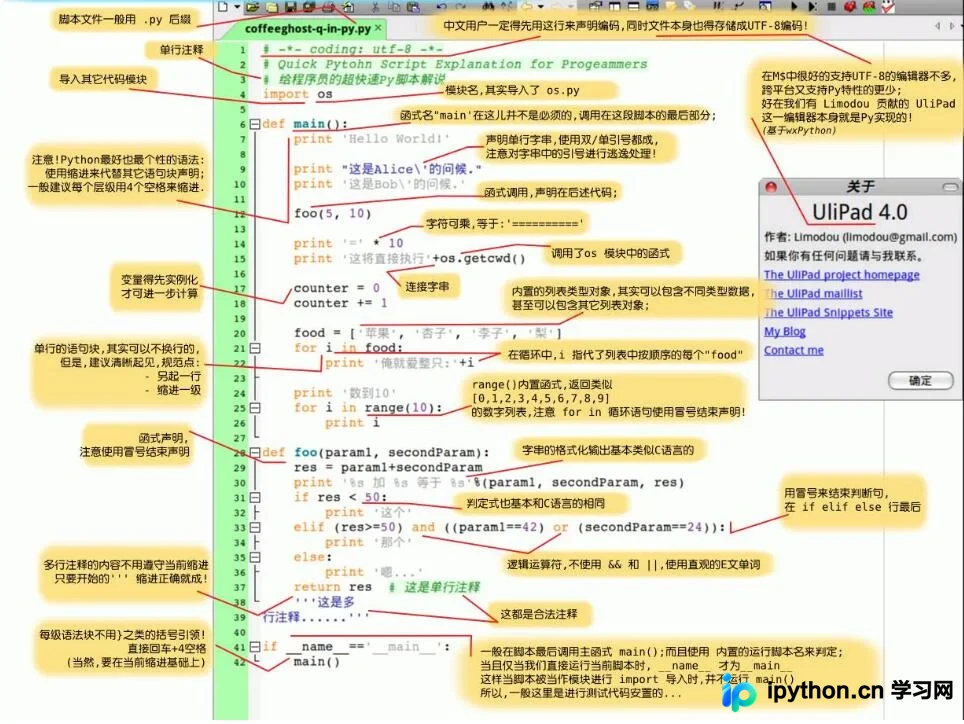
Python入门神图一张
具备编程基础者一眼即可了解Python用法,真正30分钟上手。 由国外高手绘制,现翻译为中文,入门超简单
附优秀书单一份:
你眼中的Python大牛 应该都有这份书单
Python书单 不将就
不可错过的十本Python好书
以上就是本文的全部内容,希望对大家的学习有所帮助,也希望大家多多支持本站。
免责声明:本文内容仅供参考,不代表本站观点。转载或引用请注明出处。









