

Python爬虫实战:批量抓取城市公交网络站点数据

本文介绍如何使用Python爬虫批量抓取城市公交网络站点数据。通过requests获取页面,利用BeautifulSoup解析HTML结构,提取公交线路链接、站点信息及运营详情。代码包含完整的请求、解析与数据保存逻辑,适用于学习网络爬虫基础及数据抓取实战。
目标与准备工作
本次爬取的目标是获取指定城市(以北京为例)的公交线路网络数据,包括线路基本信息、运营时间、票价以及具体的上下行站点列表。目标网站为 http://beijing.8684.cn/。
在开始之前,需要确保环境中已安装以下Python库:
requests:用于发送HTTP请求。beautifulsoup4:用于解析HTML文档。lxml:作为BeautifulSoup的解析器,提高解析效率。

核心实现步骤
1. 初始化请求与解析
首先,构造请求头以模拟浏览器访问,避免被服务器拒绝。获取首页HTML后,使用BeautifulSoup进行解析。
# -*- coding: utf-8 -*-
import requests ##导入requests
from bs4 import BeautifulSoup ##导入bs4中的BeautifulSoup
import os
headers = {'User-Agent':'Mozilla/5.0 (Windows NT 10.0; WOW64) AppleWebKit/537.36 (KHTML, like Gecko) Chrome/49.0.2623.221 Safari/537.36 SE 2.X MetaSr 1.0'}
all_url = 'http://beijing.8684.cn' ##开始的URL地址
start_html = requests.get(all_url, headers=headers)
#print (start_html.text)
Soup = BeautifulSoup(start_html.text, 'lxml') # 以lxml的方式解析html文档
2. 提取公交线路链接
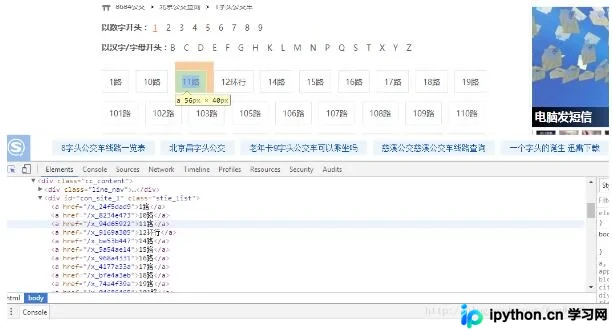
首页通常包含各条公交线路的入口。通过定位特定的HTML元素(如 div class="bus_kt_r1")下的所有 a 标签,可以获取每条线路的相对链接。随后,将相对链接与基础URL拼接,形成完整的线路详情页URL。
all_a = Soup.find('div',class_='bus_kt_r1').find_all('a')3. 获取线路详情页数据
访问每个线路详情页,再次使用BeautifulSoup解析。由于目标网站结构可能存在嵌套复杂的情况(例如同时包含id和class的div难以直接定位),代码采用了迂回策略,通过 find_all('div')[-1] 定位到包含线路列表的容器,再提取其中的 a 标签。
href = a['href'] #取出a标签的href 属性
html = all_url + href
second_html = requests.get(html,headers=headers)
#print (second_html.text)
Soup2 = BeautifulSoup(second_html.text, 'lxml')
all_a2 = Soup2.find('div',class_='cc_content').find_all('div')[-1].find_all('a') # 既有id又有class的div不知道为啥取不出来,只好迂回取了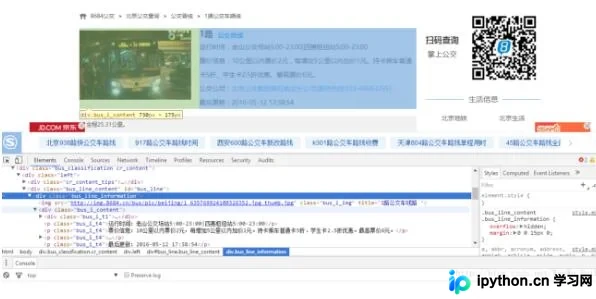
4. 解析站点与运营信息
在详情页中,提取线路名称、类型、运营时间、票价、运营公司及更新时间。同时,重点解析站点信息。通常线路分为上行和下行,分别对应不同的HTML区块(div class="bus_line_top" 和 div class="bus_line_site")。
title1 = a2.get_text() #取出a1标签的文本
href1 = a2['href'] #取出a标签的href 属性
#print (title1,href1)
html_bus = all_url + href1 # 构建线路站点url
thrid_html = requests.get(html_bus,headers=headers)
Soup3 = BeautifulSoup(thrid_html.text, 'lxml')
bus_name = Soup3.find('div',class_='bus_i_t1').find('h1').get_text() # 提取线路名
bus_type = Soup3.find('div',class_='bus_i_t1').find('a').get_text() # 提取线路属性
bus_time = Soup3.find_all('p',class_='bus_i_t4')[0].get_text() # 运行时间
bus_cost = Soup3.find_all('p',class_='bus_i_t4')[1].get_text() # 票价
bus_company = Soup3.find_all('p',class_='bus_i_t4')[2].find('a').get_text() # 公交公司
bus_update = Soup3.find_all('p',class_='bus_i_t4')[3].get_text() # 更新时间
bus_label = Soup3.find('div',class_='bus_label')
if bus_label:
 bus_length = bus_label.get_text() # 线路里程
else:
 bus_length = []
#print (bus_name,bus_type,bus_time,bus_cost,bus_company,bus_update)
all_line = Soup3.find_all('div',class_='bus_line_top') # 线路简介
all_site = Soup3.find_all('div',class_='bus_line_site')# 公交站点
line_x = all_line[0].find('div',class_='bus_line_txt').get_text()[:-9]+all_line[0].find_all('span')[-1].get_text()
sites_x = all_site[0].find_all('a')
sites_x_list = [] # 上行线路站点
for site_x in sites_x:
 sites_x_list.append(site_x.get_text())
line_num = len(all_line)
if line_num==2: # 如果存在环线,也返回两个list,只是其中一个为空
 line_y = all_line[1].find('div',class_='bus_line_txt').get_text()[:-9]+all_line[1].find_all('span')[-1].get_text()
 sites_y = all_site[1].find_all('a')
 sites_y_list = [] # 下行线路站点
 for site_y in sites_y:
  sites_y_list.append(site_y.get_text())
else:
 line_y,sites_y_list=[],[]
information = [bus_name,bus_type,bus_time,bus_cost,bus_company,bus_update,bus_length,line_x,sites_x_list,line_y,sites_y_list]
5. 完整循环与数据保存
将上述逻辑封装在循环中,遍历所有线路,并将结果存入列表。最后,定义保存函数,将提取的数据写入TXT文件。若需存储至数据库(如MySQL或MongoDB),可在此处替换为相应的数据库插入操作。
# -*- coding: utf-8 -*-
# Python3.5
import requests ##导入requests
from bs4 import BeautifulSoup ##导入bs4中的BeautifulSoup
import os
headers = {'User-Agent':'Mozilla/5.0 (Windows NT 10.0; WOW64) AppleWebKit/537.36 (KHTML, like Gecko) Chrome/49.0.2623.221 Safari/537.36 SE 2.X MetaSr 1.0'}
all_url = 'http://beijing.8684.cn' ##开始的URL地址
start_html = requests.get(all_url, headers=headers)
#print (start_html.text)
Soup = BeautifulSoup(start_html.text, 'lxml')
all_a = Soup.find('div',class_='bus_kt_r1').find_all('a')
Network_list = []
for a in all_a:
 href = a['href'] #取出a标签的href 属性
 html = all_url + href
 second_html = requests.get(html,headers=headers)
 #print (second_html.text)
 Soup2 = BeautifulSoup(second_html.text, 'lxml')
 all_a2 = Soup2.find('div',class_='cc_content').find_all('div')[-1].find_all('a') # 既有id又有class的div不知道为啥取不出来,只好迂回取了
 for a2 in all_a2:
  title1 = a2.get_text() #取出a1标签的文本
  href1 = a2['href'] #取出a标签的href 属性
  #print (title1,href1)
  html_bus = all_url + href1
  thrid_html = requests.get(html_bus,headers=headers)
  Soup3 = BeautifulSoup(thrid_html.text, 'lxml')
  bus_name = Soup3.find('div',class_='bus_i_t1').find('h1').get_text()
  bus_type = Soup3.find('div',class_='bus_i_t1').find('a').get_text()
  bus_time = Soup3.find_all('p',class_='bus_i_t4')[0].get_text()
  bus_cost = Soup3.find_all('p',class_='bus_i_t4')[1].get_text()
  bus_company = Soup3.find_all('p',class_='bus_i_t4')[2].find('a').get_text()
  bus_update = Soup3.find_all('p',class_='bus_i_t4')[3].get_text()
  bus_label = Soup3.find('div',class_='bus_label')
  if bus_label:
   bus_length = bus_label.get_text()
  else:
   bus_length = []
  #print (bus_name,bus_type,bus_time,bus_cost,bus_company,bus_update)
  all_line = Soup3.find_all('div',class_='bus_line_top')
  all_site = Soup3.find_all('div',class_='bus_line_site')
  line_x = all_line[0].find('div',class_='bus_line_txt').get_text()[:-9]+all_line[0].find_all('span')[-1].get_text()
  sites_x = all_site[0].find_all('a')
  sites_x_list = []
  for site_x in sites_x:
   sites_x_list.append(site_x.get_text())
  line_num = len(all_line)
  if line_num==2: # 如果存在环线,也返回两个list,只是其中一个为空
   line_y = all_line[1].find('div',class_='bus_line_txt').get_text()[:-9]+all_line[1].find_all('span')[-1].get_text()
   sites_y = all_site[1].find_all('a')
   sites_y_list = []
   for site_y in sites_y:
   sites_y_list.append(site_y.get_text())
  else:
   line_y,sites_y_list=[],[]
  information = [bus_name,bus_type,bus_time,bus_cost,bus_company,bus_update,bus_length,line_x,sites_x_list,line_y,sites_y_list]
  Network_list.append(information)
# 定义保存函数,将运算结果保存为txt文件
def text_save(content,filename,mode='a'):
 # Try to save a list variable in txt file.
 file = open(filename,mode)
 for i in range(len(content)):
  file.write(str(content[i])+'\n')
 file.close()
# 输出处理后的数据
text_save(Network_list,'Network_bus.txt'); 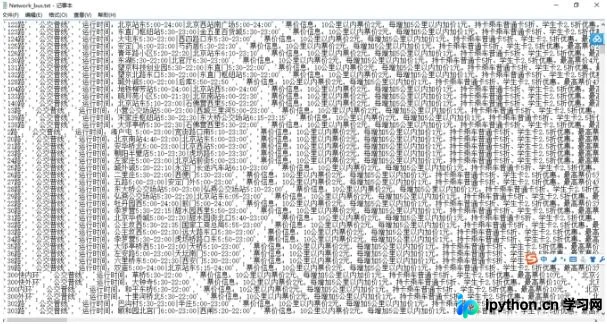
总结
通过上述步骤,我们成功实现了对城市公交网络站点数据的批量爬取。该示例展示了如何使用Python进行网页请求、HTML解析以及数据提取,并可扩展至数据库存储。以上就是Python爬虫实例_城市公交网络站点数据的爬取方法的详细内容,更多关于Python爬虫的资料请关注本站其它相关文章!
免责声明:本文内容仅供参考,不代表本站观点。转载或引用请注明出处。









