

Python multiprocessing RuntimeError 错误排查与解决方案

本文详细解析 Python 中 multiprocessing 模块常见的 RuntimeError 错误。主要涵盖两类问题:一是 Windows 系统下未使用 if __name__ == '__main__' 导致的启动引导错误,需将逻辑封装并添加保护语句;二是 Python 与 numpy 版本不兼容引发的运行时检查失败。文章提供了通过 PyCharm 降级 numpy 版本的具体操作步骤,帮助开发者快速修复代码。
以下是该错误的详细解释说明
RuntimeError: \n An attempt has been made to start a new process before the\n current process has finished its bootstrapping phase.\n \n This probably means that you are not using fork to start your\n child processes and you have forgotten to use the proper idiom\n in the main module:\n \n if __name__ == '__main__':\n freeze_support()\n ...\n \n The "freeze_support()" line can be omitted if the program\n is not going to be frozen to produce an executable.
以下是触发该错误的原始代码片段
import multiprocessing as mp
import time
from urllib.request import urlopen,urljoin
from bs4 import BeautifulSoup
import re

base_url = "https://morvanzhou.github.io/"

#crawl爬取网页
def crawl(url):
    response = urlopen(url)
    time.sleep(0.1)
    return response.read().decode()

#parse解析网页
def parse(html):
    soup = BeautifulSoup(html,'html.parser')
    urls = soup.find_all('a',{"href":re.compile('^/.+?/$')})
    title = soup.find('h1').get_text().strip()
    page_urls = set([urljoin(base_url,url['href'])for url in urls])
    url = soup.find('meta',{'property':"og:url"})['content']
    return title,page_urls,url

unseen = set([base_url])
seen = set()
restricted_crawl = True

pool = mp.Pool(4)
count, t1 = 1, time.time()
while len(unseen) != 0:                 # still get some url to visit
    if restricted_crawl and len(seen) > 20:
            break
    print('\nDistributed Crawling...')
    crawl_jobs = [pool.apply_async(crawl, args=(url,)) for url in unseen]
    htmls = [j.get() for j in crawl_jobs]      # request connection

    print('\nDistributed Parsing...')
    parse_jobs = [pool.apply_async(parse, args=(html,)) for html in htmls]
    results = [j.get() for j in parse_jobs]    # parse html

    print('\nAnalysing...')
    seen.update(unseen)         # seen the crawled
    unseen.clear()              # nothing unseen

    for title, page_urls, url in results:
        print(count, title, url)
        count += 1
        unseen.update(page_urls - seen)     # get new url to crawl
print('Total time: %.1f s' % (time.time()-t1))    # 16 s !!!
以下是修正后的正确代码示例
import multiprocessing as mp
import time
from urllib.request import urlopen,urljoin
from bs4 import BeautifulSoup
import re

base_url = "https://morvanzhou.github.io/"

#crawl爬取网页
def crawl(url):
    response = urlopen(url)
    time.sleep(0.1)
    return response.read().decode()

#parse解析网页
def parse(html):
    soup = BeautifulSoup(html,'html.parser')
    urls = soup.find_all('a',{"href":re.compile('^/.+?/$')})
    title = soup.find('h1').get_text().strip()
    page_urls = set([urljoin(base_url,url['href'])for url in urls])
    url = soup.find('meta',{'property':"og:url"})['content']
    return title,page_urls,url

def main():
    unseen = set([base_url])
    seen = set()
    restricted_crawl = True

    pool = mp.Pool(4)
    count, t1 = 1, time.time()
    while len(unseen) != 0:                 # still get some url to visit
        if restricted_crawl and len(seen) > 20:
                break
        print('\nDistributed Crawling...')
        crawl_jobs = [pool.apply_async(crawl, args=(url,)) for url in unseen]
        htmls = [j.get() for j in crawl_jobs]      # request connection

        print('\nDistributed Parsing...')
        parse_jobs = [pool.apply_async(parse, args=(html,)) for html in htmls]
        results = [j.get() for j in parse_jobs]    # parse html

        print('\nAnalysing...')
        seen.update(unseen)         # seen the crawled
        unseen.clear()              # nothing unseen

        for title, page_urls, url in results:
            print(count, title, url)
            count += 1
            unseen.update(page_urls - seen)     # get new url to crawl
    print('Total time: %.1f s' % (time.time()-t1))    # 16 s !!!


if __name__ == '__main__':
    main()
综上所述,解决此类问题的核心方法是将运行逻辑整合到一个函数中,并在主模块入口处加入
if __name__ == '__main__':
    main()
这行代码即可有效解决该问题。
Python 报错: RuntimeError
Python 报错:RuntimeError: fails to pass a sanity check due to a bug in the windows runtime 这种类型的错误
此类错误的常见原因分析
1. 当前 Python 解释器与 numpy 库版本之间存在兼容性问题,例如本人使用的 python3.9 搭配 numpy1.19.4 时就会引发此类报错。
2. numpy1.19.4 版本与许多当前的 Python 版本均存在兼容性问题。
解决办法
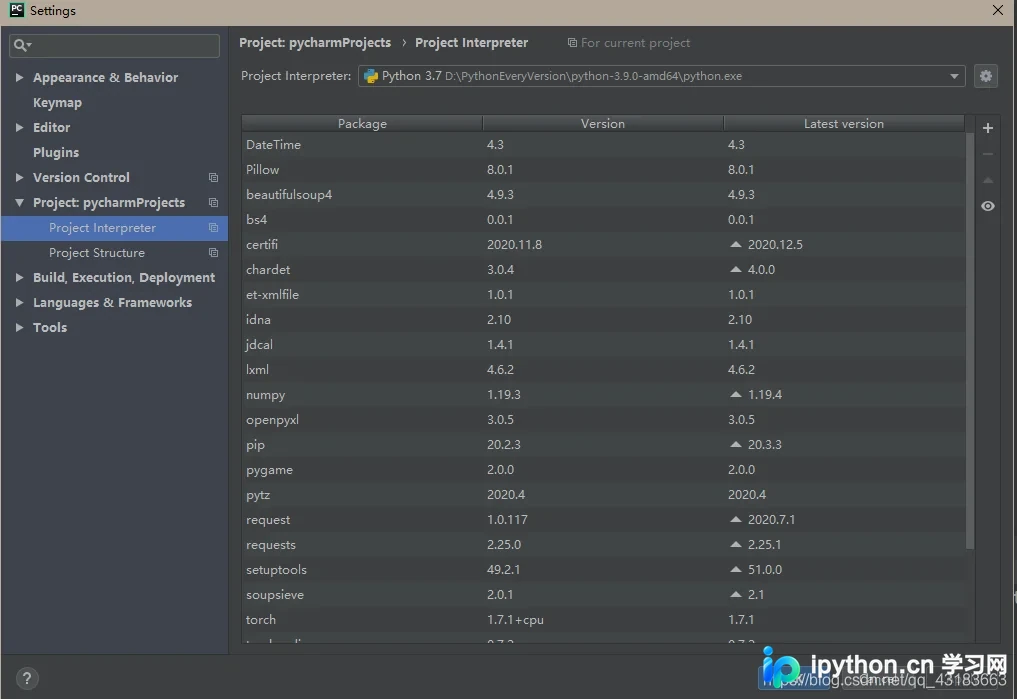
在 File->Settings->Project:pycharmProjects->Project Interpreter 路径下,将 numpy 的版本降级即可解决。
1. 打开 Interpreter 设置界面,如下图所示:
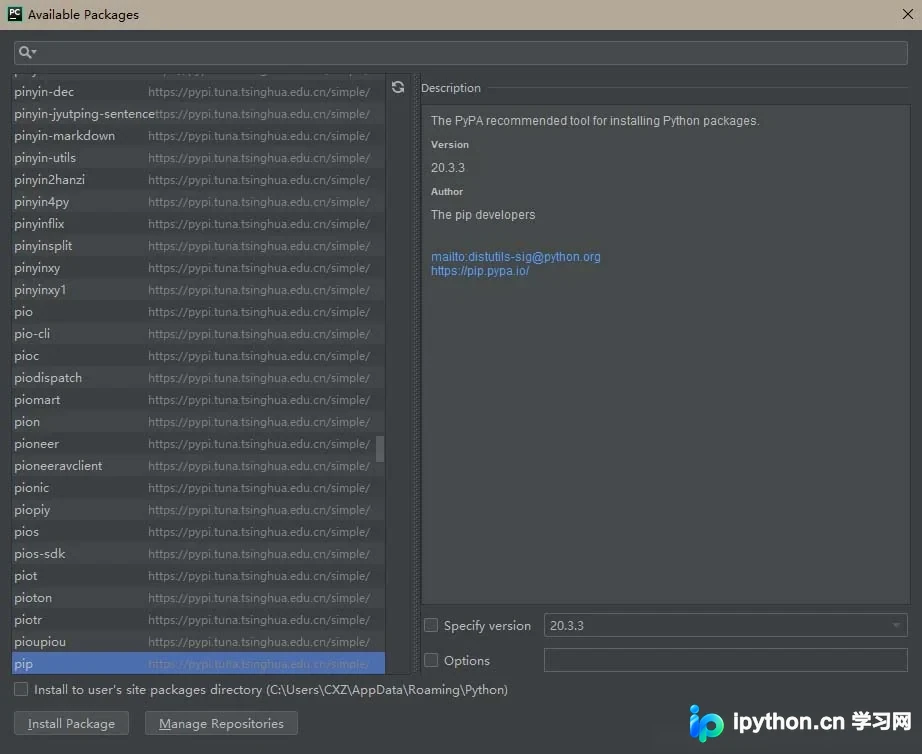
2. 双击 numpy 以修改其版本号:
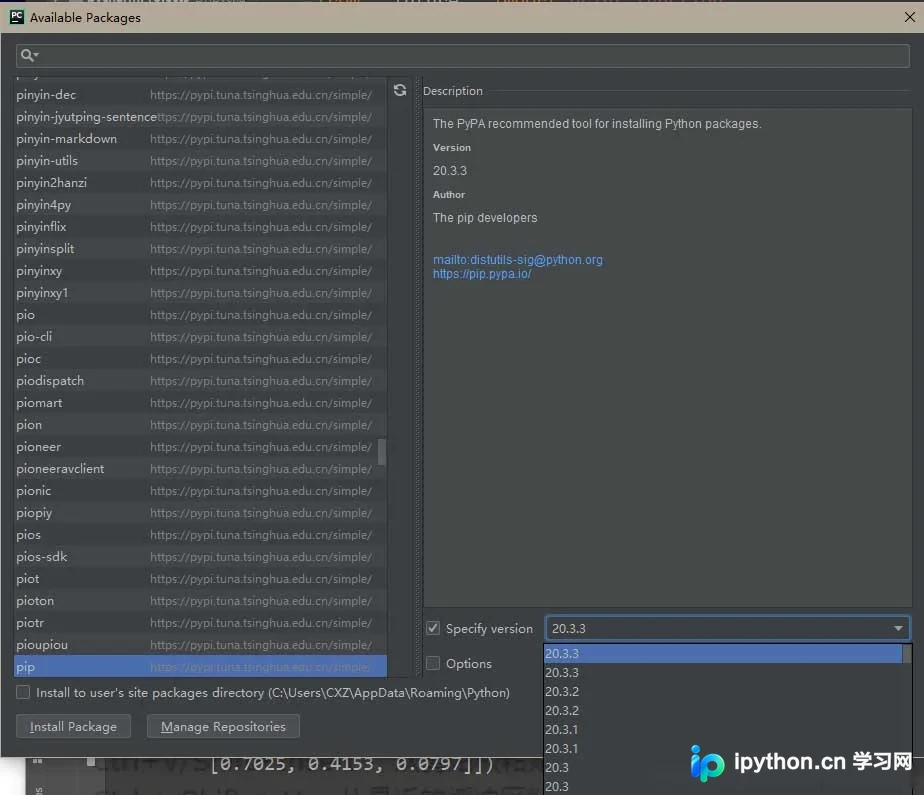
3. 勾选复选框方可修改版本,导入所需的较低版本即可:
完成上述操作后,重新运行代码即可。
以上为个人经验分享,希望能给大家一个参考,也希望大家多多支持本站。
免责声明:本文内容仅供参考,不代表本站观点。转载或引用请注明出处。









