

Python计算图片数据集均值与方差的方法详解

发布时间:2026-10-15| 2人浏览过
本文介绍如何使用Python计算图像数据集的整体均值和方差。首先需确保所有图片尺寸统一,通过批量调整图片大小后,遍历数据集累加RGB通道像素值并计算平均值,随后再次遍历计算方差。代码示例展示了具体实现逻辑,适用于模型训练前的数据预处理阶段。
前言
在图像处理任务中,获取整个数据集的均值和方差数值往往是必要的预处理步骤。以下提供的代码示例旨在帮助开发者解决这一计算需求。
在执行计算前,必须确保数据集中的所有图片具有统一的尺寸,否则计算结果将不准确。示例代码中设定的图片尺寸为512*512,用户可根据实际需求进行调整。若需处理统一尺寸的图片,可参考相关的批量调整代码。
Python批量reshape图片
# -*- coding: utf-8 -*-
"""
Created on Thu Aug 23 16:06:35 2018
@author: libo
"""
from PIL import Image
import os
def image_resize(image_path, new_path):           # 统一图片尺寸
    print('============>>修改图片尺寸')
    for img_name in os.listdir(image_path):
        img_path = image_path + "/" + img_name    # 获取该图片全称
        image = Image.open(img_path)              # 打开特定一张图片
        image = image.resize((512, 512))          # 设置需要转换的图片大小
        # process the 1 channel image
        image.save(new_path + '/'+ img_name)
    print("end the processing!")
if __name__ == '__main__':
    print("ready for ::::::::  ")
    ori_path = r"Z:\pycharm_projects\ssd\VOC2007\JPEGImages"                # 输入图片的文件夹路径
    new_path = 'Z:/pycharm_projects/ssd/VOC2007/reshape'                   # resize之后的文件夹路径
    image_resize(ori_path, new_path)
import os
from PIL import Image
import matplotlib.pyplot as plt
import numpy as np
from scipy.misc import imread
filepath = r'Z:\pycharm_projects\ssd\VOC2007\reshape' # 数据集目录
pathDir = os.listdir(filepath)
R_channel = 0
G_channel = 0
B_channel = 0
for idx in range(len(pathDir)):
filename = pathDir[idx]
img = imread(os.path.join(filepath, filename)) / 255.0
R_channel = R_channel + np.sum(img[:, :, 0])
G_channel = G_channel + np.sum(img[:, :, 1])
B_channel = B_channel + np.sum(img[:, :, 2])
num = len(pathDir) * 512 * 512 # 这里(512,512)是每幅图片的大小,所有图片尺寸都一样
R_mean = R_channel / num
G_mean = G_channel / num
B_mean = B_channel / num
R_channel = 0
G_channel = 0
B_channel = 0
for idx in range(len(pathDir)):
filename = pathDir[idx]
img = imread(os.path.join(filepath, filename)) / 255.0
R_channel = R_channel + np.sum((img[:, :, 0] - R_mean) ** 2)
G_channel = G_channel + np.sum((img[:, :, 1] - G_mean) ** 2)
B_channel = B_channel + np.sum((img[:, :, 2] - B_mean) ** 2)
R_var = np.sqrt(R_channel / num)
G_var = np.sqrt(G_channel / num)
B_var = np.sqrt(B_channel / num)
print("R_mean is %f, G_mean is %f, B_mean is %f" % (R_mean, G_mean, B_mean))
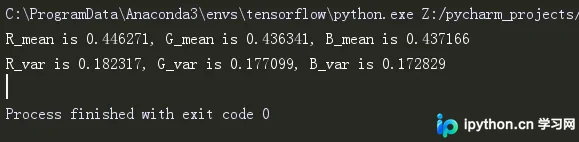
print("R_var is %f, G_var is %f, B_var is %f" % (R_var, G_var, B_var))该处理过程可能耗时较长,请耐心等待程序运行完毕。
最终输出的结果格式如下所示。
参考
计算数据集均值和方差
import os
from PIL import Image
import matplotlib.pyplot as plt
import numpy as np
from scipy.misc import imread
filepath = ‘/home/JPEGImages‘ # 数据集目录
pathDir = os.listdir(filepath)
R_channel = 0
G_channel = 0
B_channel = 0
for idx in xrange(len(pathDir)):
    filename = pathDir[idx]
    img = imread(os.path.join(filepath, filename))
    R_channel = R_channel + np.sum(img[:,:,0])
    G_channel = G_channel + np.sum(img[:,:,1])
    B_channel = B_channel + np.sum(img[:,:,2])
num = len(pathDir) * 384 * 512 # 这里(384,512)是每幅图片的大小,所有图片尺寸都一样
R_mean = R_channel / num
G_mean = G_channel / num
B_mean = B_channel / num
R_channel = 0
G_channel = 0
B_channel = 0for idx in xrange(len(pathDir)):
filename = pathDir[idx]
img = imread(os.path.join(filepath, filename))
R_channel = R_channel + np.sum((img[:,:,0] - R_mean)**2)
G_channel = G_channel + np.sum((img[:,:,1] - G_mean)**2)
B_channel = B_channel + np.sum((img[:,:,2] - B_mean)**2)
R_var = R_channel / num
G_var = G_channel / num
B_var = B_channel / num
print("R_mean is %f, G_mean is %f, B_mean is %f" % (R_mean, G_mean, B_mean))
print("R_var is %f, G_var is %f, B_var is %f" % (R_var, G_var, B_var))以上就是Python计算图片数据集的均值方差示例详解的详细内容,更多关于Python计算图片数据集均值方差的资料请关注本站其它相关文章!
免责声明:本文内容仅供参考,不代表本站观点。转载或引用请注明出处。









