

Python+Turtle绘制可爱的小蜜蜂详解

本文详细介绍如何使用Python的turtle库绘制一只可爱的小蜜蜂。内容涵盖环境配置、库导入、背景音乐播放设置以及头部、脖子和腹部的具体绘制步骤。通过解析关键代码参数,帮助读者掌握turtle绘图技巧,并提供完整可运行代码供学习调整。
收到公众号读者的私信请求,需要协助绘制一只小蜜蜂。
既然承诺了有空就帮忙,便利用五一假期时间,今天一同完成这个绘制任务。
一、效果展示
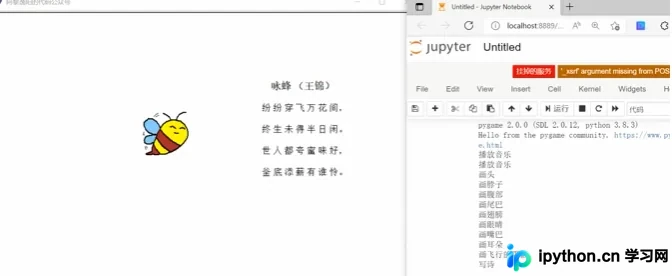
在深入代码细节之前,先展示最终的绘制效果。
感兴趣的朋友可以根据实际需求修改相关函数,尝试绘制其他形态的小蜜蜂。
二、代码详解
本章节将详细解析如何利用Python中的turtle库完成小蜜蜂的绘制过程。
1.导入库
首先导入程序所需的库文件。若某些库未安装导致运行报错,可通过Anaconda Prompt使用pip命令进行安装。
import os
import pygame
import turtle as t
本例涉及的库较少,仅包含os、pygame和turtle三个库。
os库主要用于设置文件读取的路径位置。
pygame库用于在绘制过程中添加背景音乐,以增加趣味性;若不需要背景音乐,可不加载此库。
turtle库是核心绘图库,相当于提供一支画笔,允许用户通过数学逻辑控制的代码在画布上完成绘图。
2.播放音乐
接着利用pygame库播放背景音乐,本例选用的音乐为《照耀星河》。
###############不需要播放音乐的话这一段可以直接删除##################
#播放音乐
print('播放音乐')
pygame.mixer.init()
pygame.mixer.music.load(r"F:\公众号\51.小蜜蜂\乐进大将军 - 照耀星河.mp3")
pygame.mixer.music.set_volume(0.5)
pygame.mixer.music.play(1, 10)
print('播放音乐')
###############不需要播放音乐的话这一段可以直接删除##################
该部分代码与主体逻辑相对独立,可以选择在代码开头添加,也可以直接删除。
若选择播放音乐,需在代码的music.load函数中填入目标音乐文件的实际路径。
3.画小蜜蜂的头
随后进入小蜜蜂的正式绘制环节,首先绘制头部的外轮廓。
t.title('阿黎逸阳的代码公众号')
t.speed(1)
t.setup(startx=0, starty = 0, width=800, height = 600)
#画身体
#画头
print('画头')
t.penup()
t.goto(-50, 50)
t.pendown()
t.begin_fill()
t.left(40)
t.pendown()
t.pensize(2)
t.color('black', 'yellow')
t.circle(100, 5)
t.circle(25, 130)
t.circle(30, 70)
t.left(60)
t.circle(90, 32)
t.end_fill()
print('画脖子')
关键代码详解:
t.pensize(width):用于设置画笔的线条粗细。
t.color(color):用于设置画笔的颜色。
t.penup():抬起画笔,通常用于移动到新的绘图起点。
t.goto(x,y):移动画笔至指定坐标位置,参数为横坐标x和纵坐标y。
t.pendown():放下画笔,通常与penup配合使用以开始或结束绘图。
t.left(degree):控制画笔向左旋转指定角度,括号内数值表示度数。
t.right(degree):控制画笔向右旋转指定角度,括号内数值表示度数。
t.circle(radius,extent,steps):radius表示半径,正值时圆心在左侧,负值时在右侧;extent表示绘制的弧度;steps表示阶数。
绘制外轮廓的关键在于调节circle函数中的半径和弧度参数,以控制曲线的弯曲程度,使小蜜蜂轮廓更加流畅。
4.画脖子和腹部
完成头部外轮廓后,分模块绘制其余部分,本节重点绘制脖子和腹部。
#画脖子
t.left(180)
t.begin_fill()
t.fillcolor('brown')
t.circle(-90, 32)
t.left(110)
t.circle(50, 20)
t.setheading(-60)
t.circle(80, 28)
t.setheading(23)
t.circle(60, 22)
t.end_fill()
print('画腹部')
#画腹部
t.left(180)
t.circle(-60, 20)
t.begin_fill()
t.fillcolor('yellow')
t.circle(-50, 25)
t.setheading(140)
t.circle(-40, 33)
t.setheading(80)
t.circle(-40, 20)
t.setheading(-60)
t.circle(80, 28)
t.end_fill()
print('画尾巴')
其余代码使用的函数大致相同,因篇幅限制,仅在最后提供不含背景音乐的全量代码。
三、完整代码
本章节提供绘制小蜜蜂的完整代码,感兴趣的朋友可自行调整,尝试绘制不同飞行状态的小蜜蜂。
import os
import pygame
import turtle as t

t.title('阿黎逸阳的代码公众号')
t.speed(1)
t.setup(startx=0, starty = 0, width=800, height = 600)
#画身体
#画头
print('画头')
t.penup()
t.goto(-50, 50)
t.pendown()
t.begin_fill()
t.left(40)
t.pendown()
t.pensize(2)
t.color('black', 'yellow')
t.circle(100, 5)
t.circle(25, 130)
t.circle(30, 70)
t.left(60)
t.circle(90, 32)
t.end_fill()
print('画脖子')
#画脖子
t.left(180)
t.begin_fill()
t.fillcolor('brown')
t.circle(-90, 32)
t.left(110)
t.circle(50, 20)
t.setheading(-60)
t.circle(80, 28)
t.setheading(23)
t.circle(60, 22)
t.end_fill()
print('画腹部')
#画腹部
t.left(180)
t.circle(-60, 20)
t.begin_fill()
t.fillcolor('yellow')
t.circle(-50, 25)
t.setheading(140)
t.circle(-40, 33)
t.setheading(80)
t.circle(-40, 20)
t.setheading(-60)
t.circle(80, 28)
t.end_fill()
print('画尾巴')
#画尾巴
t.penup()
t.goto(-89, 36)
t.pendown()
t.begin_fill()
t.fillcolor('brown')
t.setheading(140)
t.circle(-40, 31)
t.setheading(-120)
t.circle(20, 40)
t.setheading(-150)
t.circle(-50, 14)
t.setheading(-45)
t.circle(9, 90)
t.setheading(-40)
t.circle(10, 70)
t.end_fill()
print('画翅膀')
#画翅膀
t.penup()
t.goto(-88, 83)
t.pendown()
t.begin_fill()
t.fillcolor('LightSkyBlue')
t.setheading(100)
t.circle(22, 80)
t.setheading(-150)
t.circle(30, 20)
t.setheading(-100)
t.circle(20, 107)
t.end_fill()
t.setheading(-180)
t.begin_fill()
t.circle(50, 20)
t.circle(8, 180)
t.circle(30, 15)
t.end_fill()
print('画眼睛')
#画眼睛
#左眼睛
t.penup()
t.goto(-70, 85)
t.pendown()
t.setheading(30)
t.circle(-8, 90)
#右眼睛
t.penup()
t.goto(-52, 82)
t.pendown()
t.setheading(40)
t.circle(-7, 90)
print('画嘴巴')
#画嘴巴
t.penup()
t.goto(-62, 75)
t.pendown()
t.setheading(-50)
t.circle(6, 90)
print('画耳朵')
#画耳朵
t.penup()
t.goto(-68, 98)
t.pendown()
t.setheading(110)
t.circle(20, 60)
t.penup()
t.goto(-58, 98)
t.pendown()
t.setheading(80)
t.circle(-18, 80)
print('画飞行的阴影')
#画飞行的阴影
#线1
t.penup()
t.goto(-100, 105)
t.pendown()
t.pensize(1.3)
t.setheading(50)
t.circle(-18, 35)
#线2
t.penup()
t.goto(-97, 104)
t.pendown()
t.pensize(1.3)
t.setheading(40)
t.circle(-18, 25)
#线3
t.penup()
t.goto(-120, 70)
t.pendown()
t.setheading(92)
t.circle(-18, 23)
#线4
t.penup()
t.goto(-118, 70)
t.pendown()
t.setheading(92)
t.circle(-18, 10)
#线5
t.penup()
t.goto(-115, 43)
t.pendown()
t.setheading(115)
t.circle(-18, 23)
#线6
t.penup()
t.goto(-113, 46)
t.pendown()
t.setheading(115)
t.circle(-18, 13)
t.hideturtle()
print('写诗')
def write_1(x, y, size, ss):
    t.hideturtle()
    t.penup()
    t.goto(x, y)
    t.pendown()
    t.pencolor('black')
    #t.write('猜谜语', font=('Times New Roman', 12, 'normal'))
    t.write(ss, font=('Times New Roman', size, 'normal'))
def write_2():
    x = 120
    y = 150
    write_1(x, y, 14, '咏蜂 (王锦)')
    write_1(x-17, y-40, 13, '纷 纷 穿 飞 万 花 间,')
    write_1(x-17, y-40*2, 13, '终 生 未 得 半 日 闲。')
    write_1(x-17, y-40*3, 13, '世 人 都 夸 蜜 味 好,')
    write_1(x-17, y-40*4, 13, '釜 底 添 薪 有 谁 怜。')
write_2()
write_2()
write_2()
write_2()
write_2()
write_2()
write_2()
write_2()
write_2()
write_2()
print('绘图完毕')
至此,关于Python+Turtle绘制小蜜蜂的详解介绍完毕。更多Python Turtle相关内容可搜索本站往期文章或继续浏览后续文章,希望大家多多支持本站!
免责声明:本文内容仅供参考,不代表本站观点。转载或引用请注明出处。









